
Introduction
The iFkoo Bedside Lamp is a versatile, portable LED light designed for various uses, including as a bedside lamp, night light, or for outdoor activities like camping. It features a touch-sensitive control panel, dimmable warm light, and multiple color-changing RGB modes. The lamp is equipped with a built-in rechargeable battery for cordless operation.
Key features include:
- Long-lasting Battery Life: Integrated 2200mAh battery provides extended use.
- Eye-Friendly Design: Double shade design with 360° light diffusion for uniform and delicate illumination.
- Simple Touch Control: Intuitive touch-sensitive top surface for easy mode switching and brightness adjustment.
- Dimmable & Colorful Light: 3 brightness levels in warm light mode and 256 adjustable RGB color shades.
What's in the Box
- iFkoo Bedside Lamp (Model IF-A1-NEW)
- USB Charging Cable
- Instruction Manual

Image: The iFkoo Bedside Lamp shown next to its product packaging, illustrating the compact size and design.
Setup
Charging the Lamp
Before first use, fully charge the iFkoo Bedside Lamp. Connect the provided USB charging cable to the charging port located on the back of the lamp's base. Connect the other end of the USB cable to a compatible USB power adapter (not included) or a computer's USB port. The charging indicator light will illuminate during charging and turn off when fully charged.
The lamp features a built-in 2200mAh rechargeable battery. It is recommended to fully charge the lamp before its initial use to ensure optimal battery performance.

Image: The iFkoo Bedside Lamp placed on a desk, suggesting its use as a desk lamp or while charging via a laptop.
Operating Instructions
The iFkoo Bedside Lamp is controlled via its touch-sensitive top surface.
Power On/Off
- To turn on the lamp, press and hold the touch-sensitive top surface for approximately 3 seconds.
- To turn off the lamp, press and hold the touch-sensitive top surface for approximately 3 seconds.
Switching Light Modes (Warm White / RGB Color)
- While the lamp is on, press and hold the touch-sensitive top surface for approximately 3 seconds to switch between Warm White Light Mode and RGB Color Changing Mode.
Adjusting Warm White Light Brightness
- In Warm White Light Mode, tap the touch-sensitive top surface to cycle through 3 brightness levels: Dim, Medium, and High.
Selecting RGB Colors
- In RGB Color Changing Mode, tap the touch-sensitive top surface to cycle through various colors (Red, Blue, Green, Purple, Sky Blue) and a breathing light mode.
- To pause on a specific color, simply stop tapping when your desired color is displayed.
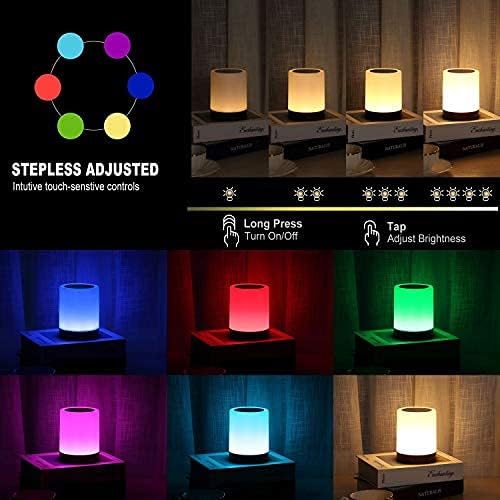
Image: A visual guide demonstrating the touch controls for the lamp, illustrating how to long press for power and mode changes, and tap for brightness or color selection.

Image: Multiple iFkoo Bedside Lamps showcasing the range of available RGB colors, including blue, red, green, purple, and light blue.
Using the Hanging Feature
The lamp includes a small metal loop on its base that can be pulled out to serve as a handle. This allows the lamp to be easily carried or hung, making it ideal for camping or other situations where overhead lighting is desired.

Image: The iFkoo Bedside Lamp is shown hanging inside a tent, demonstrating its portability and hanging capability for outdoor use.
Maintenance
Cleaning
To clean the lamp, ensure it is turned off and disconnected from any charging source. Wipe the surface with a soft, dry cloth. Do not use abrasive cleaners or immerse the lamp in water.
Battery Care
The lamp contains a built-in rechargeable battery. Do not attempt to remove or replace the battery. For optimal battery life, avoid fully discharging the lamp frequently and recharge it regularly.
Troubleshooting
- Lamp not turning on: Ensure the lamp is sufficiently charged. Press and hold the touch-sensitive top surface for 3 seconds to power on. If the lamp was recently charged, verify the charging cable and power source are functioning correctly.
- Light mode not changing: Ensure you are using the correct touch gesture. A long press (3 seconds) switches between Warm White and RGB modes, while a short tap changes brightness or color within the current mode.
- Short battery life: Battery life can vary based on brightness and color mode usage. Ensure the lamp is fully charged before use. If battery life significantly degrades over time, contact customer support.
Specifications
| Model Number | IF-A1-NEW |
| Power Source | Battery Powered (Rechargeable) |
| Battery Capacity | 2200mAh |
| Battery Life (Min Brightness) | Up to 24 hours |
| Battery Life (Max Brightness) | Up to 15 hours |
| Light Source Type | LED |
| Control Method | Touch |
| Dimmable | Yes (3 levels warm light) |
| Color Options | Warm White, RGB (256 shades) |
| Material | ABS + PP Plastic |
| Item Weight | 9.6 ounces |
| Dimensions | 5.24 x 4.02 x 3.98 inches (Package) |
| Water Resistance Level | Waterproof |
Warranty and Support
Satisfaction Guarantee
iFkoo offers a satisfaction guarantee for this product. If you encounter any issues or are not completely satisfied, please refer to your purchase documentation or contact the seller for assistance.
Customer Support
For technical support, warranty claims, or any questions regarding your iFkoo Bedside Lamp, please contact the manufacturer or seller through the platform where the product was purchased. Please have your model number (IF-A1-NEW) and purchase date available when contacting support.