
1. Introduction and Overview
Thank you for purchasing the Yupiteru WDT500 Front and Rear 2-Camera Drive Recorder. This device is designed to record video footage from both the front and rear of your vehicle, providing crucial evidence in case of an incident. The WDT500 features a compact design to minimize obstruction of your view and utilizes a direct power connection for a clean, integrated installation without occupying your cigarette lighter socket. The front camera records in Full HD (2 million pixels), while the rear camera records in 1 million pixels, ensuring clear footage. It also includes built-in GPS for location and speed data, and a G-sensor for automatic event recording during impacts.
2. Package Contents
Please ensure all the following items are included in your package:
- WDT500 Main Unit (Front Camera) x 1
- Rear Camera x 1
- 5V Converter with Direct Power Cable (approx. 4m) x 1
- Rear Camera Connection Cable (approx. 9m) x 1
- Mounting Brackets (for front and rear cameras) x 1 set
- Double-sided Tape x 1 set
- microSD Card (16GB, pre-installed in main unit) x 1
- Warranty Card x 1
Note: The detailed instruction manual is available for download from the official Yupiteru website.
3. Setup and Installation
Proper installation is crucial for optimal performance. It is recommended to have this device installed by a professional if you are not familiar with vehicle electrical systems.
3.1 Mounting the Front Camera
Select a location on your front windshield that does not obstruct the driver's view and is within the wiper's sweep area. Clean the windshield surface thoroughly before attaching the mounting bracket with the provided double-sided tape. Ensure the camera lens has a clear view of the road ahead.
3.2 Mounting the Rear Camera
Mount the rear camera on the inside of your rear window. Its compact, bracket-integrated design allows for installation close to the glass, minimizing reflections. Route the 9-meter rear camera cable discreetly along the vehicle's interior trim to connect it to the main unit.
3.3 Power Connection
The WDT500 uses a direct power connection (DC12V input, 5V output via converter). Connect the provided direct power cable to your vehicle's fuse box or an appropriate power source. This method ensures a secure and permanent power supply without using the cigarette lighter socket. Ensure all connections are secure to prevent accidental disconnection.
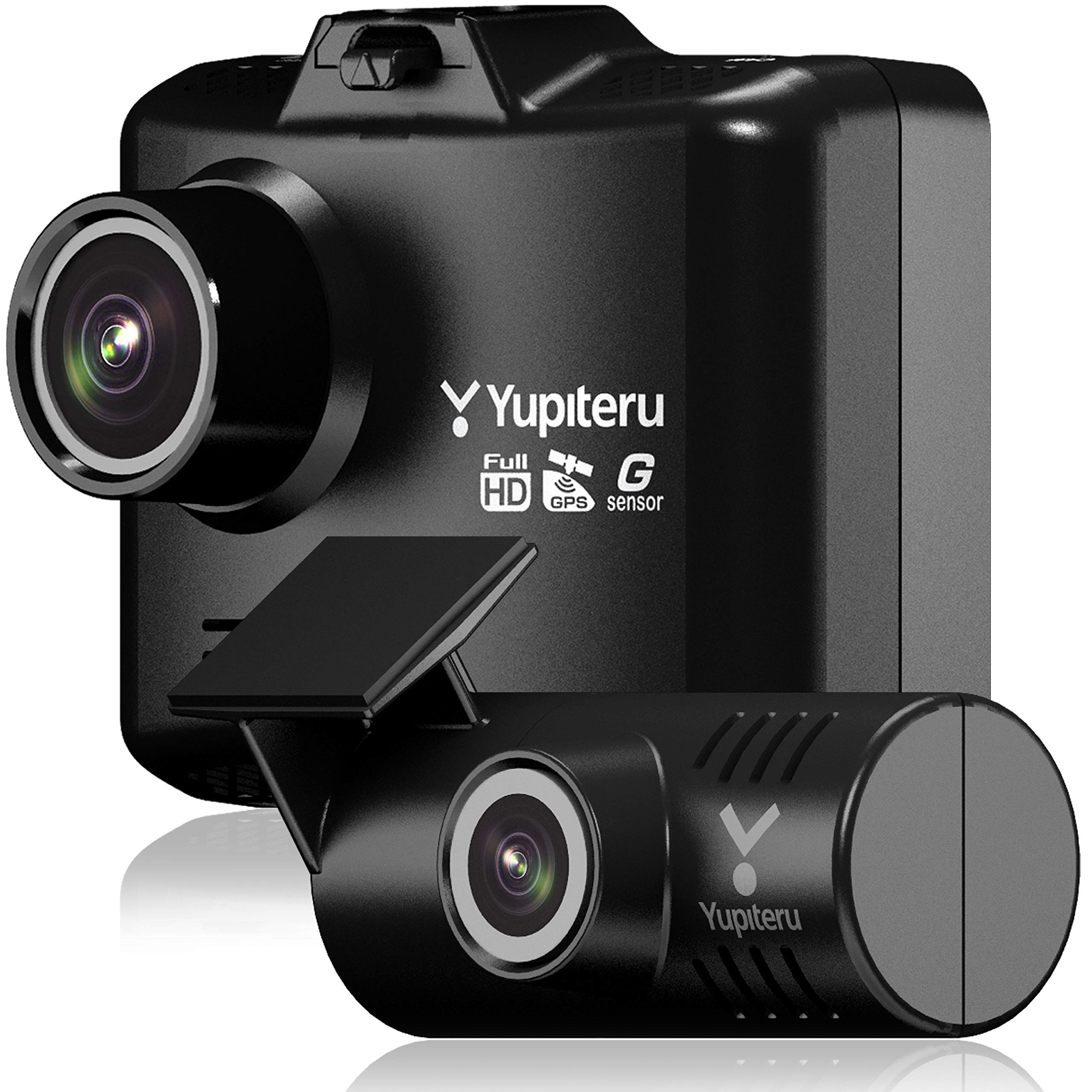
Image: Yupiteru WDT500 main unit and rear camera, showing the compact design and included accessories.
4. Operating Instructions
The WDT500 is designed for simple, automatic operation. Familiarize yourself with the buttons on the side of the main unit: DISP (Display), MENU, and MODE.
4.1 Power On/Off
The device will automatically power on and begin recording when your vehicle's ignition is turned on. It will power off automatically when the ignition is turned off.
4.2 Recording
Continuous loop recording starts automatically upon power-on. Older files are overwritten by new recordings when the microSD card is full, except for event-recorded files.
4.3 Event Recording (G-Sensor)
In the event of a sudden impact or acceleration/deceleration detected by the G-sensor, the device will automatically save the current recording segment as an event file, protecting it from being overwritten.
4.4 Display Modes
Press the DISP button to cycle through different display modes, such as front camera view, rear camera view, or picture-in-picture.
4.5 Menu Navigation
Press the MENU button to access settings. Use the DISP and MODE buttons to navigate and select options.
4.6 microSD Card Handling
The device comes with a 16GB microSD card pre-installed. Ensure the card is properly inserted. For optimal performance, regularly format the microSD card via the device's menu. Supported card capacities are 8GB to 32GB (Class 10 or higher).
Video: This video demonstrates the Yupiteru WDT500 powering on, displaying the Yupiteru logo, transitioning to a live camera view, and then showing an alert regarding the microSD card. This sequence illustrates the device's startup process and initial operational feedback.
5. Features
- High-Quality Recording: The front camera records in Full HD (2 million pixels), providing clear and detailed footage. The rear camera records in 1 million pixels.
- Compact Design: Both front and rear camera units are designed to be compact, minimizing their presence and ensuring they do not obstruct the driver's field of vision. The rear camera features an integrated bracket for close mounting to the glass, reducing reflections.
- Long Rear Camera Cable: An approximately 9-meter long cable for the rear camera is included, accommodating installation in various vehicle types, including minivans and SUVs.
- Built-in GPS: The front camera includes a built-in GPS module to record location and speed data, which can be viewed during playback using the dedicated viewer software.
- G-Sensor: Equipped with a G-sensor that detects sudden impacts or changes in vehicle motion. The sensitivity of the G-sensor can be adjusted in 0.1 increments via the menu.
- HDR (High Dynamic Range) - Front Only: The front camera supports HDR, which helps to correct images in areas with significant brightness differences, such as tunnels or strong backlighting, ensuring clearer recordings.
- Noise Countermeasures: Designed with noise reduction technology to minimize interference with other electronic devices in your vehicle.
- LED Signal Light Compatible: The device is compatible with LED traffic signals, ensuring they are recorded correctly without flickering.
6. Specifications
| Specification | Detail |
|---|---|
| Front Camera Image Quality | 2 Million Pixels (Full HD) |
| Rear Camera Image Quality | 1 Million Pixels |
| Front Camera Max Recording Angle | Diagonal: 153° (Horizontal: 128°, Vertical: 68°) |
| Rear Camera Max Recording Angle | Diagonal: 95° (Horizontal: 82°, Vertical: 45°) |
| Front Camera Dimensions (W×H×D) | 64 × 49 × 38 mm (Excluding mounting bracket) |
| Rear Camera Dimensions (W×Diameter) | 54 × 25 mm |
| Front Camera Weight | Approx. 71g (including microSD card) |
| Rear Camera Weight | Approx. 18g |
| GPS | Built-in (Front Camera) |
| HDR | Supported (Front Camera only) |
| G-Sensor | Built-in (Sensitivity adjustable in 0.1 increments) |
| Recording Media | microSD Card (16GB included, supports 8-32GB Class 10 or higher) |
| Playback Method | Dedicated Viewer Software / Windows Media Player |
| Voice Recording | ON/OFF selectable |
| Power Voltage | DC12V (5V input) |
| Power Consumption | 5W |
7. Maintenance
Regular maintenance ensures the longevity and reliable operation of your drive recorder.
- microSD Card Formatting: It is recommended to format the microSD card regularly (e.g., once a month) using the device's menu. This helps maintain card performance and prevents data corruption.
- Cleaning Lenses: Periodically clean the front and rear camera lenses with a soft, dry cloth to ensure clear recording quality. Avoid using abrasive cleaners.
- Checking Connections: Ensure all cables, especially the direct power cable and rear camera cable, are securely connected and not damaged.
8. Troubleshooting
If you encounter issues with your WDT500, refer to the following common troubleshooting steps. For detailed solutions, please consult the full downloadable manual from the Yupiteru website.
- Device Not Powering On: Check the direct power cable connection to your vehicle's power source. Ensure the vehicle's ignition is on.
- Recording Errors: Format the microSD card. If the issue persists, try using a different compatible microSD card. Ensure the card is Class 10 or higher.
- No GPS Signal: Ensure the front camera has a clear view of the sky. GPS signal acquisition may take longer in certain environments (e.g., underground parking, dense urban areas).
- Image Quality Issues: Clean the camera lenses. Check if the protective film has been removed from the lenses.
9. Warranty and Support
The Yupiteru WDT500 comes with a manufacturer's warranty.
- Warranty Period: 1 year from the date of purchase.
- Warranty Eligibility: The manufacturer's warranty applies only to products sold and shipped by Amazon.co.jp (or authorized retailers). Consumable items are excluded from the warranty.
- Support: For further assistance, detailed troubleshooting, or to download the complete instruction manual, please visit the official Yupiteru website.