
1. Introduction and Product Overview
Thank you for choosing Kenwood KFC-1096PS 4" 2-Way Speakers. These speakers are designed to deliver enhanced audio performance in your vehicle. This manual provides essential information for proper installation, operation, and maintenance.
Key Features
- Advanced audio technology for superior sound quality.
- 4-inch (10 cm) polypropylene cone with diamond array pattern for minimized distortion and enhanced durability.
- Durable rubber surround for long-lasting performance.
- Balanced dome tweeter for clear high-frequency reproduction.
- Kenwood's Sound Field Enhancer for improved sound dispersion.
- Acoustic Sound Harmonizer for smoother transition to higher frequencies.
- Designed for easy replacement in existing factory speaker locations.
Package Contents
Verify that all items listed below are included in your package:
- Two (2) Kenwood KFC-1096PS 4" 2-Way Speakers
- Two (2) Speaker Grilles
- Two (2) 20-inch lengths of speaker wire (each with female quick-slides on one end and bare wire on the other)
- Mounting Screws and Clips
- Instruction Manual / Warranty Card
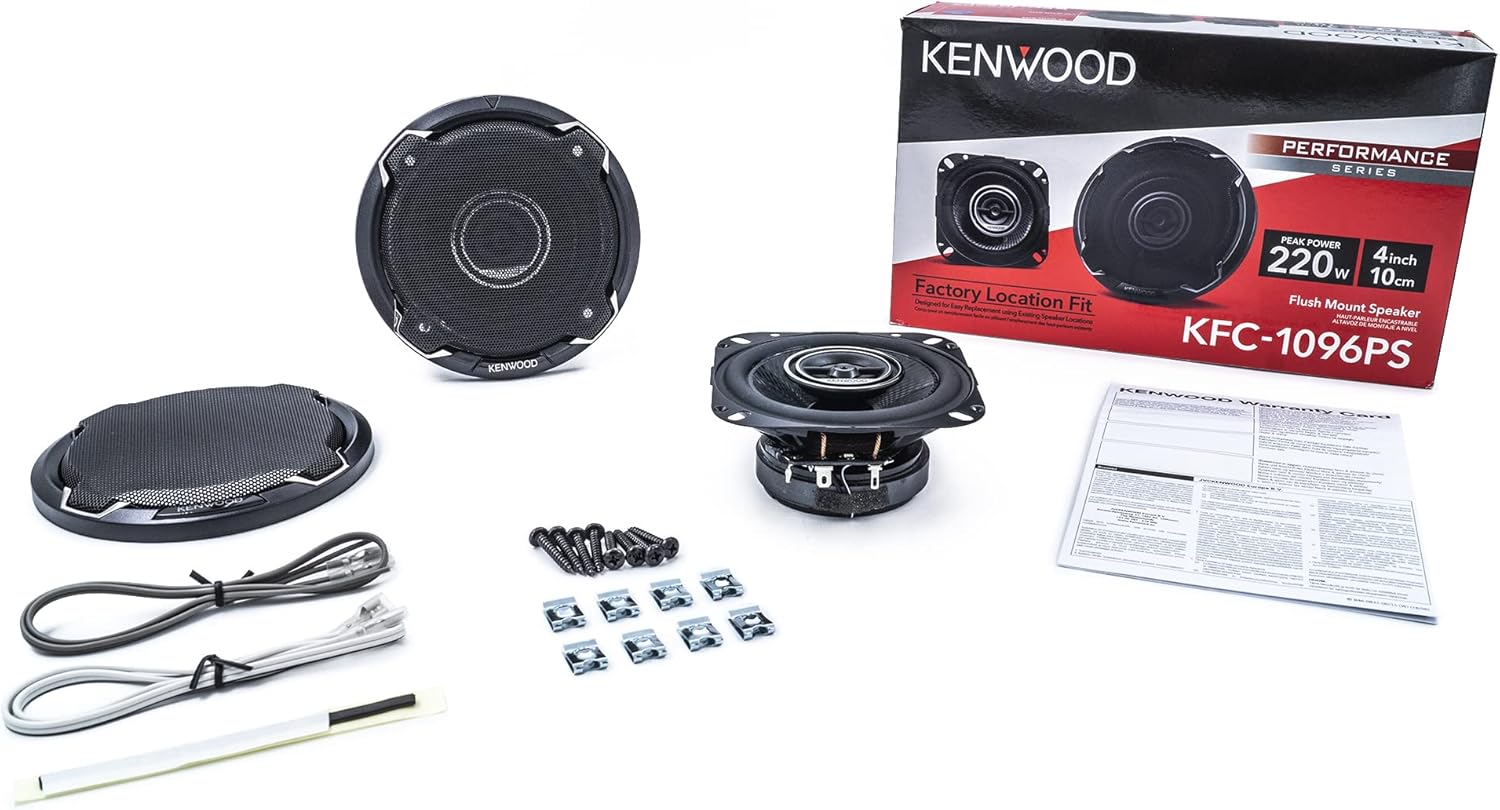
Figure 1.1: Contents of the Kenwood KFC-1096PS speaker package, including two speakers, grilles, wiring, and mounting hardware.
2. Setup and Installation
Proper installation is crucial for optimal performance and safety. It is recommended to have these speakers installed by a qualified professional if you are not familiar with car audio system installation.
General Guidelines
- Disconnect the vehicle's battery before beginning any electrical work to prevent short circuits.
- Ensure the mounting location is suitable for 4-inch speakers and provides adequate depth.
- Use the provided mounting hardware for secure installation.
- Route speaker wires away from moving parts, sharp edges, and heat sources.
- Observe correct polarity when connecting speakers to your amplifier or head unit.
Wiring Connections
The Kenwood KFC-1096PS speakers have a nominal impedance of 4 Ohms. Connect them to an amplifier or head unit capable of safely driving a 4 Ohm load.
- Identify the positive (+) and negative (-) terminals on the speaker. The larger terminal is typically positive.
- Connect the positive (+) wire from your amplifier/head unit to the positive (+) terminal on the speaker.
- Connect the negative (-) wire from your amplifier/head unit to the negative (-) terminal on the speaker.
- Use the provided speaker wires, ensuring a secure connection at both ends.

Figure 2.1: Rear view of the KFC-1096PS speaker, highlighting the wiring terminals and product label.
3. Operation
Once properly installed, the Kenwood KFC-1096PS speakers will function as part of your vehicle's audio system. Their operation is controlled by your car's head unit or external amplifier.
- Ensure your head unit or amplifier is powered on.
- Adjust volume levels gradually to avoid sudden loud sounds.
- Utilize the equalizer and sound settings on your head unit to fine-tune the audio output to your preference.
- Avoid driving the speakers beyond their rated power handling (220W Peak, 50W RMS) to prevent damage.
4. Maintenance
Regular maintenance helps ensure the longevity and optimal performance of your speakers.
- Cleaning: Use a soft, dry cloth to gently wipe the speaker grilles and surrounds. Avoid using harsh chemicals or abrasive cleaners.
- Inspection: Periodically check speaker connections for looseness or corrosion.
- Protection: Ensure grilles are properly installed to protect the speaker cones from physical damage.
- Environment: While designed for automotive use, avoid exposing speakers to excessive moisture or extreme temperatures. The speakers are not waterproof.
5. Troubleshooting
If you experience issues with your Kenwood KFC-1096PS speakers, refer to the following common troubleshooting steps:
| Problem | Possible Cause | Solution |
|---|---|---|
| No sound from speakers |
|
|
| Distorted or unclear sound |
|
|
| Sound only from one speaker |
|
|
6. Specifications
| Model Number | KFC-1096PS |
| Speaker Type | 4" (10 cm) 2-Way Coaxial Speakers |
| Peak Power Handling | 220 Watts |
| RMS Power Handling | 50 Watts |
| Impedance | 4 Ohms |
| Woofer Material | Polypropylene Cone with Diamond Array Pattern |
| Tweeter Type | Balanced Dome Tweeter |
| Frequency Response | Up to 20,000 Hz |
| Mounting Type | Car Speakers (Flush Mount) |
| Included Components | Grilles, Speaker Wire |
| Vehicle Compatibility | Select Cars, Trucks, & SUVs |
| Product Dimensions (Approx.) | 4 inches (10 cm) diameter |
| Item Weight (Approx. per pair) | 2.68 pounds (1.22 kg) |
| Manufacturer | KENWOOD |


Figure 6.1: Front and side views of the Kenwood KFC-1096PS speaker, illustrating its design and profile.
7. Warranty and Support
Kenwood products are manufactured to high-quality standards and are backed by a limited warranty.
Limited Warranty
This product comes with a limited warranty provided by KENWOOD. Please refer to the warranty card included in your package for specific terms, conditions, and duration of coverage. Keep your purchase receipt as proof of purchase for warranty claims.
Customer Support
For technical assistance, troubleshooting beyond this manual, or warranty inquiries, please contact Kenwood customer support. Visit the official Kenwood website for the most up-to-date contact information and support resources.