
Introduction
Welcome to the KaraoKing G308 Karaoke Machine user manual. This portable karaoke system is designed to provide high-quality audio and an immersive entertainment experience for both adults and children. Featuring two wireless microphones, a disco ball light, and multiple connectivity options, the G308 is perfect for parties, family gatherings, or casual singing sessions.

Figure 1: KaraoKing G308 Karaoke Machine. This image shows the main unit with its central disco ball light and two wireless microphones docked on either side.
Package Contents
Please ensure all items are present in the package:
- KaraoKing G308 Karaoke Machine Unit
- 2 Wireless Microphones
- USB Charging Cable
- Warranty Card
Setup Guide
1. Charging the Unit and Microphones
The KaraoKing G308 features a built-in rechargeable battery (12V, 1800mAh) for hours of use. The wireless microphones also require charging.
- Connect the provided USB charging cable to the karaoke machine's charging port and a compatible USB power adapter (not included).
- Allow the unit to fully charge before first use.
- To charge the microphones, remove them from their docking stations on the main unit.
- Insert the USB charging cable into the charging port located at the bottom of each microphone.
- Ensure microphones are fully charged for optimal performance.

Figure 2: The KaraoKing G308 is 100% wireless, powered by internal rechargeable batteries in both the main unit and the two cordless microphones.
2. Initial Power On
Press and hold the power button on the main unit to turn it on. The unit will typically announce "Bluetooth mode" or similar upon activation.
Operating Instructions
1. Connecting to Audio Sources
The G308 offers multiple ways to play your music:
- Bluetooth:
- Ensure the karaoke machine is in Bluetooth mode (indicated by voice prompt).
- On your smartphone or other Bluetooth-enabled device, search for "KaraoKing G308" in the Bluetooth settings.
- Select "KaraoKing G308" to pair. A confirmation sound will indicate successful connection.
- USB Drive: Insert a USB drive containing MP3 files into the USB port. The unit will automatically begin playing music.
- SD Card: Insert an SD card containing MP3 files into the SD card slot. The unit will automatically begin playing music.

Figure 3: The KaraoKing G308 supports various audio inputs including USB, SD Card, and Bluetooth. It also features an ambient music adjustment mode to lower original vocals.
2. Using the Wireless Microphones
The G308 comes with two wireless microphones for duet singing. Each microphone has independent controls:
- Echo Effect (ECH): Use the ECH buttons to adjust the echo level of your voice.
- Volume Control (VOL): Use the VOL buttons to adjust the microphone's volume independently.
- Vocal Mute (ON/OFF): This unique feature allows you to mute the original track vocals, enabling you to sing your own cover. Toggle ON/OFF as desired.
- Sound Effects:
- FUNNY: Activates a funny voice effect.
- CATCALL: Plays a catcall sound effect.
- LAUGHTER: Plays a laughter sound effect.
- APPLAUSE: Plays an applause sound effect.

Figure 4: The wireless microphones feature controls for echo, volume, and various sound effects like funny voice, catcall, laughter, and applause.
3. Disco Ball Lights
The integrated disco ball light enhances the party atmosphere. Use the "LED MODE" button on the main unit to cycle through different lighting modes or turn the lights off.

Figure 5: The built-in disco ball light creates an immersive visual experience, projecting colorful patterns onto the ceiling and walls.
4. Main Unit Controls
The main unit features intuitive controls for playback and mode selection:
- MODE: Switches between Bluetooth, USB, and SD card input modes.
- LED MODE: Controls the disco ball light effects.
- Music Orig: Activates the vocal mute function for original tracks.
- Playback Controls: Play/Pause, Next Track, Previous Track.
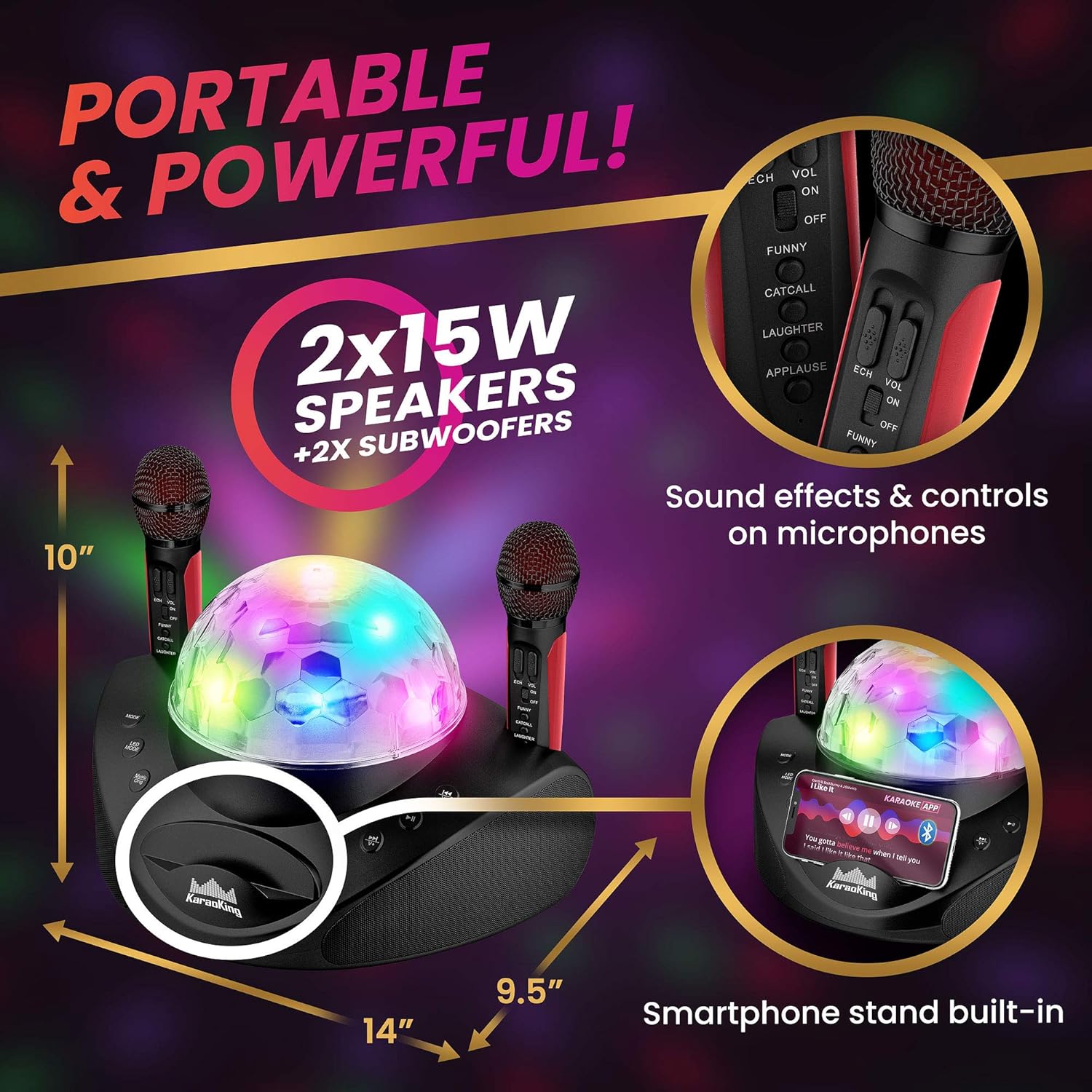
Figure 6: The KaraoKing G308 is portable and powerful, featuring 2x15W speakers and a convenient built-in smartphone stand.
Maintenance
To ensure the longevity and optimal performance of your KaraoKing G308 Karaoke Machine, follow these maintenance guidelines:
- Cleaning: Use a soft, dry cloth to clean the exterior of the unit and microphones. Do not use liquid cleaners or abrasive materials.
- Storage: Store the unit in a cool, dry place away from direct sunlight and extreme temperatures.
- Battery Care: For best battery life, fully charge the unit and microphones before long periods of storage. Recharge periodically if not used for extended durations.
- Microphone Handling: Handle microphones with care. Avoid dropping them or exposing them to excessive moisture.
Troubleshooting
If you encounter any issues with your KaraoKing G308, please refer to the following common problems and solutions:
| Problem | Possible Cause | Solution |
|---|---|---|
| Unit does not power on. | Low battery or no charge. | Connect the unit to a power source using the USB cable and allow it to charge. |
| Microphone not working or low volume. | Microphone battery low, microphone turned off, or volume too low. | Ensure the microphone is charged and turned on. Increase the microphone's volume using the VOL buttons. |
| Static noise from speakers. | Interference from other electronic devices or poor signal. | Move the unit away from other electronics. Ensure a clear line of sight for Bluetooth connection. |
| Loud beeping sound when pressing buttons. | This is a normal operational sound for button presses. | This is an intended feature and cannot be disabled. |
| Cannot connect via Bluetooth. | Unit not in Bluetooth mode, device not discoverable, or previously paired. | Press the MODE button until "Bluetooth mode" is announced. Ensure your device's Bluetooth is on and discoverable. Try forgetting the device on your phone and re-pairing. |
Specifications
| Feature | Detail |
|---|---|
| Brand | KaraoKing |
| Model | G308 Black |
| Microphone Form Factor | Handheld |
| Power Source | Rechargeable, Battery Powered |
| Material | Metal |
| Output Wattage | 15 Watts (per speaker, 2 speakers total) |
| Connectivity Technology | Bluetooth, USB, SD Card |
| Special Features | Portable, Cordless, Wireless, Disco Ball Lights, Vocal Mute Option |
| Item Weight | 6.74 Pounds |
| Package Dimensions | 14 x 10.25 x 10 inches |
| Included Components | USB Cable, Warranty Card |
Warranty and Support
The KaraoKing G308 Karaoke Machine comes with a 30-day warranty. If you experience any defects or issues within this period, or if you are unsatisfied for any reason, please do not hesitate to contact KaraoKing customer support to resolve the issue.
For support inquiries, please refer to the contact information provided on your warranty card or the official KaraoKing website.