
KaraoKing G308
KaraoKing G308 Gold Karaoke Machine User Manual
Model: G308 | Brand: KaraoKing
Introduction
Welcome to the user manual for your new KaraoKing G308 Gold Karaoke Machine. This portable and powerful system is designed to provide hours of entertainment with its dual wireless microphones, vibrant LED disco light, and versatile connectivity options. Please read this manual carefully to ensure proper setup, operation, and maintenance of your device.
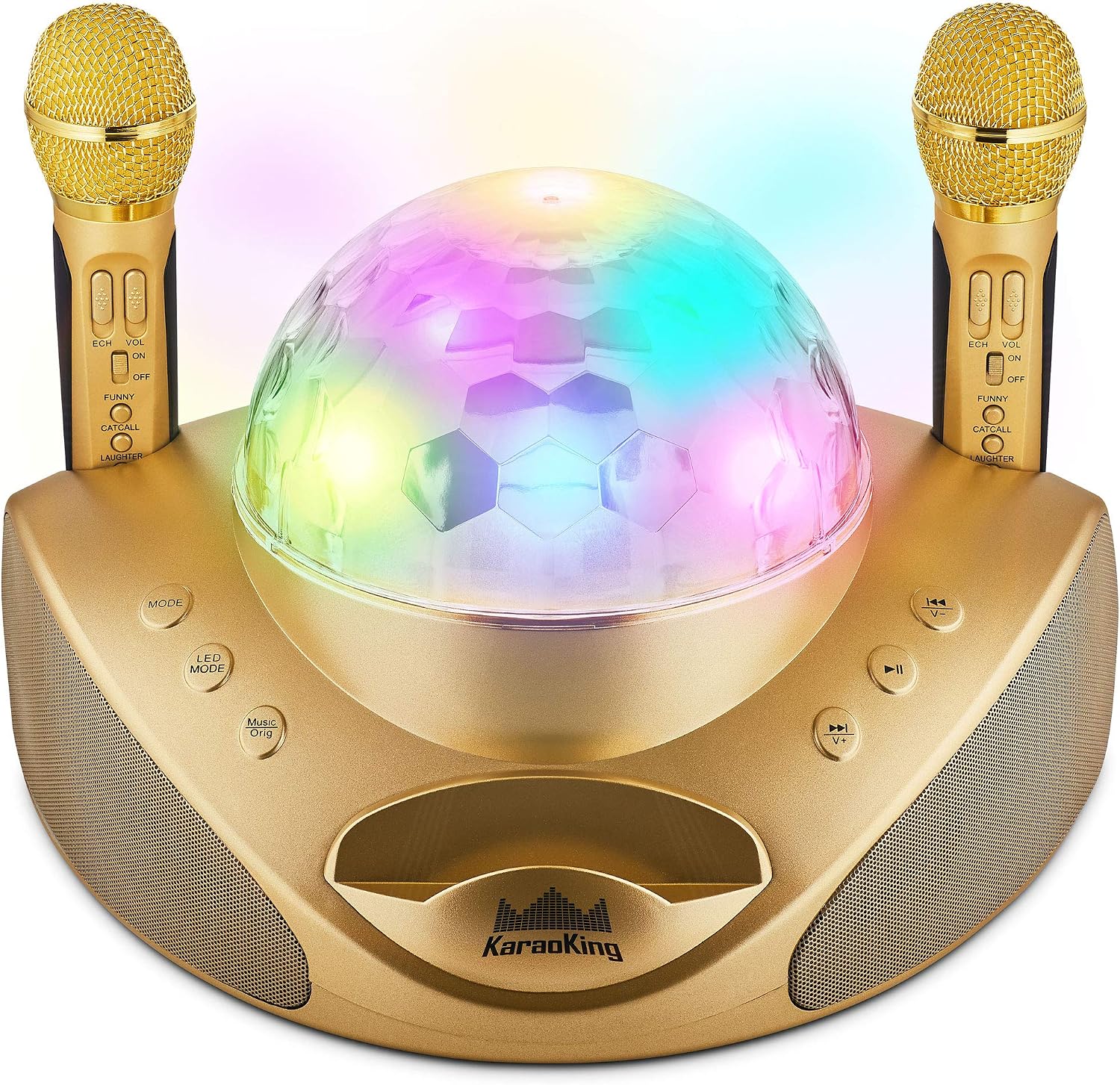
Figure 1: The KaraoKing G308 Gold Karaoke Machine, showcasing its main unit with integrated disco light and two wireless microphones.
Setup Guide
1. Unboxing and Components
Carefully remove all components from the packaging. Ensure you have the following items:
- KaraoKing G308 Karaoke Machine Unit
- 2 Wireless Microphones
- USB Charging Cable (for microphones)
- Power Adapter (if included, or use a standard USB power adapter)
- Warranty Card
2. Initial Charging
The main karaoke machine unit has a built-in rechargeable battery (12V, 1800mAh). For optimal performance, fully charge the unit before first use. Connect the power adapter to the DC IN port on the machine and plug it into a wall outlet. The charging indicator will illuminate.
3. Microphone Charging
The two wireless microphones also require charging. Remove the microphones from their base on the main unit. Connect the included USB charging cable to the charging port on each microphone and then to a USB power source (e.g., a USB wall adapter or computer USB port). Note that only one USB cable is provided for charging both microphones; you may need to charge them sequentially or use an additional USB cable.

Figure 2: Connectivity options for the KaraoKing G308, including USB, SD card, and Bluetooth.
4. Connecting Audio Sources
Your KaraoKing G308 supports multiple audio input methods:
- Bluetooth: Turn on the karaoke machine. Activate Bluetooth on your smartphone or other device and search for "KaraoKing G308" in the list of available devices. Select it to pair. A confirmation sound will indicate successful pairing.
- USB Drive: Insert a USB flash drive containing MP3 audio files into the USB port on the machine. The machine will automatically detect and begin playing compatible files.
- SD Card: Insert an SD card containing MP3 audio files into the SD card slot. The machine will automatically detect and play compatible files.
Operating Instructions
1. Power On/Off and Volume Control
Press and hold the Power button to turn the unit on or off. Use the Volume Up (+) and Volume Down (-) buttons on the main unit to adjust the overall music volume. Note that some volume controls may be dual-function buttons requiring a press-and-hold action.
2. Microphone Functions

Figure 3: Wireless Microphones with Echo, Volume, and Sound Effect Controls.
- Power: Each microphone has an ON/OFF switch.
- Echo Effect: Use the "ECH" button on the microphone to add or adjust the echo effect to your vocals.
- Microphone Volume: Use the "VOL" button on the microphone to adjust the individual microphone volume.
- Voice Effects: The microphones feature buttons for "Funny," "Catcall," "Laughter," and "Applause" sound effects. Press these buttons to activate the respective sound. Be aware that some sound effects, particularly "Applause," can be quite loud.
3. Vocal Mute Option (Music Orig)
The KaraoKing G308 features a unique "Music Orig" button. Press this button to reduce or mute the original vocals from a playing track, allowing you to sing along with the instrumental version. This eliminates the need to search for karaoke-specific versions of songs.
4. LED Light Modes

Figure 4: The G308's LED Disco Light in action.
The unit includes a built-in LED disco light. Press the "LED MODE" button to cycle through different light patterns and effects, enhancing your karaoke experience.
5. Smartphone Stand
A convenient slot on the main unit serves as a smartphone stand, allowing you to place your device for easy viewing of lyrics or music selection while performing.
Maintenance
- Cleaning: Use a soft, dry cloth to clean the exterior of the karaoke machine and microphones. Do not use abrasive cleaners or solvents.
- Battery Care: To prolong battery life, avoid fully discharging the unit frequently. Recharge the unit regularly, even if not in use for extended periods.
- Storage: Store the unit in a cool, dry place away from direct sunlight and extreme temperatures.
Troubleshooting
| Problem | Possible Cause | Solution |
|---|---|---|
| No sound from speakers. | Unit is off, volume is too low, or audio source not connected properly. | Ensure unit is powered on. Increase main unit volume. Verify Bluetooth connection, USB drive, or SD card insertion. |
| Microphones not working. | Microphones are off, battery low, or out of range. | Turn on microphone power switch. Charge microphones fully. Ensure microphones are within operating range of the main unit. Speak directly into the microphone's head for best pickup. |
| Bluetooth connection issues. | Device not in pairing mode, or interference. | Ensure the karaoke machine is in Bluetooth mode. Turn off and on Bluetooth on your device. Move closer to the machine. Disconnect other Bluetooth devices. |
| Sound effects are too loud. | Default volume for effects is high. | There is no separate volume control for sound effects. Use them sparingly or be mindful of the volume when activating. |
| Microphones not charging. | Incorrect connection or faulty cable. | Ensure the USB cable is securely connected to both the microphone and a working USB power source. Verify the USB cable is not damaged. Remember only one USB cable is provided for both mics. |
Specifications
| Feature | Detail |
|---|---|
| Model Number | G308 |
| Brand | KaraoKing |
| Color | Gold |
| Item Weight | 6.59 pounds |
| Package Dimensions | 14.1 x 10 x 9.8 inches |
| Power Source | Rechargeable, Battery Powered |
| Voltage | 12 Volts (DC) |
| Speaker Count | 1 (with 2x15W speakers and 2x subwoofers) |
| Connectivity | Bluetooth, USB, SD Card |
| Microphones | 2 Wireless Microphones |
| Special Features | Portable, Cordless, Wireless, Vocal Mute Option, LED Disco Light, Voice Effects |
| Included Components | Karaoke Machine, 2 Wireless Microphones, USB Cable, Warranty Card |

Figure 5: Dimensions and speaker details of the KaraoKing G308.
Warranty and Support
Your KaraoKing G308 Karaoke Machine comes with a 30-day warranty from the date of purchase. This warranty covers manufacturing defects. For any issues, defects, or support inquiries beyond this period, please contact KaraoKing customer service.
For further assistance, please visit the official KaraoKing store or contact their customer support channels as provided on the warranty card or product packaging.
Ask a question about this manual
Ask about setup, troubleshooting, compatibility, parts, safety, or missing instructions. Manuals+ will review the question and use this page’s manual context to help answer it.