
1. Introduction
The Pyle PMXU68BT is a versatile 6-channel studio audio mixer designed for professional and portable use. It features Bluetooth compatibility, a USB audio interface, and a digital DJ mixing console, making it suitable for studio recording, live sound, and various audio mixing applications. This manual provides detailed instructions for setting up, operating, and maintaining your mixer to ensure optimal performance.

Figure 1: Front view of the Pyle PMXU68BT 6-Channel Bluetooth Studio Audio Mixer, showing all controls and inputs.
2. Key Features
- 6-Channel Control: Independent master volume, gain, high/low EQ, FX/send, and pan tone audio adjustment for each channel.
- Bluetooth Music Streaming: Seamless wireless audio streaming from smartphones, tablets, laptops, and computers.
- 4 Combo Mic Inputs: Equipped with 4 mic/line combo inputs for vocals, instruments, or other sources.
- EQ Controls: BUS audio control, sound routing, smooth rotary faders for mic/USB/line/master controls, and LED indicator lights. Features an LCD display and front panel control center with output signal indication.
- +48V Phantom Power: Provides +48V phantom power for condenser microphones with ultra-low noise design and high headroom.
- USB Interface: MP3 flash drive reader and computer connection for playback and recording.
- Headphone Output: 6.35mm headphone output jack for monitoring.
3. Package Contents
Please check that all items are present in the package:
- Pyle PMXU68BT Bluetooth Studio Mixer
- Wall Power Adapter
- User Manual (this document)
4. Setup
4.1 Power Connection
- Ensure the mixer's power switch is in the OFF position.
- Connect the provided wall power adapter to the DC 5V input on the mixer.
- Plug the power adapter into a suitable electrical outlet.
- Turn the mixer's power switch to the ON position. The power indicator LED will illuminate.
4.2 Connecting Microphones and Instruments
The PMXU68BT features 4 XLR/1/4'' combo audio line/microphone inputs (Channels 1-4) and 1/4'' (6.35mm) mono/stereo inputs (Channels 5-6).

Figure 2: Top view of the mixer, highlighting input and control layout.
- XLR Microphones: Connect XLR cables from your microphones to the XLR inputs on Channels 1-4. If using condenser microphones, activate the +48V phantom power switch for the respective channel.
- 1/4'' Instruments/Line Devices: Connect instruments (guitars, keyboards) or other line-level devices using 1/4'' cables to the 1/4'' inputs on Channels 1-4, or to the stereo 1/4'' inputs on Channels 5-6.
4.3 Connecting Output Devices
- Main Outputs: Connect your main speakers or recording device to the (2) XLR 3-pin (L/R) main outputs.
- Headphones: Plug your headphones into the 1/4'' (6.35mm) headphone jack output for monitoring.
5. Operating Instructions
5.1 Channel Controls
Each input channel (1-6) features dedicated controls:
- GAIN: Adjusts the input sensitivity for the connected microphone or instrument.
- HIGH/LOW: 2-band graphic EQ (80Hz/12kHz, +15dB) for adjusting treble and bass frequencies.
- FX/SEND: Controls the level of the signal sent to the internal effects processor or external send.
- PAN: Adjusts the stereo position of the channel's signal (left to right).
- VOL: Adjusts the individual channel's volume level.
5.2 Bluetooth Connectivity
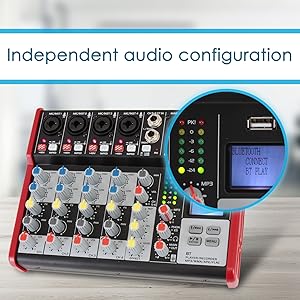
Figure 3: Connecting a smartphone via Bluetooth to the mixer.
- Press the 'MODE' button on the digital display panel until 'BT' is selected.
- On your external device (smartphone, tablet, etc.), search for Bluetooth networks.
- Select 'PYLEPRO MIXER' from the list of available devices.
- Once paired, you can stream audio wirelessly to the mixer.
5.3 USB Playback and Recording
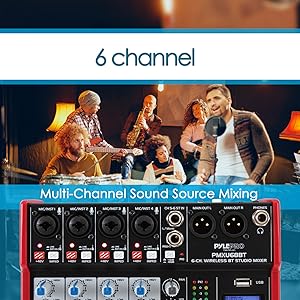
Figure 4: USB port for connecting a flash drive.
- Playback: Insert a USB flash drive (up to 64GB) containing MP3, WMA, APE, or FLAC audio files into the USB port. Use the digital display controls (E/PREV, P/PLAY, N/NEXT, MENU) to navigate and play tracks.
- Recording: The mixer can record the mixed audio output directly to a connected USB flash drive. Refer to the digital display menu for recording options. Note: Playback and recording via USB cannot be performed simultaneously.
5.4 +48V Phantom Power
The +48V phantom power switch provides power to condenser microphones. Ensure this switch is only activated when using condenser microphones that require it. Turn off phantom power before connecting or disconnecting microphones to prevent damage.
6. Maintenance
- Cleaning: Use a soft, dry cloth to clean the mixer's surface. Avoid using abrasive cleaners, solvents, or waxes.
- Storage: Store the mixer in a cool, dry place away from direct sunlight and extreme temperatures.
- Handling: Handle the mixer with care. Avoid dropping or subjecting it to strong impacts.
- Liquids: Keep the mixer away from liquids. Spills can cause damage to internal components.
7. Troubleshooting
| Problem | Possible Cause | Solution |
|---|---|---|
| No sound output | Incorrect cable connections, low volume levels, phantom power off for condenser mic. | Check all cable connections. Increase channel and master volume levels. Activate +48V phantom power if using a condenser microphone. |
| Bluetooth not connecting | Mixer not in BT mode, device not discoverable, out of range. | Ensure mixer is in 'BT' mode. Make sure your device's Bluetooth is on and discoverable. Move device closer to the mixer (within 33+ ft). |
| USB playback/recording not working | Unsupported file format, USB drive not detected, drive full, attempting simultaneous playback/recording. | Ensure files are MP3, WMA, APE, or FLAC. Check USB drive connection. Verify drive has sufficient space. Do not attempt playback and recording at the same time. |
| Distorted audio | Input gain too high, output level too high. | Reduce the GAIN knob for the affected channel. Lower the main output level. |
8. Specifications
- Brand: Pyle
- Model: PMXU68BT
- Number of Channels: 6
- Product Dimensions (L x W x H): 8.70'' x 2.59'' x 6.50'' -inches (6.5"D x 8.66"W x 2.6"H)
- Connectivity Technology: Auxiliary, Bluetooth, USB
- Power Source: Corded Electric
- Frequency Response: +0.5 dB, 20Hz-20kHz
- Output Connector Type: XLR
- Audio Input: XLR, 1/4" (6.35mm)
- Phantom Power Voltage: +48V
- Power Consumption: Max: 5W
- Bluetooth Version: 2.1
- Wireless Range: Up to 33'+ ft.
- USB Digital Audio File Compatibility: MP3, WMA, APE, FLAC
- Maximum USB Flash Support: Up to 64GB
- Audio Level Meter: 2 x 6 point LED display
- Max Output Level: 3 Vrms
- System Gain: -14 +40dB
- Dynamic Range: 102 dB
- THD @ 1kHz: <0.05%
- Stereo Crosstalk: 92 dB
9. Warranty
This product comes with a limited manufacturer's warranty. For specific details regarding warranty coverage, terms, and conditions, please refer to the warranty information provided with your purchase documentation or contact Pyle customer support.
10. Support
For technical support, product inquiries, or service, please visit the official Pyle website or contact their customer service department. You can often find FAQs, troubleshooting guides, and contact information on their support pages.
Pyle USA Store: https://www.amazon.com/stores/PyleUSA/page/D79E9149-99F8-49A4-8E8C-D24560694FC2


