
TELESIN SR
TELESIN Eyeon 3-in-1 Action Camera Accessory Kit User Manual
Model: SR
1. Introduction
Thank you for choosing the TELESIN Eyeon 3-in-1 Action Camera Accessory Kit. This kit provides versatile mounting solutions for your action camera, allowing you to capture dynamic, hands-free footage from various perspectives. This manual will guide you through the setup, operation, and maintenance of your new accessories.
2. Package Contents
Please verify that all items listed below are included in your package:
- 1 x Chest Strap
- 1 x Head Strap
- 1 x Wrist Strap
- 1 x J-Hook Buckle
- 2 x Thumb Screws

Figure 2.1: All components included in the TELESIN Eyeon 3-in-1 Action Camera Accessory Kit.
3. Setup and Installation
3.1. Chest Harness Setup
- Unfold the chest harness and identify the shoulder straps and waist strap.
- Place the harness over your shoulders, ensuring the camera mount plate is centered on your chest.
- Adjust the shoulder straps and waist strap using the buckles until the harness fits snugly and comfortably. The waist strap adjusts from 25 inches (slack) to 67 inches (full extension), and shoulder straps adjust from 18 inches (slack) to 54 inches (full extension).
- Attach the J-Hook buckle to the camera mount plate on the chest harness.
- Secure your action camera to the J-Hook buckle using one of the provided thumb screws. Ensure the screw is tightened firmly to prevent camera movement during activity.
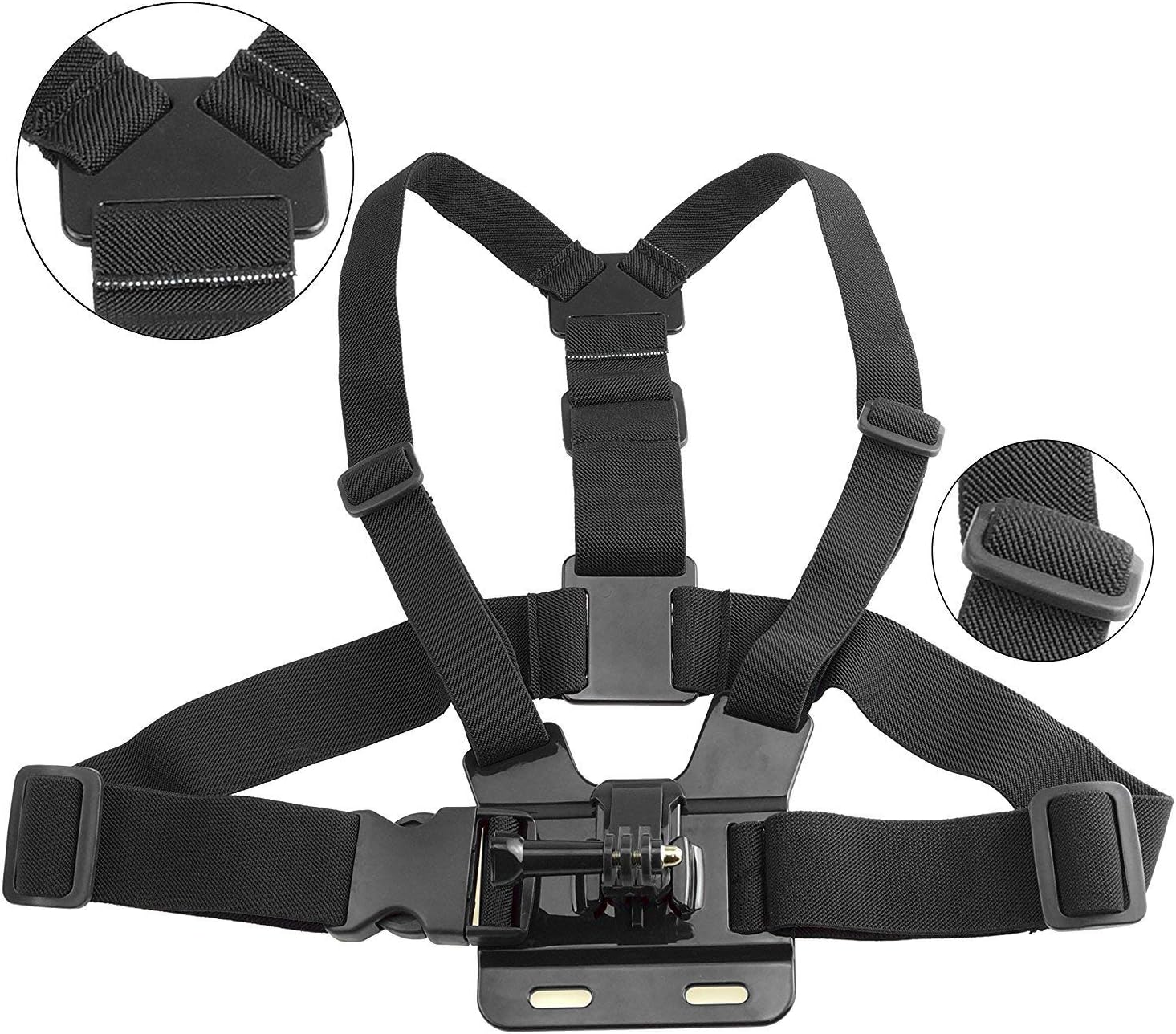
Figure 3.1.1: Rear view of the chest harness, illustrating the strap design for secure fit.

Figure 3.1.2: Detail of the adjustable buckle mechanism on the chest harness, allowing for size customization.
3.2. Head Strap Setup
- Identify the main strap and the top strap of the head strap. The interior features an anti-skid design for secure placement.
- Place the head strap around your head or helmet.
- Adjust the straps to achieve a snug and stable fit. The strap can be worn directly on the head or over a helmet.
- Attach your action camera to the mount on the head strap using a thumb screw. Ensure it is securely fastened.

Figure 3.2.1: The head strap shown with an action camera, demonstrating its fit from front and back perspectives.

Figure 3.2.2: Measurements of the head strap, indicating its approximate size for fitting.
3.3. Wrist Strap Setup
- Wrap the wrist strap around your wrist or arm.
- Secure the strap using the adjustable Velcro closure, ensuring a comfortable yet firm fit.
- Attach your action camera to the mount on the wrist strap using a thumb screw.
- The mount features 360-degree rotation. To adjust the camera angle, rotate the camera mount to your desired position.
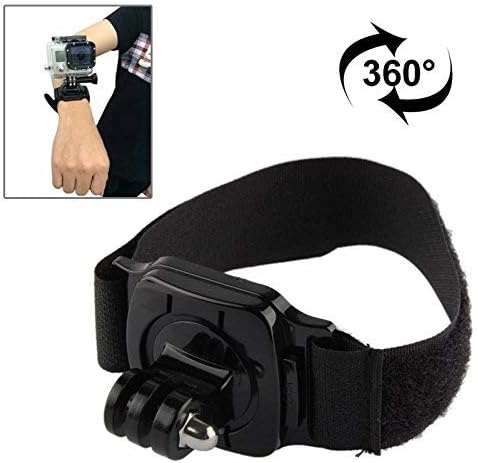
Figure 3.3.1: The wrist strap in use, highlighting its ability to rotate the camera 360 degrees for flexible shooting angles.
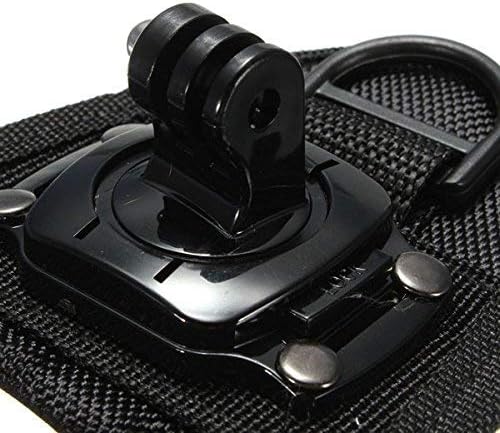
Figure 3.3.2: Detailed view of the camera attachment point on the wrist strap, showing the secure locking mechanism.
4. Operating Instructions
Once your action camera is securely mounted to the desired accessory, you are ready to capture footage. Here are some general tips:
- Chest Harness: Ideal for capturing a first-person perspective of activities like skiing, mountain biking, motocross, or hiking. The low angle provides an immersive view of your hands and surroundings.
- Head Strap: Provides a higher, eye-level perspective, perfect for capturing what you see directly. Suitable for activities where you need your hands free, such as climbing, fishing, or exploring.
- Wrist Strap: Offers flexibility for unique angles and quick adjustments. The 360-degree rotation allows you to easily change the camera's direction without removing the strap, making it suitable for activities like surfing, paddling, or even vlogging.
- Always ensure your camera is firmly attached to the mount before engaging in any activity. Periodically check the tightness of the screws during extended use.
5. Maintenance
To ensure the longevity and optimal performance of your TELESIN Eyeon accessories, follow these maintenance guidelines:
- Cleaning: After use, especially in dusty, muddy, or saltwater environments, wipe down the straps and plastic components with a damp cloth. For stubborn dirt, a mild soap solution can be used. Rinse thoroughly with fresh water if used in saltwater.
- Drying: Allow all components to air dry completely before storing to prevent mildew or corrosion.
- Storage: Store the kit in a cool, dry place away from direct sunlight and extreme temperatures. Avoid folding straps tightly for extended periods to prevent material fatigue.
- Inspection: Regularly inspect straps for signs of wear, fraying, or damage. Check buckles and mounts for cracks or deformities. Replace any damaged components immediately to ensure safe use.
6. Troubleshooting
If you encounter any issues with your TELESIN Eyeon kit, refer to the following common problems and solutions:
- Strap feels too tight or too loose: Adjust the buckles and Velcro closures on the respective straps (chest, head, wrist) to achieve a comfortable and secure fit. Refer to Section 3 for adjustment details.
- Camera is not stable or wobbly: Ensure that the thumb screws securing the camera to the J-Hook or direct mount are tightened firmly. Check that the J-Hook buckle is fully seated in its slot on the chest harness.
- Wrist strap rotation is stiff: Apply a small amount of silicone-based lubricant to the rotating mechanism if it becomes stiff. Avoid oil-based lubricants.
- Components appear damaged: Discontinue use immediately. Contact TELESIN customer support or your retailer for assistance. Do not attempt to repair severely damaged components yourself.
7. Specifications
| Feature | Description |
|---|---|
| Product Name | TELESIN Eyeon 3-in-1 Action Camera Accessory Kit |
| Model Number | SR |
| Compatibility | GoPro Hero 2018/7/6/5/4/3/Session/Fusion, SJCAM, Xiaomi YI 4K/LITE/Mijia, Polaroid, APEMAN, Campark, DBPOWER, Crosstour, Victure, Garmin, and other action cameras. |
| Materials | Lightweight, breathable, and durable fabrics with plastic buckles and mounts. |
| Chest Strap Adjustment | Waist: 25-67 inches; Shoulder: 18-54 inches |
| Wrist Strap Feature | 360-degree rotation |
| Package Dimensions | 31 x 23.3 x 11.6 cm (12.2 x 9.2 x 4.6 inches) |
| Package Weight | 390 grams (0.86 lbs) |
8. Warranty and Support
For warranty information, product registration, or technical support, please refer to the official TELESIN website or contact the retailer from whom you purchased the product. Keep your proof of purchase for warranty claims.
Ask a question about this manual
Ask about setup, troubleshooting, compatibility, parts, safety, or missing instructions. Manuals+ will review the question and use this page’s manual context to help answer it.