
Product Overview
The Phenyx Pro PWB-5-568.65 is a durable and portable UHF wireless bodypack transmitter designed for stable and interference-free performance. It features a fixed frequency of 568.65MHz and is specifically compatible with Phenyx Pro PTU-5000 and PTU-4000 Series receivers. This bodypack is ideal for use with lapel or headset microphones equipped with a 3-pin mini XLR connector.
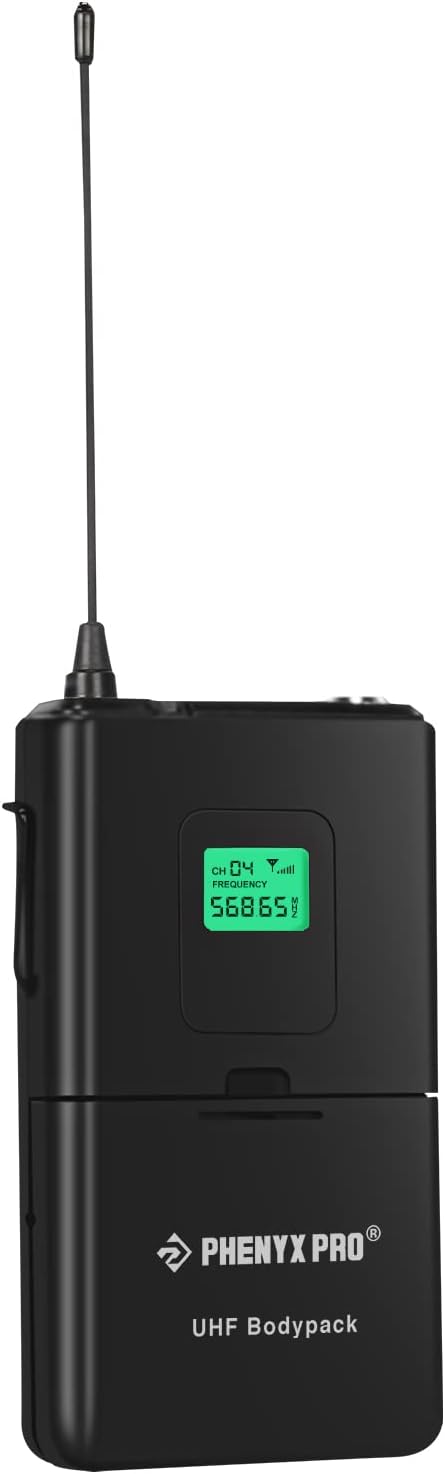
Figure 1: Front view of the Phenyx Pro Wireless Bodypack Transmitter, showing the LCD display and antenna.

Figure 2: Detailed view highlighting key features: 3-pin mini XLR jack for microphone connection, ON/OFF switch, and low battery indicator light.
Setup Guide
1. Battery Installation
The bodypack transmitter requires batteries for operation. Please note that batteries are NOT included with the unit. To install:
- Locate the battery compartment on the rear of the bodypack.
- Open the battery compartment cover.
- Insert the required batteries, ensuring correct polarity (+/-) as indicated inside the compartment.
- Close the battery compartment cover securely.
The LCD display will turn red when the battery level is low, indicating that battery replacement is needed.

Figure 3: Various views of the bodypack, including the open battery compartment for installation.
2. Microphone Connection
Connect your lapel or headset microphone to the bodypack transmitter using its 3-pin mini XLR connector. Ensure the connection is firm to prevent signal loss.
3. Frequency Matching
This bodypack transmitter operates on a fixed frequency (568.65MHz). It is crucial that the receiver you are pairing it with (Phenyx Pro PTU-5000 or PTU-4000 Series) is set to the exact same frequency for proper operation. Refer to your receiver's manual for instructions on checking and setting its frequency.

Figure 4: Illustration demonstrating the importance of matching the frequency between the bodypack transmitter and the wireless receiver.
Operating Instructions
Powering On/Off
Locate the ON/OFF switch on the bodypack transmitter. Slide the switch to the 'ON' position to power on the device. Slide it to the 'OFF' position to power it down.
LCD Display Information
The integrated LCD display provides essential operational information:
- Frequency: Displays the current operating frequency (e.g., 568.65MHz).
- Channel Number: Shows the assigned channel (e.g., CH 04).
- Battery Level: Indicates the remaining battery life. The display turns red when the battery level is critically low.
Operational Range
The bodypack transmitter offers a reliable operating range of up to 260 feet (approximately 79 meters) in optimal conditions. Environmental factors such as obstacles, Wi-Fi signals, and other wireless devices may affect this range.
Fixed Frequency System
This unit operates on a fixed frequency. Multi-set operation (using multiple bodypacks on different frequencies simultaneously) is not supported with this specific model or the PTU-5000/PTU-4000 series receivers.
Maintenance
To ensure the longevity and optimal performance of your Phenyx Pro Wireless Bodypack Transmitter, follow these maintenance guidelines:
- Cleaning: Wipe the bodypack with a soft, dry cloth. Avoid using harsh chemicals, solvents, or abrasive cleaners, as these can damage the ABS plastic casing and internal components.
- Battery Care: Remove batteries from the bodypack if it will not be used for an extended period to prevent battery leakage and potential damage to the device.
- Storage: Store the bodypack in a cool, dry place away from direct sunlight, extreme temperatures, and high humidity.
- Handling: While durable, avoid dropping the unit or subjecting it to strong impacts.
Troubleshooting
This section addresses common issues you might encounter with your bodypack transmitter.
| Problem | Possible Cause | Solution |
|---|---|---|
| Bodypack does not power on. | No batteries, incorrect battery installation, or dead batteries. | Ensure batteries are inserted correctly with proper polarity. Replace with fresh batteries. |
| No sound or intermittent sound. | Microphone not connected properly, receiver not on same frequency, out of range, or interference. | Check microphone connection. Verify receiver frequency matches bodypack. Move closer to receiver. Check for other wireless devices causing interference. |
| LCD display is red. | Low battery level. | Replace batteries immediately. |
| Bodypack not compatible with my receiver. | Incorrect receiver model. | This bodypack is ONLY compatible with Phenyx Pro PTU-5000/PTU-4000 Series receivers. Ensure your receiver is one of these models. |
Specifications
| Feature | Detail |
|---|---|
| Model Name | 568.65MHz BodyPack |
| Frequency Response | 568.65 MHz |
| Microphone Form Factor | Headset (compatible with headset/lapel mics with 3-pin mini XLR) |
| Polar Pattern | Unidirectional (for compatible microphones) |
| Power Source | Battery Powered |
| Item Weight | 10 Ounces (approx. 283 grams) |
| Product Dimensions (L x W x H) | 3.38 x 2.87 x 1.53 inches (approx. 8.59 x 7.29 x 3.89 cm) |
| Material | ABS plastics |
| Compatibility | Phenyx Pro PTU-5000/PTU-4000 Series receiver |
| Special Features | Portable, Wireless, LCD Display, Low Battery Indicator |
Warranty and Support
For information regarding product warranty, please refer to the official Phenyx Pro website or contact their customer support directly. Phenyx Pro offers various protection plans for extended coverage, which can be found on the product's purchase page or by contacting their sales team.
For technical assistance or further inquiries, please visit the Phenyx Pro Store on Amazon or their official support channels.