
1. Product Overview
The YODOLLA 100-inch Motorized Projector Screen is designed to provide a superior viewing experience for home theaters, business presentations, and educational settings. Featuring a 16:9 aspect ratio and compatibility with 4K and 3D content, this screen offers a vibrant and clear image. Its motorized retraction system ensures smooth and quiet operation, while dual control options (wired and wireless remote) provide convenience. The screen can be easily mounted on walls or ceilings, making it versatile for various indoor and outdoor applications.

This image displays the YODOLLA 100-inch motorized projector screen in its extended position, showcasing its large display area and the included wired and wireless remote controls for operation.
2. Key Features
- Smooth Auto-Lock Mechanism: New self-locking design allows the screen to be fixed at any desired length.
- Ultra-Quiet Motor: Ensures smooth and quiet retraction and extension, contributing to a long service life and reduced wrinkle generation.
- Versatile Application: Ideal for home theater, school, business office, and outdoor use with its 16:9 aspect ratio and 100-inch diagonal length.
- Dual Wall/Ceiling Mounted: Lightweight design (18.7 lbs) allows for easy installation on either walls or ceilings using screws or expansion hooks.
- Safer Power Connection: Advanced power connection style enhances safety and reduces risk of short circuit or disconnection.
- Premium PVC Matte Screen: Features a 160° viewing angle, 1.2 gain, and supports 3D/4K/1080P, providing high-quality color reproduction.
- Three-Layer Construction: Reduces light penetration and improves image brightness for a superior visual experience.

This diagram illustrates the multi-layered construction of the YODOLLA projector screen, highlighting the White PC Film for optimal projection, the Polyester Material for durability, and the Black Backing to prevent light penetration.

This image shows a group of people enjoying a soccer game on the YODOLLA projector screen, emphasizing the wide 160-degree viewing angle that ensures clear visibility from various positions in the room.
3. Package Contents
Please verify that all components are present and in good condition upon opening the package:
- YODOLLA Motorized Projector Screen (100-inch, 16:9)
- Wireless Remote Control
- Wired Control Box
- Expansion Screws (x2)
- S-shaped Hooks (x2)
- User Manual
This image details the robust mounting mechanism of the projector screen, including the pre-drilled holes on the casing and the provided S-hooks and expansion screws for secure wall or ceiling installation.
4. Setup and Installation
The YODOLLA projector screen offers flexible installation options for both wall and ceiling mounting. It is recommended to have at least two people for installation due to the screen's length and weight.
4.1 Wall Mounting
- Identify a suitable location on the wall, ensuring it is level and has adequate support for the screen's weight (approximately 18.7 lbs).
- Measure and mark the positions for the mounting screws. The screen casing has pre-drilled holes on each end.
- Drill pilot holes at the marked positions. Insert the provided expansion screws into the holes.
- Carefully lift the screen and align the mounting holes on the screen casing with the installed screws. Secure the screen firmly to the wall.
4.2 Ceiling Mounting
- Locate suitable ceiling joists or a secure mounting surface that can support the screen's weight.
- Measure and mark the positions for the S-shaped hooks. Ensure the distance between the hooks matches the screen's mounting points.
- Install the S-shaped hooks securely into the ceiling.
- Carefully lift the screen and hang it onto the installed S-shaped hooks. Ensure it is stable and level.
4.3 Power Connection
The power cord is located on the right-hand side of the screen casing (when facing the screen). Connect the power cord to a standard electrical outlet. The advanced power connection style is designed for higher safety.
5. Operating Instructions
The YODOLLA motorized projector screen can be operated using either the wireless remote control or the wired control box.
5.1 Using the Wireless Remote Control
The wireless remote control provides convenient operation from a distance. It typically features three buttons:
- UP button: Press to retract the screen upwards.
- DOWN button: Press to extend the screen downwards.
- STOP button: Press to pause the screen at any desired position.
5.2 Using the Wired Control Box
The wired control box offers direct manual control and serves as a backup. It also typically features UP, DOWN, and STOP buttons, functioning identically to the wireless remote.
5.3 Auto-Lock Mechanism
The screen features an auto-lock mechanism, allowing it to be stopped at any point during extension or retraction. Simply press the STOP button on either remote when the screen reaches your desired length.

This image displays the two control options for the YODOLLA projector screen: a convenient wireless remote for flexible operation and a wired control box for direct manual control.
6. Maintenance
Proper maintenance will ensure the longevity and optimal performance of your projector screen.
- Cleaning the Screen Surface: Use a soft, damp cloth with mild soap and water to gently wipe the screen surface. Avoid abrasive cleaners or harsh chemicals, as these can damage the screen material. Always wipe in one direction to prevent streaks.
- Dusting: Regularly dust the screen casing and surface with a soft, dry cloth to prevent dust buildup.
- Storage: When not in use for extended periods, retract the screen fully into its casing to protect it from dust and damage.
- Motor Care: The motor is designed for quiet and smooth operation. Avoid manually forcing the screen up or down, as this can damage the motor mechanism.
7. Troubleshooting
If you encounter any issues with your YODOLLA projector screen, please refer to the following common problems and solutions:
| Problem | Possible Cause | Solution |
|---|---|---|
| Screen does not extend/retract. | No power, remote control battery low, motor malfunction. | Check power connection and outlet. Replace remote control batteries. If issue persists, contact customer support. |
| Screen gets stuck or jams. | Obstruction in the path, internal mechanism issue. | Ensure no objects are obstructing the screen's path. Do not force the screen. Contact customer support. |
| Image appears dim or washed out. | Excessive ambient light, projector settings, screen surface dirty. | Reduce ambient light in the room. Adjust projector brightness/contrast settings. Clean the screen surface as per maintenance instructions. |
| Initial plastic smell. | New product odor. | This is normal for new plastic products. Allow the screen to air out for a few days in a well-ventilated area. The smell will dissipate. |
8. Specifications
| Feature | Detail |
|---|---|
| Model Number | 100INCH |
| Display Dimensions | 100 inch (diagonal) |
| Aspect Ratio | 16:9 |
| Product Dimensions (W x H) | 87"W x 49"H (Screen Area) |
| Material | Polyvinyl Chloride (PVC) |
| Viewing Angle | 160° |
| Gain | 1.2 |
| Compatibility | 3D/4K/1080P |
| Mounting Type | Ceiling & Wall |
| Item Weight | 18.7 pounds |

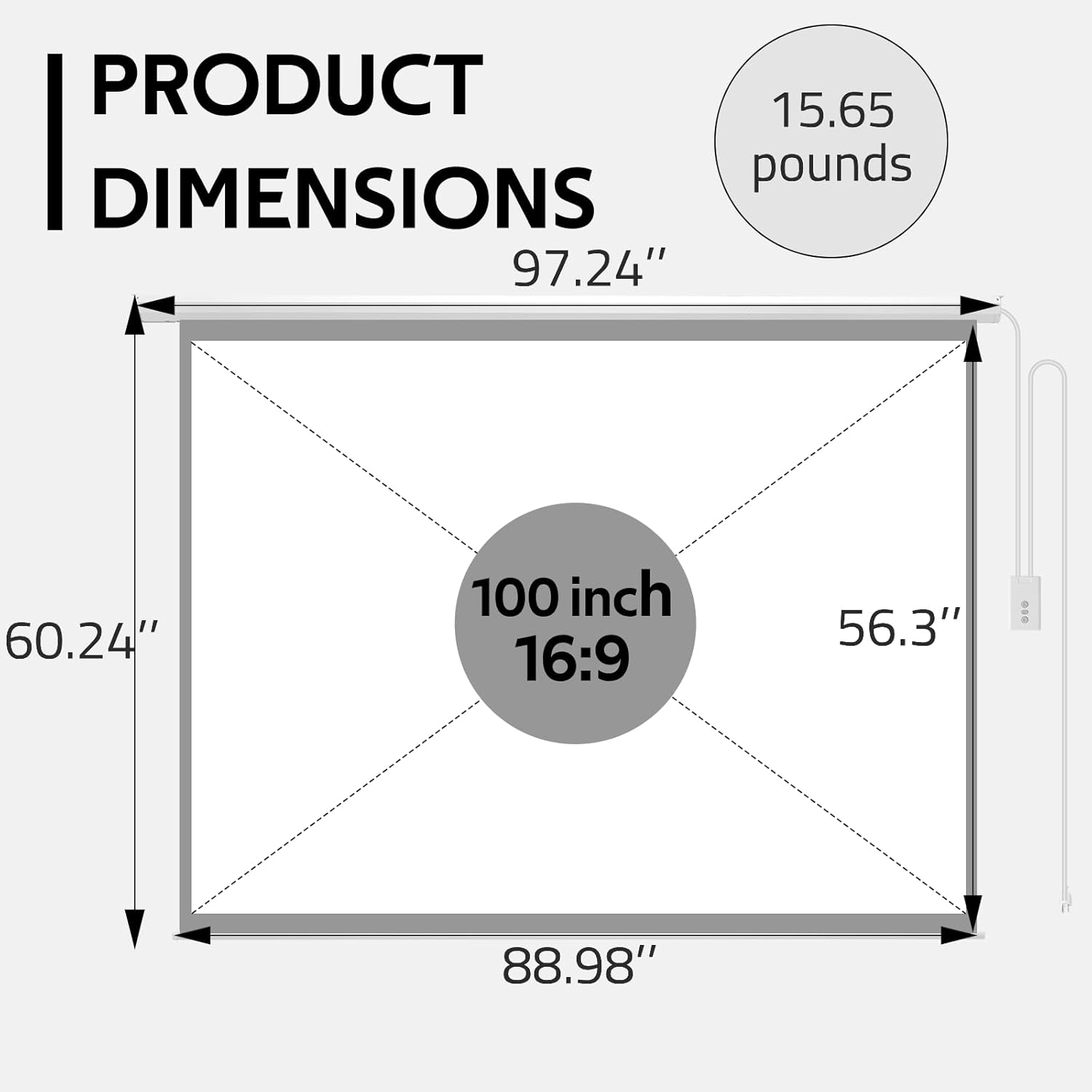
This diagram provides the exact measurements for the 100-inch, 16:9 aspect ratio YODOLLA projector screen, indicating its overall width of 97.24 inches and height of 56.3 inches, along with the viewing area dimensions.

This chart provides guidance on optimal viewing distances for different screen sizes, suggesting 9 feet for an 84-inch screen, 10 feet for a 100-inch screen, and 12 feet for a 120-inch screen, to ensure the best viewing experience.
9. Warranty and Support
YODOLLA is committed to providing high-quality products and customer satisfaction. If you have any concerns or require assistance with your projector screen, please do not hesitate to contact YODOLLA customer service. They are dedicated to providing effective support and resolving any issues you may encounter.
For information regarding warranty coverage and terms, please refer to the product packaging or contact YODOLLA customer support directly.
Contact Information: Please refer to the official YODOLLA website or your purchase documentation for the most current customer service contact details.