
Respironics 1137964
Dreamwisp Replacement Headgear (Standard) User Manual
Model: 1137964 | Brand: Respironics
Product Overview
The Philips Respironics DreamWisp Replacement Headgear (Standard) is designed to provide a secure and comfortable fit for your DreamWisp nasal mask. This four-point headgear system ensures exceptional stability during use, contributing to effective therapy.
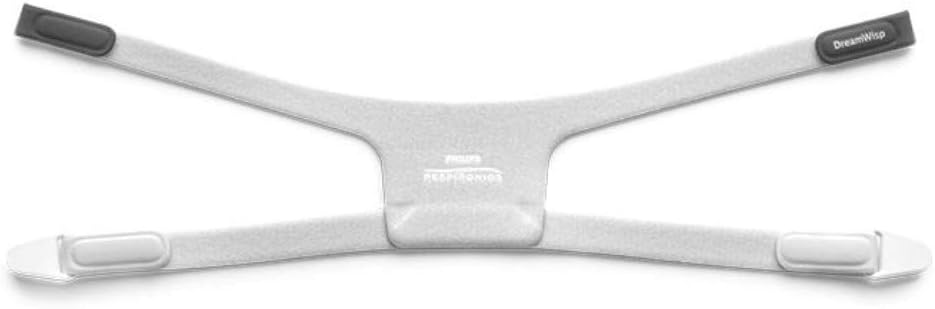
Image: Philips Respironics DreamWisp Replacement Headgear (Standard). This image displays the white, four-point headgear with grey connection points, designed for secure attachment to the DreamWisp nasal mask.
Key Features:
- Specifically designed as a replacement headgear for the Philips Respironics DreamWisp nasal mask.
- Features a four-point design for enhanced stability and fit.
- Ensures a secure and comfortable experience during CPAP therapy.
- Included in the Box: Single Replacement Headgear.
Setup Instructions
Follow these steps to properly attach and adjust your DreamWisp Replacement Headgear to your nasal mask.
- Unpack Components: Carefully remove the replacement headgear from its packaging. Ensure all parts are present and undamaged.
- Identify Connections: The headgear has four connection points. Two upper straps connect to the top of the mask frame, and two lower straps connect to the sides of the mask frame.
- Attach Upper Straps: Connect the upper straps of the headgear to the designated slots or clips on the top of your DreamWisp nasal mask frame. Ensure they are securely fastened.
- Attach Lower Straps: Connect the lower straps of the headgear to the designated slots or clips on the sides of your DreamWisp nasal mask frame. These often use magnetic clips or simple loops.
- Initial Adjustment: Once all four points are connected, gently place the mask on your face. Adjust the straps evenly to achieve a snug but comfortable fit. The headgear should hold the mask in place without excessive pressure.
Operating Instructions
Proper use of the headgear is crucial for effective and comfortable CPAP therapy.
- Wearing the Mask: With the headgear attached to the mask, hold the mask against your face and pull the headgear over your head. Position the headgear so that the top straps rest comfortably over the crown of your head and the lower straps are positioned below your ears.
- Fine-Tuning Fit: While lying down and with your CPAP device running, make small adjustments to the headgear straps. The goal is to achieve a seal without overtightening, which can cause discomfort or red marks. Adjust the upper and lower straps independently until the mask is stable and there are no significant air leaks.
- Daily Use: The headgear is designed for daily use. Ensure it is clean and properly adjusted before each use to maintain optimal performance and comfort.
Care and Maintenance
Regular cleaning and proper care will extend the life of your headgear and ensure hygienic use.
- Daily Cleaning: It is recommended to wipe down the headgear daily with a damp cloth and mild soap. Rinse thoroughly with clean water.
- Weekly Cleaning: For a more thorough cleaning, hand wash the headgear weekly in warm, soapy water using a mild detergent. Avoid harsh chemicals, bleach, or alcohol-based cleaners, as these can damage the material.
- Rinsing: Rinse the headgear completely to remove all soap residue.
- Drying: Air dry the headgear completely out of direct sunlight before reattaching it to your mask or storing it. Do not machine wash or tumble dry.
- Replacement: Headgear typically needs to be replaced every 3-6 months, or sooner if it shows signs of wear, stretching, or damage, as this can affect mask seal and comfort.
Troubleshooting
If you encounter issues with your headgear, refer to the following common problems and solutions:
| Problem | Possible Cause | Solution |
|---|---|---|
| Headgear feels too tight or causes red marks. | Straps are overtightened. | Loosen all straps slightly. Adjust evenly until comfortable, ensuring a good seal without excessive pressure. |
| Mask is slipping or leaking air. | Headgear is too loose or stretched; improper fit. | Tighten straps slightly, ensuring even tension. If headgear is old or stretched, consider replacing it. Re-adjust mask position on face. |
| Headgear is uncomfortable or irritating. | Incorrect positioning; material sensitivity; wear and tear. | Ensure headgear is positioned correctly, not twisted. Clean thoroughly. If irritation persists, consult your healthcare provider or consider replacement. |
Specifications
Detailed specifications for the DreamWisp Replacement Headgear (Standard).
- Item Model Number: 1137964
- Manufacturer: Philips Respironics
- ASIN: B07SQ3RBQW
- Package Dimensions: 5.47 x 4.13 x 1.65 inches
- Item Weight: 1.13 ounces
- Date First Available: July 18, 2019
Warranty Information
Specific warranty details for the Philips Respironics DreamWisp Replacement Headgear (Standard) are typically provided with the original product purchase or can be obtained directly from Philips Respironics or your authorized dealer. Please retain your proof of purchase for any warranty claims.
Generally, replacement parts like headgear may have a limited warranty against manufacturing defects. For precise terms and conditions, refer to the documentation included with your original DreamWisp mask system or contact the manufacturer.
Customer Support
For further assistance, questions, or concerns regarding your DreamWisp Replacement Headgear, please contact Philips Respironics customer support or your authorized medical equipment supplier.
It is recommended to have your product model number (1137964) and purchase date available when contacting support.
Related documents1137964

Ask a question about this manual
Ask about setup, troubleshooting, compatibility, parts, safety, or missing instructions. Manuals+ will review the question and use this page’s manual context to help answer it.