
Introduction
This manual provides comprehensive instructions for the assembly, operation, and maintenance of your MASUNN MD-4050 Metal Detector. Designed for high sensitivity and strong discrimination capabilities, this detector is versatile and user-friendly, suitable for locating coins, relics, jewelry, gold, and silver.
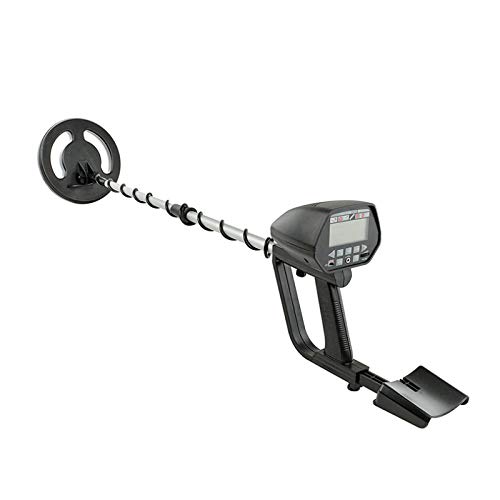
Image: Fully assembled MASUNN MD-4050 Metal Detector, showing the control panel, adjustable stem, and search coil from a front perspective.
Setup and Assembly
Follow these steps to assemble your metal detector:

Image: Side view of the MASUNN MD-4050 Metal Detector, illustrating the stem and control box assembly.
- Battery Installation: The detector requires two 9V 6F22 batteries (not supplied). Open the battery compartment on the control box and insert the batteries, ensuring correct polarity. Close the compartment securely.
- Attach the Search Coil: Connect the search coil to the lower stem using the provided bolt and knob. Ensure it is securely fastened but allows for slight angle adjustment.
- Connect the Lower Stem: Insert the lower stem into the middle stem, adjusting the length as needed.
- Connect the Middle Stem to the Control Box: Slide the middle stem into the control box assembly. Secure it with the locking collar.
- Wrap the Cable: Carefully wrap the search coil cable around the stem, ensuring it is not too tight or loose, and plug the connector into the corresponding port on the control box.
- Adjust the Armrest: Adjust the armrest for comfortable use.
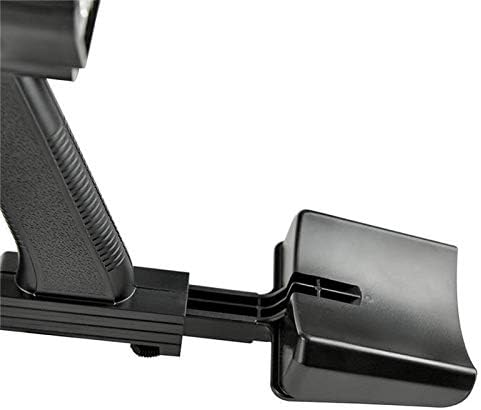
Image: Close-up view of the adjustable armrest and handle of the MASUNN MD-4050 Metal Detector, showing ergonomic design.
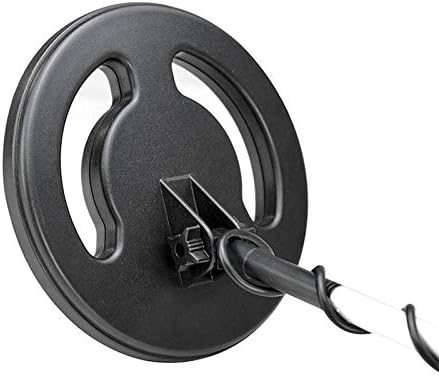
Image: Close-up view of the search coil and its connection point to the lower stem of the MASUNN MD-4050 Metal Detector.
Operating Instructions
Familiarize yourself with the control panel and its functions before operation.

Image: Detailed view of the MASUNN MD-4050 Metal Detector's control panel, highlighting the LCD display, function buttons, and volume knob.
Control Panel Functions:
- Power (OFF/ON): Use the switch to turn the detector on or off.
- SENS (Sensitivity): Adjusts the detector's sensitivity to detect targets. Higher sensitivity increases detection depth but may also increase interference.
- DISC (Discrimination): Allows the detector to ignore certain types of metal. Use the '+' and '-' buttons to adjust the discrimination range.
- NOTCH: Ignores unwanted metals and finds valuable items by setting the DISC and NOTCH range.
- VOLUME: Adjusts the audio output level.
- PHONE Jack: Connect 3.5mm headphones for private operation and clearer audio signals.
LCD Display:
The LCD shows the probable type of metal with an arrow, target depth, DISC/NOTCH range, SENS level, and battery status. It also features a numeric display for DISC and target identification.
Detection Modes:
- ALL METAL Mode: Detects all types of metal. This mode offers the greatest detection depth.
- DISC Mode: Discriminates against unwanted metals. The detector will only respond to metals within the selected range.
- NOTCH Mode: Allows you to selectively eliminate specific metal categories from detection while still detecting others.
Audio Discrimination:
The detector produces three distinct audio tones (high, medium, and low) for different types of metal, aiding in target identification without looking at the display.
Sweeping the Search Coil:
Hold the search coil parallel to the ground, approximately 1-2 inches above the surface. Sweep the coil slowly from side to side in overlapping arcs. Maintain a consistent height and speed for optimal detection.
Maintenance
- Cleaning: Wipe the detector with a damp cloth after each use. Do not use abrasive cleaners or solvents. The search coil is waterproof, but the control box is not. Avoid submerging the control box.
- Storage: Store the detector in a dry, cool place when not in use. Remove batteries if storing for extended periods to prevent leakage.
- Battery Care: Replace batteries when the low battery indicator appears on the LCD. Always use fresh, high-quality 9V batteries.
Troubleshooting
| Problem | Possible Cause | Solution |
|---|---|---|
| No power | Dead or incorrectly installed batteries. | Check battery polarity; replace with new 9V batteries. |
| Erratic signals/False signals | High sensitivity setting; electromagnetic interference; mineralized ground. | Reduce sensitivity; move away from power lines or other electronics; try DISC mode. |
| No audio from headphones | Headphones not properly plugged in; faulty headphones. | Ensure headphones are fully inserted; test with another pair of headphones. |
| Poor detection depth | Low sensitivity; small target; highly mineralized soil. | Increase sensitivity (if conditions allow); sweep slower; ensure batteries are fresh. |
Specifications
- Power: 2 x 9V 6F22 batteries (not supplied)
- Frequency: 5.88 kHz
- Current: Standby 20 mA; Max 55 mA
- Voltage: 18 V
- Sensitivity: US 1 cm: 100 mm; US 25 cm: 100 mm; Tab: 100 mm
- Modes: LCD Mode, Sound Mode (All Metal, DISC, NOTCH)
- Extendable Length: 102-126 cm (approximately 40.16-49.6 inches)
- Coil Diameter: 20 cm (approximately 7.87 inches)
- Color: Black
- Package Weight: Approximately 1.45 kg (approximately 3.2 lbs)
- Package Dimensions: Approximately 54 x 23 x 11 cm (approximately 21.26 x 9.06 x 4.33 inches)
Warranty and Support
Specific warranty information is not provided in the product details. For any support inquiries or warranty claims, please refer to the retailer or manufacturer's official website for the most up-to-date information.