1. Important Safety Information
Read and understand all safety warnings and instructions in this manual before operating the generator. Failure to follow these instructions may result in electric shock, fire, serious injury, or death. Keep this manual for future reference.
- Carbon Monoxide Hazard: Generators produce carbon monoxide, a colorless, odorless, poisonous gas. Operate the generator outdoors in a well-ventilated area, far from windows, doors, and vents. Never operate indoors, in a garage, or in partially enclosed spaces.
- Fire Hazard: Gasoline is highly flammable. Refuel in a well-ventilated area with the engine off and cooled. Do not smoke or allow open flames near the generator or fuel tank.
- Electrical Shock Hazard: Do not operate the generator in wet conditions. Ensure all electrical connections are dry and secure. Never touch live electrical parts.
- Hot Surfaces: The generator's engine and muffler become very hot during operation and remain hot for some time after shutdown. Avoid touching hot surfaces to prevent burns.
- Children and Pets: Keep children and pets away from the generator, especially during operation.
For comprehensive safety guidelines, refer to the detailed safety section in the printed manual included with your product.
2. Product Overview
The DENQBAR DQ-2000 is a portable inverter generator designed to provide clean, stable power for various applications. Featuring eBLUE 2.0 technology, it ensures ultra-quiet operation and reduced fuel consumption in eco mode. Its lightweight design and ergonomic handle facilitate easy transport.

Figure 2.1: DENQBAR Inverter Generator DQ-2000. This image displays the DENQBAR Inverter Generator DQ-2000 from a front-side angle, highlighting its blue casing and the control panel with various outlets and switches.
Key Features:
- Clean Power: eBLUE 2.0 technology ensures stable power output, safe for sensitive electronics.
- Quiet Operation: Encapsulated design and high-quality insulation contribute to ultra-silent performance.
- Portability: Lightweight (21 kg) with an ergonomic handle for easy transport.
- Fuel Efficiency: Eco mode adjusts engine speed to load, reducing fuel consumption and emissions.
- Versatile Outputs: Includes 230V AC, 12V DC, and two USB ports (5V-1A and 5V-2.1A Fast Load).
- Parallel Capability: Can be combined with another DQ-2000 unit for increased power output.

Figure 2.2: Super Silent Operation. This image highlights the super silent operation of a DENQBAR inverter generator (DQ-2100, similar to DQ-2000) due to its encapsulated construction, high-quality insulation, and low sound frequencies.
Control Panel and Connections:

Figure 2.3: Control Panel Layout. A detailed view of the DENQBAR DQ-2000 control panel, labeling key components such as the operation indicator, overload indicator, low oil indicator, ECO switch, parallel port, DC outlet, AC outlet, and USB fast charge ports (5V-1A and 5V-2.1A).
- Operation Indicator: Lights up when the generator is running normally.
- Overload Indicator: Illuminates if the generator is overloaded.
- Low Oil Indicator: Warns when the oil level is too low.
- ECO Switch: Activates or deactivates Eco mode for fuel efficiency.
- Parallel Port: Used to connect two DQ-2000 units for increased power.
- DC Outlet (12V): For charging 12V batteries.
- AC Outlet (230V): Standard power outlet for appliances.
- USB Ports (5V-1A, 5V-2.1A): For charging mobile devices.
3. Setup and Initial Preparation
3.1 Unpacking
Carefully remove the generator and all accessories from the packaging. Inspect for any shipping damage. Keep the packaging for potential future transport or storage.
3.2 Adding Engine Oil
The generator is shipped without engine oil. It is crucial to add the correct type and amount of oil before the first start-up. Refer to the specifications for recommended oil type.
- Place the generator on a level surface.
- Locate the oil fill cap/dipstick.
- Unscrew and remove the oil fill cap/dipstick.
- Slowly pour the recommended engine oil into the oil fill opening until it reaches the upper mark on the dipstick. Do not overfill.
- Securely replace the oil fill cap/dipstick.
Note: Engine oil is not included with the generator and must be purchased separately.
3.3 Adding Fuel
Use fresh, unleaded gasoline with an octane rating of 87 or higher. Do not use E85 or mixed fuels.
- Ensure the generator is turned off and has cooled down.
- Move the generator to a well-ventilated outdoor area for refueling.
- Unscrew the fuel tank cap.
- Carefully pour gasoline into the fuel tank, avoiding overfilling. Leave some space for fuel expansion.
- Securely replace the fuel tank cap. Wipe up any spilled fuel immediately.
4. Operating Instructions
4.1 Starting the Generator
- Ensure the generator is on a level surface and away from any obstructions.
- Check oil and fuel levels.
- Turn the fuel valve to the 'ON' position.
- Move the choke lever to the 'CHOKE' position (for cold starts).
- Turn the engine switch to the 'ON' position.
- Pull the recoil starter handle firmly and smoothly until the engine starts.
- Once the engine starts, slowly move the choke lever to the 'RUN' position.
4.2 Connecting Devices
Once the generator is running stably, you can connect your electrical devices.
- 230V AC Devices: Plug your appliances into the 230V AC outlet. Ensure the total wattage does not exceed the generator's continuous power rating (1.8 kW).
- 12V DC Devices: Connect 12V devices or battery charging cables to the 12V DC outlet.
- USB Devices: Use the USB ports to charge smartphones, tablets, and other compatible devices. The 2.1A port offers faster charging.
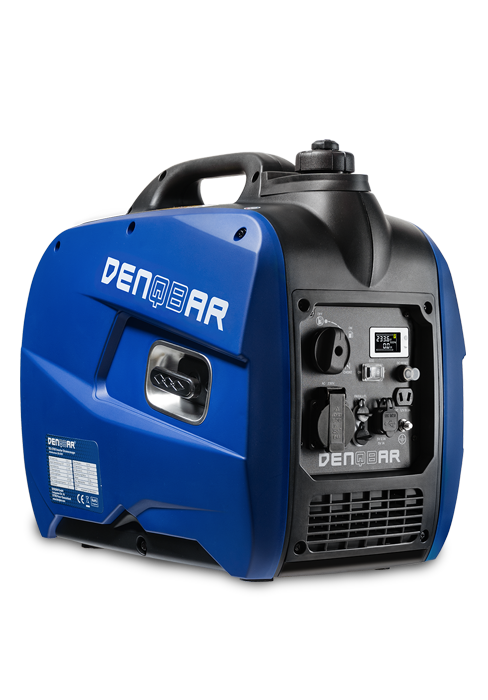
Figure 4.1: Safe Power for Electronics. This image illustrates the generator's ability to provide stable power for sensitive electronic devices such as laptops, smartphones, and other household appliances.
4.3 Using Eco Mode
The ECO switch allows the generator to automatically adjust engine speed to match the electrical load. This reduces fuel consumption, noise levels, and engine wear when operating at less than full capacity.
- To activate Eco mode, set the ECO switch to 'ON'.
- To deactivate Eco mode (for full power output or starting high-load devices), set the ECO switch to 'OFF'.
4.4 Parallel Operation (Optional)
The DQ-2000 can be connected in parallel with another DENQBAR DQ-2000 generator to double the available power. A parallel kit (sold separately) is required for this function.
- Ensure both generators are off and cooled.
- Connect the parallel kit cables to the designated parallel ports on both generators.
- Start both generators according to the standard starting procedure.
- Once both are running stably, you can connect your devices to the outlets on the parallel kit.

Figure 4.2: Parallel Function. This image shows two DENQBAR DQ-2000 Inverter Generators connected in parallel, demonstrating the capability to double power output.
4.5 Shutting Down the Generator
- Disconnect all electrical devices from the generator.
- Turn the engine switch to the 'OFF' position.
- Turn the fuel valve to the 'OFF' position.
- Allow the generator to cool down completely before moving or storing.
5. Maintenance
Regular maintenance is essential for the longevity and reliable operation of your DENQBAR DQ-2000 generator. Always ensure the generator is off and cooled before performing any maintenance.
5.1 Daily/Before Each Use
- Check engine oil level and add if necessary.
- Check fuel level and refill if necessary.
- Inspect the generator for any visible damage or loose parts.
5.2 After First 20 Hours or 1 Month
- Change engine oil.
5.3 Every 50 Hours or 3 Months
- Clean the air filter.
- Check spark plug.
5.4 Every 100 Hours or 6 Months
- Change engine oil.
- Clean/replace spark plug.
- Inspect fuel filter.
5.5 Storage
For long-term storage, ensure the fuel tank is empty or treated with a fuel stabilizer. Run the engine until it stops from lack of fuel. Drain the carburetor. Change the engine oil. Store the generator in a clean, dry place.
For detailed maintenance procedures and schedules, consult the complete instruction manual.
6. Troubleshooting
This section provides solutions for common issues you might encounter with your DQ-2000 generator.
| Problem | Possible Cause | Solution |
|---|---|---|
| Engine does not start | No fuel Low oil level Engine switch OFF Choke not set correctly Spark plug issue | Add fuel Add oil Turn engine switch ON Adjust choke Check/clean/replace spark plug |
| No power output | Overload Circuit breaker tripped ECO mode engaged with high load | Reduce load, reset overload Reset circuit breaker Turn ECO mode OFF for high-load devices |
| Engine runs rough | Stale fuel Dirty air filter Spark plug issue | Drain and refill with fresh fuel Clean/replace air filter Check/clean/replace spark plug |
| Generator is too loud | ECO mode OFF Muffler damage | Engage ECO mode Inspect muffler for damage, contact service |
If you are unable to resolve an issue using this guide, please refer to the full manual or contact DENQBAR customer support.
7. Technical Specifications
Below are the key technical specifications for the DENQBAR Inverter Generator DQ-2000.

Figure 7.1: Generator Dimensions and Key Data. An illustration of the DENQBAR DQ-2000 Inverter Generator showing its dimensions: 50 cm length, 29.5 cm width, and 47.5 cm height. It also highlights its 2.0 kW max power, 1.8 kW continuous power, 21 kg weight, 4.6 L fuel capacity, and up to 11 hours run time.
| Specification | Value |
|---|---|
| Model Number | DQ-0273 |
| Manufacturer | DENQBAR |
| Max Power (230V) | 2.0 kW |
| Continuous Power (230V) | 1.8 kW |
| Voltage | 230 Volts |
| Frequency | 50 Hz |
| DC Output | 12V / 8.3A |
| USB Output | 5V / 1A, 5V / 2.1A |
| Fuel Type | Gasoline |
| Fuel Tank Capacity | Approx. 4.6 Liters |
| Run Time (approx.) | Up to 11 hours (depending on load) |
| Dimensions (L x W x H) | 50 x 25.5 x 47.5 cm |
| Weight | 21 Kilograms |
| Special Features | Portable, Eco Mode, Parallel Operation Capable |
| Included Components | Inverter generator, instructions (DE/EN/FR), tool kit, car charging cable |
8. Warranty and Support
Your DENQBAR DQ-2000 Inverter Generator is covered by a manufacturer's warranty. Please refer to the warranty card included in your product packaging for specific terms and conditions, including warranty period and coverage details.
For technical assistance, spare parts, or warranty claims, please contact DENQBAR customer support. Contact information can typically be found in your product manual or on the official DENQBAR website.
When contacting support, please have your model number (DQ-2000) and serial number ready to expedite service.