
Introduction
This manual provides detailed instructions for the installation, operation, and maintenance of your Lanzar VIBE432.5 4-Channel Car Amplifier. Please read this manual thoroughly before attempting installation or operation to ensure proper use and to prevent damage to the unit or your vehicle's audio system.
The Lanzar VIBE Series MOSFET amplifiers are designed to deliver high-quality audio performance. These amplifiers provide the necessary power and clarity for an enhanced car audio experience, focusing on rich bass production and overall sound quality.
Product Features
- Advanced Technology: Incorporates DC to DC switching power supplies for dynamic range and peak performance.
- Intelligent Design: Features Power and Protection LED indicators, soft turn-on/off circuitry, and advanced protection mechanisms.
- Sound Specialization: Equipped with silver RCA connectors and speaker screw-down terminals for secure, distortion-free audio connections.
- RCA Line-Out Jacks: Allows for building multi-amplifier systems by distributing the signal without external splitter cords.
- Audio Evolution: Regulated MOSFET Pulse Width Modulated (PWM) power supply maintains rated power across varying battery voltages, ensuring excellent frequency response.
- Material: Constructed with durable Aluminum.
What's in the Box
Upon unpacking, please verify that all items listed below are present and in good condition.

Image: Contents of the Lanzar VIBE432.5 package, including the amplifier, remote subwoofer level control, and connection cable.
- Lanzar VIBE432.5 4-Channel Car Amplifier
- Remote Subwoofer Level Control
- Connection Cable for Remote Control
- Mounting Hardware (screws, etc.)
Setup and Installation
Proper installation is critical for optimal performance and safety. If you are unsure about any part of the installation process, it is recommended to seek professional assistance.
1. Mounting Location
Choose a mounting location that is dry, well-ventilated, and away from direct sunlight or heat sources. Ensure sufficient space around the amplifier for proper air circulation. Avoid mounting on carpet or other materials that could obstruct airflow.
2. Power Connections
Before making any connections, disconnect the vehicle's negative battery terminal to prevent electrical shorts.
- +12V (Power): Connect a heavy-gauge wire (e.g., 8-gauge or larger, depending on power requirements) directly from the positive terminal of the car battery to the +12V terminal on the amplifier. Install an in-line fuse holder with an appropriate fuse (e.g., 30A x 2, as indicated by the amplifier's fuses) within 18 inches of the battery.
- GND (Ground): Connect a heavy-gauge wire from the GND terminal on the amplifier to a clean, unpainted metal surface on the vehicle's chassis. Ensure a solid, low-resistance connection.
- REM (Remote Turn-On): Connect a smaller gauge wire from the REM terminal on the amplifier to the remote turn-on output of your car stereo or head unit. This wire signals the amplifier to turn on when the stereo is activated.
3. Audio Input Connections
Connect the RCA output cables from your car stereo system to the "Line Input" RCA jacks on the amplifier. The VIBE432.5 is a 4-channel amplifier, allowing for front and rear speaker inputs.

Image: Diagram showing RCA Line Input and Line Out connections, Level controls, Bass Boost, Mode switches, and Remote Subwoofer Control port on the amplifier's front panel.
4. Speaker Output Connections
Connect your speakers to the amplifier's speaker terminals. Observe correct polarity (+ to + and - to -) for each speaker. The VIBE432.5 supports 4-channel operation or can be bridged for 2-channel operation (e.g., for subwoofers).

Image: Diagram illustrating the speaker output terminals (CH1, CH2, CH3, CH4), bridged mode connections, and power/ground/remote terminals on the amplifier's rear panel.
- 4-Channel Mode: Connect one speaker to each channel (CH1, CH2, CH3, CH4).
- Bridged Mode: For higher power output to fewer speakers (e.g., subwoofers), connect speakers across designated bridged terminals (e.g., CH1+CH2 for one speaker, CH3+CH4 for another). Refer to the diagram for specific bridged connections.
5. Remote Subwoofer Bass Control
Connect the provided remote subwoofer level control to the "Remote" port on the amplifier using the supplied cable. Mount the control in an accessible location for easy adjustment of subwoofer bass levels.

Image: Close-up view of the remote subwoofer level control unit, showing the level knob and the RJ-style connector port.
6. Final Checks
Once all connections are made, double-check all wiring for correct polarity, secure connections, and proper insulation to prevent shorts. Reconnect the vehicle's negative battery terminal.
Operating Instructions
After successful installation, follow these steps to operate your amplifier:
- Power On: Turn on your car stereo. The amplifier's "PWR" (Power) LED indicator should illuminate, indicating it is receiving power and is operational. If the "PROT" (Protection) LED illuminates, refer to the Troubleshooting section.
- Level Control (Gain): Adjust the "Level" (gain) control for each channel (CH1/CH2 and CH3/CH4) to match the output voltage of your car stereo. Start with the level at minimum and slowly increase it until you achieve a clear, undistorted sound at your desired maximum volume from the stereo. Avoid setting the gain too high, as this can introduce distortion.
- Mode Switch (Crossover):
- Full: Full range audio output.
- High Pass: Allows frequencies above the set crossover point (40Hz-3kHz) to pass, typically used for full-range speakers or tweeters.
- Low Pass: Allows frequencies below the set crossover point (40Hz-3kHz) to pass, typically used for subwoofers.
- Bass Boost: Use the "Bass Boost" switch to apply a low-frequency boost if desired. Use this feature sparingly to avoid distortion or damage to speakers.
- Remote Subwoofer Bass Control: If connected, use the remote control knob to adjust the subwoofer's bass level conveniently from the driver's seat.
Maintenance
To ensure the longevity and optimal performance of your Lanzar VIBE432.5 amplifier, follow these simple maintenance guidelines:
- Cleaning: Periodically wipe the amplifier's exterior with a soft, dry cloth. Do not use harsh chemicals or abrasive cleaners.
- Ventilation: Ensure that the amplifier's cooling fins are free from dust and debris. Good airflow is essential to prevent overheating.
- Connections: Occasionally check all power, ground, remote, RCA, and speaker connections to ensure they are secure and free from corrosion. Loose connections can lead to poor performance or damage.
- Fuses: The amplifier is equipped with replaceable fuses (30A x 2). If a fuse blows, replace it only with a fuse of the same type and rating. Never use a higher-rated fuse, as this can cause severe damage to the amplifier or vehicle's electrical system.
Troubleshooting
If you experience issues with your amplifier, consult the following troubleshooting guide before contacting support.
No Power / Power LED Off
- Check the +12V power wire connection at the battery and amplifier.
- Verify the in-line fuse near the battery and the fuses on the amplifier. Replace if blown.
- Ensure the ground wire connection is secure and making good contact with the chassis.
- Check the remote turn-on (REM) wire connection at both the stereo and amplifier. Ensure the stereo is turned on.
Protection LED On (PROT)
- Overheating: The amplifier may be overheating. Ensure adequate ventilation around the amplifier. Allow it to cool down.
- Speaker Short Circuit: Check speaker wiring for any shorts (e.g., bare wires touching each other or the vehicle chassis). Ensure speaker impedance matches the amplifier's specifications.
- Low Voltage: Check the vehicle's battery voltage.
No Sound Output
- Confirm the amplifier is powered on (Power LED illuminated).
- Check RCA input cables from the stereo to the amplifier.
- Verify speaker wire connections at both the amplifier and speakers.
- Ensure the stereo's volume is up and not muted.
- Adjust the amplifier's "Level" (gain) controls.
Distorted Sound
- Reduce the amplifier's "Level" (gain) control.
- Check for proper crossover settings (High Pass/Low Pass).
- Ensure speaker impedance is compatible.
- Check for damaged speakers or wiring.
Specifications
The following are the technical specifications for the Lanzar VIBE432.5 4-Channel Car Amplifier:
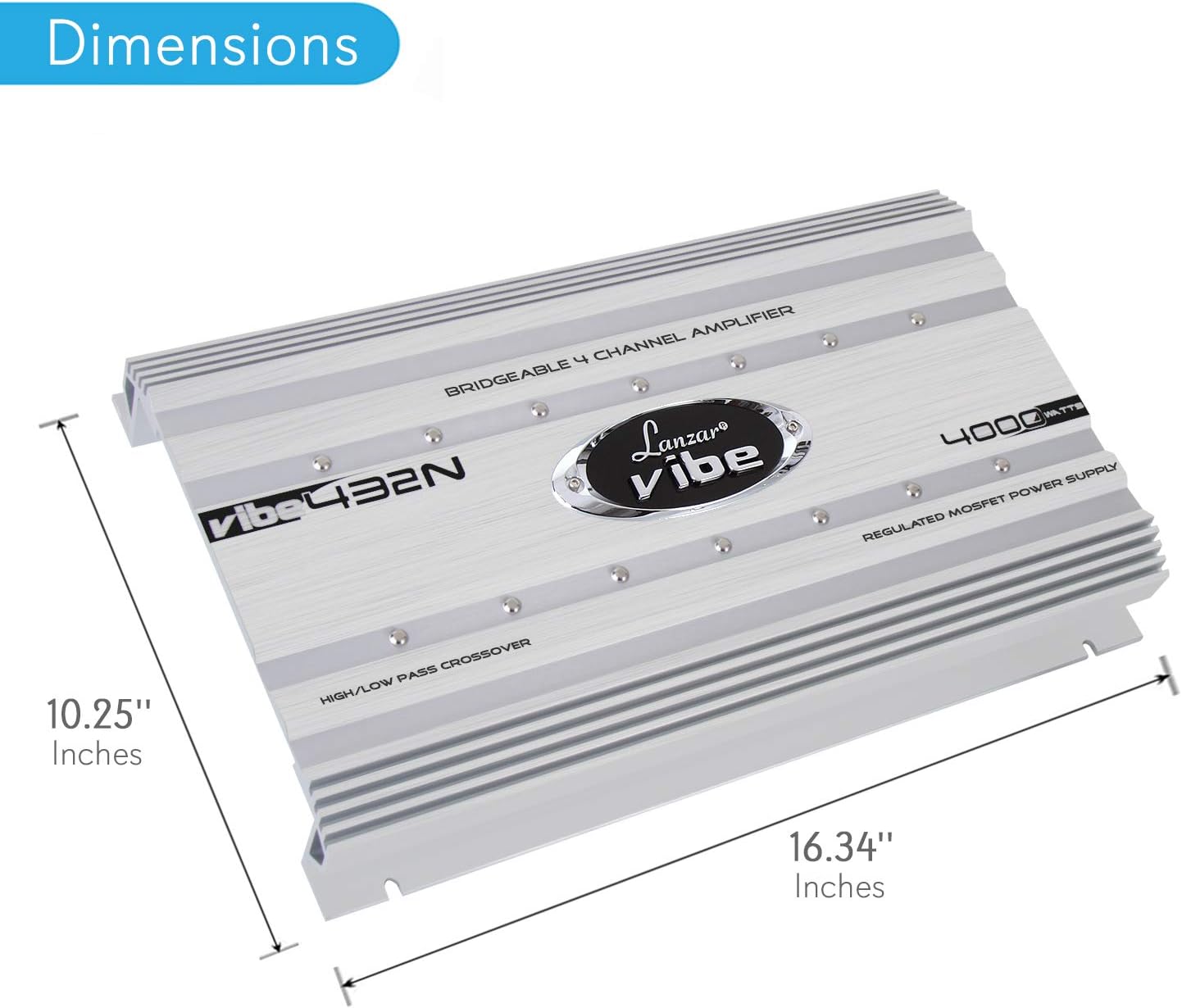
Image: Dimensions of the Lanzar VIBE432.5 amplifier, showing a length of 16.34 inches and a width of 10.25 inches.
| Feature | Specification |
|---|---|
| Model | VIBE432.5 |
| Number of Channels | 4 |
| Output Power | 500 Watts (Note: Product title mentions 4000-Watt, but specifications list 500 Watts. Refer to product packaging for exact RMS/Peak power ratings.) |
| Voltage | 16 Volts (Operating Voltage Range) |
| Material Type | Aluminum |
| Mounting Type | Surface Mount |
| Specification Met | Less Than 1% THD, 95 dB S/N Ratio, >75 dB Crosstalk |
| Frequency Response (Remote Bass Control) | 10 Hz - 40 KHz |
| Dimensions (Approximate) | 16.34 inches (Length) x 10.25 inches (Width) |
Note: Specifications are subject to change without notice. Please refer to the product packaging for the most accurate and up-to-date information.
Warranty and Support
Lanzar products are designed for reliability and performance. For warranty information, technical support, or service inquiries, please refer to the warranty card included with your product or visit the official Lanzar website. Keep your purchase receipt as proof of purchase for warranty claims.
For further assistance, please contact Lanzar customer support.