1. Introduction
This manual provides comprehensive instructions for the LVYUAN 1000W Car Power Inverter, Model 1000W4USB-US. This device converts 12V DC power from your vehicle's battery into 110V/120V AC household power, enabling you to operate various electronic devices on the go. Please read this manual thoroughly before use to ensure safe and optimal performance.
2. Safety Instructions
WARNING: Failure to follow these safety instructions may result in injury or damage to the inverter or connected devices.
- Ensure the inverter is connected to a 12V DC power source only.
- Do not expose the inverter to water, rain, or excessive moisture.
- Avoid operating the inverter in direct sunlight or near heat sources.
- Ensure adequate ventilation around the inverter to prevent overheating.
- Do not open the inverter casing; there are no user-serviceable parts inside.
- Keep children away from the inverter and connected devices.
- Disconnect the inverter from the power source when not in use.
- Do not connect the inverter to AC distribution wiring.
- Always connect the inverter to the battery terminals correctly: positive to positive, negative to negative. Reverse polarity can cause damage.
- Ensure the total wattage of connected devices does not exceed the inverter's continuous power rating (1000W).

3. Package Contents
Verify that all items are present in your package:
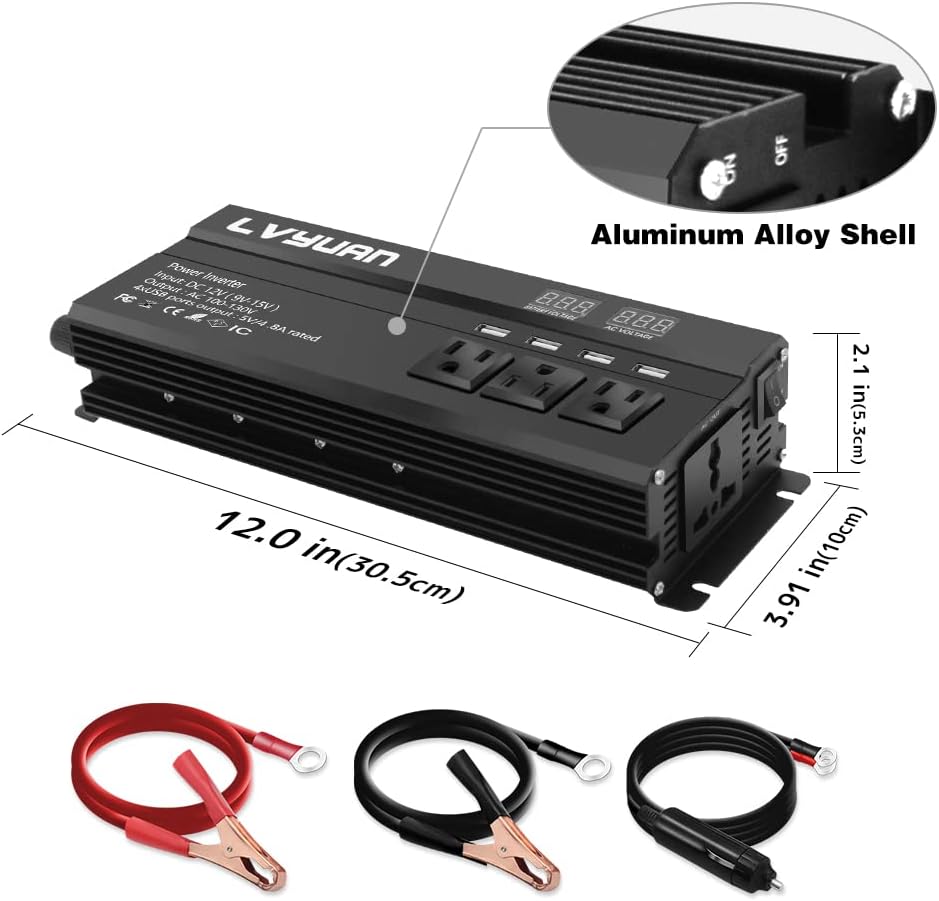
- LVYUAN 1000W Car Power Inverter
- Battery Clip Cables (Red and Black)
- Cigarette Lighter Plug Cable
- User Manual (This document)
- Extra Fuses

4. Product Features
- Powerful Output: Provides continuous 1000W power, converting DC 12V to AC 110V/120V.
- Multiple Outlets: Features 3 American-style outlets, 1 universal outlet, and 2 USB ports (3.1A total) for versatile charging.
- LED Display: Real-time monitoring of battery voltage and output voltage.
- Advanced Protection: Six safety protection modes including over-voltage, under-voltage, overload, over-temperature, short circuit, and reverse polarity protection.
- Efficient Cooling: Sturdy aluminum alloy body enhances heat dissipation, ensuring long-lasting performance.


5. Setup
The inverter can be connected to your vehicle's 12V DC power source using either the cigarette lighter plug or the battery clip cables.
5.1. Connecting via Cigarette Lighter Socket (for loads up to 150W)
- Ensure the inverter's power switch is in the "OFF" position.
- Insert the cigarette lighter plug cable into the inverter's DC input port.
- Plug the cigarette lighter adapter firmly into your vehicle's 12V cigarette lighter socket.
- Turn on the inverter. The LED display should illuminate.
5.2. Connecting via Battery Clip Cables (for loads up to 1000W)
CAUTION: Always connect the battery clip cables directly to the vehicle battery for loads exceeding 150W to prevent damage to the vehicle's electrical system.
- Ensure the inverter's power switch is in the "OFF" position.
- Connect the red battery clip cable to the inverter's positive (+) terminal and the black battery clip cable to the inverter's negative (-) terminal. Tighten the terminal nuts securely.
- Connect the red battery clip to the positive (+) terminal of your vehicle's 12V battery.
- Connect the black battery clip to the negative (-) terminal of your vehicle's 12V battery.
- Ensure all connections are secure and free from corrosion.
- Turn on the inverter. The LED display should illuminate.
6. Operating Instructions
- After successful connection and powering on the inverter, the LED display will show the input battery voltage and the output AC voltage.
- Plug your AC-powered devices into the inverter's AC outlets.
- Plug your USB-powered devices into the inverter's USB ports.
- Ensure the total power consumption of all connected devices does not exceed 1000W.
- When finished, turn off the inverter and disconnect all devices. Then, disconnect the inverter from the power source.

6.1. Applications
The LVYUAN 1000W Car Power Inverter is suitable for a variety of applications, including:
- Outdoor activities (camping, tailgating)
- Home power backup during outages
- Solar power systems
- Emergency power needs
- Trucks, boats, and RVs
- Powering laptops, small appliances, and charging mobile devices


7. Maintenance
- Keep the inverter clean and free from dust and debris. Use a dry cloth for cleaning.
- Ensure the cooling fan is not obstructed. Periodically check for dust buildup and clean if necessary to maintain efficient cooling.
- Check all cable connections regularly to ensure they are secure and free from corrosion.
- Store the inverter in a cool, dry place when not in use.
- If the inverter's internal fuse blows, replace it with an extra fuse of the same rating provided in the package. Refer to the "Troubleshooting" section for fuse replacement guidance.
8. Troubleshooting
| Problem | Possible Cause | Solution |
|---|---|---|
| Inverter not turning on | Loose connection, low battery voltage, blown fuse, faulty power switch. | Check all connections. Ensure battery voltage is above 11V. Replace fuse if blown. Contact support if switch is faulty. |
| No AC output | Overload, short circuit, over-temperature, low/high input voltage. | Reduce load. Check for short circuits in connected devices. Allow inverter to cool down. Check battery voltage. |
| Low power output (less than 1000W) | Input voltage too low (e.g., below 13.7V for full 1000W). | Ensure the input voltage from the battery is sufficient, ideally 13.7V or higher for maximum output. |
| Cooling fan is loud or not working | Normal operation under load, fan obstruction, fan failure. | Fan noise is normal when the inverter is under load or dissipating heat. Ensure no obstructions. If fan completely stops and inverter overheats, contact support. |
| Inverter shuts down automatically | Activation of protection modes (overload, over-temperature, low/high voltage, short circuit). | Identify and resolve the cause of the protection activation (e.g., reduce load, allow cooling, check battery). Restart the inverter. |
9. Specifications
| Feature | Detail |
|---|---|
| Model Number | 1000W4USB-US |
| Continuous Power | 1000 Watts |
| Input Voltage | DC 12V (9V-15V) |
| Output Voltage | AC 110V-120V |
| USB Output | 5V/3.1A (total for 2 ports) |
| AC Outlets | 3 American-style, 1 Universal |
| Product Dimensions | 12 x 3.9 x 2.1 inches (30.5 x 10 x 5.3 cm) |
| Item Weight | 2.8 pounds (1.27 kg) |
| Power Source | Solar and Battery Powered |
| Shell Material | Aluminum Alloy |
10. Warranty and Support
LVYUAN products are designed for reliability and performance. For warranty information, technical support, or service inquiries, please contact LVYUAN customer service through the retailer where the product was purchased or visit the official LVYUAN website.
Please retain your purchase receipt as proof of purchase for any warranty claims.


