
Product Overview
The Fimate XT-09 Wireless Selfie Stick Tripod is a versatile accessory designed for capturing photos and videos with your smartphone. It combines the functionality of a selfie stick with a stable tripod stand and features a detachable wireless remote for convenient operation.
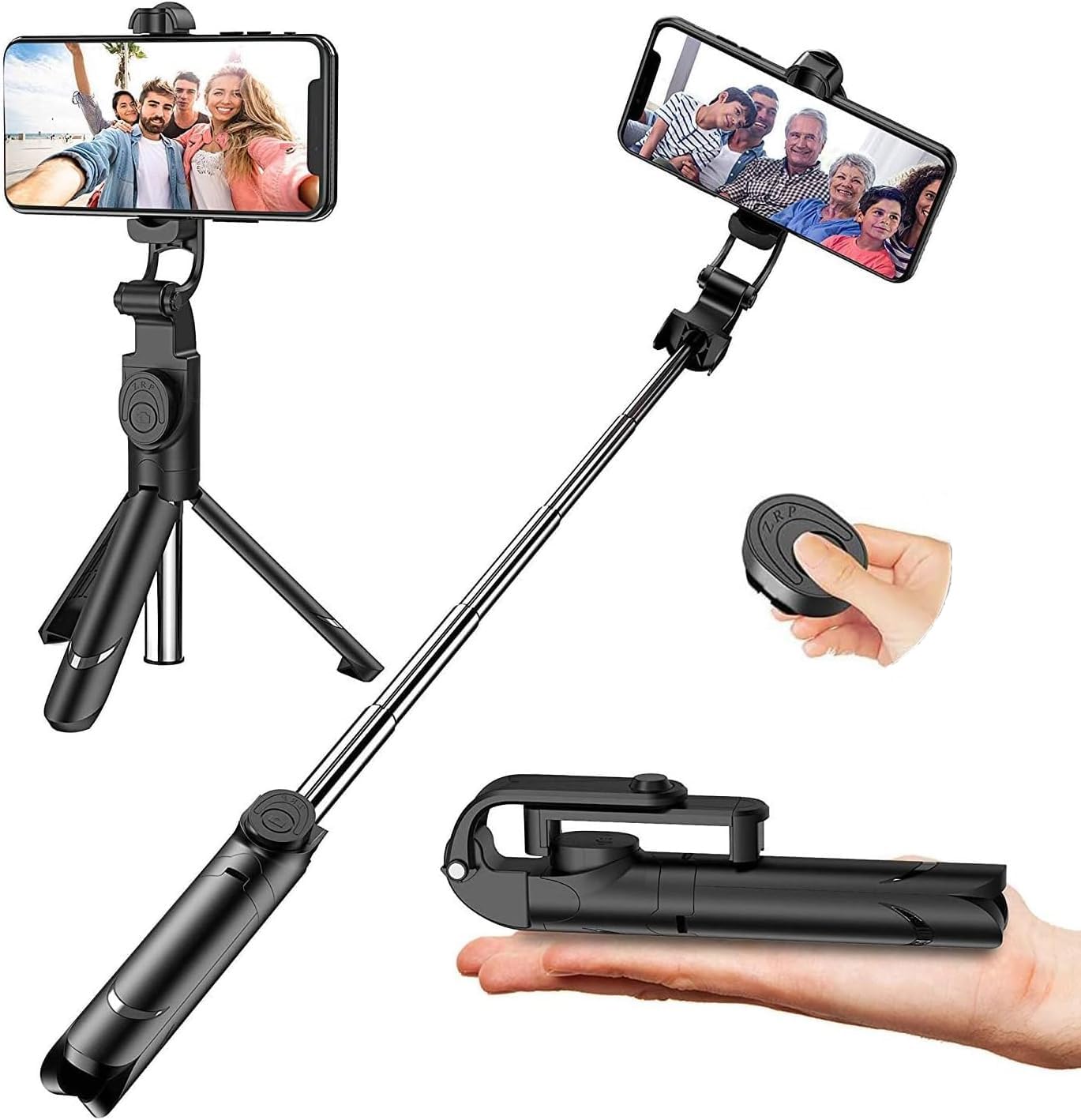
Image: The Fimate XT-09 Wireless Selfie Stick Tripod in its extended form with a smartphone mounted, showcasing its main components like the phone holder, extendable rod, and tripod base.
Key Features
- Multi-Angle Shooting: Features a 180° rotation head and 360° rotatable phone holder, allowing for horizontal or vertical camera modes.
- Wireless Remote: Includes a detachable Bluetooth remote controller with a maximum range of 33 feet for easy self-photography or group photos.
- Adjustable Extension Length: Extends from 7.9 inches to 26.6 inches, offering flexibility for various shooting needs.
- Compact & Portable: Designed for easy carrying, fitting into pockets or small bags.
- Energy Saving: Equipped with a 65mAh battery supporting up to 50,000 photos, with an automatic sleep mode after 10 minutes of inactivity.
Setup Guide
- Unfold the Tripod: Gently pull the bottom part of the handle to extend the three legs, forming a stable tripod base.
- Extend the Monopod: Pull the telescopic rod upwards to extend the selfie stick to your desired length.
- Mount Your Smartphone:
- Open the phone holder clamps.
- Carefully place your smartphone into the holder, ensuring it is securely gripped by the silicone protection pads.
- Adjust the phone holder's angle and rotation (180° head rotation, 360° phone holder rotation) for optimal positioning.
- Pair the Bluetooth Remote:
- Remove the detachable wireless remote from its slot on the handle.
- Turn on the remote (usually by pressing and holding the button until an indicator light flashes).
- On your smartphone, go to Bluetooth settings and search for available devices.
- Select "QIRITA" or a similar device name to pair. The indicator light on the remote will stop flashing once paired.

Image: A detailed diagram illustrating the various components of the Fimate XT-09, including the screw head for the smartphone, aluminum alloy stick, wireless Bluetooth control, and non-slip foot pad tripod.
Video: A demonstration of how to set up the selfie stick, attach a phone, and pair the remote control for use as a tripod or monopod.
Operating Instructions
Using as a Selfie Stick:
- Ensure the tripod legs are folded back into the handle.
- Extend the monopod rod to your desired length.
- Hold the handle firmly and use the detachable Bluetooth remote to capture photos or start/stop video recording.
Using as a Tripod:
- Extend the tripod legs from the handle and place the tripod on a flat, stable surface.
- Adjust the monopod rod to the desired height.
- Position your smartphone in the holder, adjusting the angle as needed.
- Use the Bluetooth remote to take photos or record videos from a distance.
Adjusting Angles:
The phone holder allows for 360° rotation, enabling you to switch between horizontal (landscape) and vertical (portrait) modes. The head also offers 180° rotation for finding the perfect shooting angle.
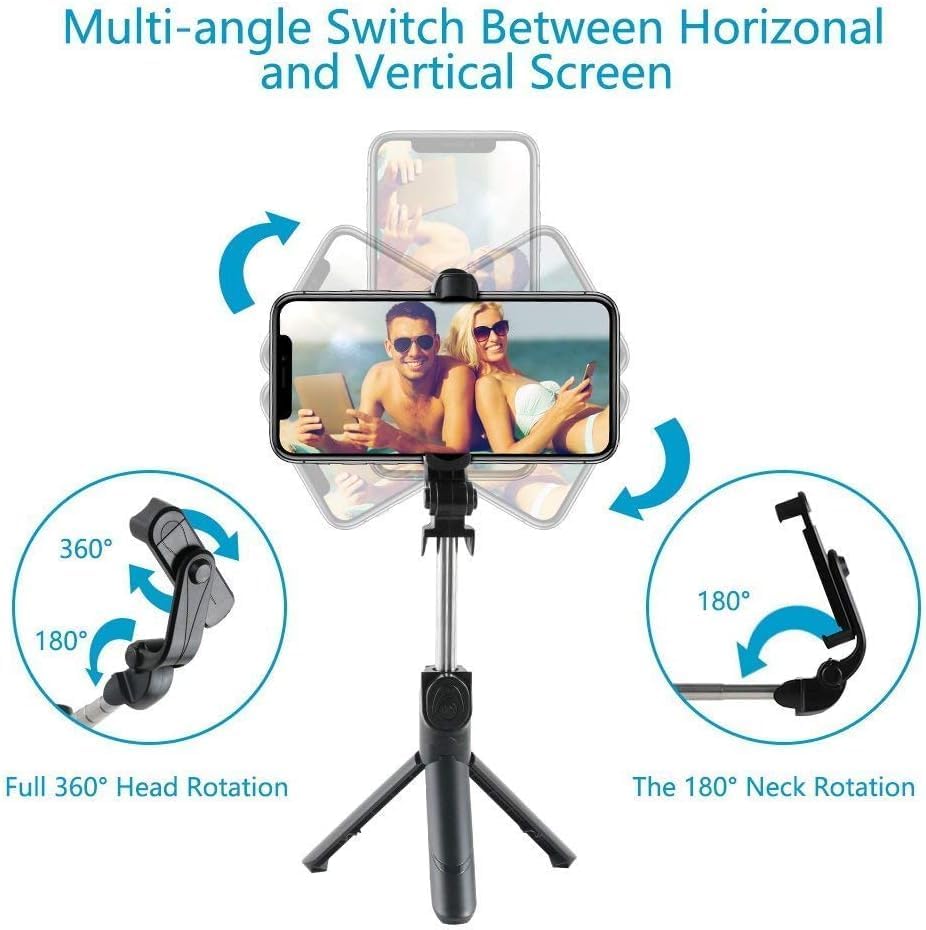
Image: An illustration demonstrating the multi-angle adjustment capabilities of the selfie stick, including 360° full head rotation and 180° neck rotation for switching between horizontal and vertical screen orientations.
Maintenance
- Cleaning: Wipe the selfie stick and phone holder with a soft, dry cloth. Avoid using harsh chemicals or abrasive materials.
- Storage: When not in use, fold the tripod legs and retract the monopod rod to its compact size. Store the detachable remote in its designated slot to prevent loss. Keep the device in a cool, dry place away from direct sunlight and extreme temperatures.
- Battery: The remote control uses a 65mAh battery. If the remote stops responding, the battery may need replacement. Refer to the remote's specific instructions for battery type and replacement procedure.
Troubleshooting
| Problem | Possible Cause | Solution |
|---|---|---|
| Remote not pairing with phone. | Bluetooth not enabled on phone, remote battery low, remote not in pairing mode. | Ensure Bluetooth is on. Recharge/replace remote battery. Press and hold remote button to enter pairing mode. |
| Phone not fitting securely in holder. | Phone case too bulky, phone width exceeds maximum capacity. | Remove phone case if necessary. Ensure phone width is within 2.48-3.50 inches. |
| Tripod feels unstable. | Uneven surface, legs not fully extended, phone too heavy for full extension. | Place on a flat surface. Ensure legs are fully deployed. Reduce extension length if phone is heavy. |
| Selfie stick does not extend/retract smoothly. | Dirt or debris in telescopic mechanism. | Clean the telescopic rod with a soft, dry cloth. Avoid forcing the mechanism. |
Specifications
| Brand | Fimate |
| Model Name | XT-09 |
| Material | Metal |
| Color | Black |
| Item Weight | 140 Grams |
| Weight Limit | 6.6 Pounds |
| Maximum Height | 68 Centimeters (approx. 26.77 inches) |
| Minimum Length (Folded) | 7.9 inches (approx. 20 cm) |
| Compatible Devices | Camera, Smartphone (screen width 2.48-3.50 inches) |
| Special Feature | Remote Control |
| Remote Battery | 65mAh (supports 50,000 times photography) |
Warranty and Support
This Fimate product comes with a 30-day money-back guarantee and a 6-month seller warranty. Fimate also offers lifetime dedicated support to ensure your long-term satisfaction with the product.
For any inquiries or support, please contact Fimate customer service through your purchase platform or the official Fimate website.