
1. Introduction
Thank you for choosing the Topsolar SolarFairy 100W Portable Foldable Solar Panel Charger Kit. This manual provides essential information for the safe and efficient use of your solar panel. Please read it thoroughly before operation and retain it for future reference.
This portable solar panel is designed to provide reliable power for various devices, including portable power stations, 12V RV/car batteries, and USB/Type-C compatible electronics like smartphones and tablets. Its foldable design ensures portability and ease of use in outdoor environments.
2. Safety Information
Always observe the following safety precautions to prevent injury or damage to the product:
- Do not attempt to modify or disassemble the solar panel. Unauthorized modifications can lead to electric shock, fire, or product damage.
- Keep the solar panel away from fire, water, and corrosive substances.
- Avoid dropping or subjecting the panel to strong impacts.
- Ensure proper ventilation when operating the panel, especially when charging devices.
- Do not cover the solar panel during operation, as this can reduce efficiency and potentially cause overheating.
- Before testing the 14.4V port voltage, connect a load/battery to activate it.
- The panel is designed with Short Circuit Protection, Surge Protection, and Over Power Protection for safe operation.

Image: The control unit of the Topsolar SolarFairy 100W solar panel, illustrating its built-in safety features including short circuit, surge, and over power protection.
3. Package Contents
The Topsolar SolarFairy 100W Portable Foldable Solar Panel Charger Kit typically includes:
- Topsolar SolarFairy 100W Foldable Solar Panel
- Various DC cables and connectors for different portable power stations
- DC to Alligator Clip Cable for 12V battery charging
- User Manual

Image: The Topsolar SolarFairy 100W solar panel in its compact, folded state, ready for transport.
4. Product Features
- Designed For Most Portable Power Stations: Features a 19V DC port specifically for charging portable power stations, complete with various cables and connectors.
- USB Smart and Fast Charging Technology: Equipped with Dual USB Ports (QC3.0 & 2.0, 5V/9V/12V 2A max) and a USB-C port supporting PD3.0. Ideal for charging smartphones, tablets, GPS, and digital cameras. The built-in smart IC chip optimizes charging speed and protects devices from overcharging.
- Foldable & Portable Design: Folds down to a compact size (approximately 9.85 x 7.90 x 2.40 inches), making it easy to carry in a backpack or trunk. Includes adjustable brackets for optimal sun exposure.
- Powerful High Conversion Efficiency: Utilizes high-efficiency monocrystalline solar cells, providing greater power output even with a smaller panel size. Maximizes system output and performs well in low-light conditions compared to polycrystalline panels.
- Durable Construction: Fully laminated with advanced technology and long-lasting ETFE material for enhanced durability.

Image: An illustration detailing the durable construction of the solar panel, highlighting the ETFE material for lighter weight, longer life, and high light transmittance, along with the photocell and solar intensity indicator.
5. Specifications
| Feature | Detail |
|---|---|
| Brand | Topsolar |
| Model Number | T05SC60-1 |
| Material | Monocrystalline Silicon |
| Product Dimensions (Folded) | 9.85"L x 7.9"W x 2.4"H |
| Item Weight | 3.56 Kilograms |
| Efficiency | High Efficiency |
| Maximum Voltage | 18 Volts |
| Maximum Power | 100 Watts |
| Special Features | Fast Charging |
| Connector Type | USB, DC |

Image: A visual representation of the Topsolar SolarFairy 100W solar panel's dimensions when folded and fully extended, highlighting its compact and portable nature.
6. Setup Instructions
- Unfold the Panel: Carefully unfold the solar panel completely.
- Position for Sunlight: Place the solar panel in a location with direct sunlight. Use the integrated adjustable kickstands to angle the panel towards the sun for maximum efficiency. Adjust the angle periodically as the sun moves.
- Connect Devices: Identify the appropriate output port for your device (DC 19V for power stations, DC 14.4V for 12V batteries, USB-A/USB-C for mobile devices).
- Monitor Solar Intensity: The control unit features a solar intensity indicator. Ensure sufficient sunlight for optimal charging.
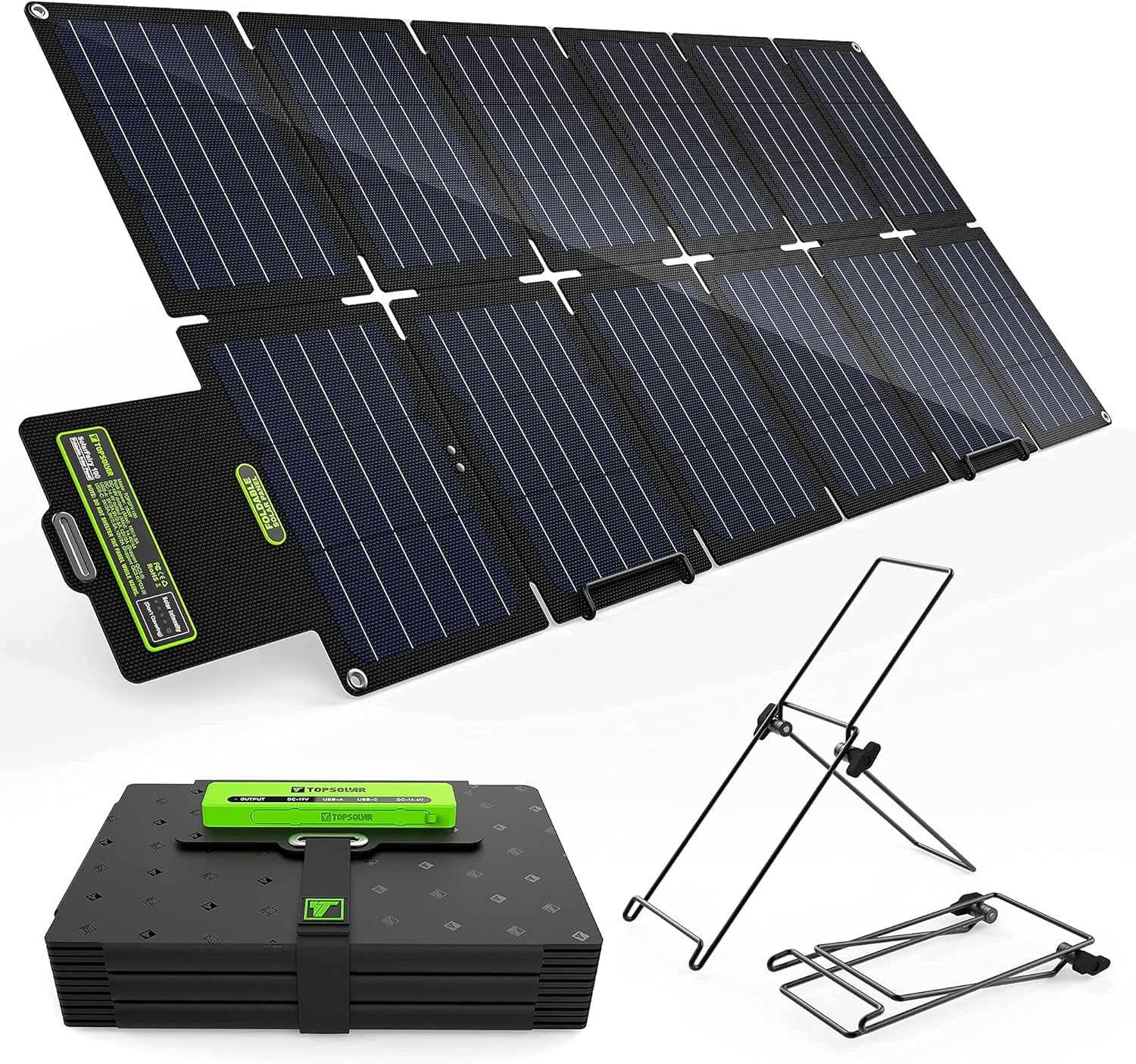
Image: The Topsolar SolarFairy 100W solar panel fully unfolded and supported by its integrated kickstands, positioned to capture sunlight.
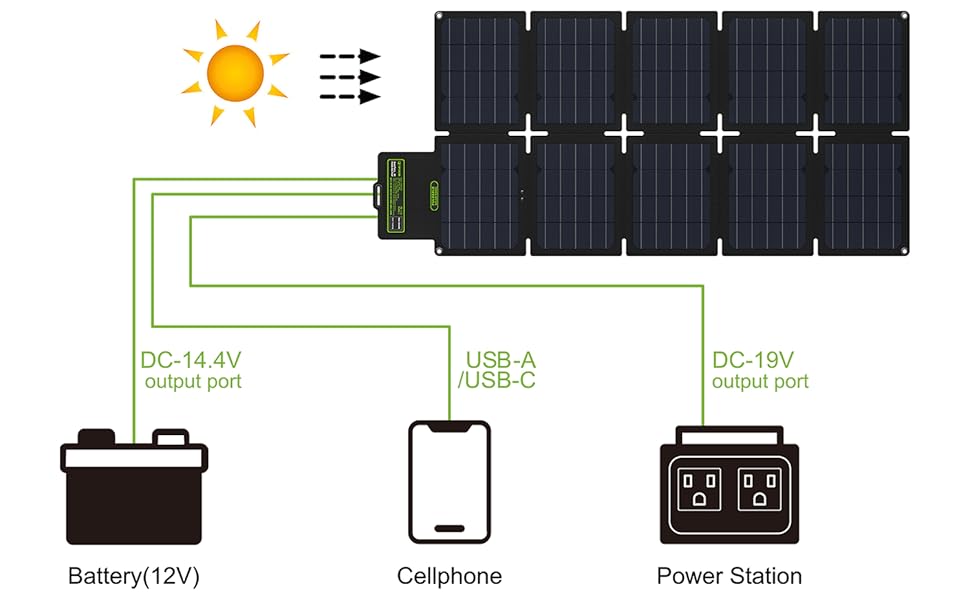
Image: A connection diagram showing the solar panel's various output ports (DC-14.4V, USB-A/USB-C, DC-19V) and how to connect them to a 12V battery, a cellphone, and a power station.
7. Operating Instructions
Once the solar panel is set up and receiving adequate sunlight, you can begin charging your devices:
- Charging Portable Power Stations: Use the provided DC cables and connectors to connect the 19V DC output port of the solar panel to your portable power station's input.
- Charging 12V Batteries: Connect the DC to Alligator Clip cable to the 14.4V DC output port and then to your 12V battery terminals. Note: The 14.4V port requires a load (battery) to be connected to measure voltage.
- Charging USB/Type-C Devices: Plug your smartphone, tablet, or other USB-compatible device into the USB-A (QC3.0 & 2.0) or USB-C (PD3.0) ports. The smart IC chip will automatically detect your device and deliver optimal charging speed.

Image: A detailed view of the control panel on the Topsolar SolarFairy, showing multiple devices (smartphone, tablet) connected to the USB-A and USB-C ports for charging, along with DC output options.
8. Maintenance
To ensure the longevity and optimal performance of your Topsolar SolarFairy solar panel:
- Cleaning: Regularly wipe the solar panel surface with a soft, damp cloth to remove dust, dirt, or debris that may reduce efficiency. Do not use harsh chemicals or abrasive materials.
- Storage: When not in use, fold the panel and store it in a dry, cool place away from direct sunlight and extreme temperatures.
- Inspection: Periodically check cables and connectors for any signs of wear or damage. Replace any damaged components immediately.
- Water Resistance: The panel is designed to be durable, but avoid prolonged exposure to heavy rain or submerging the control unit in water. Ensure the port cover is properly sealed when not in use.
9. Troubleshooting
If you encounter issues with your solar panel, refer to the following common problems and solutions:
- No Power Output:
- Ensure the panel is in direct sunlight and not shaded.
- Check all cable connections to ensure they are secure.
- Verify the solar intensity indicator on the control unit. If it shows low intensity, reposition the panel.
- For 14.4V output, confirm a battery is connected to activate the port.
- Slow Charging:
- Adjust the panel angle to face the sun directly.
- Clean the panel surface to remove any obstructions.
- Ensure the device being charged is compatible with the output specifications (e.g., USB-C PD for fast charging).
- Cloudy weather or low sun angle will naturally reduce charging speed.
- Device Not Recognized:
- Try connecting the device to a different USB port.
- Ensure the device's charging cable is functional.
- Restart the device and try connecting again.
10. Warranty & Support
Topsolar products are manufactured to high-quality standards. For specific warranty details, please refer to the warranty card included with your purchase or contact Topsolar customer support. If you require technical assistance or have questions not covered in this manual, please reach out to Topsolar customer service through their official website or the retailer where you purchased the product.


