Introduction
This manual provides essential information for the setup, operation, and maintenance of your Hama Wireless Keyboard and Mouse Combo. This set offers a reliable 2.4 GHz wireless connection, a full QWERTY layout keyboard, and a mouse with adjustable DPI for comfortable and efficient use.
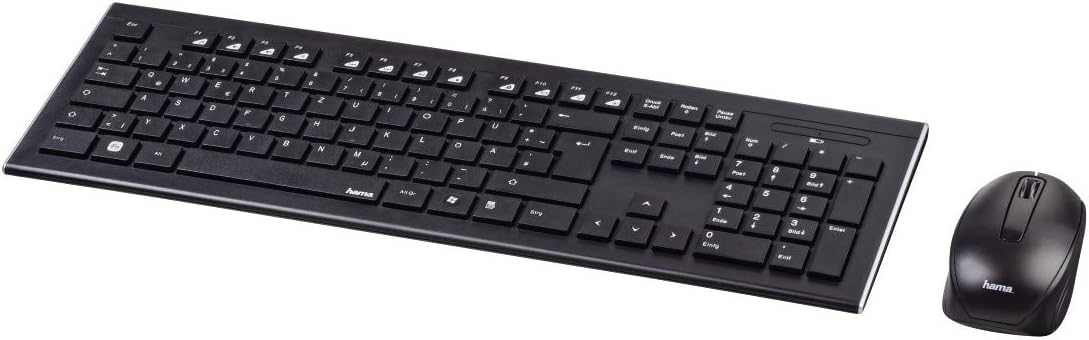
Image: The Hama wireless keyboard and mouse combo, showcasing the full-size QWERTY keyboard and the ergonomic mouse.
What's in the Box
Please check the contents of your package to ensure all items are present:
- 1 x Hama Wireless Keyboard
- 1 x Hama Wireless Mouse
- 1 x USB Nano Receiver
- 1 x AAA Battery (for keyboard)
- 1 x AA Battery (for mouse)
- 1 x Instruction Manual (this document)
Setup
Battery Installation
For the Keyboard: Locate the battery compartment on the underside of the keyboard. Insert the provided AAA battery, ensuring correct polarity (+/-). Close the battery compartment cover.
For the Mouse: Locate the battery compartment on the underside of the mouse. Insert the provided AA battery, ensuring correct polarity (+/-). Close the battery compartment cover.

Image: Underside view of the Hama keyboard, highlighting the battery compartment and the adjustable tilt feet.
Connecting the USB Nano Receiver
The Hama Wireless Keyboard and Mouse Combo uses a single USB nano receiver for both devices. This allows for a simple "Smartlink automatic connection".
Insert the USB nano receiver into an available USB port on your computer (PC or Mac). The system should automatically detect and install the necessary drivers. No manual driver installation is typically required.

Image: The Hama wireless keyboard and mouse, illustrating the wireless connection to the USB nano receiver.
Operating Instructions
Keyboard Usage
- Typing: The keyboard features a full QWERTY layout (Spanish layout) with silent keys, providing a comfortable and quiet typing experience.
- Function Keys: Utilize the function keys (F1-F12) for various shortcuts, often in combination with the 'Fn' key if present, depending on your operating system.
- Wireless Range: The 2.4 GHz wireless technology ensures a stable connection with a range of up to 8 meters.

Image: Side profile of the Hama wireless keyboard, demonstrating its flat and slim design.
Mouse Usage
- Movement: The mouse features an optical sensor for precise tracking. It is comfortable to use on most surfaces, though reflective surfaces should be avoided for optimal performance.
- DPI Adjustment: The mouse's pointer sensitivity is adjustable up to 1600 DPI (dots per inch). This allows you to customize the cursor speed to your preference. Refer to your operating system's mouse settings for specific adjustment procedures.
- Buttons: Standard left-click, right-click, and scroll wheel functionality.
Maintenance
- Cleaning: Use a soft, dry cloth to clean the surfaces of the keyboard and mouse. For stubborn dirt, a slightly damp cloth can be used, but ensure no moisture enters the devices.
- Battery Replacement: When the devices become unresponsive or exhibit erratic behavior, it may be time to replace the batteries. Follow the battery installation steps outlined in the Setup section. Dispose of used batteries responsibly according to local regulations.
- Storage: When not in use for extended periods, it is recommended to remove the batteries to prevent leakage. Store the devices in a cool, dry place.
Troubleshooting
Devices Not Responding
Check Batteries: Ensure batteries are correctly inserted and have sufficient charge. Replace if necessary.
Check Receiver: Make sure the USB nano receiver is securely plugged into a working USB port on your computer. Try a different USB port.
Proximity: Ensure the keyboard and mouse are within the 8-meter operating range of the receiver and there are no major obstructions.
Interference: Other wireless devices operating on the 2.4 GHz frequency might cause interference. Try moving the receiver or the devices away from other wireless equipment.
Re-pairing (if applicable): While the Smartlink feature usually connects automatically, some systems might benefit from re-pairing. Consult your computer's operating system manual for specific steps on re-detecting wireless peripherals.
Erratic Cursor Movement / Typing
Mouse Surface: Ensure the mouse is used on a non-reflective, clean surface.
Battery Level: Low battery can cause inconsistent performance. Replace batteries.
Interference: As above, check for other wireless devices causing interference.
Specifications
| Feature | Detail |
|---|---|
| Brand | Hama |
| Model Number | 69182664 |
| Connectivity Technology | 2.4 GHz Wireless (USB Nano Receiver) |
| Keyboard Layout | Full QWERTY (Spanish Layout) |
| Keyboard Feature | Silent Keys, Flat Design |
| Mouse Sensor Technology | Optical |
| Mouse DPI | Adjustable up to 1600 DPI |
| Wireless Range | Up to 8 meters |
| Power Source | Battery Powered (1x AAA for keyboard, 1x AA for mouse) |
| Compatible Devices | Personal Computer (PC), Mac |
| Color | Black |
| Dimensions (L x W x H) | 60 x 60 x 85 cm |
| Product Weight | 2 Kilograms |
Note: Dimensions and weight may refer to packaging.
Warranty
This Hama product is covered by the manufacturer's warranty in accordance with current legislation. Please retain your proof of purchase for any warranty claims. For detailed warranty terms and conditions, refer to the Hama official website or contact their customer support.
Support
For further assistance, technical support, or information regarding spare parts, please visit the official Hama website or contact their customer service department. Contact details can usually be found on the Hama website or on the product packaging.
Please note that information regarding spare parts availability and software updates is not available in the provided product data.