1. Product Overview
This document provides instructions for the Pioneer Carrozzeria AVIC-MRZ099 Voice Recognition Microphone Clip. This clip is designed to securely hold the microphone used for voice control and hands-free communication functions with compatible Pioneer Carrozzeria car navigation systems.
It is a genuine Pioneer accessory, ensuring compatibility and optimal performance with your AVIC-MRZ099 system.

Figure 1: Front view of the Pioneer Carrozzeria AVIC-MRZ099 Voice Recognition Microphone Clip.
2. Setup and Installation
Follow these steps to properly install the microphone clip:
- Identify Microphone: Locate the voice recognition microphone for your Pioneer Carrozzeria AVIC-MRZ099 system. Ensure it is in good condition.
- Attach Microphone to Clip: Gently slide the microphone into the designated slot on the clip. Ensure it is seated firmly and securely.
- Select Mounting Location: Choose a suitable location within your vehicle for the microphone clip. Ideal locations are typically near the driver, such as on the sun visor, dashboard edge, or A-pillar, where it can clearly pick up your voice without obstruction.
- Secure the Clip: Attach the clip to the chosen location. The clip is designed to grip various surfaces. Ensure it is stable and does not obstruct your view or interfere with vehicle controls.
- Cable Management: Route the microphone cable neatly to your car navigation unit, ensuring it does not interfere with driving or get tangled.
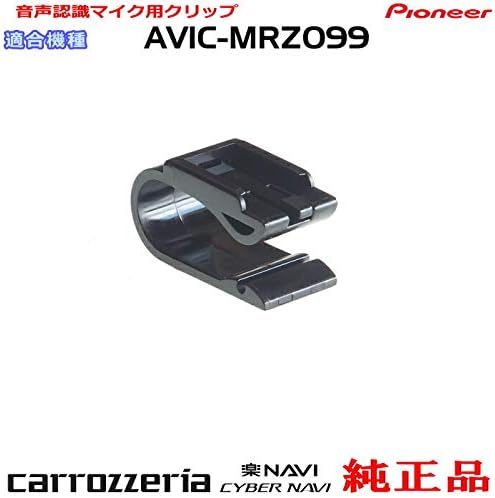
Figure 2: The microphone clip, indicating compatibility with AVIC-MRZ099.
3. Operating Instructions
Once the microphone and clip are installed, you can utilize the voice recognition and hands-free functions of your Pioneer Carrozzeria AVIC-MRZ099 car navigation system.
- Voice Control Activation: Refer to your AVIC-MRZ099 car navigation system's main instruction manual for specific details on how to activate voice control. This usually involves pressing a dedicated button on the unit or steering wheel.
- Hands-Free Calling: When a compatible Bluetooth phone is paired with your AVIC-MRZ099, the microphone will enable hands-free calling. Speak clearly towards the microphone for optimal communication.
- Optimal Speaking Distance: For best performance, speak naturally towards the microphone from a typical driving position. Avoid shouting or whispering.
4. Maintenance
To ensure the longevity and proper function of your microphone clip, follow these simple maintenance guidelines:
- Cleaning: Wipe the clip occasionally with a soft, dry cloth to remove dust and debris. Do not use harsh chemicals or abrasive cleaners.
- Inspection: Periodically check the clip for any signs of damage, such as cracks or weakened grip. If the clip is damaged, it may not securely hold the microphone.
- Storage: If removing the clip for an extended period, store it in a cool, dry place away from direct sunlight.
Note: The product description mentions that used microphone bodies often have damaged plastic. When handling, exercise care to prevent damage to the clip or the microphone it holds.
5. Troubleshooting
If you encounter issues with your microphone clip, consider the following:
- Microphone Not Secure:
- Ensure the microphone is fully inserted into the clip.
- Check the clip for any visible damage or deformation that might prevent a secure grip.
- Clip Not Holding Position:
- Verify that the surface you are attaching the clip to is suitable and provides enough friction.
- Avoid attaching to excessively thick or thin surfaces that exceed the clip's design limits.
- Inspect the clip for any wear or damage to its gripping mechanism.
- Voice Recognition Issues:
- Ensure the microphone is correctly connected to your AVIC-MRZ099 unit.
- Check the microphone itself for damage.
- Refer to your AVIC-MRZ099 car navigation system's manual for troubleshooting voice recognition functions.
6. Specifications
| Attribute | Detail |
|---|---|
| Brand | Pioneer |
| Model Number | CM9p-CZN7192-AVIC-MRZ099 |
| Compatible Models | Pioneer Carrozzeria AVIC-MRZ099 (and other compatible models as specified by Pioneer) |
| Included Components | Clip (Microphone not included) |
| ASIN | B07SM94LMV |
| First Available Date | June 4, 2019 |

Figure 3: The microphone clip, showing the C-M9P identifier.
7. Warranty and Support
This microphone clip is a genuine Pioneer product. For specific warranty information, please refer to the documentation included with your original Pioneer Carrozzeria AVIC-MRZ099 system or contact Pioneer customer support directly.
For technical assistance or inquiries regarding this product, please visit the official Pioneer website or contact their customer service department. Ensure you have your product model number (AVIC-MRZ099) and the clip's manufacturer reference (CM9p-CZN7192) available when seeking support.
Pioneer Official Website: www.pioneer.jp (Please note: This link is for general Pioneer support and may not lead directly to product-specific support for this accessory.)