
1. Introduction
This manual provides essential information for the installation, operation, and maintenance of your Sonew Fingerprint Access Control System. Please read this manual thoroughly before installation and use to ensure proper functionality and security.

Image 1.1: Front view of the Sonew Fingerprint Access Control System, showcasing the keypad and fingerprint scanner.
2. Package Contents
Verify that all items listed below are included in your package:
- 1 x Sonew Door Access Control Unit
- 1 x Set of Mounting Accessories (screws, wall plugs, wrench)
- 1 x User Manual (this document)

Image 2.1: The Sonew Access Control Unit displayed alongside its mounting accessories and a remote control (if applicable).
3. Product Features
- Durable Construction: Made from zinc alloy material, providing a sturdy, anti-prying, and shock-proof design.
- Advanced Fingerprint Recognition: Utilizes international fingerprint technology for 0.2-second fast recognition.
- High User Capacity: Supports up to 3000 users (1000 fingerprints + 2000 PINs).
- Sensitive Semiconductor Sensor: High sensitivity sensor capable of identifying dry, shallow, or slightly damaged fingerprints.
- Weather Resistance: IP66 rated for dust and water resistance, suitable for outdoor use.
- Versatile Application: Suitable for offices, factories, residential areas, and various business environments for access control and time tracking.
- Wiegand Output: Features Wiegand 26-bit output, allowing it to function as a slave fingerprint reader for third-party controllers.

Image 3.1: Illustrative image depicting the security features and biometric access control capabilities of the system.
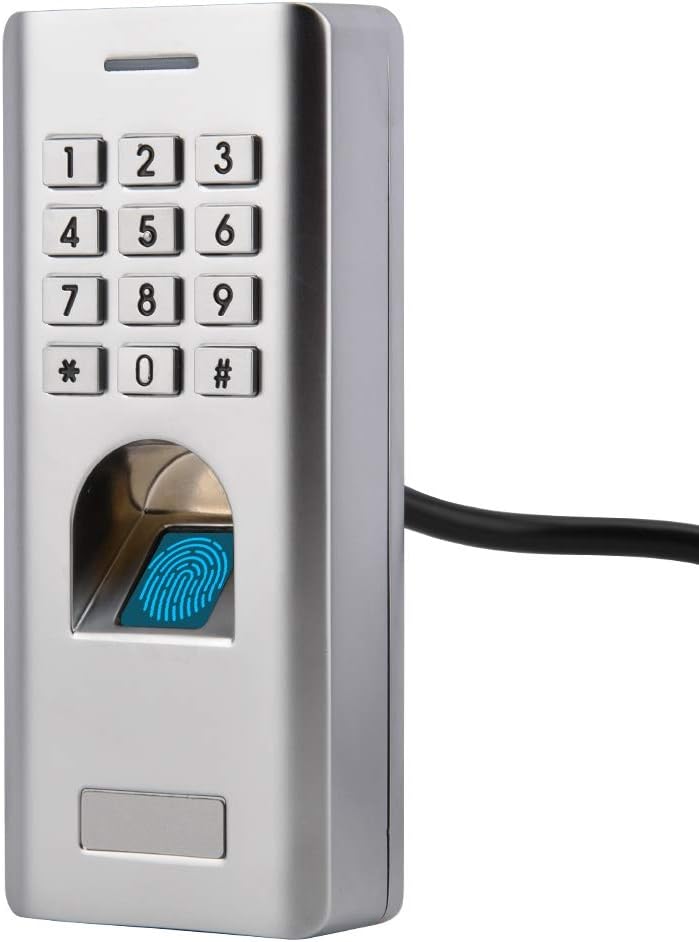
Image 3.2: The access control unit shown in an outdoor environment, highlighting its IP66 waterproof rating.
4. Specifications
| Feature | Detail |
|---|---|
| User Capacity | 3000 (1000 Fingerprint + 2000 PIN) |
| PIN Length | 4~6 digits |
| Operating Voltage | 12V DC |
| Idle Current | ≤45mA |
| Active Current | ≤150mA |
| Fingerprint Reader | Optical Fingerprint Module |
| Resolution | 500DPI |
| Identification Time | <1 Second |
| False Acceptance Rate (FAR) | <0.001% |
| False Rejection Rate (FRR) | <0.01% |
| Wiring Connections | Relay output, exit button, alarm, door sensor, Wiegand output |
| Relay Output | One (NO, NC, Common) |
| Adjustable Relay Output Time | 0~99 Seconds (Default: 5 seconds) |
| Adjustable Alarm Output Time | 0~3 Minutes (Default: 1 minute) |
| Lock Output Load | 2 Amp Maximum |
| Alarm Output Load | 5 Amp Maximum |
| Wiegand Interface | Wiegand 26 bits output |
| Ingress Protection (IP) Rating | IP66 |
| Operating Temperature | -30°C~60°C / -22°F~140°F |
| Operating Humidity | 20%RH~90%RH |
| Material | Zinc Alloy |
| Finish | Powder Coat |
| Dimensions (L x W x H) | 3.94 x 3.94 x 3.94 inches |
| Item Weight | 1.23 pounds (0.56 Kilograms) |
5. Installation and Setup
Proper installation is crucial for the security and functionality of your access control system. It is recommended that installation be performed by a qualified technician.
- Mounting Location: Choose a suitable, secure location for the access control unit, typically near the door it will control. Ensure the surface is flat and stable.
- Wiring: Connect the unit to your power supply (12V DC), electric lock, exit button, door sensor, and alarm system according to the wiring diagram provided in the full product documentation. Pay close attention to polarity and connection types (NO/NC).
- Secure Mounting: Use the provided mounting accessories to securely attach the unit to the wall or door frame.
- Power On: Once all connections are secure, apply power to the unit. The system should initiate with an audible signal or indicator light.
- Initial Programming: Refer to the detailed programming guide (usually included with the product) to set up the master administrator fingerprint/PIN and begin adding user credentials.

Image 5.1: Rear view of the access control unit, illustrating the wiring connections for power, lock, and other peripherals.

Image 5.2: The access control unit securely mounted on a wall, ready for operation.
6. Operation
The Sonew Fingerprint Access Control System offers multiple methods for secure entry.
6.1. Adding Users (Administrator Mode)
To add new users, you must first enter administrator mode. This typically involves entering a master PIN or scanning a registered administrator fingerprint. Follow the on-screen prompts or refer to the full programming guide for specific steps to enroll new fingerprints or PINs.
6.2. Fingerprint Unlock
- Place a registered finger flat on the fingerprint scanner.
- Hold your finger steady until the system confirms recognition (e.g., a green light or audible beep).
- The door will unlock for the programmed duration.
6.3. PIN Unlock
- Enter your registered 4-6 digit PIN on the keypad.
- Press the '#' key to confirm.
- The door will unlock for the programmed duration.

Image 6.1: A user interacting with the fingerprint scanner for access, demonstrating the ease of use.
7. Maintenance
Regular maintenance ensures the longevity and reliable performance of your access control system.
- Cleaning: Gently wipe the fingerprint scanner and keypad with a soft, dry, lint-free cloth. Avoid abrasive cleaners or solvents.
- Connection Check: Periodically inspect all wiring connections to ensure they are secure and free from corrosion or damage.
- Software Updates: If applicable, check the manufacturer's website for any firmware or software updates that may improve performance or security.
- Environmental Protection: While the unit is IP66 rated, avoid prolonged exposure to extreme weather conditions or direct water jets to maximize lifespan.
8. Troubleshooting
If you encounter issues with your Sonew Fingerprint Access Control System, refer to the following common problems and solutions:
- System Not Powering On:
- Check the 12V DC power supply connection.
- Verify the power source is active.
- Fingerprint Not Recognized:
- Ensure your finger is clean and dry.
- Place your entire finger pad flat on the scanner.
- Try re-enrolling your fingerprint if the issue persists.
- Ensure you are using a registered fingerprint.
- PIN Not Working:
- Verify the PIN entered is correct and registered.
- Ensure you press '#' after entering the PIN.
- Door Not Unlocking:
- Check the connection between the access control unit and the electric lock.
- Ensure the lock itself is functioning correctly.
- Verify the relay output time setting.
- System Beeps Continuously:
- This may indicate an alarm condition or a wiring fault. Consult the full manual for specific alarm codes or check door sensor connections.
For issues not covered here, please consult the comprehensive user manual provided with your product or contact Sonew customer support.
9. Warranty and Support
Warranty information for your Sonew Fingerprint Access Control System is typically included with the product packaging or available on the official Sonew website. Please retain your proof of purchase for warranty claims.
For further assistance, technical support, or to inquire about replacement parts, please visit the official Sonew store or contact their customer service department:
Sonew Store: https://www.amazon.com/stores/Sonew/page/331933A2-EC71-47F9-8BF4-25DD5775CEBD