
Introduction
The HUATO S220-T8 is an advanced 8-channel thermocouple data logger and thermometer designed for precise temperature measurement across a wide range. It supports eight types of thermocouple sensors (K, J, E, T, N, S, R, B), enabling measurements from -200 to 1800°C. This device is suitable for various applications requiring accurate temperature monitoring and data logging.
Product Overview
Key Features
- 8-Channel Data Logger with a large LCD display for temperature readings.
- Supports Thermocouple Types K, J, E, T, N, S, R, B with a measuring range from -200 to 1800°C.
- Features input isolation protection between each channel, ensuring high accuracy.
- Capable of recording up to 86,000 data points per channel.
- Includes real-time monitoring functionality.
- Plug-and-play operation with easy-to-use LogPro software.
Package Contents
- HUATO S220-T8 Data Logger Unit
- 9V Battery
- AC Adaptor
- USB Cable
- NIST Traceable Certificate (3 Points)
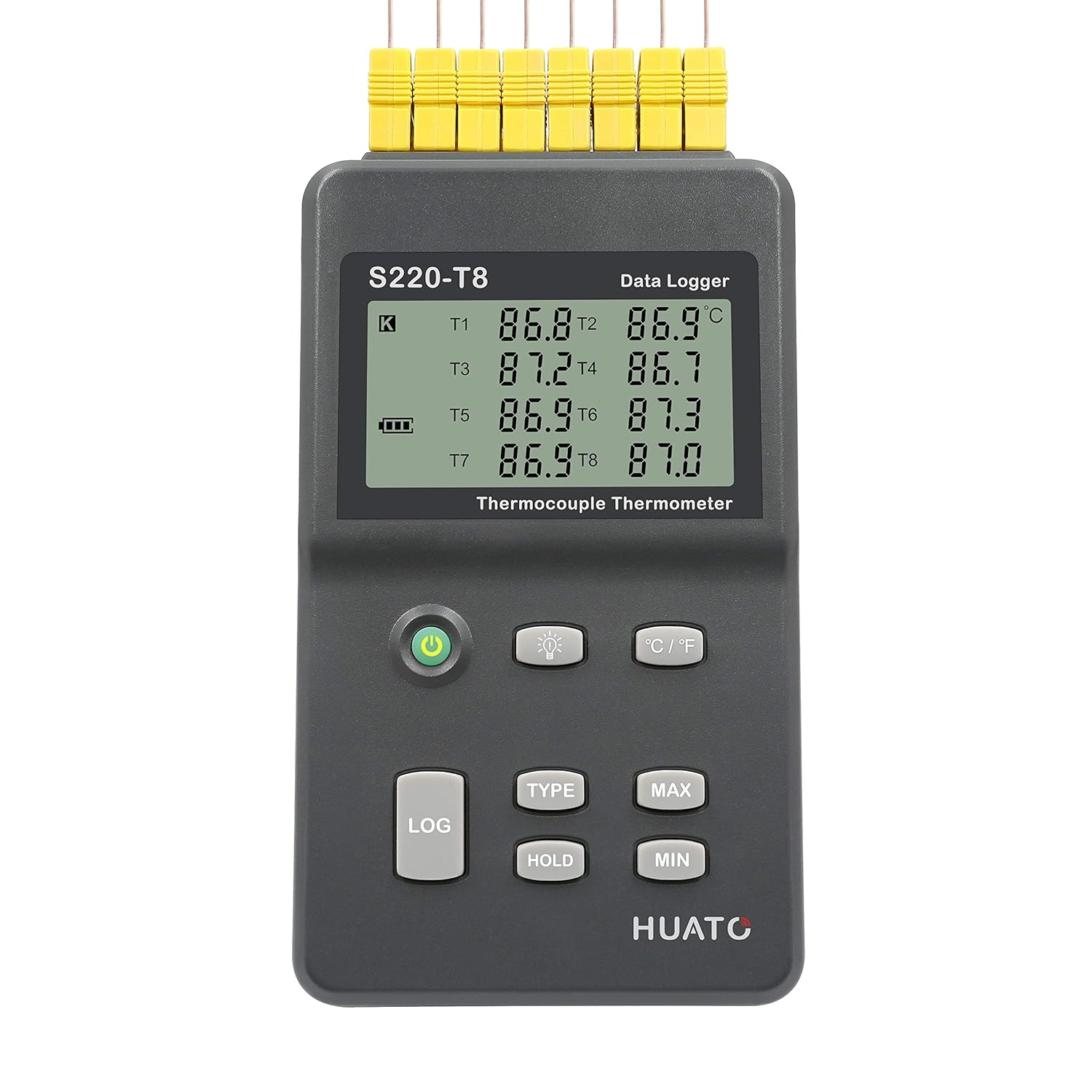
Figure 1: Front view of the HUATO S220-T8 Data Logger with connected thermocouple probes, showing the digital display.

Figure 2: Contents of the HUATO S220-T8 package, including the data logger, AC adapter, 9V battery, and calibration certificate.

Figure 3: Side view of the data logger, illustrating the integrated kickstand for desktop use.

Figure 4: Top view of the data logger, highlighting the eight clearly labeled thermocouple input ports.
Setup
- Power Supply: Insert the included 9V battery into the battery compartment located on the back of the unit. Alternatively, connect the provided AC adapter to the DC input port on the side of the device and plug it into a standard power outlet.
- Thermocouple Connection: Connect your thermocouple probes to the input ports labeled T1 through T8 on the top of the data logger. Ensure the polarity is correct (positive to '+' and negative to '-'). The device supports K, J, E, T, N, S, R, B type thermocouples.
- Software Installation: Download the LogPro software from the Zeolite International download page. Follow the on-screen instructions to install the software on your computer. This software is required for data logging, real-time monitoring, and configuration.
- USB Connection: Connect the data logger to your computer using the provided USB cable. This connection is necessary for software communication, data transfer, and real-time monitoring.


Figure 5: The 9V battery and USB cable included for device setup and operation.
Operating Instructions
Basic Operation
- Power On/Off: Press the Power button (green circle icon) to turn the device on or off.
- Display Backlight: Press the Light Bulb button to toggle the display backlight on or off for improved visibility in low-light conditions.
- Unit Conversion: Press the °C/°F button to switch between Celsius and Fahrenheit temperature units.
- Thermocouple Type Selection: Press the TYPE button to cycle through the supported thermocouple types (K, J, E, T, N, S, R, B) for the active channel. Ensure the selected type matches your connected probe for accurate readings.
- Hold Function: Press the HOLD button to freeze the current temperature readings on the display. Press again to resume live readings.
- Max/Min Readings: Press the MAX button to display the maximum recorded temperature for each channel. Press the MIN button to display the minimum recorded temperature.
Data Logging
- Initiate Logging: Press the LOG button to start data recording. The device will log data points at the interval configured via the LogPro software.
- Stop Logging: Press the LOG button again to stop data recording.
- Data Transfer: Connect the device to your computer via USB and use the LogPro software to download recorded data. The software allows for viewing, analyzing, and exporting data.
Real-time Monitoring
For real-time temperature monitoring, connect the S220-T8 to your computer using the USB cable and open the LogPro software. The software will display live temperature readings from all connected channels, allowing for immediate observation and analysis.
Maintenance
- Cleaning: Wipe the device with a soft, dry cloth. Do not use abrasive cleaners or solvents.
- Battery Replacement: When the battery indicator on the display shows low power, replace the 9V battery. Ensure the device is powered off before replacing the battery.
- Storage: Store the data logger in a cool, dry place away from direct sunlight and extreme temperatures when not in use.
- Calibration: Regular calibration is recommended to maintain measurement accuracy. Refer to the NIST traceable certificate for calibration details.
Troubleshooting
- Device Not Powering On:
- Check if the 9V battery is correctly inserted and has sufficient charge.
- Ensure the AC adapter is properly connected to the device and a working power outlet.
- Incorrect Temperature Readings:
- Verify that the correct thermocouple type is selected on the device (using the TYPE button) matching the connected probe.
- Check thermocouple connections for proper polarity and secure fit.
- Ensure the thermocouple probes are within their specified temperature range.
- Consider if the thermocouple itself is damaged or requires replacement.
- Software Not Recognizing Device:
- Ensure the USB cable is securely connected to both the device and the computer.
- Verify that the LogPro software is correctly installed. Reinstallation may be necessary.
- Check your computer's device manager for any driver issues related to the USB connection.
- Data Logging Issues:
- Confirm that logging was initiated by pressing the LOG button.
- Check the available memory on the device using the LogPro software.
- Ensure the logging interval is set appropriately in the software.
Specifications
| Feature | Detail |
|---|---|
| Model Number | S220-T8 |
| Channels | 8 |
| Supported Thermocouple Types | K, J, E, T, N, S, R, B |
| Measuring Range | -200 to 1800°C (sensor type dependent) |
| Data Points Per Channel | Up to 86,000 |
| Display Type | Digital LCD |
| Connectivity | USB |
| Power Source | 1 x 9V Battery (included), AC Adaptor (included) |
| Product Dimensions | 6.4 x 3.7 x 1.4 inches |
| Weight | 10.23 ounces |
| Outer Material | Plastic |
| Special Features | High Accuracy, Large Display, 8 Channel, Input Isolation Protection |
| Certification | NIST Traceable Certificate (3 Points) |
Warranty and Support
For warranty information, technical support, or service inquiries, please contact Zeolite International, the seller of this product. Refer to your purchase documentation for specific warranty terms and contact details. The LogPro software can be downloaded from the official Zeolite International download page.
Note: The product comes with a 3-point NIST traceable certificate, ensuring calibration accuracy at the time of purchase.


