
Introduction
This manual provides essential instructions for setting up, operating, and maintaining your AULCMEET replacement remote control. This remote is designed to function as a direct replacement for the original remote controls of various Philips TV models, requiring no programming.
Compatible Models
This replacement remote control is compatible with the following Philips TV models:
- Philips 24PFL3603
- Philips 24PFL3603/F7
- Philips 65PFL5922/F7
- Philips RR24PFL3603/F7
Setup
Installing Batteries
- Locate the battery compartment on the back of the remote control.
- Slide the battery compartment cover downwards or outwards to open it.
- Insert two (2) AAA alkaline batteries, ensuring the positive (+) and negative (-) terminals align correctly with the markings inside the compartment.
- Replace the battery compartment cover by sliding it back into place until it clicks securely.
The remote control is now ready for use with your compatible Philips TV. No programming is required.
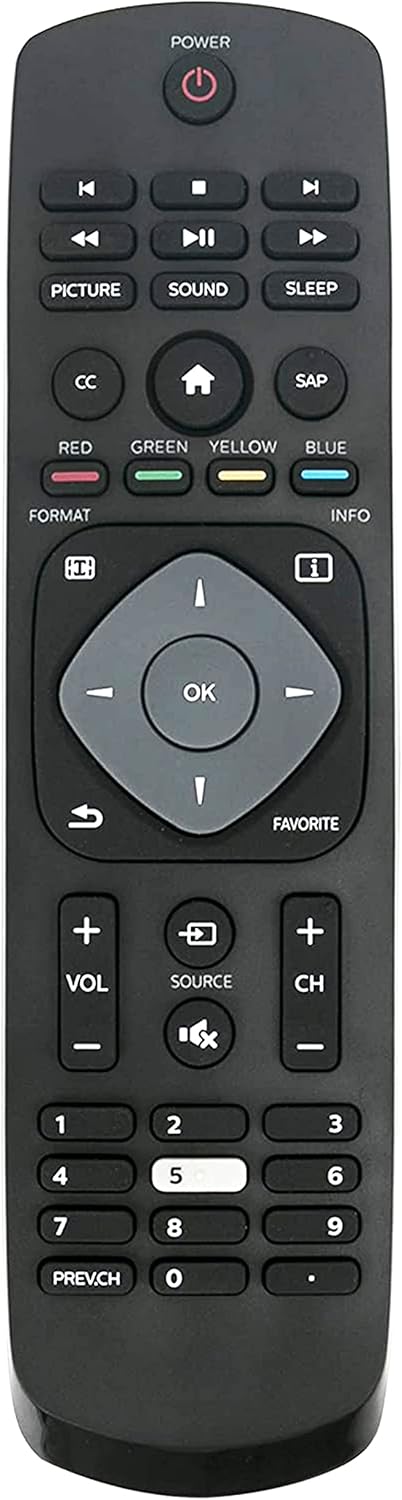
Operating Instructions
The AULCMEET replacement remote control is designed for intuitive operation, mirroring the functions of your original Philips TV remote. Simply point the remote at your television and press the desired button.
Key Functions Overview
- POWER: Turns the TV on or off.
- PLAY/PAUSE, SKIP: Controls media playback (if supported by TV).
- PICTURE, SOUND, SLEEP: Accesses picture settings, sound modes, or sets a sleep timer.
- CC (Closed Caption), HOME, SAP (Secondary Audio Program): Accesses closed captions, the TV's home menu, or secondary audio.
- RED, GREEN, YELLOW, BLUE: Color-coded function buttons, typically used for interactive TV features or menu navigation.
- FORMAT, INFO: Adjusts screen format or displays program information.
- Navigation Pad (Up, Down, Left, Right, OK): Navigates through menus and confirms selections.
- BACK, FAVORITE: Returns to the previous screen or accesses favorite channels.
- VOL (+/-): Increases or decreases the volume.
- SOURCE: Selects input sources (HDMI, AV, etc.).
- MUTE: Mutes or unmutes the TV sound.
- CH (+/-): Changes channels up or down.
- Number Pad (0-9): Directly enters channel numbers.
- PREV.CH: Returns to the previously viewed channel.
Maintenance
- Cleaning: Use a soft, dry cloth to clean the remote control. Avoid using liquid cleaners or abrasive materials.
- Battery Replacement: Replace batteries when the remote's response becomes sluggish or stops working. Always replace both batteries at the same time with new AAA alkaline batteries.
- Storage: If the remote will not be used for an extended period, remove the batteries to prevent leakage and potential damage.
Troubleshooting
- Remote not responding: Ensure batteries are inserted correctly with the correct polarity. Replace old batteries with new ones.
- Remote's range is limited: Check for obstructions between the remote and the TV's infrared sensor. Ensure the remote's batteries are not low.
- Specific buttons not working: This may indicate a dirty contact or a faulty button. Try cleaning the remote as described in the Maintenance section. If the issue persists, consider replacing the remote.
- TV not responding to any remote: Ensure the TV itself is powered on and functioning correctly. Try using the TV's physical buttons to confirm it is not a TV-specific issue.
Specifications
| Feature | Detail |
|---|---|
| Brand | AULCMEET |
| Model Number | 341920000321004 |
| Compatible Devices | Philips Televisions |
| Power Source | 2 x AAA Alkaline Batteries (not included) |
| Product Dimensions | 7.5 x 2 x 0.5 inches (19.05 x 5.08 x 1.27 cm) |
| Item Weight | 2.46 ounces (70 grams) |
| Color | Black |
| Special Feature | Ergonomic design |

Warranty Information
Please refer to the product packaging or the seller's website for specific warranty details. Typically, replacement remote controls come with a limited warranty covering manufacturing defects.
Support
For further assistance or inquiries regarding your AULCMEET replacement remote control, please contact the seller or manufacturer directly through their official support channels. Provide your product model number (341920000321004) and purchase details for efficient service.