
Bosch GDR18V-1400B12
BOSCH GDR18V-1400B12 18V 1/4 In. Hex Impact Driver Kit User Manual
Model: GDR18V-1400B12 | Brand: Bosch
1. Introduction
This user manual provides essential information for the safe and effective operation, maintenance, and troubleshooting of your BOSCH GDR18V-1400B12 18V 1/4 In. Hex Impact Driver Kit. Please read this manual thoroughly before using the tool and retain it for future reference.
The BOSCH GDR18V-1400B12 18V 1/4 in. hex impact driver kit is designed for professional-grade fastening and drilling applications. It features a compact design and delivers up to 1,400 in.-lbs. of max torque, with 0-3,600 no-load impacts per minute and 0-2,800 RPM. The tool incorporates the BOSCH hammer-and-anvil system, which concentrates torque to the tool rather than the user, enhancing control and reducing fatigue. Its well-balanced, compact Impactor design has a head length of just 5.9 in. and a weight of only 2.3 lbs. (tool only, not including battery), complemented by a soft slim-grip handle. The quick-change 1/4 in. hex drive chuck includes a Power Groove for enhanced bit grip. The kit comes complete with one 18V 2.0 Ah SlimPack battery and an 18V charger.
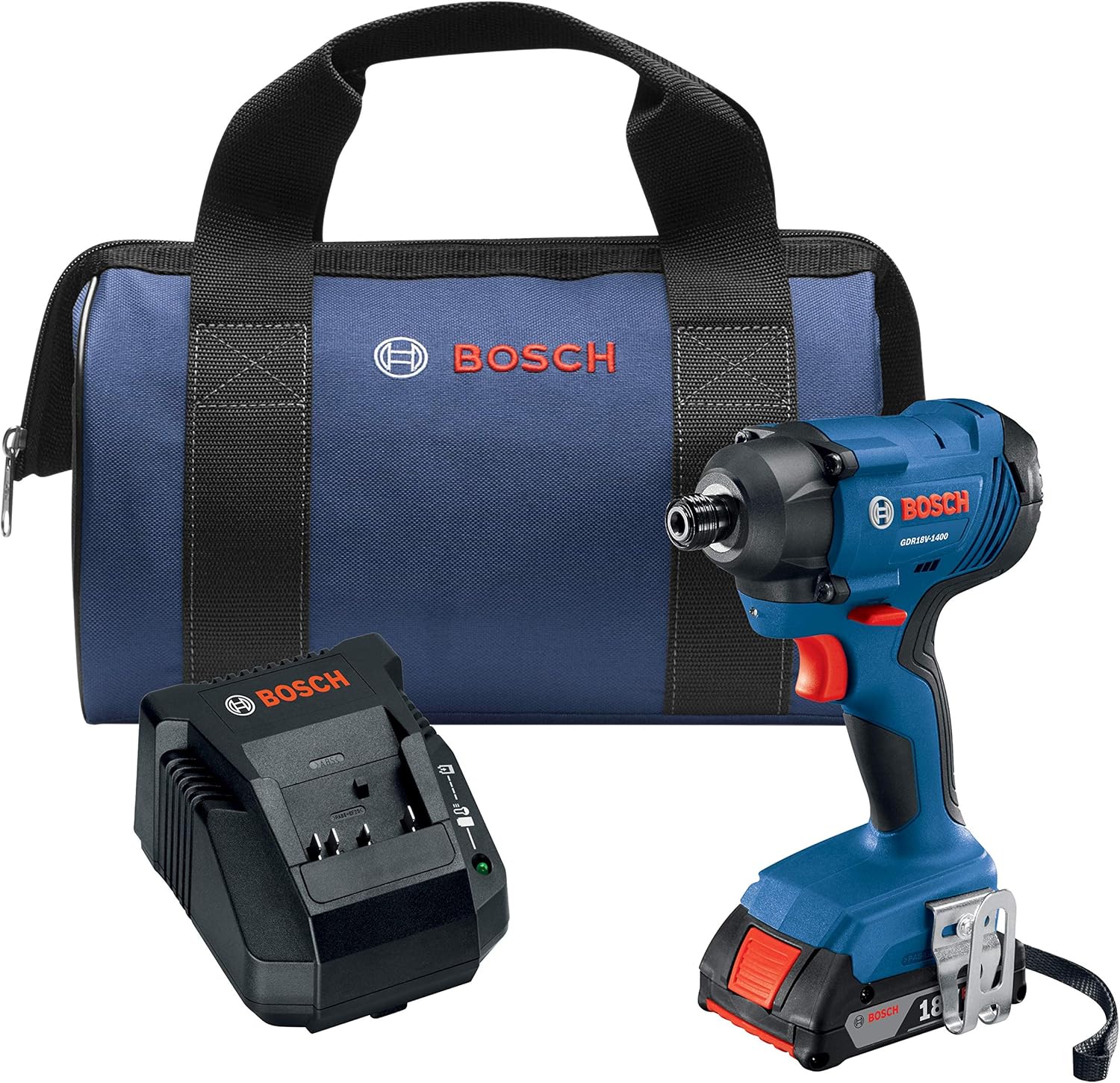
Figure 1.1: BOSCH GDR18V-1400B12 18V 1/4 In. Hex Impact Driver Kit including the impact driver, 18V 2.0 Ah battery, 18V charger, and a carrying bag.
2. General Safety Information
Always observe the following safety precautions when operating any power tool. Failure to do so may result in serious personal injury or property damage.
2.1 Work Area Safety
- Keep work area clean and well lit. Cluttered or dark areas invite accidents.
- Do not operate power tools in explosive atmospheres, such as in the presence of flammable liquids, gases or dust. Power tools create sparks which may ignite the dust or fumes.
- Keep children and bystanders away while operating a power tool. Distractions can cause you to lose control.
2.2 Electrical Safety
- Power tool plugs must match the outlet. Never modify the plug in any way.
- Avoid body contact with earthed or grounded surfaces, such as pipes, radiators, ranges and refrigerators. There is an increased risk of electric shock if your body is earthed or grounded.
- Do not expose power tools to rain or wet conditions. Water entering a power tool will increase the risk of electric shock.
2.3 Personal Safety
- Stay alert, watch what you are doing and use common sense when operating a power tool.
- Use personal protective equipment. Always wear eye protection. Protective equipment such as dust mask, non-skid safety shoes, hard hat, or hearing protection used for appropriate conditions will reduce personal injuries.
- Prevent unintentional starting. Ensure the switch is in the off-position before connecting to battery pack, picking up or carrying the tool.
3. Package Contents
Verify that all items listed below are present and in good condition upon opening the package. If any items are missing or damaged, please contact Bosch customer service.
- (1) GDR18V-1400 18V 1/4 In. Hex Impact Driver
- (1) 18V Lithium-Ion 2.0 Ah SlimPack Battery
- (1) 18V Charger
- (2) Insert Bits
- (1) Carrying Bag
4. Setup
4.1 Charging the Battery
Before first use, fully charge the 18V Lithium-Ion 2.0 Ah SlimPack Battery using the provided 18V charger. Connect the charger to a standard power outlet and insert the battery. The charger's indicator lights will show the charging status. Refer to the charger's specific manual for detailed charging instructions and indicator meanings.
4.2 Attaching and Removing the Battery
To attach the battery, align the battery with the base of the impact driver and slide it in until it clicks securely into place. To remove the battery, press the release tabs on the sides of the battery pack and slide the battery out.
4.3 Inserting and Removing Bits
The GDR18V-1400 features a quick-change 1/4 in. hex drive chuck. To insert a bit, pull the chuck collar forward, insert the 1/4 in. hex shank bit fully into the chuck, and then release the collar. The bit will lock into place. To remove a bit, pull the chuck collar forward and pull the bit out.

Figure 4.1: Key features of the BOSCH GDR18V-1400 impact driver, highlighting the 1/4" Hex Drive for quick bit changes.
5. Operating Instructions
5.1 Powering On/Off and Variable Speed Trigger
To power on the impact driver, press the variable speed trigger. The tool's speed is controlled by how far the trigger is depressed; pressing it further increases the speed. Release the trigger to turn the tool off.
5.2 Forward/Reverse Rotation
The direction of rotation is controlled by the forward/reverse switch located above the trigger. Push the switch to the left for forward rotation (for driving fasteners) and to the right for reverse rotation (for removing fasteners). Ensure the switch is in the center position for trigger lock when not in use.
5.3 LED Work Light
The integrated LED light illuminates the work area when the trigger is pressed, improving visibility in low-light conditions.
5.4 Hammer-and-Anvil System
The BOSCH GDR18V-1400 utilizes a hammer-and-anvil system that delivers powerful impacts for driving screws and fasteners. This system concentrates torque to the tool, reducing kickback and strain on the user. Allow the tool to do the work, applying steady pressure without excessive force.

Figure 5.1: Driving a screw into wood using the impact driver.

Figure 5.2: Fastening a metal bracket to a wooden stud.

Figure 5.3: Driving a screw into a metal stud.
6. Maintenance
Regular maintenance ensures the longevity and optimal performance of your impact driver.
6.1 Cleaning
- Always disconnect the battery pack before performing any cleaning or maintenance.
- Use a clean, damp cloth to wipe down the exterior of the tool. Do not use harsh chemicals or abrasive cleaners.
- Keep the ventilation openings clear of dust and debris to prevent overheating. Use compressed air if necessary.
- Clean the chuck regularly to ensure smooth bit insertion and removal.
6.2 Storage
- Store the tool, battery, and charger in a cool, dry place, away from direct sunlight and moisture.
- Store the battery pack partially charged (around 50%) if storing for extended periods to maximize battery life.
- Keep out of reach of children.
7. Troubleshooting
| Problem | Possible Cause | Solution |
|---|---|---|
| Tool does not start | Battery not charged or not properly inserted; Trigger lock engaged | Ensure battery is fully charged and securely inserted. Disengage the forward/reverse switch from the center (locked) position. |
| Reduced power or speed | Low battery charge; Overload protection activated | Recharge the battery. Reduce the load on the tool; allow it to cool down if it has been used continuously under heavy load. |
| Bit not holding securely | Chuck collar not fully released; Debris in chuck | Ensure the chuck collar is fully released after inserting the bit. Clean any debris from the chuck mechanism. |
If the problem persists after attempting these solutions, please contact Bosch customer service for further assistance.
8. Specifications
| Feature | Specification |
|---|---|
| Brand | Bosch |
| Model Number | GDR18V-1400B12 |
| Power Source | Battery Powered |
| Voltage | 18 Volts |
| Amperage | 2 Amps |
| Maximum Rotational Speed | 2800 RPM |
| Maximum Torque | 1400 Inch Pounds |
| Chuck Size | 1/4 In. Hex |
| Item Weight (Tool Only) | 2.3 Pounds |
| Product Dimensions | 5.9"L x 3"W x 9.2"H |
| Battery Type | Lithium Ion |
| Special Feature | Variable Speed |
9. Warranty and Support
Bosch power tools are manufactured to the highest quality standards. For specific warranty details, including coverage period and terms, please refer to the warranty card included with your product or visit the official Bosch website. Keep your purchase receipt as proof of purchase for warranty claims.
9.1 Customer Service
For technical assistance, spare parts, or repair services, please contact Bosch customer support. Contact information can typically be found on the Bosch website or on the product packaging.
You can visit the official Bosch store for more information and products: Bosch Store on Amazon