
1. Introduction
Thank you for purchasing the ENUOTEK EN-M008-32 Remote Control Dimmable LED Wall Spot Lamp. This product is designed to provide versatile and adjustable lighting for various indoor spaces, such as bedrooms, living rooms, and study areas. Please read this manual carefully before installation and use to ensure proper operation and safety.
2. Product Features
- Creative Plug-in Design: Combines an LED lamp with a European socket plug, compatible with standard Type-C, Type-E, and Type-F sockets.
- Flexible Gooseneck: A 35cm flexible gooseneck allows easy adjustment of the lighting direction and area.
- Remote Control: Includes a radio frequency (RF) remote control with a range of up to 10 meters, capable of penetrating walls.
- Dimmable Functionality: Offers both stepless dimming and 4-level dimming (10%, 40%, 80%, 100% brightness) via the remote control.
- Touch Switch: The lamp body features a touch switch for basic ON/OFF control.
- Versatile Use: Ideal as a wall lamp, night light, or reading lamp in various rooms, and as a work light when plugged into a power outlet.

Figure 2.1: Remote Control and Manual Touch Control
3. Package Contents
- 1 x ENUOTEK LED Wall Spot Lamp
- 1 x Remote Control

Figure 3.1: Package Contents
4. Safety Instructions
- Ensure the power outlet voltage matches the lamp's specifications (230V).
- Do not disassemble or modify the lamp.
- Keep the lamp away from water and high humidity environments.
- This lamp is designed for indoor use only.
- Do not use with external timer sockets, as this may interfere with the lamp's functionality or remote control pairing.
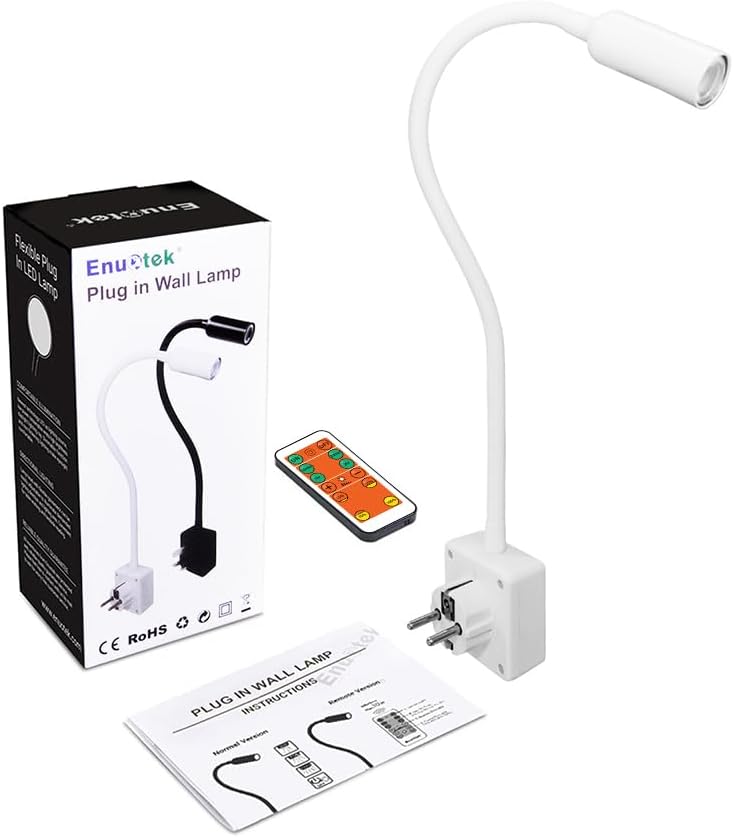
Figure 4.1: Timer Socket Warning
5. Setup
5.1 Plugging in the Lamp
- Identify a suitable European Type-C, Type-E, or Type-F power socket.
- Insert the lamp's plug firmly into the power socket.

Figure 5.1: Compatible Socket Types
5.2 Remote Control Pairing
To ensure the remote control functions correctly, it must be paired with the lamp. Follow these steps:
- Press and hold the 'OFF' button on the remote control. Do not release it.
- While holding the 'OFF' button, plug the lamp into a power socket.
- Wait approximately 10 seconds. The lamp will flash once to indicate successful pairing.
- Release the 'OFF' button. The remote control is now paired and ready for use.
Note: Each remote control has a unique code. It can be paired with only one lamp, or matched to two or more lamps simultaneously by repeating the process for each lamp while holding the 'OFF' button.

Figure 5.2: Remote Control Pairing Process
6. Operating Instructions
6.1 Manual Operation (Touch Switch)
The lamp features a touch-sensitive switch on its base for basic ON/OFF functionality. Simply touch the switch to turn the lamp on or off.
6.2 Remote Control Operation
The included remote control provides comprehensive control over the lamp's functions:
- ON/OFF: Press the ON or OFF buttons to turn the lamp on or off.
- Stepless Dimming: Use the + and - buttons to adjust brightness smoothly from minimum to maximum.
- 4-Level Dimming: Quickly select preset brightness levels: 10%, 40%, 80%, 100%.
- Auto Off Timer: Set the lamp to automatically turn off after a specified duration: 10 mins, 20 mins, 1 hr, 2 hrs.

Figure 6.1: Remote Control Functions

Figure 6.2: Dimmable Features Overview
6.3 Adjusting Color Temperature and Brightness (Video Demonstration)
Watch this video for a demonstration of how to adjust the color temperature and brightness of the lamp.
Video 6.1: This video demonstrates the installation, color temperature adjustment (5000K, 4000K, 3000K), and dimming capabilities (100% to 15%) of the ENUOTEK LED wall reading lamp.
7. Specifications
| Feature | Specification |
|---|---|
| Brand | ENUOTEK |
| Model Number | EN-M008-32 |
| Wattage | 3 watts |
| Luminous Flux | 280 Lumens |
| Color Temperature | 4000K (Neutral White) |
| Voltage | 230 Volts |
| Light Source Type | LED (COB LED) |
| Control Method | Remote Control, Touch Switch |
| Connectivity Technology | Radio Frequency (RF) |
| Material | Plastic |
| Product Dimensions (D x W x H) | 2.6D x 6W x 47.3H centimeters |
| Mounting Type | Wall Mount (Plug-in) |
| Energy Efficiency Class | G |

Figure 7.1: Product Dimensions
For detailed energy information, please refer to the EU EPREL database: https://eprel.ec.europa.eu/qr/808799
8. Maintenance
- Cleaning: Disconnect the lamp from the power outlet before cleaning. Use a soft, dry cloth to wipe the lamp body. Do not use abrasive cleaners or solvents.
- Bulb Replacement: The LED light source is integrated and not user-replaceable.
- Storage: If not in use for an extended period, store the lamp in a cool, dry place.
9. Troubleshooting
| Problem | Possible Cause | Solution |
|---|---|---|
| Lamp does not turn on. | No power, lamp not plugged in correctly, remote control battery low. | Check power outlet, ensure lamp is fully plugged in, replace remote control battery. |
| Remote control not working. | Not paired, battery low, interference. | Re-pair the remote control (see Section 5.2), replace battery, ensure no strong RF interference. |
| Lamp flashes or flickers. | Unstable power supply, incompatible timer socket. | Plug into a stable power source, avoid using with timer sockets. |
10. Warranty and Support
This ENUOTEK product comes with a 2-year availability period for spare parts within the EU, ensuring long-term support for your purchase. For any issues or inquiries not covered in this manual, please contact ENUOTEK customer support through your retailer or the official ENUOTEK website.
