
1. Introduction
Thank you for choosing the YHAAVALE 9200E Car Police Siren and PA System. This manual provides detailed instructions for the proper installation, operation, and maintenance of your device. Please read this manual thoroughly before installation and use to ensure safe and optimal performance.
2. Safety Information
WARNING: Improper installation or use can lead to electrical shock, fire, or damage to the product and vehicle. Always follow local regulations and laws regarding the use of emergency warning equipment.
- Ensure the vehicle's power is disconnected before beginning installation.
- All wiring should be performed by a qualified professional if you are unsure.
- Connect the system to a DC12V power source only.
- Mount the speaker and control box securely to prevent detachment during vehicle operation.
- Avoid exposing the control box to excessive moisture or extreme temperatures.
- The siren produces high-volume sounds. Prolonged exposure to high sound levels can cause hearing damage. Use hearing protection when testing or operating the siren in close proximity.
- Do not operate the siren in residential areas or where prohibited by law.
3. Package Contents
Verify that all items listed below are present in your package:
- 1x Siren Control Box
- 1x Round Cone Speaker
- 1x Wireless Remote Control
- 1x Remote Control Mounting Bracket
- 1x Power Cable with Fuse Holder
- 1x Speaker Cable
- Mounting Hardware (screws, nuts, washers)

Image 3.1: Overview of all included components.
4. Product Overview
The YHAAVALE 9200E system consists of a robust siren speaker, a central control box, and a convenient wireless remote control for various functions.

Image 4.1: The 100W round cone siren speaker.

Image 4.2: The control box and remote control unit.
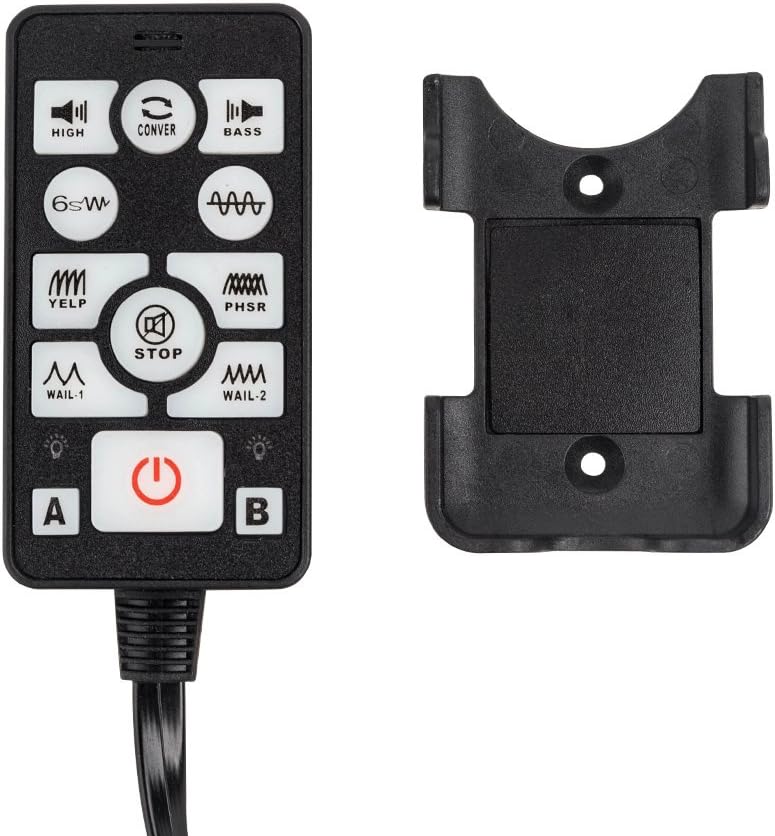
Image 4.3: The wireless remote control and its mounting bracket.
5. Setup and Installation
Careful installation is crucial for the performance and longevity of your siren system. Plan your mounting locations and wiring paths before starting.
5.1 Mounting the Speaker
- Choose a secure, unobstructed location for the speaker, typically in the engine bay or behind the grille, ensuring sound projection is clear.
- Use the provided mounting bracket and hardware to firmly attach the speaker. Ensure it is not near hot engine components or moving parts.
- Angle the speaker slightly downwards to prevent water accumulation.
5.2 Mounting the Control Box
- Select a dry, secure location inside the vehicle cabin, such as under the dashboard or seat, away from direct sunlight or excessive heat.
- Mount the control box using the provided screws or suitable fasteners. Ensure adequate ventilation around the unit.
5.3 Wiring Connections
The system requires a 12V DC power source. Refer to your vehicle's manual for safe access points.
- Power Connection: Connect the red wire from the control box to the vehicle's positive (+) 12V power source (preferably directly to the battery with an inline fuse, or a fused accessory circuit). Connect the black wire to a reliable chassis ground (-).
- Speaker Connection: Connect the speaker wires from the control box to the siren speaker. Ensure correct polarity if indicated, though most siren speakers are non-polarized.
- Remote Control Connection: Plug the remote control's RJ45 connector into the corresponding port on the control box.
- Microphone (PA) Connection: If a PA microphone is included or supported, connect it to the designated port on the control box.
- Testing: Once all connections are secure, reconnect the vehicle's power and perform a brief functional test.
6. Operating Instructions
The YHAAVALE 9200E system is operated via the wired remote control unit.
6.1 Remote Control Functions
Familiarize yourself with the buttons on the remote control:
- Power Button (⑁): Press to turn the siren system ON or OFF.
- STOP Button: Stops any active siren tone.
- HIGH: Activates a high-pitched siren tone.
- CONVER: Activates a conversion siren tone.
- BASS: Activates a bass-heavy siren tone.
- 6SW: Activates a 6-second sweep tone.
- YELP: Activates the Yelp siren tone.
- PHSR (Phaser): Activates the Phaser siren tone.
- WAIL-1: Activates the Wail-1 siren tone.
- WAIL-2: Activates the Wail-2 siren tone.
- Button A / Button B: These may be programmable or activate additional tones/functions depending on the specific unit. Refer to any supplementary documentation if provided.
6.2 PA System Operation
To use the Public Address (PA) function:
- Ensure the microphone is connected to the control box.
- Press the dedicated PA button (if available, often integrated with the microphone itself or a specific button on the remote).
- Speak clearly into the microphone. The sound will be amplified through the external speaker.
- Adjust volume as needed (if volume controls are present on the remote or control box).
7. Maintenance
The YHAAVALE 9200E system is designed for durability with minimal maintenance. However, periodic checks can ensure optimal performance.
- Cleaning: Wipe the control box and remote with a soft, dry cloth. Do not use harsh chemicals or abrasive cleaners.
- Cable Inspection: Periodically check all cables and connections for signs of wear, fraying, or corrosion. Ensure all connections remain secure.
- Mounting Security: Verify that the speaker and control box remain securely mounted and have not loosened over time due to vehicle vibrations.
- Fuse Check: If the system loses power, check the inline fuse on the power cable and replace it with a fuse of the same rating (e.g., 10A or 15A, as specified by the manufacturer) if blown.
8. Troubleshooting
If you encounter issues with your YHAAVALE 9200E system, refer to the table below for common problems and solutions.
| Problem | Possible Cause | Solution |
|---|---|---|
| No power to the system | Loose power connection, blown fuse, faulty wiring. | Check power and ground connections. Inspect and replace the inline fuse if necessary. Verify wiring integrity. |
| Siren tones not working | Speaker not connected, faulty speaker, remote control issue. | Ensure speaker cables are securely connected. Test with a known good speaker if possible. Check remote control connection. |
| PA system not working | Microphone not connected, faulty microphone, incorrect PA button pressed. | Verify microphone connection. Ensure the correct PA activation button is used. |
| Distorted sound | Loose speaker connection, damaged speaker, power fluctuation. | Check speaker wiring. Inspect speaker for physical damage. Ensure stable 12V power supply. |
If the problem persists after attempting these solutions, please contact customer support.
9. Specifications
| Feature | Detail |
|---|---|
| Brand | YHAAVALE |
| Model Number | YHUS-9200EB027 |
| ASIN | B07SHKKWY2 |
| UPC | 711102645630 |
| Power Output | 100W |
| Voltage | DC12V |
| Sound Level | 132 dB |
| Number of Channels | 2 |
| Item Weight | 4.29 Kilograms |
| Compatible Devices | Passenger Car |
| Control Type | Wired Remote Control |
| Speaker Type | Metal Black Round Cone Speaker |
10. Warranty and Support
YHAAVALE products are manufactured to high-quality standards. This product comes with a standard manufacturer's warranty against defects in materials and workmanship under normal use. Please retain your proof of purchase for warranty claims.
For technical support, warranty inquiries, or replacement parts, please contact your retailer or visit the official YHAAVALE website for contact information.
Please note that the warranty does not cover damage caused by improper installation, misuse, unauthorized modifications, or acts of nature.