
NEXPOW 150W
NEXPOW Portable Inverter Generator User Manual
Model: 150W
1. Introduction
Thank you for choosing the NEXPOW Portable Inverter Generator. This compact and lightweight power station is designed to provide reliable power for various applications, including home backup, camping, and outdoor activities. It features multiple output ports, including AC, DC, and USB, along with an integrated flashlight for convenience. Please read this manual thoroughly before operation to ensure safe and efficient use of your device.
2. Safety Information
Always observe the following safety precautions to prevent injury or damage to the unit:
- Do not disassemble, repair, or modify the unit. Incorrect reassembly may cause fire or electric shock.
- Keep the unit away from heat sources, direct sunlight, humidity, and water.
- Use only the provided charger and cables.
- Do not operate the unit if it has been damaged or dropped.
- Ensure proper ventilation during use to prevent overheating.
- Keep out of reach of children.
- Do not insert foreign objects into the ports.
- Avoid short-circuiting the output terminals.
3. Package Contents
Verify that all items are present in your package:
- NEXPOW Portable Inverter Generator
- AC Wall Charger
- Car Charger Cable
- User Manual

Image: The NEXPOW Portable Inverter Generator shown with its included accessories, including the AC wall charger, car charger cable, and user manual.
4. Product Overview
Familiarize yourself with the various components and ports of your power station:
Image: Front view of the NEXPOW Portable Inverter Generator, highlighting the power button, digital display, AC output, DC 12V outputs, USB-1, USB-PD, and USB-2 ports, and the integrated flashlight.
- Power Button: Used to turn the unit on/off and switch between output modes.
- Digital Display: Shows battery percentage and active output indicators.
- AC Output: Standard 110V AC outlet for household appliances.
- DC 12V Output: Two DC 12V ports for compatible devices.
- USB Ports: Includes USB-1, USB-PD (Power Delivery), and USB-2 for charging various mobile devices.
- DC 12V Input: For charging the power station via AC wall charger or car charger.
- Integrated Flashlight: Provides illumination for convenience.
5. Setup and Charging
Before first use, fully charge your NEXPOW Portable Inverter Generator.
5.1 Charging the Power Station
The unit can be charged using the included AC wall charger, car charger, or a compatible solar panel (sold separately).
- Connect the charging cable to the DC 12V Input port on the power station.
- Connect the other end of the charger to a power source (wall outlet, car charger, or solar panel).
- The digital display will show the charging progress. The unit is fully charged when the display reads 100%.
- Charging time with the AC wall charger is approximately 5-6 hours.
Note: If the display reads 100% but the battery has self-discharged slightly over time, the unit may not immediately accept a charge. A brief discharge may be required before it begins charging again.
6. Operating Instructions
6.1 Powering On/Off and Output Modes
The NEXPOW Portable Inverter Generator has distinct modes for USB/DC and AC output.
- To turn on the unit and activate USB and DC outputs: Press the power button briefly until the power percentage display turns on.
- To activate the AC output: Press and hold the power button longer until the large light in front glows bright green. When AC output is active, the USB and DC ports are disabled.
- To turn off the unit completely: Press the power button until there is nothing showing on the percentage display and the green light is off. Ensure the unit is fully powered off when not in use to prevent battery drain.
6.2 Using the Integrated Flashlight
To turn the integrated flashlight ON or OFF, press the power button two times very rapidly. The flashlight can be used independently of the DC/USB or AC power outputs.
7. Maintenance
Proper maintenance ensures the longevity and performance of your power station.
- Store the unit in a cool, dry place away from direct sunlight and extreme temperatures.
- Recharge the unit every 3-6 months, even if not in use, to maintain battery health.
- Clean the exterior with a soft, dry cloth. Do not use abrasive cleaners or solvents.
- Ensure all ports are free of dust and debris.
8. Troubleshooting
If you encounter issues with your NEXPOW Portable Inverter Generator, refer to the following common problems and solutions:
| Problem | Possible Cause / Solution |
|---|---|
| Unit does not turn on. | Battery may be completely drained. Connect to charger and allow it to charge for a few minutes before attempting to power on. |
| AC output not working. | Ensure the power button is pressed and held until the green AC indicator light is on. The unit may be in USB/DC mode. Also, check if the connected device exceeds the 150W output limit. |
| USB/DC output not working. | Ensure the unit is powered on (display showing percentage) and not in AC output mode. |
| Unit not charging. | Verify charger connection. If the display shows 100% but the battery is not fully charged, briefly discharge the unit (e.g., by connecting a small load) and then reconnect the charger. |
| Flashlight not working. | Ensure the power button is pressed twice rapidly to activate the flashlight function. |
9. Specifications
Key technical specifications for the NEXPOW Portable Inverter Generator:
| Feature | Specification |
|---|---|
| Brand | NEXPOW |
| Model Number | 150W |
| Wattage | 178 watts (Input) |
| Output Wattage | 150 Watts (Running) |
| Voltage | 110 Volts |
| Power Source | Battery Powered, Solar Powered |
| Battery Type | Lithium Ion |
| Item Weight | 4.73 pounds |
| Product Dimensions | 8.86"L x 3.15"W x 4.09"H |
| Runtime | 3 hours (dependent on load) |
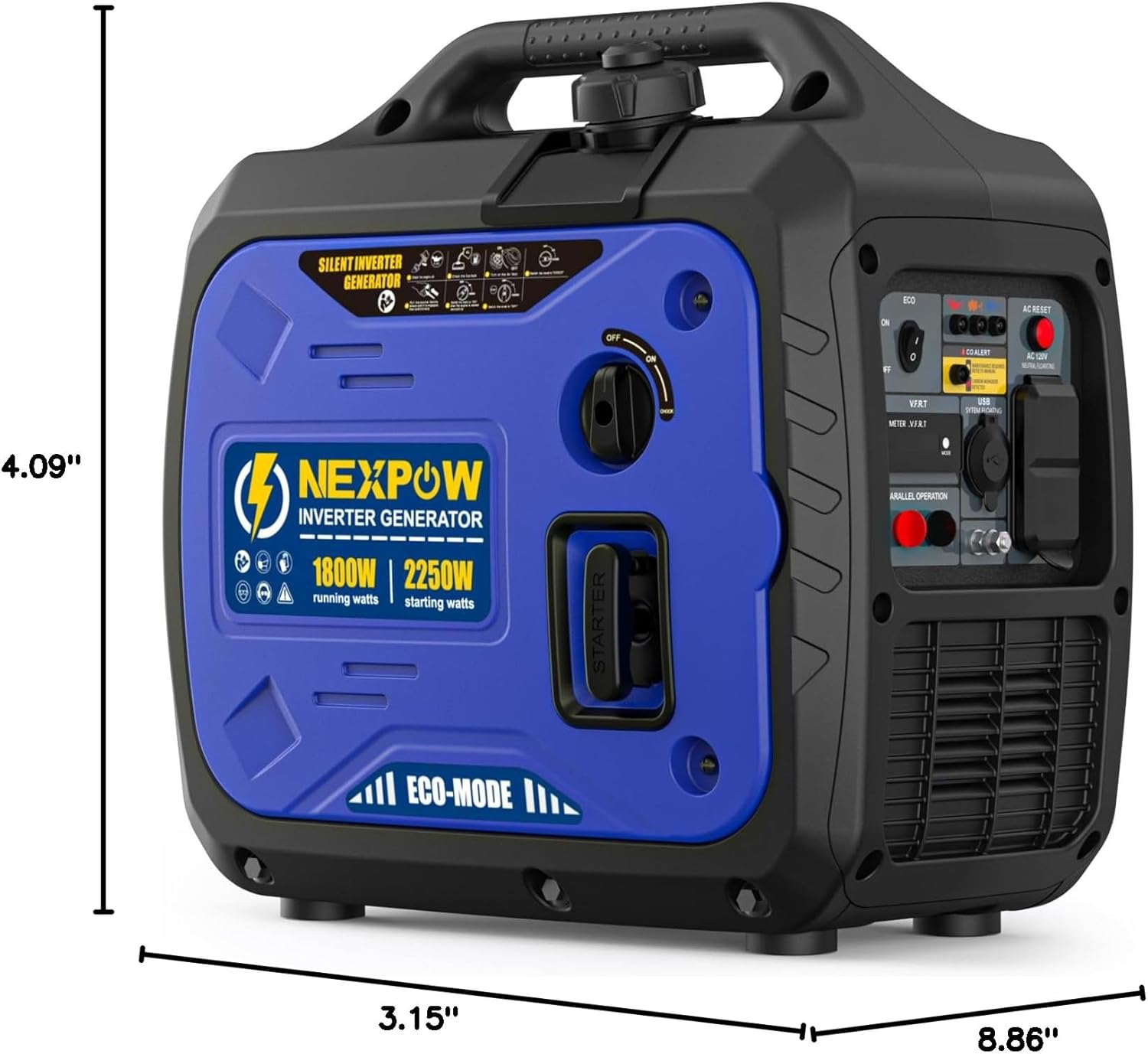
Image: Side view of the NEXPOW Portable Inverter Generator illustrating its compact dimensions: 8.86 inches long, 3.15 inches wide, and 4.09 inches high.
10. Warranty and Support
NEXPOW stands behind the quality of its products. For warranty claims, technical support, or any inquiries regarding your portable power station, please contact NEXPOW customer service.
Customer Service Email: Service@nexpow.com
Please provide your model number (150W) and purchase details when contacting support for faster assistance.
Ask a question about this manual
Ask about setup, troubleshooting, compatibility, parts, safety, or missing instructions. Manuals+ will review the question and use this page’s manual context to help answer it.