
Bracwiser MD7421(BW)
Bracwiser MD7421 Single Monitor Mount User Manual
Model: MD7421(BW)
Product Overview
The Bracwiser MD7421 Single Monitor Mount is designed to free up desk space and provide an ergonomic viewing experience for your monitor. This robust steel arm supports one monitor ranging from 13 to 32 inches and weighing up to 22 lbs. It features extensive adjustability, including tilt, swivel, and rotation, allowing for optimal positioning.

Image: The Bracwiser MD7421 single monitor mount, showcasing its design and desk clamp.

Image: Illustration of the monitor mount's compatibility, supporting 13-32 inch monitors with VESA 75x75mm or 100x100mm patterns and a maximum capacity of 22 lbs (10 kg).
Package Contents
Before beginning installation, please verify that all components listed below are present and undamaged. If any parts are missing or damaged, please contact customer support.
- 1 x Monitor Mount Assembly
- 1 x Mounting Hardware Kit (screws, washers, spacers)
- 1 x User Manual (this document)
- 1 x Small Tablet Stand (bonus item)

Image: A comprehensive layout of all components included in the Bracwiser monitor mount package, including the main mount parts, hardware, and tools.
Setup and Installation
The Bracwiser MD7421 offers two primary installation methods: C-clamp and Grommet mount. Choose the method best suited for your desk setup.
Mounting Options

Image: Visual representation of the two available mounting options: the C-clamp mount for desk edges up to 100mm thick, and the grommet mount for desks with a pre-drilled hole of at least 42mm diameter.
C-Clamp Installation
This method is suitable for desks with a thickness up to 3.86 inches (approximately 98mm). Ensure the desk edge is sturdy enough to support the weight of the mount and monitor.
- Attach the C-clamp to the bottom of the pole.
- Position the C-clamp on the edge of your desk.
- Tighten the clamp screw until the mount is securely fastened to the desk.

Image: Close-up view of the C-clamp component, demonstrating how it attaches to a desk edge.
Grommet Mount Installation
This method requires a pre-existing hole in your desk with a minimum diameter of 1.65 inches (approximately 42mm).
- Disassemble the C-clamp and attach the grommet base to the pole.
- Insert the pole through the desk hole.
- Secure the grommet base from underneath the desk using the provided hardware.

Image: Close-up view of the grommet mount component, illustrating its use with a desk hole.
Attaching the Monitor
The monitor mount supports VESA patterns of 75x75mm and 100x100mm. The VESA plate is detachable for easier installation.
- Remove the VESA plate from the monitor arm.
- Attach the VESA plate to the back of your monitor using the appropriate screws and spacers from the hardware kit. Ensure the screws are tightened securely but do not overtighten.
- Slide the monitor with the attached VESA plate onto the monitor arm.
- Secure the VESA plate to the arm using the locking mechanism (if applicable) or tightening screw.

Image: Diagram showing the detachable VESA plate and its dimensions, highlighting the ease of monitor attachment.

Image: A close-up view of the VESA plate securely attached to the monitor arm, ready to receive a display.
Operating and Adjustments
The Bracwiser MD7421 monitor mount offers a wide range of adjustments to achieve your optimal viewing angle and ergonomic setup.
Adjustable Features
- Tilt: Adjust the monitor vertically by tilting it up or down by +/-80 degrees.
- Swivel: Rotate the monitor horizontally left or right by +/-90 degrees. The arm itself can swivel 180 degrees at its joints.
- Rotation: Rotate the monitor 360 degrees for landscape or portrait orientation.
- Height Adjustment: The monitor can be adjusted along the 400mm (15.75 inch) pole to your desired height.
- Arm Extension: The foldable arm allows for extension and retraction, providing flexibility in monitor positioning and saving space when not in use.

Image: Diagrams illustrating the 360° rotation, ±90° left and right swivel, and ±80° up and down tilt capabilities of the monitor mount.

Image: A user demonstrating the 180-degree swivel capability of the monitor arm, allowing for flexible positioning.

Image: An illustration showing the full swivel range of the monitor arm, indicating its flexibility in horizontal movement.
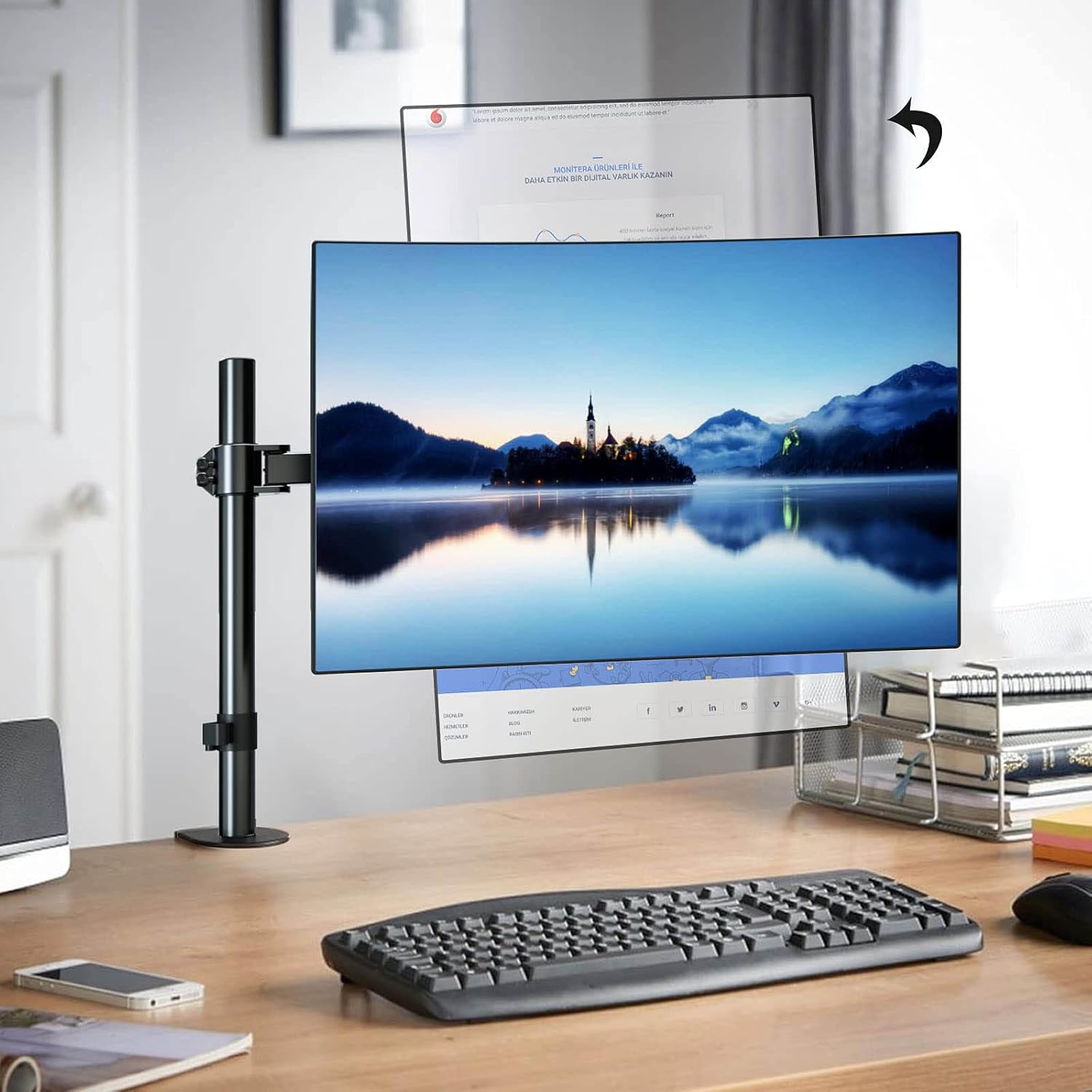
Image: A monitor mounted on the pole, demonstrating the vertical height adjustment capability.
Maintenance
Regular maintenance ensures the longevity and optimal performance of your Bracwiser monitor mount.
- Cleaning: Wipe the mount with a soft, damp cloth. Avoid abrasive cleaners or solvents.
- Tightening: Periodically check all screws and connections to ensure they remain tight, especially after initial installation and significant adjustments.
- Cable Management: Utilize the integrated cable management clips to keep cables tidy and prevent strain.

Image: The monitor mount featuring a foldable arm for space-saving and a dedicated storage slot for Allen keys, along with integrated cable management.

Image: A close-up view of the cable management system on the monitor arm, showing how cables can be routed neatly.
Troubleshooting
If you encounter issues with your Bracwiser monitor mount, refer to the following common problems and solutions:
| Problem | Possible Cause | Solution |
|---|---|---|
| Monitor sags or tilts down | Tilt mechanism not tight enough; monitor too heavy. | Tighten the tilt adjustment screw. Ensure monitor weight is within the 22 lbs (10 kg) limit. |
| Mount is unstable on desk | C-clamp or grommet base not tightened sufficiently. | Re-tighten the C-clamp or grommet base. Ensure desk thickness/hole diameter is compatible. |
| Monitor does not rotate/swivel freely | Joints are too tight. | Loosen the adjustment screws at the arm joints slightly. |
| VESA plate does not fit monitor | Incorrect VESA pattern or screw size. | Verify your monitor's VESA pattern (75x75mm or 100x100mm). Use the correct screws and spacers from the hardware kit. |
Specifications
| Feature | Detail |
|---|---|
| Model Number | MD7421(BW) |
| Compatible Monitor Size | 13 - 32 inches |
| Weight Capacity | Up to 22 lbs (10 kg) |
| VESA Compatibility | 75x75mm, 100x100mm |
| Tilt Angle | +/- 80 degrees |
| Swivel Angle | +/- 90 degrees (at VESA plate), 180 degrees (at arm joints) |
| Rotation | 360 degrees |
| Pole Height | 400mm (15.75 inches) |
| Mounting Type | Desk Clamp (up to 3.86" / 98mm thick), Grommet (min 1.65" / 42mm hole diameter) |
| Material | Alloy Steel |
| Color | Black |
| Item Weight | 0.317 ounces (Note: This value is from source data and appears unusually low for a steel mount.) |
| UPC | 739450800990 |

Image: An illustration indicating how monitor size is measured diagonally, relevant for compatibility.
Warranty and Support
For warranty information or technical support, please contact Bracwiser customer service. Refer to the product packaging or the official Bracwiser website for the most current contact details.
Online Resources:
- Official Bracwiser Store: Bracwiser Store on Amazon
- User Manual (PDF): Download PDF Manual
Note: No official product videos with 'Seller' creator type were available in the provided data to embed in this manual.