1. Product Overview
The Crystal Vision Technology CVT21WB is a wireless audio 1080P 2MP camera designed for surveillance. It features built-in microphones for audio capture and delivers high-definition video both day and night. This camera is weather-resistant and includes night vision capabilities, making it suitable for various indoor and outdoor environments.
Important Note: This camera is only compatible with Crystal Vision wireless surveillance NVR systems, specifically the CVT804 and CVT808 Series.
Key Features:
- Integrated Microphone: Captures clear audio alongside video footage.
- 1080P Full HD Video: Provides 2.0 Megapixel (1920x1080) high-definition video for clear imaging.
- Weather Resistant (IP65): Designed for durability in various weather conditions.
- Night Vision: Equipped with low-light technology for clear visibility in dark environments.
- Wireless Connectivity: Utilizes Wi-Fi for flexible placement and installation.
Camera Components:
Familiarize yourself with the main components of your CVT21WB camera:
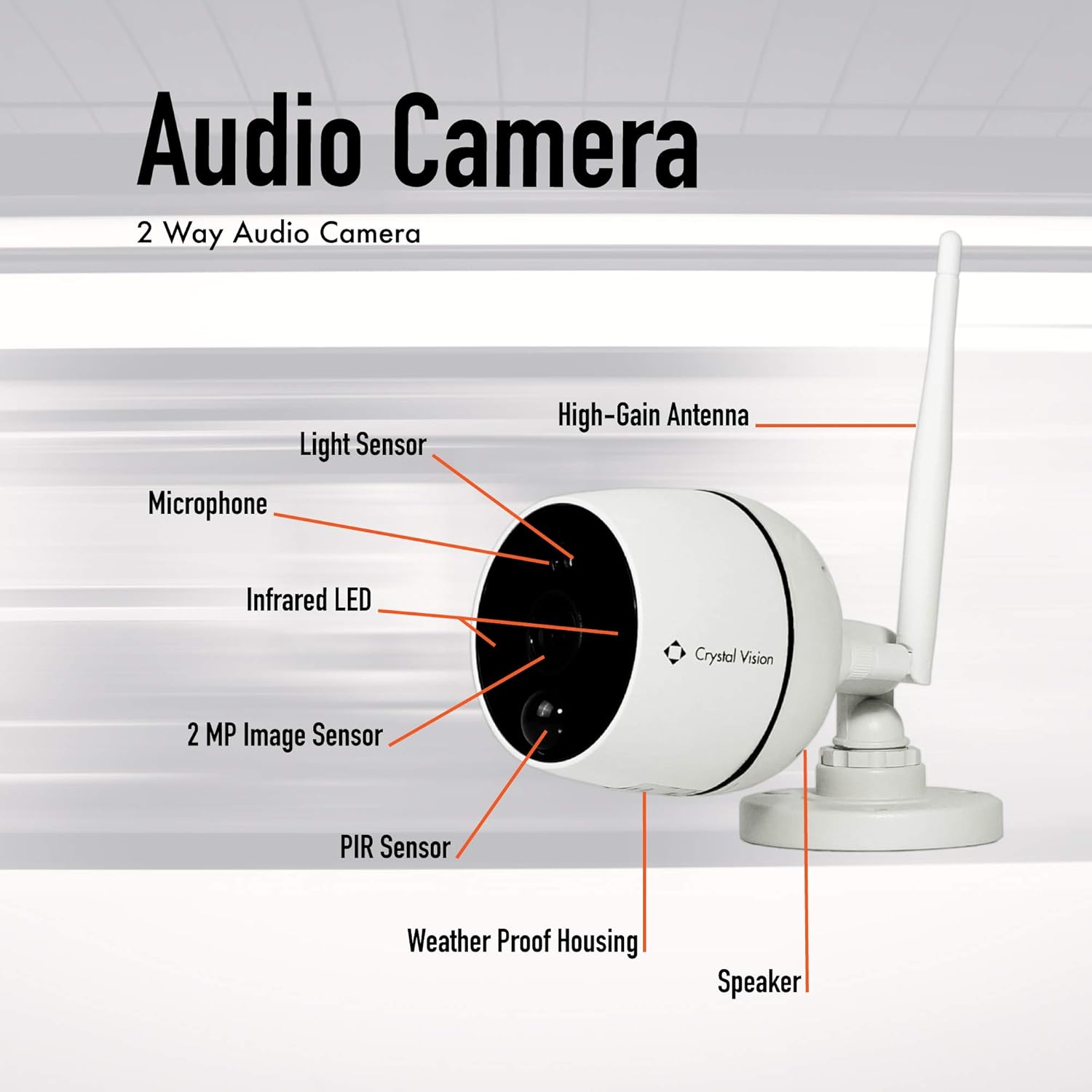
Image 1.1: This diagram illustrates the key components of the CVT21WB camera. Visible elements include the light sensor, microphone, infrared LED, 2 MP image sensor, PIR sensor, weather-proof housing, speaker, and the high-gain antenna for wireless communication.
Package Contents:
Verify that all items are present in your package:

Image 1.2: This image displays the contents typically found in the CVT21WB camera package. It includes the 2-way audio camera unit, an antenna, an extension cable, a power supply adapter, and a set of anchors and screws for mounting.
2. Setup and Installation
Before beginning installation, ensure you have your compatible Crystal Vision NVR (CVT804 or CVT808 Series) powered on and configured according to its own manual.
2.1 Mounting the Camera
- Select a Location: Choose a suitable location for your camera. The CVT21WB is designed for both indoor and outdoor use and is wall-mountable. Consider areas that provide optimal viewing angles and are within range of your Wi-Fi network.
- Mark Drilling Points: Use the camera's mounting base as a template to mark the positions for drilling holes on the wall.
- Drill Holes: Drill pilot holes at the marked positions. Insert the provided anchors into the holes if mounting on drywall or masonry.
- Secure the Camera: Attach the camera's mounting base to the wall using the provided screws. Ensure it is securely fastened.
- Adjust Angle: Adjust the camera's angle to cover the desired surveillance area.
2.2 Powering the Camera
- Connect Power Adapter: Connect the power adapter to the camera's power input port.
- Plug into Outlet: Plug the power adapter into a standard AC/DC power outlet. The camera will power on automatically.
2.3 Wireless Pairing with NVR
The CVT21WB camera is designed to wirelessly pair with compatible Crystal Vision NVRs. Refer to your NVR's instruction manual for specific steps on adding new wireless cameras. Generally, the process involves:
- Access NVR Settings: Navigate to the camera management or wireless pairing section on your NVR interface.
- Initiate Pairing: Select the option to add a new wireless camera or initiate pairing mode on the NVR.
- Camera Detection: The NVR will search for available wireless cameras. Ensure your CVT21WB camera is powered on and within range.
- Confirm Connection: Once detected, confirm the connection on the NVR. The camera's video feed should appear on your NVR display.
3. Operating the Camera
Once the camera is successfully paired with your NVR, you can access its features through the NVR interface or associated mobile application.
3.1 Live View and Recording
- Access Live Feed: On your NVR monitor or mobile app, select the CVT21WB camera to view its live 1080P HD video feed.
- Recording: The NVR system will typically manage video recording based on your configured settings (e.g., continuous, motion-triggered, scheduled).
3.2 Audio Monitoring
The built-in microphone allows for audio monitoring of the camera's surroundings.
- Enable Audio: On your NVR or app, ensure the audio option for the CVT21WB camera is enabled to hear sound from the camera's location.
- Two-Way Audio (if supported by NVR/App): While the camera has a speaker, two-way audio functionality depends on the NVR system and its application. If supported, you may be able to speak through the camera's speaker from your monitoring device.
3.3 Night Vision
The camera automatically switches to night vision mode in low-light conditions, utilizing its infrared LEDs and low light technology to provide clear black and white images.
- Automatic Activation: The light sensor on the camera detects ambient light levels and activates night vision as needed.
- Optimal Performance: Ensure there are no obstructions directly in front of the camera that could block the infrared light.
4. Maintenance
Regular maintenance helps ensure optimal performance and longevity of your camera.
4.1 Cleaning
- Lens Cleaning: Gently wipe the camera lens with a soft, clean, lint-free cloth. If necessary, use a small amount of lens cleaning solution. Avoid abrasive materials that could scratch the lens.
- Housing Cleaning: Wipe the camera's weather-resistant housing with a damp cloth to remove dust and dirt. Do not use harsh chemicals.
4.2 Environmental Considerations
- Weather Resistance: The camera has an IP65 rating, meaning it is protected against dust ingress and low-pressure water jets from any direction. While weather-resistant, avoid submerging the camera in water or exposing it to extreme pressure washing.
- Temperature: Operate the camera within its specified temperature range to prevent damage.
4.3 Firmware Updates
Periodically check the Crystal Vision Technology website or your NVR's settings for available firmware updates. Firmware updates can improve performance, add features, or enhance security.
5. Troubleshooting
If you encounter issues with your CVT21WB camera, refer to the following common troubleshooting steps:
5.1 No Video Feed / Disconnected Camera
- Check Power: Ensure the camera is properly powered on and the power adapter is securely connected to both the camera and the power outlet.
- Wi-Fi Signal: Verify that the camera is within range of your NVR's wireless signal. Obstructions like thick walls or metal objects can interfere with the signal.
- Re-pair Camera: If the connection is lost, try re-pairing the camera with your NVR following the steps in Section 2.3.
- NVR Status: Check the status of your NVR system to ensure it is operating correctly.
5.2 Poor Video Quality
- Clean Lens: Ensure the camera lens is clean and free from dirt, dust, or smudges (refer to Section 4.1).
- Lighting Conditions: While the camera has night vision, extreme low light or direct bright lights can affect image quality.
- Wi-Fi Interference: Strong Wi-Fi interference can degrade video stream quality. Try repositioning the camera or NVR.
5.3 No Audio / Poor Audio Quality
- Enable Audio: Confirm that audio monitoring is enabled on your NVR or mobile application.
- Microphone Obstruction: Ensure the microphone port on the camera is not blocked.
- Environmental Noise: High ambient noise levels will affect audio clarity.
5.4 Camera Not Responding
- Power Cycle: Disconnect the camera's power adapter, wait 10 seconds, and then reconnect it.
- Factory Reset: If available, a factory reset button (often a small pinhole button) can restore the camera to its default settings. Refer to the NVR manual or manufacturer's support for specific instructions on resetting the camera.
6. Specifications
| Feature | Detail |
|---|---|
| Model | CVT21WB |
| Video Resolution | 1080p (1920x1080) |
| Image Sensor | 2 Megapixel |
| Audio | Built-in Microphone, Speaker (for potential two-way audio) |
| Connectivity | Wireless (Wi-Fi) |
| Power Source | AC/DC Adapter |
| Mounting Type | Wall Mount |
| Weather Resistance | IP65 (Dust tight, protected against low-pressure water jets) |
| Night Vision | Yes, with Night Color low light technology |
| Compatibility | Crystal Vision NVR CVT804 and CVT808 Series |
| Item Weight | 1.3 pounds |
| Package Dimensions | 7.44 x 3.98 x 3.31 inches |
| UPC | 852653008113 |
7. Warranty and Support
For warranty information, technical support, or service inquiries, please contact Crystal Vision Technology directly. Details regarding your product's warranty period and terms are typically provided at the time of purchase or can be found on the manufacturer's official website.
Manufacturer: Crystal Vision Technology
Online Support: For additional resources, FAQs, and contact information, please visit the official Crystal Vision Technology Store on Amazon or their official website.