
TREE.NB EG04XL
TREE.NB EG04XL Laptop Battery Instruction Manual
Model: EG04XL
Introduction
This instruction manual provides essential information for the safe and effective use of your TREE.NB EG04XL laptop battery. It covers compatibility, installation, operation, maintenance, and troubleshooting to ensure optimal performance and longevity of your battery. Please read this manual thoroughly before installing or using the battery.
Safety Information
To prevent personal injury or damage to your device, please observe the following safety precautions:
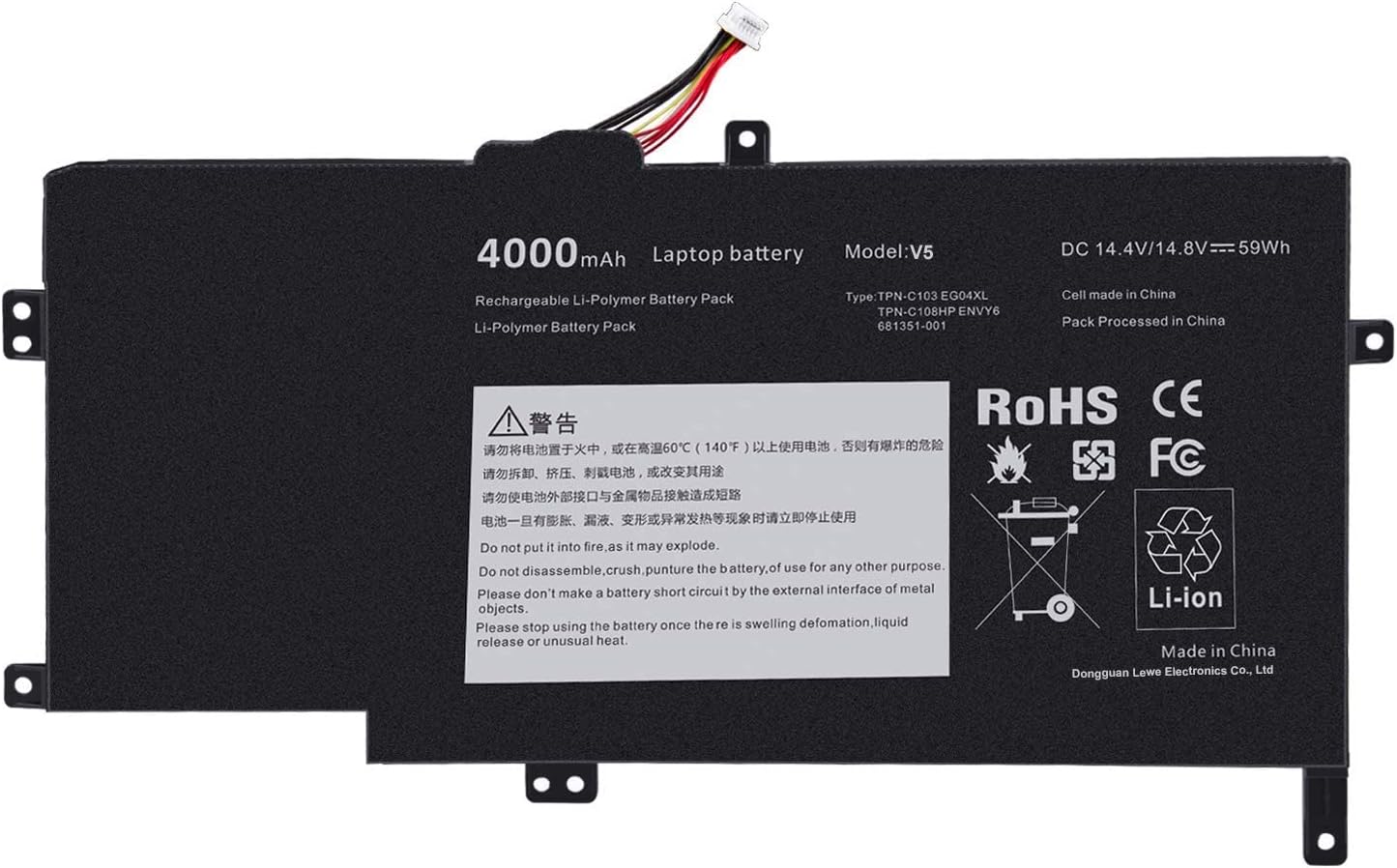
- Do not put the battery into fire, as it may explode.
- Do not disassemble, crush, or puncture the battery.
- Do not make a battery short circuit by external interface of metal objects.
- Stop using the battery immediately if there is swelling, deformation, liquid release, or any unusual heat.
- Keep the battery away from extreme temperatures (above 60°C / 140°F) and direct sunlight.
- Dispose of used batteries according to local regulations. Do not dispose of with household waste.
Compatibility
The TREE.NB EG04XL battery is compatible with various HP Envy 6-series laptops and specific part numbers. Please verify your laptop model or original battery part number before purchase and installation.
Compatible HP Envy Laptop Series:
- HP Envy 6-xxxxxx All Series (e.g., 6-1000, 6-1001tu, 6-1001tx, etc.)
- HP ENVY 6-xxxxxxx Ultrabook All Series (e.g., 6-1201TX, 6-1202TX, etc.)
- HP Envy 6-xxxxxxx Sleekbook All Series (e.g., 6-1140ca, 6-1168ca, etc.)
- HP ENVY SLEEKBOOK 6-xxxxxx All Series (e.g., 6-1010US, 6-1011NR, etc.)
- HP ENVY Ultrabook 6-xxxxxx PC All Series (e.g., 6-1116TX, 6-1117TX PC, etc.)
- HP ENVY SLEEKBOOK 6T-1000 REFURB, 6T-1100, 6T-1100 REFURB
- HP ENVY 6T-1200 ULTRABOOK, 6T-1200 ULTRABOOK REFURB
- HP ENVY SLEEKBOOK 6Z-1000, 6Z-1000 REFURB, 6Z-1100, 6Z-1100 REFURB
Compatible Part Numbers:
- HSTNN-IB3T
- HSTNN-DB3T
- EG04XL
- TPN-C103
- TPN-C108
- 681881-171
- 681881-271
- 681881-1B1
- 681951-001
Setup and Installation
Replacing a laptop battery typically requires careful handling and specific tools. If you are unsure about the process, it is recommended to seek professional assistance or consult your laptop's service manual.
- Preparation: Ensure your laptop is powered off and disconnected from the AC adapter. Remove any external peripherals.
- Access the Battery: Depending on your HP Envy model, you may need to remove the back cover of the laptop. This often involves unscrewing several small screws. Use appropriate tools, such as a small Phillips head screwdriver and a plastic pry tool, to avoid damaging the casing.
- Disconnect Old Battery: Carefully locate the battery connector on the motherboard. Gently disconnect the old battery's cable from the motherboard.
- Remove Old Battery: Unscrew any screws securing the old battery in place and carefully lift it out of its compartment.
- Install New Battery: Place the new TREE.NB EG04XL battery into the compartment, ensuring it aligns correctly. Secure it with the screws you removed earlier.
- Connect New Battery: Carefully connect the new battery's cable to the motherboard connector. Ensure it is firmly seated.
- Reassemble Laptop: Replace the back cover of your laptop and secure all screws.
- Initial Charge: It is recommended to fully charge the new battery before its first use.

Operating Guidelines
To maximize the performance and lifespan of your new battery:
- Initial Use: For the first few uses, it is recommended to fully charge the battery to 100% and then discharge it to about 5-10% before recharging. This helps calibrate the battery's charge indicator.
- Regular Charging: Avoid frequently discharging the battery completely. Lithium-ion batteries benefit from partial discharges.
- Temperature: Operate your laptop in a moderate temperature environment. Extreme heat or cold can degrade battery performance and lifespan.
- Battery Cycles: The battery is designed for up to 500 recharge cycles over its life. A cycle is one full discharge and recharge.
Maintenance
Proper maintenance can extend the life of your laptop battery:
- Storage: If storing the battery for an extended period, charge it to about 50-70% and store it in a cool, dry place. Avoid storing a fully charged or fully discharged battery.
- Cleaning: Keep the battery contacts clean and free of dust or debris.
- Software Updates: Ensure your laptop's operating system and drivers are up to date, as power management features can impact battery health.
Troubleshooting
If you encounter issues with your TREE.NB EG04XL battery, consider the following:
- Battery Not Charging:
- Ensure the AC adapter is properly connected and functioning.
- Check if the battery is correctly seated and connected inside the laptop.
- Try restarting your laptop.
- Update or reinstall battery drivers in Device Manager.
- Laptop Not Starting with Battery Connected:
- If the laptop fails to start when the battery is connected (as reported by some users for specific HP Envy models like 6-1047CL), try removing the battery and powering the laptop with only the AC adapter. If it starts, the battery may be faulty or incompatible with your specific motherboard revision.
- Ensure the battery is fully charged.
- Short Battery Life:
- Check power settings in your operating system to ensure they are optimized for battery life.
- Close unnecessary background applications.
- Reduce screen brightness.
- Ensure the laptop's cooling system is clean and functioning to prevent overheating, which can reduce battery efficiency.
- Battery Not Recognized:
- Verify the battery is correctly installed and its connector is secure.
- Perform a hard reset of your laptop (consult your laptop's manual for specific steps).
Specifications
Key specifications for the TREE.NB EG04XL Laptop Battery:
| Feature | Detail |
|---|---|
| Brand | TREE.NB |
| Series / Model | EG04XL / V5 |
| Battery Type | Lithium Ion (Li-Polymer) |
| Voltage / Capacity | DC 14.4V/14.8V (59Wh) - 4000mAh |
| Color | Black |
| Item Weight | Approximately 10.2 ounces |
| Package Dimensions | Approximately 13.9 x 7.6 x 0.75 inches |
| Manufacturer | Dongguan Lewe Electronics Co., Ltd |
| Certifications | CE, FCC certified for safety |
| Recharge Cycles | Up to 500 recharge cycles |


Warranty and Support
TREE.NB stands behind the quality of its products:
- Warranty: This product comes with a 12-month warranty from the date of purchase.
- Customer Support: For any questions, technical assistance, or warranty claims, please contact TREE.NB customer support. 24 x 7 email support is available.
- Online Resources: Visit the official TREE.NB Store on Amazon for additional product information and support.
Ask a question about this manual
Ask about setup, troubleshooting, compatibility, parts, safety, or missing instructions. Manuals+ will review the question and use this page’s manual context to help answer it.