
Dib C430R
Dib C430R Bidet Toilet Seat Instruction Manual
Model: C430R
1. Introduction
The Dib C430R is an advanced bidet toilet seat designed to provide enhanced personal hygiene and comfort. This manual provides detailed instructions for the safe installation, operation, and maintenance of your Dib C430R bidet toilet seat. Please read this manual thoroughly before use and retain it for future reference.
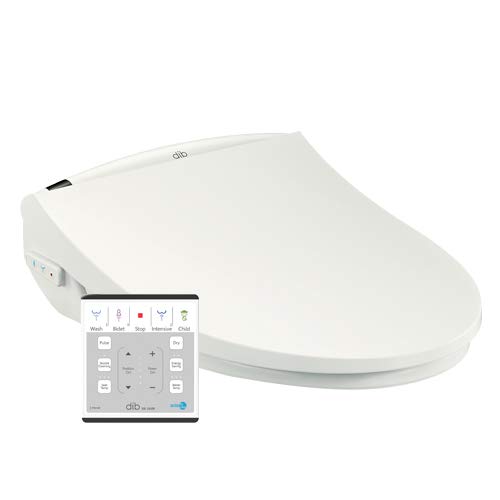
Image 1.1: The Dib C430R Bidet Toilet Seat with its wireless remote control.
2. Important Safety Instructions
To reduce the risk of fire, electric shock, or injury, always follow basic safety precautions when using electrical appliances. This includes:
- Read all instructions before installing and using the bidet toilet seat.
- Ensure the bidet is connected to a properly grounded electrical outlet.
- Do not immerse the electrical components in water or other liquids.
- Unplug the unit from the electrical outlet before cleaning or performing any maintenance.
- Do not allow children to operate the bidet without adult supervision, especially when using the child mode.
- Do not use abrasive cleaners or harsh chemicals on the bidet surface.
- If the power cord is damaged, it must be replaced by the manufacturer, its service agent, or similarly qualified persons to avoid a hazard.
3. Package Contents
Verify that all components are present in the package:
- Dib C430R Bidet Toilet Seat
- Wireless Remote Control
- Mounting Plate and Bolts
- T-Valve Connector
- Water Supply Hose
- User Manual
4. Setup and Installation
Follow these steps to install your Dib C430R bidet toilet seat:
- Preparation: Turn off the water supply to your toilet at the shut-off valve. Flush the toilet to drain the tank. Remove your existing toilet seat and lid.
- Install T-Valve: Disconnect the existing water supply hose from the toilet fill valve. Install the provided T-valve connector onto the toilet fill valve. Reconnect the existing water supply hose to the T-valve.
- Mounting Plate: Place the mounting plate over the bolt holes on the toilet bowl. Insert the mounting bolts through the plate and toilet bowl holes. Secure the bolts from underneath with washers and nuts, ensuring the plate is centered.
- Attach Bidet Seat: Slide the Dib C430R bidet toilet seat onto the mounting plate until it clicks securely into place.
- Connect Water: Connect one end of the provided bidet water supply hose to the T-valve and the other end to the water inlet on the side of the bidet seat. Hand-tighten all connections, then use a wrench for a quarter turn to ensure a leak-free seal.
- Connect Power: Plug the bidet's power cord into a grounded 230V electrical outlet.
- Test: Slowly turn on the water supply to the toilet. Check all connections for leaks. Once the toilet tank refills, the bidet is ready for use.

Image 4.1: The Dib C430R Bidet Toilet Seat properly installed on a toilet.
5. Operating Instructions
The Dib C430R is operated using the wireless remote control. Ensure the remote has fresh batteries and is within range of the bidet seat.
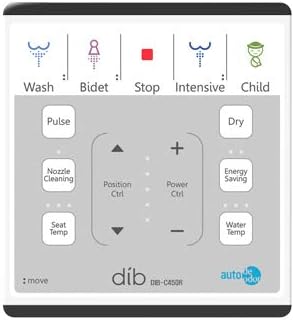
Image 5.1: Layout of the Dib C430R wireless remote control.
5.1 Basic Wash Functions
- Wash (Posterior Cleansing): Press the Wash button for a standard posterior wash.
- Bidet (Feminine Cleansing): Press the Bidet button for a gentle feminine wash.
- Intensive Wash: Press the Intensive button for a stronger water stream during posterior cleansing.
- Child Mode: Press the Child button to activate a preset wash cycle with reduced water pressure and temperature, and an adjusted nozzle position suitable for children.
- Stop: Press the Stop button to immediately cease any active wash or drying function.
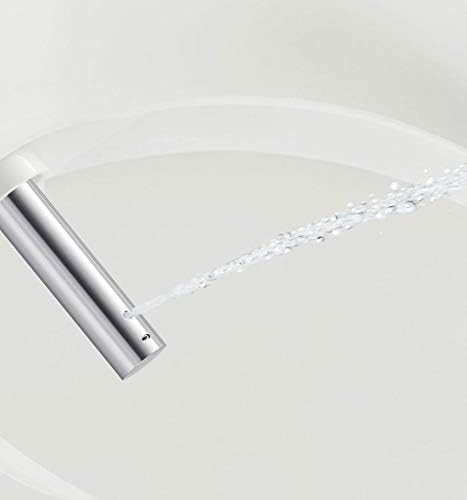
Image 5.2: The bidet nozzle extending for cleansing.
5.2 Adjustments
- Water Pressure: Use the Power Ctrl + and Power Ctrl - buttons to adjust the water stream intensity (5 levels).
- Water Temperature: Press the Water Temp button repeatedly to cycle through 4 temperature levels.
- Nozzle Position: Use the Position Ctrl up and down arrows to adjust the nozzle's forward/backward position (5 levels).
- Seat Temperature: Press the Seat Temp button repeatedly to cycle through 4 seat temperature levels.
- Dryer Temperature: Press the Dry button repeatedly to cycle through 5 air dryer temperature levels.
5.3 Special Functions
- Pulse/Massage: Press the Pulse button during a wash cycle to activate a pulsating water stream for a massage effect.
- Nozzle Cleaning: Press the Nozzle Cleaning button to initiate an automatic self-cleaning cycle for the nozzle before and after use.
- Energy Saving: Press the Energy Saving button to activate the energy-saving mode, which reduces power consumption when the bidet is not in active use.
- Night Light: The bidet features an integrated night light for convenience in low-light conditions.
- Soft Close: The seat and lid are designed with a soft-close mechanism to prevent slamming.
6. Maintenance and Cleaning
Regular cleaning and maintenance will ensure the longevity and optimal performance of your Dib C430R bidet toilet seat.
- Exterior Cleaning: Unplug the bidet before cleaning. Use a soft cloth dampened with a mild, non-abrasive detergent to wipe down the exterior surfaces. Do not use harsh chemicals, abrasive cleaners, or scrub brushes, as these can damage the finish.
- Nozzle Cleaning: The bidet features an automatic self-cleaning function for the nozzle. For additional cleaning, you can manually extend the nozzle (refer to operating instructions) and gently wipe it with a soft cloth.
- Water Filter Cleaning: Periodically check and clean the water inlet filter located at the T-valve connection. Turn off the water supply and unplug the unit before accessing the filter.
- Winterization: If the bidet is installed in an area prone to freezing temperatures, it is essential to drain all water from the unit to prevent damage. Consult a qualified technician if unsure how to perform this.
7. Troubleshooting
If you encounter issues with your Dib C430R, refer to the following common problems and solutions:
| Problem | Possible Cause | Solution |
|---|---|---|
| No water flow | Water supply off, clogged filter, T-valve closed. | Ensure water supply is on. Clean the water inlet filter. Check T-valve position. |
| No power | Power cord unplugged, circuit breaker tripped, outlet malfunction. | Check power cord connection. Reset circuit breaker. Test outlet with another device. |
| Water temperature is not warm | Water temperature setting too low, bidet heater issue. | Adjust water temperature setting on the remote. Allow time for water to heat. |
| Remote control not responding | Dead batteries, remote out of range, obstruction. | Replace remote batteries. Ensure clear line of sight to the bidet. Move closer to the bidet. |
| Water leaks from connections | Loose connections, damaged washer. | Turn off water supply. Tighten connections. Check and replace washers if damaged. |
If the problem persists after attempting these solutions, please contact customer support.
8. Specifications
Technical details for the Dib C430R Bidet Toilet Seat:
| Feature | Detail |
|---|---|
| Model | C430R (Extended Type) |
| Dimensions (W x D x H) | 410 mm x 528 mm x 165 mm (16.1 in x 20.8 in x 6.5 in) |
| Water Temperature Settings | 4 levels |
| Nozzle Position Settings | 5 levels |
| Water Pressure Settings | 5 levels |
| Seat Temperature Settings | 4 levels |
| Dryer Temperature Settings | 5 levels |
| Power Supply | 230V (Electrical connection required) |
| Key Features | Bidet & Feminine Wash, Massage/Pulsation, Antibacterial Nozzle, Bubble Wash, Auto Nozzle Retraction, Preheated Air Dryer, Oscillating Nozzle, Seat Heating, Adjustable Water Pressure, Self-cleaning Nozzle, Soft Close Seat, Remote Control, Night Light, Energy Saving Mode, Self-diagnosis, Child Function, Patented Water Jet Technology, Constant Warm Water Preparation. |

Image 8.1: Detailed dimensions for the Dib C430R Bidet Toilet Seat (Extended Type).
9. Warranty Information
The Dib C430R Bidet Toilet Seat comes with a 2-year warranty from the date of purchase. This warranty covers manufacturing defects and malfunctions under normal use. It does not cover damage resulting from improper installation, misuse, abuse, accidents, or unauthorized repairs. Please retain your proof of purchase for warranty claims.
10. Customer Support
For technical assistance, troubleshooting beyond this manual, or warranty inquiries, please contact your retailer or the manufacturer's customer service department. Have your model number (C430R) and proof of purchase ready when contacting support.
Ask a question about this manual
Ask about setup, troubleshooting, compatibility, parts, safety, or missing instructions. Manuals+ will review the question and use this page’s manual context to help answer it.