
1. Introduction
This manual provides detailed instructions for the safe and effective operation of the LOMVUM T28B Digital Multimeter. The T28B is an auto-ranging multimeter designed for measuring AC/DC voltage, AC/DC current, resistance, capacitance, frequency, temperature, diode, and continuity. It features a 6000-count display, Non-Contact Voltage (NCV) detection, a backlit LCD, and a flashlight for enhanced usability.
Please read this manual thoroughly before using the device to ensure proper function and safety.
2. Safety Information
WARNING: To avoid electric shock or personal injury, read and understand all safety information before using this multimeter.
- Always ensure the multimeter is in good working condition and free from damage before use.
- Do not apply more than the rated voltage, as marked on the meter, between the terminals or between any terminal and earth ground. The LOMVUM T28B meets 600V CAT IV and 1000V CAT III safety standards.
- Use caution when working with voltages above 30V AC RMS, 42V peak, or 60V DC. These voltages pose a shock hazard.
- Always disconnect the test leads from the circuit before changing functions.
- Ensure the correct function and range are selected for the measurement.
- Do not use the meter if the test leads are damaged or if the meter itself appears damaged.
- Replace the battery as soon as the low battery indicator appears to ensure accurate readings.
- The multimeter is equipped with explosion-proof ceramic fuse tubes for overload protection. Do not bypass or use incorrect fuses.
- Keep fingers behind the finger guards on the test probes during measurements.
3. Product Overview
3.1 Components and Display
The LOMVUM T28B Digital Multimeter features a robust design with a clear LCD and intuitive controls.

Image 3.1: LOMVUM T28B Digital Multimeter with labeled components. This image illustrates the main parts of the multimeter, including the LCD screen, rotary switch, function buttons, and input jacks.
- LCD Backlight Screen: Displays measurement readings, units, and function indicators.
- Non-contact Voltage Detection Area: Used for NCV measurements.
- NCV and Buzzer Indicator Light: Illuminates and beeps during NCV detection.
- Manual/Auto-ranging Switch: Toggles between auto-ranging and manual range selection.
- Backlight/Flashlight Button: Activates the display backlight and the integrated LED flashlight.
- Rotary Switch: Selects the primary measurement function.
- Function Select/Data Hold Button: Cycles through sub-functions within a rotary switch setting and holds the current display reading.
- Frequency/Duty Cycle/Capacitance Zero Button: Used for specific functions related to frequency, duty cycle, and capacitance measurements.
- 20A Input Jack: For high current (up to 20A) measurements.
- mA Input Jack: For milliampere current measurements.
- COM Input Jack: Common terminal for all measurements.
- V/Ω/Hz/°C/Live Input Jack: For voltage, resistance, frequency, temperature, and live wire detection.
- LED Flashlight: Provides illumination for working in dark areas.

Image 3.2: Detailed view of the LOMVUM T28B Multimeter's LCD display and measurement capabilities. This image highlights the 3.0-inch backlit LCD screen and lists the various measurement functions supported by the device, such as AC/DC Voltage, Current, Frequency, Resistance, Temperature, Duty Cycle, Capacitance, Diode, Continuity, True RMS, NCV, and Auto Ranging.
4. Setup
4.1 Package Contents
Before starting, verify that all items are present:
- LOMVUM T28B Digital Multimeter
- Test Leads with Alligator Clips
- K-type Thermocouple
- 2 x Ceramic Fuse Tubes (spare)
- 4 x 1.5V AAA Batteries
- English User's Manual (this document)

Image 4.1: The LOMVUM T28B Digital Multimeter shown with its included accessories, including test leads, alligator clips, K-type thermocouple, and AAA batteries.
4.2 Battery Installation
The LOMVUM T28B requires four 1.5V AAA batteries (included). To install or replace batteries:
- Ensure the multimeter is turned OFF and disconnect all test leads.
- Locate the battery compartment cover on the back of the meter.
- Use a screwdriver to loosen the screw(s) on the battery cover.
- Remove the cover and insert the AAA batteries, observing correct polarity (+ and -).
- Replace the battery cover and secure it with the screw(s).
4.3 Connecting Test Leads
Always connect the test leads correctly for the desired measurement:
- Insert the black test lead into the COM (Common) input jack.
- For voltage, resistance, frequency, capacitance, diode, continuity, and temperature measurements, insert the red test lead into the V/Ω/Hz/°C/Live input jack.
- For milliampere (mA) current measurements, insert the red test lead into the mA input jack.
- For high current (up to 20A) measurements, insert the red test lead into the 20A input jack.
5. Operating Instructions
5.1 General Operation
To begin a measurement:
- Turn the rotary switch to the desired measurement function.
- If a function has multiple sub-modes (e.g., AC/DC voltage), press the FUNC HOLD button to cycle through them.
- Connect the test leads to the circuit or component under test.
- Read the measurement value on the LCD.

Image 5.1: A user performing measurements with the LOMVUM T28B Digital Multimeter on an electronic circuit board. This image demonstrates the practical application of the device in a typical work environment.
5.2 Measurement Functions
- Voltage (AC/DC): Turn the rotary switch to the 'V' position. Use the FUNC HOLD button to select between AC (~) and DC (—) voltage. Connect leads in parallel with the circuit.
- Current (AC/DC, mA/A): Turn the rotary switch to the 'mA' or '20A' position. Use the FUNC HOLD button to select between AC (~) and DC (—) current. Connect leads in series with the circuit. Ensure correct input jack (mA or 20A) is used.
- Resistance (Ω): Turn the rotary switch to the 'Ω' position. Connect leads across the component. Ensure the circuit is de-energized before measuring resistance.
- Capacitance (F): Turn the rotary switch to the 'F' position. Connect leads across the capacitor. Ensure capacitors are discharged before measurement.
- Frequency (Hz) / Duty Cycle (%): Turn the rotary switch to the 'Hz/%' position. Use the FUNC HOLD button to select between frequency and duty cycle.
- Temperature (°C/°F): Turn the rotary switch to the '°C/°F' position. Insert the K-type thermocouple into the V/Ω/Hz/°C/Live and COM jacks. The display will show the ambient temperature. Place the thermocouple tip on or in the object to be measured.

Image 5.2: The LOMVUM T28B Multimeter displaying a temperature reading while a K-type thermocouple is immersed in water. This illustrates the temperature measurement function, which ranges from -20°C to 1000°C (-4°F to 1832°F).
- Diode Test: Turn the rotary switch to the diode symbol. Connect the red lead to the anode and the black lead to the cathode. A forward voltage drop will be displayed.
- Continuity Test: Turn the rotary switch to the continuity symbol. If the resistance is below approximately 50Ω, the buzzer will sound, indicating continuity.
- Non-Contact Voltage (NCV): Turn the rotary switch to the 'NCV' position. Move the top of the meter near a live AC voltage source. The NCV indicator light will flash, and the buzzer will sound with increasing frequency as the meter gets closer to the voltage source.
5.3 Special Functions
- Data Hold: Press the FUNC HOLD button briefly to freeze the current reading on the display. Press again to release.
- Backlight/Flashlight: Press the */& button briefly to turn on the LCD backlight. Press and hold the */& button for 2 seconds to turn on the LED flashlight. Repeat to turn off.

Image 5.3: The LOMVUM T28B Multimeter in use, demonstrating its LED flashlight illuminating a dark electrical panel. The image also highlights the hanging magnet feature, allowing for hands-free operation.
- Auto Shut-off: The meter will automatically power off after approximately 15 minutes of inactivity to conserve battery life. Press any button or turn the rotary switch to wake it up.
- Kickstand and Hanging Magnet: The integrated kickstand allows for hands-free viewing. A hanging magnet on the back provides additional mounting options.
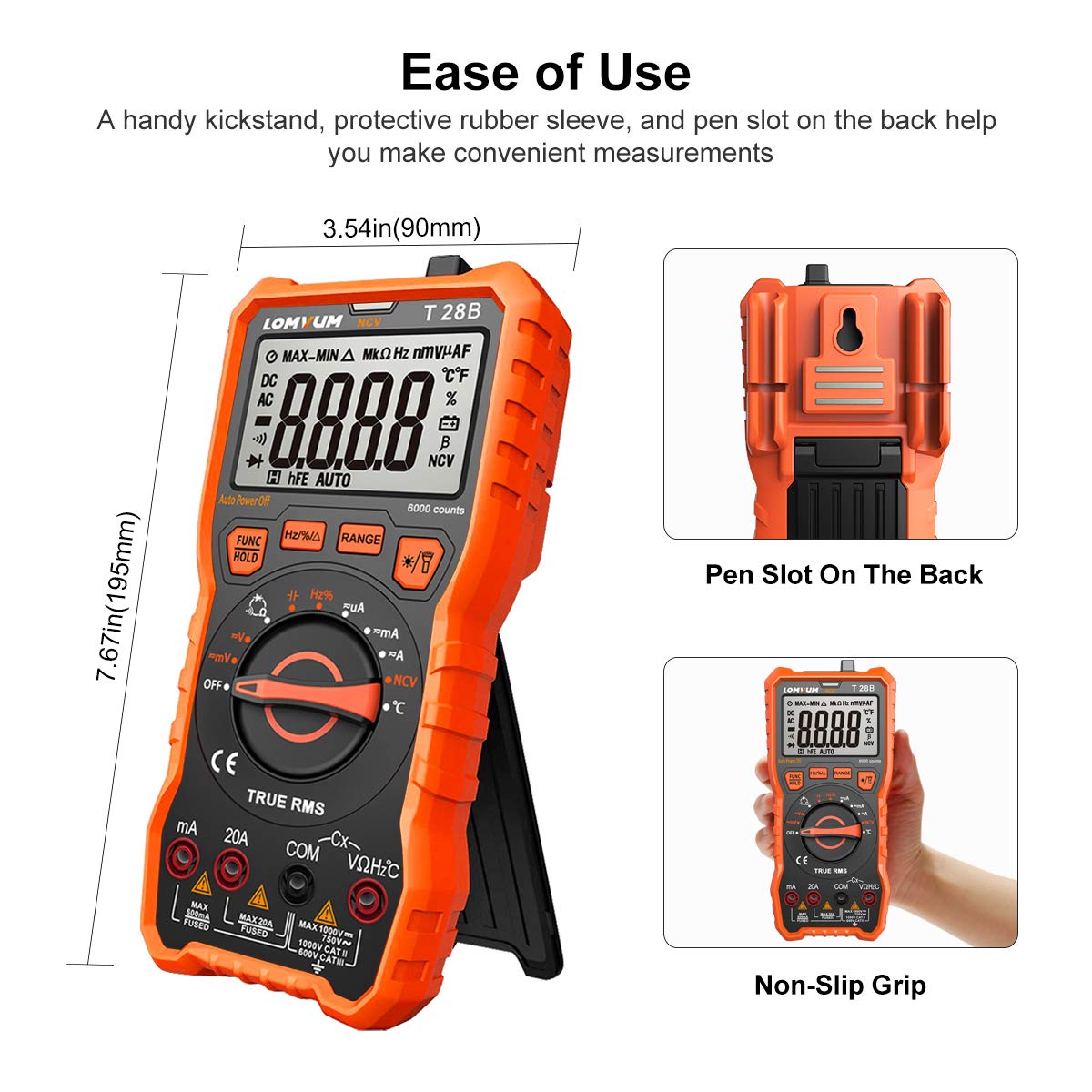
Image 5.4: The LOMVUM T28B Multimeter showcasing its ease-of-use features, including a handy kickstand for convenient measurements, a protective rubber sleeve for durability, and a pen slot on the back for storing test probes.
6. Maintenance
6.1 Fuse Replacement
The LOMVUM T28B is protected by two internal fuses:
- F1: 600mA/250V fast-acting fuse for the mA input.
- F2: 20A/250V fast-acting fuse for the 20A input.
If the meter fails to measure current, check and replace the appropriate fuse. Always use fuses of the specified type and rating.
To replace a fuse:
- Ensure the multimeter is turned OFF and disconnect all test leads.
- Remove the battery compartment cover (refer to Section 4.2).
- Carefully remove the back casing of the multimeter by unscrewing any additional screws.
- Locate the blown fuse(s) on the circuit board.
- Gently pry out the old fuse(s) and insert new fuse(s) of the correct rating.
- Reassemble the back casing and battery cover, ensuring all screws are securely fastened.
6.2 Cleaning
To clean the multimeter:
- Wipe the case with a damp cloth and mild detergent. Do not use abrasives or solvents.
- Ensure the meter is completely dry before use.
7. Troubleshooting
- No Display: Check battery installation and charge. Replace batteries if low.
- Incorrect Readings: Ensure correct function and range are selected. Verify test lead connections. Check for damaged test leads.
- Current Measurement Failure: Check and replace the appropriate fuse (600mA or 20A) if blown.
- Continuity/Diode Test Not Working: Ensure the rotary switch is set to the correct position and test leads are properly connected.
- NCV Not Detecting: Ensure the rotary switch is set to NCV. The NCV function detects AC voltage; it will not detect DC voltage.
8. Specifications
| Feature | Specification |
|---|---|
| Display | 6000 Counts, Backlit LCD |
| Ranging | Auto-Ranging and Manual Ranging |
| Safety Rating | 600V CAT IV, 1000V CAT III |
| Power Source | 4 x 1.5V AAA Batteries |
| Sampling Speed | 2-3 times per second |
| Overload Protection | Yes, with ceramic fuse tubes |
| Special Features | NCV, Data Hold, Backlight, Flashlight, Auto Shut-off, Kickstand, Hanging Magnet |
| Dimensions | 8.5 x 5.39 x 2.4 inches (215.9 x 136.9 x 61 mm) |
| Item Weight | 1.37 Pounds (0.62 Kilograms) |
| Manufacturer | LOMVUM |
| Model Number | T28B |
9. Warranty and Support
The LOMVUM T28B Digital Multimeter comes with a 2-year warranty from the date of purchase. Additionally, a Risk-Free Return within 30 Days is offered. For any questions, technical assistance, or warranty claims, please contact LOMVUM customer service.