
Audiolab 8300XP
Audiolab 8300XP Power Amplifier
User Manual
1. Introduction
The Audiolab 8300XP is a high-performance stereo power amplifier designed to deliver exceptional audio fidelity and power. It can operate in stereo mode, providing 280 Watts per channel, or be bridged to deliver 480 Watts as a monoblock amplifier. This manual provides essential information for the safe and optimal use of your 8300XP amplifier.

Figure 1.1: Audiolab 8300XP Power Amplifier, front angled view. This image shows the sleek black chassis with the power button and Audiolab logo visible on the front panel.
2. Safety Information
Please read all safety instructions carefully before operating the amplifier. Keep this manual for future reference.
- Power Source: Connect the unit only to an AC power source of the type marked on the rear panel. Ensure the voltage matches your local power supply.
- Ventilation: Do not block any ventilation openings. Ensure adequate airflow around the unit to prevent overheating.
- Water and Moisture: Do not expose the unit to rain or moisture. Do not place objects filled with liquids, such as vases, on the unit.
- Heat: Do not place the unit near heat sources such as radiators, heat registers, stoves, or other apparatus (including amplifiers) that produce heat.
- Servicing: Do not attempt to service this product yourself. Refer all servicing to qualified service personnel.
- Grounding: Ensure the power cord is properly grounded to prevent electric shock.
3. Unpacking and Contents
Carefully unpack the amplifier. Retain the packing materials for future transport. Inside the box, you should find:
- Audiolab 8300XP Power Amplifier
- AC Power Cord
- User Manual (this document)
If any items are missing or damaged, contact your dealer immediately.
4. Connections
4.1 Front Panel

Figure 4.1: Audiolab 8300XP Power Amplifier, front view. This image highlights the minimalist front panel design, featuring only the power button on the right and the Audiolab logo on the bottom right.
The front panel of the 8300XP is designed for simplicity and elegance. It features:
- Power Button: Located on the right side, used to turn the amplifier on or off.
- Power Indicator LED: A small LED (typically red) indicates the power status of the unit.
4.2 Rear Panel
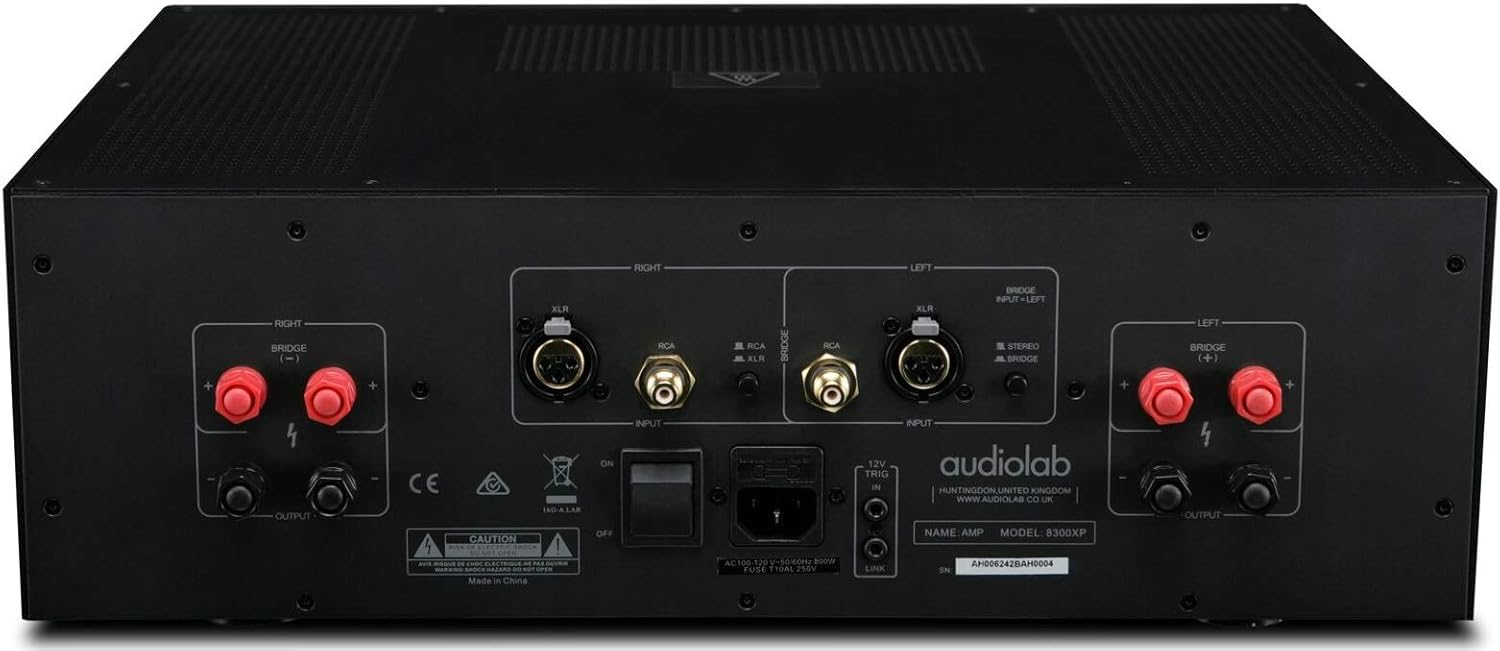
Figure 4.2: Audiolab 8300XP Power Amplifier, rear panel. This detailed view shows all input and output terminals, including XLR and RCA inputs, speaker terminals, and the power inlet.
The rear panel provides all necessary connections for integrating the 8300XP into your audio system:
- Balanced XLR Inputs (Left/Right): For connecting sources with balanced outputs, offering superior noise rejection.
- Unbalanced RCA Inputs (Left/Right): For connecting sources with unbalanced outputs.
- Speaker Outputs (Left/Right): High-quality binding posts for connecting your loudspeakers. Ensure correct polarity (+ to + and - to -).
- Bridge Mode Switch: A switch to select between Stereo and Bridged (Mono) operation. When in bridged mode, only use the designated input and speaker terminals.
- 12V Trigger In/Out: Allows for remote power control with other compatible components.
- AC Power Inlet: For connecting the supplied AC power cord.
5. Setup
5.1 Placement
Place the 8300XP on a stable, level surface away from direct sunlight, heat sources, and excessive moisture. Ensure there is adequate space around the unit for ventilation, especially above and behind it.
5.2 Connecting Speakers
- Ensure the amplifier is turned off and unplugged from the mains power.
- Connect your loudspeakers to the corresponding speaker output terminals on the rear panel.
- For stereo operation, connect the left speaker to the 'LEFT' terminals and the right speaker to the 'RIGHT' terminals. Ensure the positive (+) terminal on the amplifier connects to the positive (+) terminal on the speaker, and similarly for the negative (-) terminals.
- For bridged (mono) operation, set the 'BRIDGE' switch to 'ON'. Connect your single speaker to the designated bridged output terminals (refer to the markings on the rear panel).
5.3 Connecting Audio Sources
- Connect your pre-amplifier or audio source to either the Balanced XLR Inputs or Unbalanced RCA Inputs. Do not use both simultaneously for the same channel.
- If using balanced connections, ensure the XLR cables are securely connected.
- If using unbalanced connections, ensure the RCA cables are securely connected.
5.4 Power Connection
- Once all audio and speaker connections are made, connect the supplied AC power cord to the AC inlet on the rear panel of the amplifier.
- Plug the other end of the power cord into a suitable mains power outlet.
6. Operating Instructions
6.1 Powering On/Off
- To power on the amplifier, press the Power button on the front panel. The power indicator LED will illuminate.
- To power off the amplifier, press the Power button again. The power indicator LED will turn off.
6.2 Stereo vs. Bridged Mode
The 8300XP can operate as a two-channel stereo amplifier or a single-channel monoblock amplifier (bridged mode).
- Stereo Mode: For typical two-channel audio systems. Ensure the 'BRIDGE' switch on the rear panel is set to 'OFF'.
- Bridged Mode: For higher power output to a single speaker. Ensure the 'BRIDGE' switch on the rear panel is set to 'ON'. When in bridged mode, use only the designated input (typically the Left channel) and the specified bridged speaker terminals. Consult the rear panel markings for precise connections.
Caution: Ensure the amplifier is powered off before changing the Stereo/Bridge mode switch to prevent damage to the amplifier or speakers.
7. Maintenance
- Cleaning: Use a soft, dry cloth to clean the amplifier's exterior. Do not use abrasive cleaners, waxes, or solvents.
- Ventilation: Periodically check that the ventilation openings are clear of dust and debris.
- Power Cord: Inspect the power cord regularly for any signs of damage. If damaged, replace it with an approved cord of the same type.
8. Troubleshooting
If you experience issues with your Audiolab 8300XP, please consult the following table before contacting service personnel.
| Problem | Possible Cause | Solution |
|---|---|---|
| No power | Power cord not connected; Power outlet faulty; Internal fuse blown | Check power cord connection; Try a different outlet; Contact service for fuse replacement |
| No sound | Input cables loose/incorrect; Speaker cables loose/incorrect; Source component off/faulty; Amplifier in standby mode | Check all cable connections; Ensure source is active; Press power button to exit standby |
| Distorted sound | Input signal too high; Speaker impedance mismatch; Faulty cables | Reduce source volume; Check speaker impedance (should be 4-16 ohms); Replace cables |
| Overheating | Insufficient ventilation; Blocked vents | Ensure adequate space around amplifier; Clear any obstructions from vents |
9. Specifications
Key technical specifications for the Audiolab 8300XP Power Amplifier:
- Item model number: 8300XP
- Manufacturer: Audiolab
- Voltage: 100 Volts, 12 Volts (Trigger)
- Mounting Type: Surface Mount
- Number of Channels: 2 (Stereo)
- Power Output (Stereo): 280 Watts per channel
- Power Output (Bridged Mono): 480 Watts
10. Warranty and Support
Your Audiolab 8300XP amplifier is covered by a manufacturer's warranty. Please refer to the warranty card included with your product or visit the official Audiolab website for detailed warranty terms and conditions specific to your region.
For technical support, service, or further inquiries, please contact your authorized Audiolab dealer or distributor. You can also find support information on the official Audiolab website: www.audiolab.co.uk
Related documents8300XP


Ask a question about this manual
Ask about setup, troubleshooting, compatibility, parts, safety, or missing instructions. Manuals+ will review the question and use this page’s manual context to help answer it.