
1. Introduction
This manual provides comprehensive instructions for the installation, operation, and maintenance of your Protec Presence V2 Immobilizer Anti-theft Alarm. Please read this manual thoroughly before using the device to ensure proper function and safety.
2. Safety Information
Always follow these safety guidelines to prevent damage to the device or injury:
- Ensure professional installation for vehicle electrical systems.
- Do not attempt to disassemble or modify the device.
- Keep the device away from water and extreme temperatures.
- Use only specified power sources and accessories.
3. Package Contents
Verify that all items are present in the package:
- Protec Presence V2 Immobilizer Main Unit
- Presence Remote Control (x2)
- Wiring Harness
- Relays (x2)
- User Manual
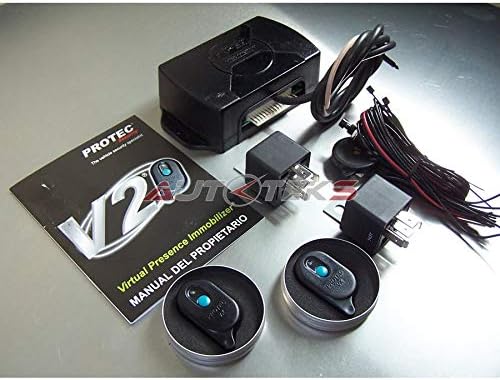
Figure 3.1: Complete Protec Presence V2 Immobilizer Kit. This image displays all components included in the package: the main control unit, two presence remote controls, the necessary wiring harness, two relays, and the printed user manual.
4. Setup and Installation
Installation of the Protec Presence V2 Immobilizer should be performed by a qualified automotive technician. Incorrect installation can lead to vehicle damage or malfunction.
4.1. Wiring Diagram (Conceptual)
The main unit connects to your vehicle's electrical system to interrupt critical circuits (e.g., ignition, fuel pump) when the presence remote is not detected. Refer to the detailed wiring diagram provided in the physical manual for specific connections.
4.2. Remote Control Pairing
The remote controls are typically pre-paired with the main unit. If re-pairing is necessary, consult the specific instructions in the physical manual or contact technical support.
5. Operating Instructions
The Protec Presence V2 Immobilizer operates automatically based on the proximity of the remote control.
5.1. Arming the System
The system automatically arms when the vehicle's ignition is turned off and the presence remote control moves out of range (typically a few meters). A confirmation signal (e.g., LED indicator, subtle sound) may be emitted.

Figure 5.1: Discreet placement of the Presence Remote Control. This image shows the compact remote control, designed to be carried discreetly, for example, in a pocket, allowing for automatic system operation without user interaction.
5.2. Disarming the System
The system automatically disarms when the presence remote control is detected within range of the main unit (e.g., when you approach the vehicle with the remote). The vehicle's ignition can then be started normally.
5.3. Anti-theft Activation
If the vehicle is started without the presence remote control, or if the remote moves out of range while the vehicle is running, the immobilizer will activate after a short delay. This will typically involve cutting off the engine or fuel supply, preventing the vehicle from being driven further.
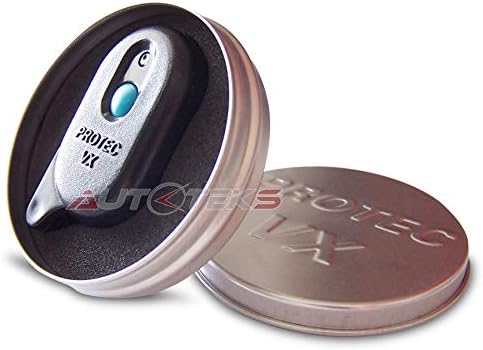
Figure 5.2: Protec Presence V2 Remote Control in its packaging. This image displays one of the compact remote controls housed within its protective metal tin, as it would be received upon purchase.
6. Maintenance
The Protec Presence V2 Immobilizer requires minimal maintenance.
- Remote Control Battery: Replace the battery in the presence remote control when the indicator light dims or the range decreases. Refer to the physical manual for battery type and replacement instructions.
- Cleaning: Wipe the main unit and remote controls with a soft, dry cloth. Do not use harsh chemicals or abrasive cleaners.
- Regular Checks: Periodically test the system's arming and disarming functions to ensure proper operation.
7. Troubleshooting
| Problem | Possible Cause | Solution |
|---|---|---|
| System does not arm. | Remote control still in range; faulty remote battery. | Ensure remote is out of range; replace remote battery. |
| Vehicle does not start (immobilized). | Remote control not detected; system armed. | Ensure remote is with you and within range; check remote battery. |
| Anti-theft activates unexpectedly. | Remote control moved out of range; signal interference. | Keep remote control with you at all times; avoid strong electromagnetic fields. |
If problems persist, contact Protec technical support.
8. Specifications
- Model: Protec Presence V2
- Type: Proximity-based Vehicle Immobilizer
- Compatible Devices: Cars
- Remote Control: Yes, included (2 units)
- ASIN: B07RZWPSFM
9. Warranty and Support
For warranty information, please refer to the documentation included with your product or visit the official Protec website. For technical support, contact your authorized dealer or Protec customer service.
Website: www.protec.com (Note: This is a placeholder URL as no official website was provided in the input.)
Email: support@protec.com (Note: This is a placeholder email as no official email was provided in the input.)