
ZERO PEST REPELLER ZS-5033
ZERO PEST REPELLER Ultrasonic Pest Repeller ZS-5033 User Manual
Model: ZS-5033
Brand: ZERO PEST REPELLER
1. Introduction
The ZERO PEST REPELLER Ultrasonic Pest Repeller is an electronic device designed to deter various pests from your indoor living spaces. Utilizing advanced ultrasonic technology, this repeller emits high-frequency sound waves that are irritating to pests but inaudible to humans and most household pets. This product offers a chemical-free and safe method for managing common household pests.

Image: Four ZERO PEST REPELLER units, illustrating the product packaging.
2. Safety Information
- This device operates without the use of poisons, traps, chemicals, or insecticides, making it safe for use around children and most household pets.
- The ultrasonic sound waves emitted are generally inaudible to humans and non-rodent pets.
- Ensure the device is plugged into a standard, properly functioning electrical outlet.
- Do not cover the device or obstruct its ultrasonic emission area.
- Keep the device dry and away from water or excessive moisture.

Image: A family with a baby, highlighting the product's safety for humans and pets.
3. Setup
Setting up your ZERO PEST REPELLER is straightforward:
- Unpack the device from its packaging.
- Locate a standard electrical outlet in the area where pest control is desired.
- Plug the device directly into the electrical outlet. Ensure it is firmly seated.
- The device will automatically begin operating. A blue indicator light will illuminate, signifying that the unit is active.
No additional settings or adjustments are required. The device is designed for continuous operation.
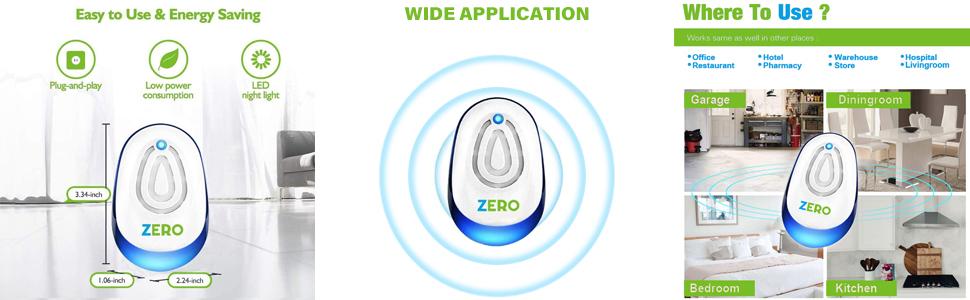
Image: A diagram illustrating the plug-and-play setup and energy efficiency.
Setup Demonstration Video
Video: A demonstration of plugging in the ZERO PEST REPELLER and its nightlight feature.
4. Operating Instructions
The ZERO PEST REPELLER operates continuously once plugged in. It emits ultrasonic waves that create an uncomfortable environment for pests, encouraging them to leave the protected area. This method is designed to be non-lethal and environmentally friendly.
Key Features:
- Ultrasonic Technology: Emits high-frequency sound waves (20-65kHz) that are effective against a range of pests including mice, mosquitoes, flies, rats, roaches, crickets, spiders, and ants.
- Nightlight Function: The device includes a convenient blue LED nightlight. This light can be toggled on or off by pressing the button located on the front of the unit.
- Continuous Operation: For optimal results, keep the device plugged in and operating 24/7.

Image: The repeller unit surrounded by various pests it is designed to deter.

Image: A kitchen setting with the repeller, emphasizing a clean, pest-free environment.
5. Placement Guidelines
Proper placement is crucial for the effectiveness of the ultrasonic pest repeller:
- Each unit provides effective coverage for an area of up to 1800 square feet.
- For optimal results, it is recommended to use one unit per room.
- Plug the device into an outlet that is clear of furniture, curtains, or other objects that could obstruct the ultrasonic waves. Walls and solid objects can block the waves.
- Place the device in an open area, ideally 20-40 inches above the floor, to allow for maximum sound wave dispersion.
- Avoid placing units behind large appliances or in areas with thick carpeting, as these can absorb ultrasonic waves.

Image: A floor plan demonstrating strategic placement of multiple units for comprehensive coverage.
6. Maintenance
The ZERO PEST REPELLER requires minimal maintenance:
- Keep the device clean by wiping it with a dry, soft cloth. Do not use water or cleaning solutions directly on the unit.
- Ensure the vents on the device are free from dust and debris to maintain optimal performance.
- No batteries or refills are needed for this electronic device.
7. Troubleshooting
- Pests still present after initial setup: It may take 3-4 weeks for the ultrasonic waves to effectively drive pests away. An initial increase in pest activity might be observed as they are disturbed and attempt to leave the area. Continue to use the device consistently.
- No indicator light: Ensure the device is securely plugged into a working electrical outlet. If the light still does not illuminate, the unit may be faulty.
- Reduced effectiveness: Check for any obstructions (furniture, curtains) blocking the device's emission area. Relocate the unit to a more open space if necessary.

Image: Illustrates the expected timeframe for achieving a pest-free environment.
8. Specifications
| Feature | Detail |
|---|---|
| Brand | ZERO PEST REPELLER |
| Model Number | ZS-5033 |
| Dimensions | 0.1 x 0.1 x 0.1 inches |
| Item Weight | 8.1 ounces |
| Power Source | Electric (Plug-in) |
| Target Species | Ant, Cockroach, Cricket, Fly, Mosquito, Mouse, Rat, Spider |
| Coverage Area | Up to 1800 sq ft per unit |
| UPC | 728891069776 |
9. Warranty and Support
For information regarding product warranty, please refer to the documentation included with your purchase or contact the manufacturer directly. For technical support or further inquiries, please consult the contact details provided on the product packaging or the official ZERO PEST REPELLER website.
Ask a question about this manual
Ask about setup, troubleshooting, compatibility, parts, safety, or missing instructions. Manuals+ will review the question and use this page’s manual context to help answer it.