
1. Introduction
This manual provides detailed instructions for the installation, operation, and maintenance of your Marsrock 1300W MPPT Pure Sine Wave Grid-Tie Micro Inverter. This device is designed to convert direct current (DC) from solar panels or wind turbines into alternating current (AC) for use in your home or to feed into the utility grid.
Key Features:
- Compact and Easy Installation: Designed for straightforward setup in various environments.
- Advanced MPPT Functionality: Maximizes power extraction from solar panels, enhancing system efficiency.
- Pure Sine Wave Output: Provides stable and clean power suitable for sensitive electronics.
- Built-in Cooling Fan: Manages internal temperature to ensure efficient and reliable operation under load.
- High Energy Conversion Efficiency: Optimizes the conversion of solar power into usable electricity.
2. Safety Information
Read all safety instructions carefully before installation and operation. Failure to follow these instructions may result in electric shock, fire, or serious injury.
- Ensure all electrical connections are made by qualified personnel and comply with local electrical codes.
- Do not attempt to disassemble or repair the inverter. Refer all servicing to qualified service personnel.
- Install the inverter in a well-ventilated area, away from flammable materials and direct sunlight.
- Ensure the DC input voltage from your solar panels or wind turbine is within the specified range (20-50V DC).
- Always disconnect both AC and DC power before performing any maintenance or wiring.
- Keep children away from the inverter and its connections.
3. Package Contents
Verify that all items listed below are included in your package:
- Inverter Body
- Install kits
- Instruction Manual

Image: Contents of the Marsrock 1300W Grid-Tie Micro Inverter package, showing the inverter unit, connection cables, and the instruction manual.
4. Product Overview
Familiarize yourself with the physical components and dimensions of your Marsrock 1300W Grid-Tie Micro Inverter.

Image: Dimensional view of the Marsrock 1300W Grid-Tie Micro Inverter, indicating its length, width, and height.
Front Panel (AC Side):

Image: Close-up of the inverter's AC side, highlighting the AC output port, power switch, and LED indicators.
- AC GRID Port: Connects to the utility grid.
- Power Switch: Toggles the inverter's power.
- RUN Indicator (Green): Indicates normal operation.
- ERROR Indicator (Red): Indicates a fault or error condition.
- Cooling Fan: Dissipates heat during operation.
Rear Panel (DC Side):
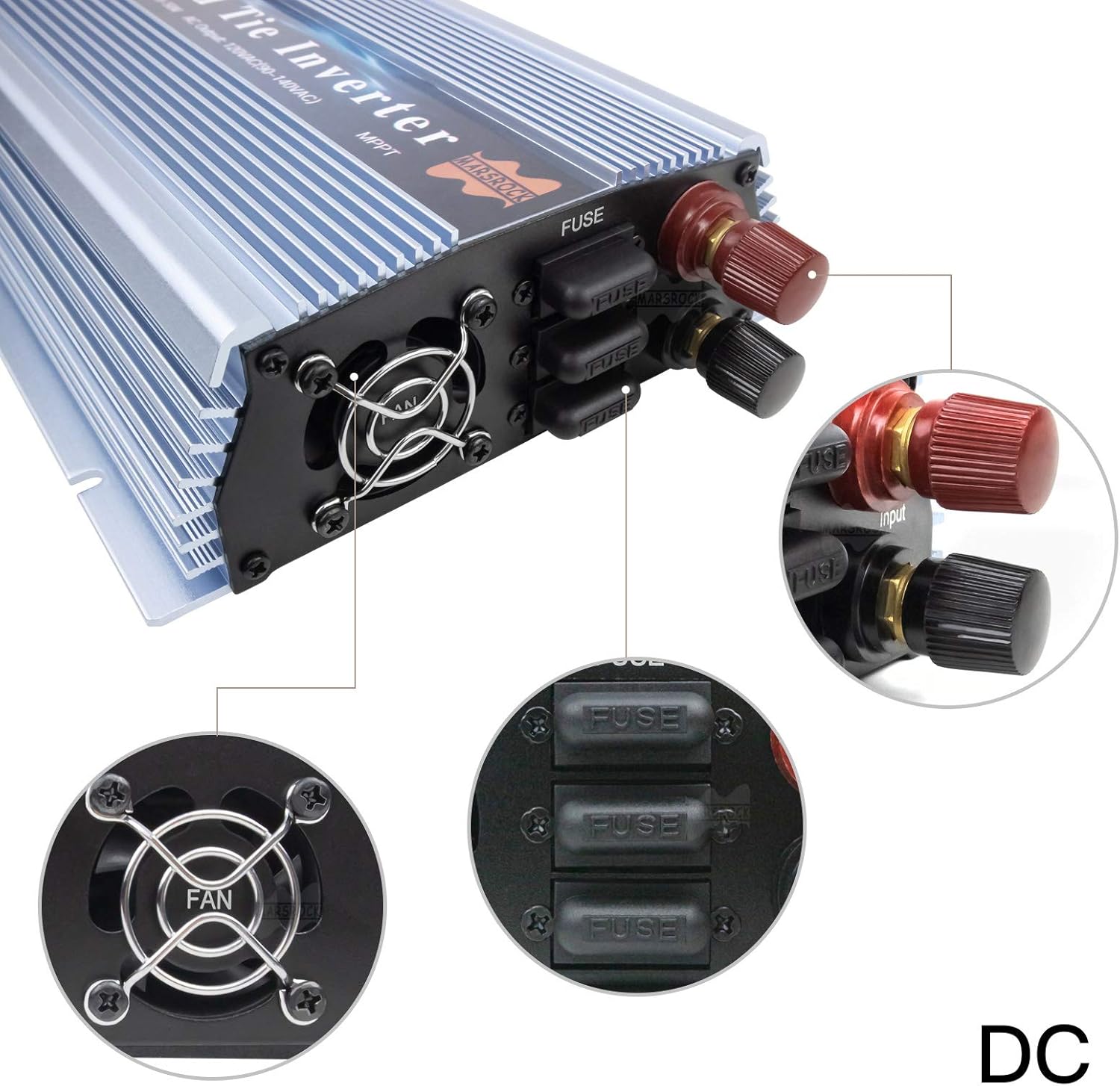
Image: Close-up of the inverter's DC side, showing the DC input terminals and fuse locations.
- DC Input (+): Positive terminal for DC input.
- DC Input (-): Negative terminal for DC input.
- FUSE: Replaceable fuses for DC input protection.
- Cooling Fan: Additional fan for heat dissipation.

Image: Comprehensive labeled diagram of both the AC and DC connection sides of the inverter.

Image: Visual representation of the inverter's cooling fan in operation, indicating airflow.
5. Installation
Follow these steps for proper installation of your grid-tie micro inverter. Refer to the wiring diagram and video for visual guidance.
Installation Steps:
- Mounting: Choose a suitable location for mounting the inverter. Ensure it is a cool, dry, and well-ventilated area, protected from direct sunlight and moisture.
- DC Connection (Step 1 in video): Connect the DC input cables from your solar panels or wind turbine to the DC input terminals on the inverter. Ensure correct polarity (positive to positive, negative to negative). The video demonstrates connecting the DC input first.
- AC Connection (Step 3 in video): Connect the AC output cable from the inverter's AC GRID port to your home's electrical system or directly to the utility grid, following local electrical codes. The video shows plugging in the AC power cord.
- Grounding: Ensure the inverter is properly grounded according to local electrical standards.
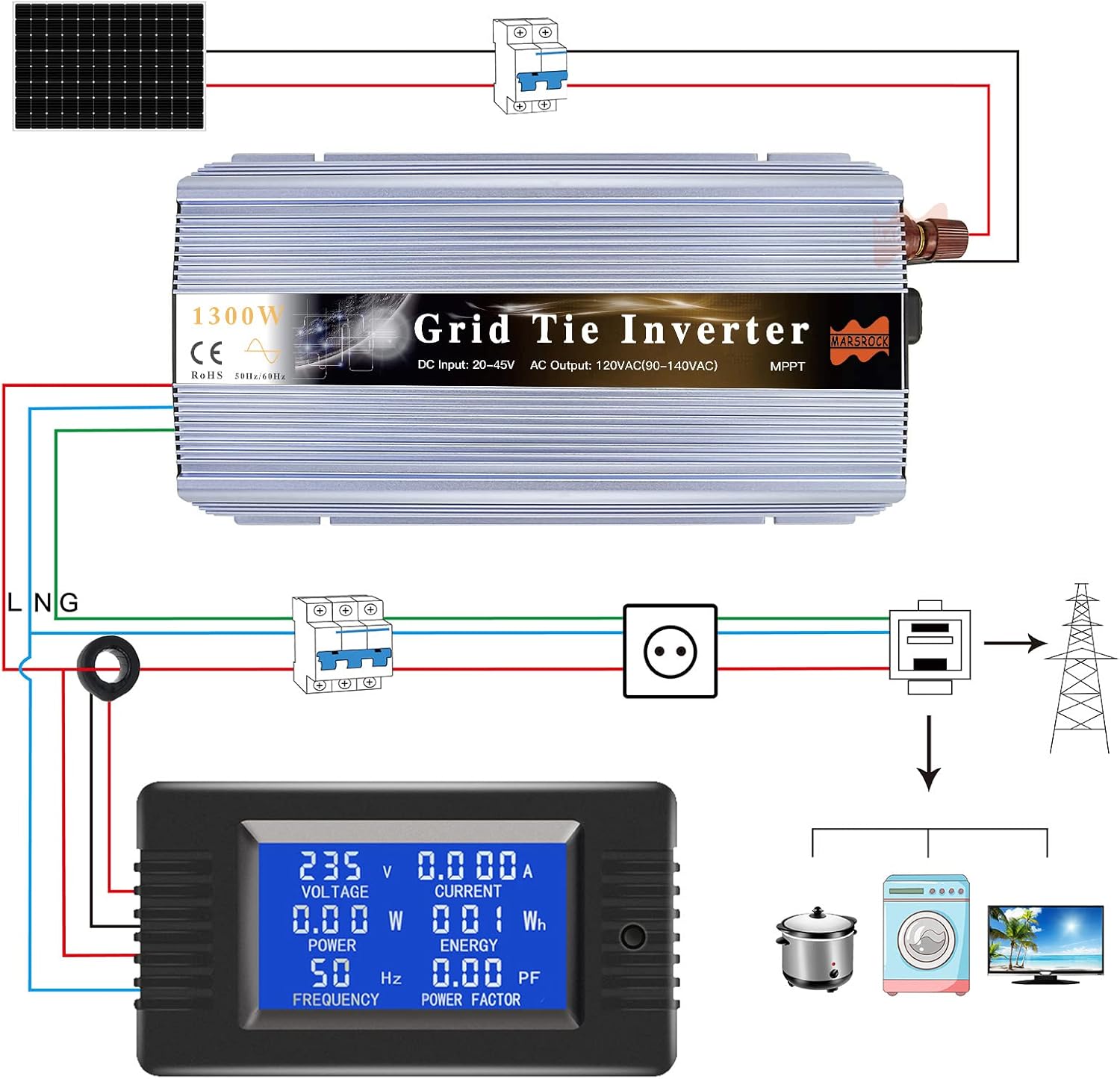
Image: Detailed wiring diagram illustrating how to connect the inverter to solar panels, the grid, and a power meter.
Installation and Operation Video:
Video: This official Marsrock Power video demonstrates the connection process for the GTI1300 inverter, including DC input and AC grid connection, and shows the indicator lights during startup and operation.
6. Operating Instructions
Once installed, operating the inverter is straightforward.
- Power On (Step 2 in video): After ensuring all connections are secure, turn on the inverter using the power switch on the AC side. The red ERROR light will illuminate briefly, then turn off.
- Grid Connection: Plug the AC power cord into the AC GRID port. The blue AC GRID light will turn on.
- Startup Sequence: The green RUN light will begin flashing, indicating the inverter is performing its self-test and synchronizing with the grid. This process may take a few seconds.
- Normal Operation: Once synchronized, the green RUN light will become solid, indicating that the inverter is actively converting DC power to AC and feeding it into the grid. The video shows the green light becoming solid as power generation begins.
- Monitoring: You can monitor the power output using an external power meter (not included) connected to your system, as shown in the wiring diagram and video.

Image: Examples of common household appliances that can be powered by the inverter's pure sine wave output.
7. Specifications
Detailed technical specifications for the Marsrock 1300W MPPT Grid-Tie Micro Inverter:
| Specification | Value |
|---|---|
| Product Dimensions | 2.2 x 5 x 11 inches |
| Item Weight | 6.21 pounds |
| Item Model Number | GTI1300W36V110V |
| Brand | Marsrock |
| Recommended Uses For Product | Home |
| Power Source | Solar Powered |
| Wattage | 1300 watts |
| Model Name | GTI Series Inverter |
8. Maintenance
Regular maintenance ensures optimal performance and longevity of your inverter.
- Cleaning: Periodically clean the exterior of the inverter with a dry, soft cloth. Ensure the cooling fan vents are free from dust and debris to maintain proper airflow.
- Inspection: Regularly inspect all electrical connections for tightness and signs of corrosion or damage.
- Environment: Ensure the installation environment remains within the recommended temperature and humidity ranges.
- Fuse Replacement: If the inverter fails to power on or shows an error related to DC input, check the fuses on the DC side. Replace blown fuses with ones of the same type and rating.
9. Troubleshooting
If you encounter issues with your inverter, refer to the following troubleshooting guide:
| Problem | Possible Cause | Solution |
|---|---|---|
| Inverter does not power on (no lights) | No DC input power; Blown DC fuse; Faulty power switch. | Check DC input connections and voltage; Replace DC fuses; Ensure power switch is ON. |
| Red ERROR light is on | DC input voltage out of range; Over-temperature; Internal fault. | Verify DC input voltage (20-50V); Ensure adequate ventilation; Contact support if issue persists. |
| Green RUN light flashing, not solid | Inverter is synchronizing with grid; Grid voltage/frequency unstable. | Wait for synchronization (up to 30 seconds); Check grid stability; Ensure AC connection is secure. |
| Low power output | Insufficient DC input power; Shading on solar panels; Suboptimal MPPT operation. | Check solar panel output; Clear any shading; Ensure panels are clean. |
| Inverter overheats and shuts down | Poor ventilation; Blocked fan; Excessive ambient temperature. | Ensure clear airflow around inverter; Clean fan and vents; Relocate to a cooler area if necessary. |
If troubleshooting steps do not resolve the issue, contact customer support for further assistance.
10. Warranty and Support
The Marsrock 1300W MPPT Grid-Tie Micro Inverter typically comes with a manufacturer's warranty. Please refer to the warranty card included in your package for specific terms and conditions, including the warranty period and coverage details.
For technical support, service, or warranty claims, please contact Marsrock customer service through the retailer where you purchased the product or visit the official Marsrock website for contact information.