
Product Overview
The Govee LED Strip Lights offer a versatile lighting solution for enhancing various indoor spaces. This 32.8ft RGB LED light set comes with a remote control, providing 20 vibrant colors and a DIY mode for personalized lighting experiences. Designed for easy installation, these lights are ideal for bedrooms, ceilings, kitchens, and other areas where dynamic and customizable illumination is desired.
What's Included
- 2 x 16.4ft LED Strip Lights (Total 32.8ft)
- 1 x Remote Control
- 1 x Control Box
- 1 x Power Adapter
- Mounting Clips (quantity may vary)
- 1 x User Manual (this document)
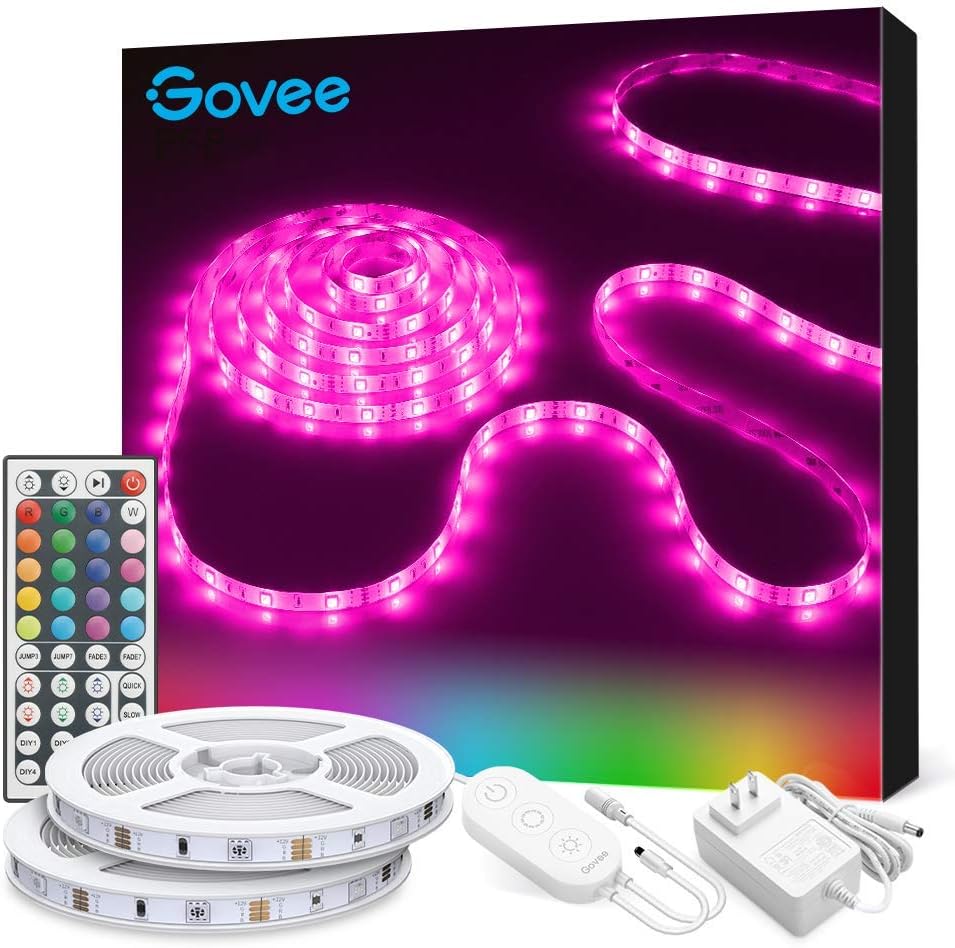
Image: The Govee LED Strip Lights package contents, including two rolls of LED strips, a remote control, a control box, and a power adapter.
Setup and Installation
Preparation
Before installation, ensure the surface is clean and dry. For optimal adhesion, wipe the surface with a clean, dry cloth to remove any dust or debris. A smooth, non-porous surface is recommended for best results.

Image: A detailed view of the Govee LED strip highlighting its bright 5050 LEDs, strong 3M adhesive backing, and designated cuttable sections for customization.
Attaching the LED Strips
- Unroll the LED strip lights completely before installation to prevent damage.
- Carefully peel off the protective backing from the 3M adhesive on the back of the strip.
- Press the strip firmly onto the prepared surface, ensuring continuous contact along the entire length.
- For additional security, especially around corners or on textured surfaces, use the included mounting clips. Secure them with screws if necessary.
- Connect the end of the LED strip to the control box.
- Connect the control box to the power adapter.
- Plug the power adapter into a standard electrical outlet.

Image: Govee LED strip lights illuminating a modern living room, demonstrating their ability to create vibrant and colorful ambient lighting.

Image: Govee LED strip lights installed in a bar area, showcasing their application for large space decoration and creating an inviting atmosphere.
Operating Instructions
Using the Remote Control
The included remote control provides comprehensive functionality for your Govee LED strip lights. Ensure the remote's IR emitter is pointed towards the control box for effective communication. The remote has an effective range of up to 32.8 feet.

Image: A remote control for Govee LED lights, illustrating its use for controlling lighting within a 32.8ft range in a bedroom environment.
- Power On/Off: Press the Power button to toggle the lights on or off.
- Color Selection: Select from 20 vibrant preset colors using the dedicated color buttons.
- DIY Colors: Use the DIY buttons to create and save your own custom color combinations.
- Brightness Adjustment: Adjust the light intensity through 6 brightness levels using the Brightness Up/Down buttons.
- Mode Selection: Cycle through various dynamic lighting modes (e.g., Flash, Fade, Jump) using the Mode buttons.
Using the Control Box
The control box attached to the LED strip offers basic control functions directly on the unit itself.
- Power Button: Press to turn the lights on or off.
- Color/Mode Button: Short press to cycle through available colors or dynamic modes.
- Brightness Button: Long press to adjust the brightness level.
Maintenance
To ensure the longevity and optimal performance of your Govee LED Strip Lights, adhere to these maintenance guidelines:
- Cleaning: Gently wipe the LED strips with a dry, soft cloth to remove dust. Avoid using liquid cleaners, solvents, or abrasive materials, as these can damage the strip or its adhesive.
- Adhesive Care: Once installed, avoid frequently repositioning the strips, as this can weaken the adhesive and lead to detachment.
- Storage: If storing the lights for an extended period, ensure they are clean, dry, and rolled neatly to prevent kinks or damage to the LEDs and circuitry.
- Power Off: Always unplug the power adapter from the wall outlet when the lights are not in use or during cleaning and maintenance.
Troubleshooting
| Problem | Solution |
|---|---|
| Lights do not turn on. | Ensure the power adapter is securely plugged into both the wall outlet and the control box. Verify that the power button on the remote or control box has been pressed. |
| Remote control is not working. | Check the battery in the remote control and replace it if necessary. Ensure there are no physical obstructions between the remote's IR emitter and the control box's receiver. The remote has a maximum range of 32.8ft. |
| Lights are dim or flickering. | Adjust the brightness settings using the remote control. Ensure the power supply is stable and sufficient for the entire length of the strip. |
| Colors are not accurate or consistent. | Ensure all connections between the strip, control box, and power adapter are secure. If the strip was cut and reconnected, verify that the connections at the cut points are correct and properly aligned. |
Product Specifications
- Model: H6189
- Length: 32.8 ft (2 x 16.4ft rolls)
- Color: RGB (Red, Green, Blue)
- Light Source Type: LED
- Number of Light Sources: 300
- Voltage: 12 Volts
- Wattage: 36 watts
- Control Method: Remote Control, Control Box
- Connectivity Protocol: IR
- Indoor/Outdoor Usage: Indoor
- Special Features: Adjustable, Color Changing, Dimmable, Remote Controlled
- Material: Plastic
- Item Weight: 1.06 pounds (0.48 Kilograms)
- Manufacturer: Govee
Warranty and Support
For detailed warranty information, product registration, and customer support, please visit the official Govee website. You can also find frequently asked questions and additional resources there.
A full user manual in PDF format is available for download: Govee LED Strip Lights User Manual (PDF)
Explore more Govee products and accessories at the official Govee Store: Govee Store on Amazon


