
Ashdown STUDIO15
Ashdown Studio 15 1x15" 300-watt Bass Combo Amp User Manual
Model: STUDIO15 | Brand: Ashdown
1. Introduction
The Ashdown Studio 15 is a lightweight and portable 300-watt bass combo amplifier, designed to deliver the renowned Ashdown tone. Featuring a custom 15-inch NEO speaker, this amplifier is suitable for practice, rehearsals, and small to medium-sized gigs. This manual will guide you through the features, setup, operation, and maintenance of your Studio 15 amplifier.
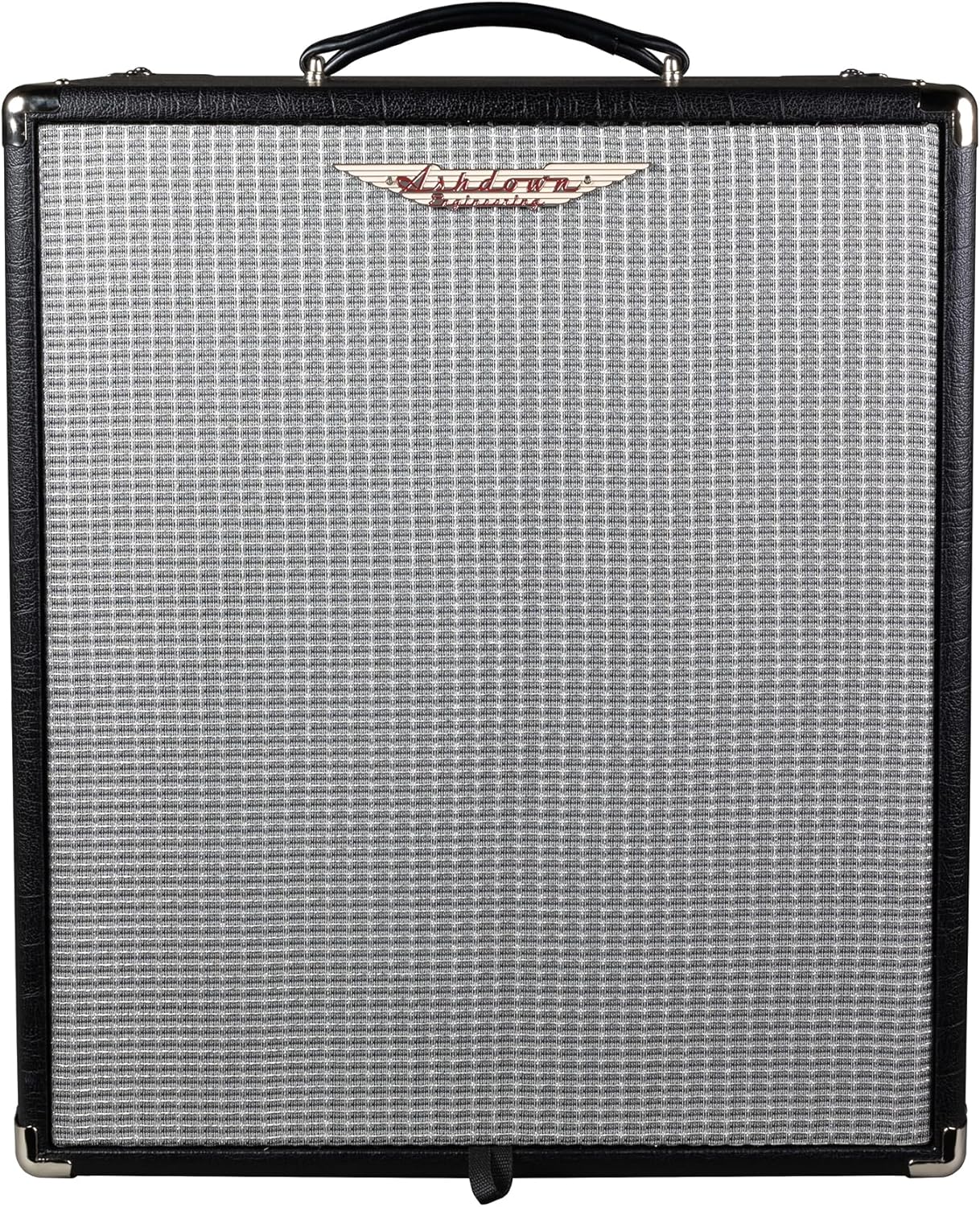
Figure 1: Front view of the Ashdown Studio 15 Bass Combo Amplifier.
2. Key Features
- Power Output: 300 Watts RMS
- Speaker: 1x15" Custom lightweight NEO speaker
- Input: Passive/Active switch for instrument input
- Tone Shaping: 5-band EQ (Bass, Lo-Mid, Middle, Hi-Mid, Treble)
- Overdrive: Footswitchable valve emulated overdrive
- Connectivity: XLR DI output, FX loop, Headphone output, Line In
- Design: Solid-state, 1-channel, lightweight and portable
3. Setup Guide
Follow these steps to set up your Ashdown Studio 15 amplifier for the first time:
- Unpacking: Carefully remove the amplifier from its packaging. Retain all packaging materials for future transport or storage.
- Placement: Place the amplifier on a stable, level surface. Ensure adequate ventilation around the unit.
- Power Connection: Connect the supplied power cord to the amplifier's AC input on the rear panel and then to a suitable grounded AC power outlet. Ensure the power switch is in the 'OFF' position before connecting.
- Instrument Connection: Connect your bass guitar to the 'INPUT' jack on the front panel using a high-quality instrument cable. Use the 'PASSIVE/ACTIVE' switch to match your instrument's output level.
- External Connections (Optional):
- FX Loop: Connect external effects pedals to the 'FX SEND' and 'FX RETURN' jacks.
- DI Output: Use the 'DI' XLR output to connect to a mixing console or recording interface.
- Headphones: Connect headphones to the 'HEADPHONES' jack for silent practice.
- Line In: Connect an external audio source (e.g., MP3 player) to the 'LINE IN' jack for practice with backing tracks.

Figure 2: Rear panel of the Ashdown Studio 15, showing power input and other connections.
4. Operating Instructions
Familiarize yourself with the front panel controls to get the most out of your amplifier.

Figure 3: Front panel controls of the Ashdown Studio 15.
4.1. Front Panel Controls
- Power Switch: Turns the amplifier ON/OFF.
- Input Jack: Connect your instrument here.
- Passive/Active Switch: Select 'Passive' for standard passive pickups and 'Active' for instruments with active electronics to prevent signal clipping.
- Shape Button: Engages a pre-set EQ curve for instant tone shaping.
- Pre-Gain Control: Adjusts the input sensitivity and overall gain before the tone controls.
- Drive Control: Engages and adjusts the level of the valve emulated overdrive. This can also be activated via a footswitch (not included).
- EQ Controls (Bass, Lo-Mid, Middle, Hi-Mid, Treble): These five rotary controls allow precise shaping of your bass tone across different frequency ranges.
- Volume Control: Adjusts the overall output volume of the amplifier.
- FX Loop (Send/Return): Connect external effects processors.
- DI Output (XLR): Provides a balanced output for connecting to a PA system or recording device.
- Headphones Jack: For private practice. Mutes the main speaker output when headphones are connected.
- Line In Jack: Connect external audio devices like an MP3 player or drum machine.
- F/S (Footswitch) Jack: Connect an optional footswitch to control the Drive function.
5. Maintenance
Proper care will ensure the longevity and optimal performance of your Ashdown Studio 15 amplifier.
- Cleaning: Use a soft, dry cloth to clean the exterior of the amplifier. Do not use abrasive cleaners or solvents.
- Ventilation: Ensure that the ventilation grilles are clear of obstructions to prevent overheating.
- Storage: Store the amplifier in a cool, dry place away from direct sunlight and extreme temperatures.
- Transportation: When transporting the amplifier, ensure it is securely packed to prevent physical damage.
- Power Cord: Regularly inspect the power cord for any signs of damage. If damaged, replace it with an approved cord.
6. Troubleshooting
If you encounter issues with your Ashdown Studio 15, refer to the following common troubleshooting steps:
- No Power:
- Check if the power cord is securely connected to both the amplifier and the wall outlet.
- Verify that the wall outlet is functional by plugging in another device.
- Check the fuse (if accessible and user-replaceable, refer to specifications for type).
- No Sound:
- Ensure the instrument cable is properly connected to both the instrument and the amplifier's input.
- Check the 'Volume' control and ensure it is turned up.
- If using headphones, disconnect them to check the main speaker output.
- Verify that the 'Passive/Active' switch is correctly set for your instrument.
- Test with a different instrument cable and instrument to rule out faulty equipment.
- Distorted Sound:
- Reduce the 'Pre-Gain' control.
- If the 'Drive' control is engaged, reduce its level or disengage it.
- Ensure the 'Passive/Active' switch is correctly set for your instrument.
- Hum or Noise:
- Ensure all cables are properly shielded and in good condition.
- Try plugging the amplifier into a different electrical outlet, preferably on a different circuit.
- Keep the amplifier away from other electronic devices that may cause interference.
If these steps do not resolve the issue, please contact Ashdown customer support or an authorized service center.
7. Specifications
| Feature | Specification |
|---|---|
| Model | STUDIO15 |
| Output Wattage | 300 Watts |
| Speaker | 1x15" NEO Speaker |
| Amplifier Type | Solid-state, 1-channel |
| EQ | 5-band (Bass, Lo-Mid, Middle, Hi-Mid, Treble) |
| Controls | Pre-Gain, Drive, EQ, Volume, Passive/Active Switch, Shape Button |
| Connectivity | Input, FX Send/Return, DI Output (XLR), Headphone Output, Line In, Footswitch Jack |
| Item Weight | 20 pounds (9.1 Kilograms) |
| Product Dimensions | 20.47 x 14.57 x 16.54 inches |
| Color | Black |
| Power Source | Corded Electric |
8. Warranty and Support
Ashdown Engineering products are manufactured to the highest standards and are covered by a limited warranty against defects in materials and workmanship. For specific warranty terms and conditions, please refer to the warranty card included with your product or visit the official Ashdown Engineering website.
For technical support, service, or spare parts, please contact your authorized Ashdown dealer or Ashdown Engineering customer service directly. Contact information can typically be found on the official Ashdown website or on your product's packaging.
When contacting support, please have your product model number (STUDIO15) and serial number ready. The serial number is located on the rear panel of the amplifier.
Related Documents - STUDIO15
 |
Ashdown Original Valve Pre Amp Pedal User Guide | Features and Controls Comprehensive user guide for the Ashdown Original Valve Pre Amp Pedal. Learn about its features, controls, and how to optimize your bass tone with this versatile valve preamp. |
 |
Ashdown Superfly Bass Pre-Amplifier User Manual and Safety Guide Comprehensive guide to the Ashdown Superfly bass pre-amplifier, covering safety instructions, front and back panel facilities, operation, specifications, and the Superfly Editor software. |
 |
Ashdown Original Head Bass Amplifier User Guide Comprehensive user guide for the Ashdown Original Head bass amplifier, detailing its features, front panel controls, rear panel connections, and operational guidance for musicians. |
 |
Ashdown Tone Pocket V2.0 & Bluetooth User Manual Comprehensive user manual for the Ashdown Tone Pocket V2.0 and Bluetooth headphone pre-amplifier, detailing features, controls, connectivity, specifications, and package contents for musicians. |
 |
Ashdown Toneman 300/600 Bass Amplifier User Manual User manual for the Ashdown Toneman 300 and Toneman 600 bass amplifiers, covering features, controls, specifications, warranty, and registration. |
 |
Ashdown ABM EVO IV Series Bass Amplifier User Manual Comprehensive user manual for the Ashdown ABM EVO IV series bass amplifiers, covering features, operation, safety, specifications, and troubleshooting for models like the ABM-600, ABM-1200, HOD-600, and Interstellar-600. |