
Introduction
Thank you for choosing the YSSHUI TSA Luggage Locks. This manual provides essential instructions for setting up, operating, and maintaining your combination locks to ensure secure travel and protection for your belongings. These locks are designed for use with luggage, travel bags, gym lockers, and other items requiring security.

Image: Two YSSHUI TSA combination locks, one with a short shackle and one with a longer flexible cable shackle, along with two separate steel security cables. The locks are black with a red TSA logo and three-digit combination dials. This image displays the complete product package.
Setup: Setting Your Combination
Your YSSHUI TSA Luggage Lock comes with a factory preset combination of 0-0-0. Follow these steps to set your personalized combination:
- Ensure the lock is set to the original combination 0-0-0.
- Push the button (labeled 'A' in the diagram) on the top of the lock to release the shackle (labeled 'B').
- With the shackle open, locate the reset button (labeled 'C'). Use a pen or a similar pointed tool to press down and hold this reset button.
- While holding the reset button, turn the three combination dials (labeled 'D') to your desired personal combination.
- Release the reset button (C). The shackle should now be able to be pushed back into the lock body.
- Scramble the dials (D) to lock the shackle. Your new combination is now set.
Important: Remember your new combination. There is no master key or override function if you forget it.
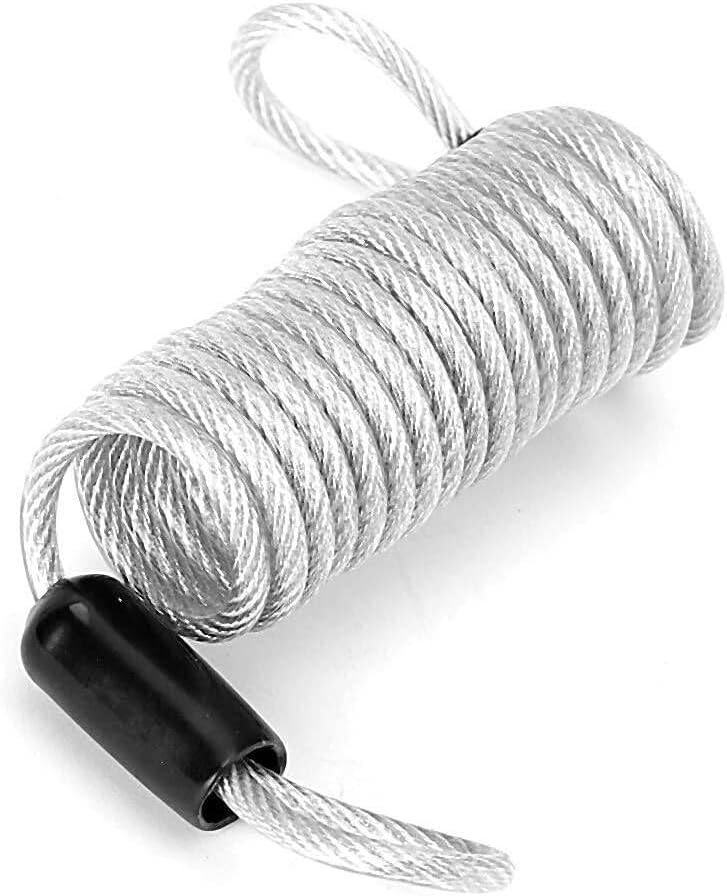
Image: A four-panel diagram illustrating the process of setting a new combination for the TSA lock. It shows the initial 0-0-0 setting, releasing the shackle, pressing the reset button with a tool, and setting the new code before scrambling the dials.
Operating Your Lock
Using the Combination Lock
- To open the lock, align the dials to your set combination.
- Press the release button (if applicable) or pull the shackle to open.
- To close and secure, insert the shackle back into the lock body and scramble the dials.
Using the Steel Security Cable
The included steel cables provide additional security and flexibility for securing multiple items or larger objects.
- Thread the steel cable through the zippers of your luggage, backpack, or around items you wish to secure.
- Pass one end of the cable through the loop of the other end, or connect both ends to the combination lock.
- Ensure the lock is properly closed and the combination is scrambled to secure the cable.

Image: Several examples of the TSA locks in use. One lock secures a suitcase to a tree, another secures a backpack to a suitcase, and a third secures two bags together, demonstrating versatile application for travel security.

Image: A coiled silver steel security cable with black plastic-coated ends, designed to be used with the combination locks for extended reach and securing multiple items.

Image: A demonstration of the steel cable's durability. It shows pliers attempting to cut the cable, with a note indicating the steel remains undamaged even if the rubber coating breaks, highlighting its robust construction.
Maintenance
To ensure the longevity and smooth operation of your YSSHUI TSA Luggage Locks, follow these simple maintenance guidelines:
- Cleaning: Wipe the lock body and dials with a soft, dry cloth. Avoid using abrasive cleaners or solvents, which can damage the finish or internal mechanisms.
- Lubrication: If the dials become stiff over time, a small amount of graphite powder or a silicone-based lubricant can be applied to the moving parts. Avoid oil-based lubricants as they can attract dust and grime.
- Storage: Store the locks in a dry environment when not in use to prevent corrosion, especially if they have been exposed to moisture.
Troubleshooting
Lock Will Not Open with Correct Combination
- Verify Combination: Double-check that you are entering the correct combination. Ensure each dial is precisely aligned with the indicator marks.
- Reset Attempt: If you are certain of the combination and it still won't open, try gently wiggling the shackle while entering the combination. Sometimes, slight misalignment can occur.
- Dials Stiff: If the dials are stiff, refer to the Maintenance section for cleaning and lubrication tips.
Cannot Set New Combination
- Factory Setting: Ensure the lock is set to the factory default (0-0-0) before attempting to reset.
- Reset Button: Confirm that the reset button is fully pressed down and held while setting the new combination. It should click into place when pressed.
- Tool Usage: Use a thin, pointed, but not overly sharp tool (like a pen tip) to press the reset button to avoid damage.
Note: If you forget your combination after setting it, there is no way to retrieve it. The lock will need to be cut or replaced.
Specifications
| Feature | Detail |
|---|---|
| Brand | YSSHUI |
| Model Number | TSA Locks-719 |
| Lock Type | 3-Digit Combination Lock |
| Material | Stainless Steel (lock body and cable) |
| Special Feature | Portable, TSA Accepted |
| Product Dimensions (Lock) | Approximately 1 x 0.5 x 0.5 inches (25.4 x 12.7 x 12.7 mm) |
| Item Weight | Approximately 6 ounces (per lock) |
| Included Components | Combination Locks, Steel Security Cables |
| Cable Diameter | 4 mm (from image PT02) |
| Cable Length | 100 cm (from image PT06) |
| Recommended Uses | Securing luggage during travel, protecting personal items in public places, securing items in lockers or storage areas. |
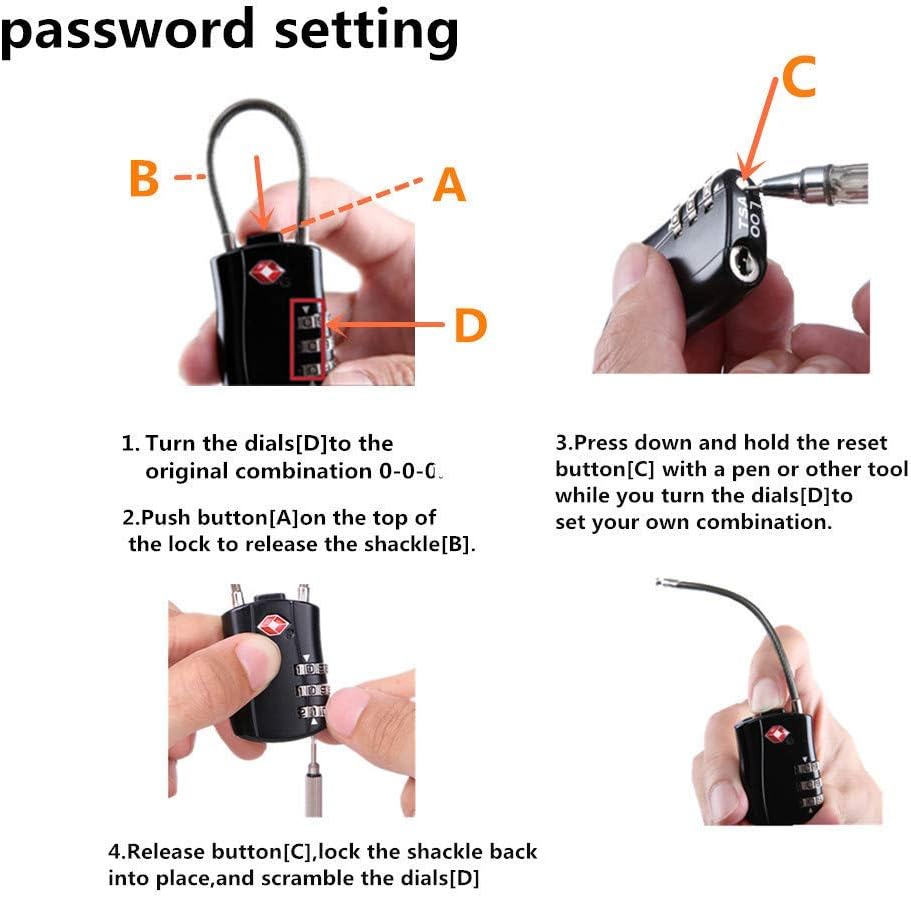
Image: A detailed diagram showing the dimensions of the TSA combination lock and its flexible cable shackle. Measurements include lock body height (80mm), width (30mm), shackle height (38mm and 27mm for different styles), and cable diameter (4mm).
Warranty and Support
Information regarding specific warranty terms or direct customer support contacts for YSSHUI products is not available in this manual. Please refer to the product packaging or the retailer's website for warranty details and customer service contact information.