1. Introduction
Welcome to the PowerWatch 2 Luxe user manual. This guide provides detailed instructions on how to set up, operate, maintain, and troubleshoot your new smartwatch. The PowerWatch 2 Luxe is an advanced smartwatch featuring unique thermoelectric and solar charging capabilities, integrated GPS, heart rate monitoring, and body temperature measurement.
Please read this manual thoroughly before using your device to ensure optimal performance and longevity.
2. What's in the Box
Verify that all items are present in your PowerWatch 2 Luxe package:
- PowerWatch 2 Luxe Smartwatch (with sapphire crystal, smooth titanium finish, and black Milanese shark mesh strap with quick-release clasp)
- User Manual (this document)
Note: The PowerWatch 2 Luxe does not require a charging cable or adapter as it charges via body heat and solar energy.
3. Setup
3.1 Initial Charge and Activation
The PowerWatch 2 Luxe charges automatically through your body heat and ambient light. For initial activation, wear the watch for at least 30 minutes or expose it to bright light. The display will activate once sufficient power is generated.
3.2 Downloading the PowerWatch App
To unlock the full features of your PowerWatch 2 Luxe, download the official PowerWatch app on your smartphone. The app is compatible with both iOS and Android devices.
- For iOS devices, search for "PowerWatch" in the Apple App Store.
- For Android devices, search for "PowerWatch" in the Google Play Store.
3.3 Pairing with Your Smartphone
- Ensure Bluetooth is enabled on your smartphone.
- Open the PowerWatch app.
- Follow the on-screen instructions in the app to add a new device.
- The app will guide you through the pairing process, which may involve confirming a code on both your watch and phone.
- Once paired, the watch will synchronize data with the app.
If you experience issues with pairing, ensure your watch is sufficiently charged and within Bluetooth range of your phone.
4. Operating Your PowerWatch 2 Luxe
4.1 Watch Interface and Navigation
The PowerWatch 2 Luxe features a digital display and physical buttons for navigation.

Image: Front view of the PowerWatch 2 Luxe display, showing current time, steps taken, and calories burned.

Image: Side view of the PowerWatch 2 Luxe, highlighting the physical buttons and the watch's profile.
- Top Button: Typically used for navigating up or accessing specific menus.
- Middle Button (Crown): Used for selecting options, confirming actions, or returning to the home screen.
- Bottom Button: Generally used for navigating down or accessing different functions.
4.2 Key Features and Functions
4.2.1 Thermoelectric and Solar Charging
The PowerWatch 2 Luxe is self-powered. It converts body heat and sunlight into electrical energy to power the device. When removed, it stores data and enters a low-power standby mode to conserve energy.
4.2.2 Body Temperature Measurement
The watch accurately monitors your skin temperature every minute. This data is tracked and can be viewed in the PowerWatch app after synchronization.
4.2.3 Integrated GPS
Utilize the built-in GPS to map your routes and record workout intensity. The GPS function tracks calories burned, time, altitude, and other useful metrics for outdoor activities.

Image: The PowerWatch 2 Luxe positioned outdoors amidst climbing gear, illustrating its suitability for adventure and GPS tracking.
4.2.4 Heart Rate Monitoring
Measure your pulse rate during workouts. The watch can also initiate an immediate measurement of your resting heart rate. Ensure the watch is snug on your wrist for accurate readings.
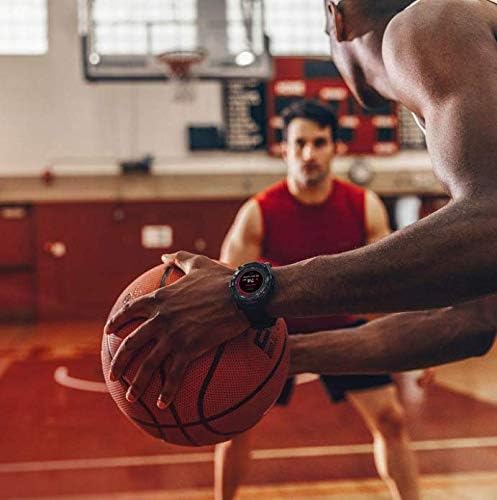
Image: The PowerWatch 2 Luxe worn on a person's wrist while holding a basketball, demonstrating its use during sports activities.
4.2.5 Activity Tracking
Track daily steps, distance, and calories burned. This data is automatically synced to the PowerWatch app for historical tracking and analysis.
4.2.6 Water Resistance
The PowerWatch 2 Luxe is water-resistant. Refer to the specifications section for detailed water resistance ratings. Avoid exposing the watch to hot water or steam.
5. Maintenance
5.1 Cleaning Your PowerWatch 2 Luxe
- Wipe the watch and strap with a soft, damp cloth.
- Do not use harsh chemicals, abrasive cleaners, or solvents.
- Ensure the watch is dry before wearing it again, especially after exposure to water.
5.2 Strap Care
The Milanese shark mesh strap is durable but can accumulate dirt. Clean it regularly with a soft brush and mild soap solution, then rinse thoroughly and dry.
5.3 Software Updates
Periodically check the PowerWatch app for available firmware updates. Updates often include performance improvements, bug fixes, and new features. Ensure your watch is sufficiently charged before initiating an update.
- Open the PowerWatch app.
- Navigate to the device settings or update section.
- Follow the on-screen prompts to download and install any available updates.
6. Troubleshooting
| Problem | Possible Cause | Solution |
|---|---|---|
| Watch not turning on/display blank | Insufficient charge. | Wear the watch for at least 30 minutes or expose it to bright light to generate power. |
| Cannot pair with smartphone | Bluetooth off, watch out of range, app issue. | Ensure Bluetooth is on, watch is close to phone. Restart both watch and phone. Reinstall PowerWatch app if necessary. |
| Inaccurate heart rate/temperature readings | Watch fit too loose, sensor obstructed. | Ensure the watch is snug on your wrist. Clean the sensor on the back of the watch. |
| GPS not acquiring signal | Obstructed view of sky, initial acquisition time. | Move to an open area with clear view of the sky. Allow a few minutes for initial GPS lock. |
| Data not syncing to app | Bluetooth connection lost, app not running. | Check Bluetooth connection. Open the PowerWatch app and ensure it's running in the foreground or background. |
7. Specifications
| Feature | Detail |
|---|---|
| Model Name | PowerWatch 2 Luxe |
| Model Number | PW11 |
| Brand | PowerWatch |
| Display Size | 1.2 Inches |
| Shape | Square |
| Operating System | Android, iOS (compatible) |
| Memory Storage Capacity | 1 GB |
| Connectivity Technology | Bluetooth |
| Wireless Communication Standard | Bluetooth |
| GPS | Integrated GPS |
| Special Features | Wireless, Thermoelectric Energy, No Recharge Required, Calorie Counter, Water Resistance, Heart Rate Monitor |
| Product Dimensions | 25.91 x 4.57 x 1.27 cm |
| Product Weight | 140 g |
| Battery | 1 Lithium Polymer (included) |
| Color | Black |
| Interface Input | Buttons |
8. Warranty and Support
For warranty information and customer support, please refer to the official PowerWatch website or contact their customer service directly. Details regarding warranty periods and service procedures are typically provided with your purchase documentation or on the manufacturer's website.
You can visit the PowerWatch store on Amazon for additional product information and support resources: PowerWatch Amazon Store


