
MAX SMART MS-5003W
MAX SMART Tablet Hand Grip Holder & Stand User Manual
Model: MS-5003W
1. Introduction
Thank you for choosing the MAX SMART Tablet Hand Grip Holder & Stand. This versatile accessory is designed to enhance your tablet experience by providing secure handling and flexible viewing angles for various activities such as drawing, reading, working, and writing. Its innovative design allows for comfortable use whether you are sitting, standing, or even hanging your tablet.
2. Package Contents
Please ensure all the following components are included in your package:
- 1 x MAX SMART Tablet Hand Grip Holder & Stand Main Unit
- 1 x Small Bracket Holder (fits 6.6" - 8.0" devices)
- 1 x Large Bracket Holder (fits 7.7" - 9.6" devices)
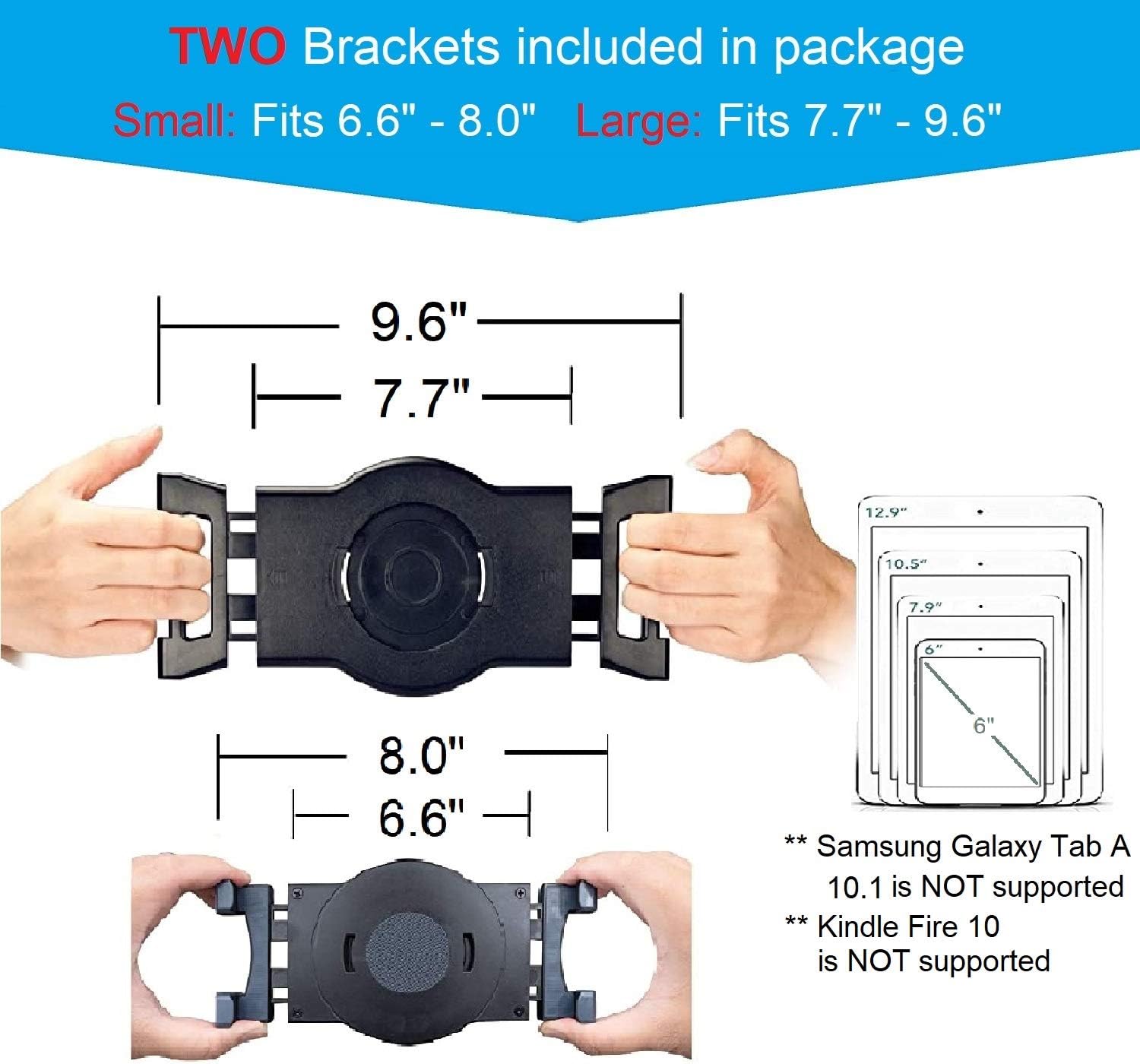
Figure 2.1: Included Small and Large Bracket Holders with dimensions.
3. Setup Instructions
- Select the Correct Bracket: Choose either the small (6.6" - 8.0") or large (7.7" - 9.6") bracket holder based on the dimensions of your tablet. Ensure your tablet's width or length falls within the specified range.
- Attach Tablet: Gently pull apart the spring-loaded arms of the selected bracket and insert your tablet. Ensure the tablet is securely gripped by all four corners of the bracket.
- Verify Fit: Confirm that your tablet is firmly held and does not wobble. The clips are designed to fit cases less than 0.3 inches in thickness. If your case is thicker, it may need to be removed for a secure fit.

Figure 3.1: Tablet securely attached to the holder.
4. Operating Instructions
4.1. Adjusting Viewing Angles
The MAX SMART holder offers extensive adjustability for optimal viewing and interaction:
- 360° Rotation: The central circular mechanism allows your tablet to rotate a full 360 degrees, enabling quick switching between landscape and portrait orientations.
- 180° Tilt: The stand's arm can tilt up to 180 degrees, providing a wide range of viewing angles for comfortable use in any position.

Figure 4.1: 360° Rotation and 180° Tilt functionality.
4.2. Using the Grip Holder Handle
The integrated grip handle provides a secure and comfortable way to hold your tablet, reducing hand fatigue during extended use.
- Simply slide your hand through the circular grip to hold the tablet firmly.
- Ideal for drawing, sketching, reading, or presenting while standing or moving.
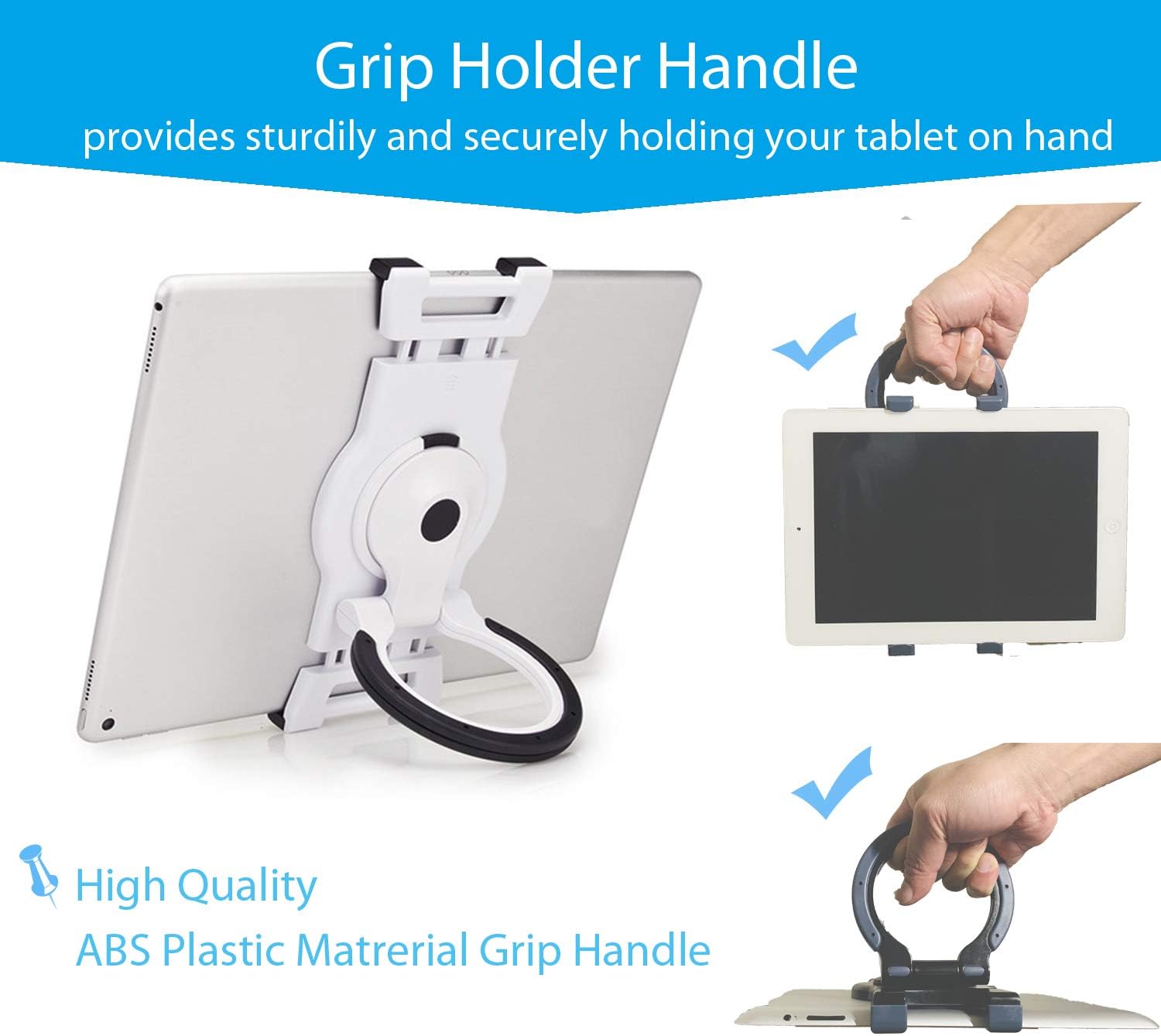
Figure 4.2: Securely holding the tablet using the grip handle.
4.3. Versatile Standing and Hanging Options
The design allows for stable positioning and convenient hanging:
- On Uneven Surfaces: The stand can be positioned stably on soft or uneven surfaces like beds, sofas, or couches.
- Hanging: The grip handle can be used to hang the tablet on a wall hook or other suitable objects for hands-free viewing, such as in a kitchen or workshop.

Figure 4.3: Tablet holder in various stable and hanging positions.

Figure 4.4: Tablet holder in use for various activities.

Figure 4.5: Tablet holder providing steady viewing angles for diverse activities.
5. Maintenance
To ensure the longevity and optimal performance of your MAX SMART Tablet Hand Grip Holder & Stand, follow these simple maintenance guidelines:
- Cleaning: Wipe the holder with a soft, damp cloth. Avoid using abrasive cleaners or solvents, as they may damage the material.
- Storage: Store the holder in a cool, dry place away from direct sunlight when not in use.
- Inspection: Periodically check all moving parts and connections to ensure they are secure and functioning correctly.
6. Troubleshooting
If you encounter any issues with your tablet holder, please refer to the following common solutions:
| Problem | Possible Cause | Solution |
|---|---|---|
| Tablet does not fit securely. | Incorrect bracket size selected or tablet case is too thick. | Ensure you are using the correct bracket (small for 6.6"-8.0", large for 7.7"-9.6"). If using a case, ensure its thickness is less than 0.3 inches. Remove the case if necessary. |
| Holder feels unstable. | Tablet not centered or placed on an extremely unstable surface. | Ensure the tablet is centered within the bracket. Adjust the angle to find a stable balance point. For very soft surfaces, try to create a flatter base. |
| Rotation or tilt is stiff. | Dust or debris in the mechanism. | Gently clean around the rotating and tilting joints with a soft, dry cloth. Do not force movement. |
7. Specifications
| Feature | Detail |
|---|---|
| Product Dimensions | 8 x 3 x 1 inches |
| Item Weight | 11.2 ounces |
| Model Number | MS-5003W |
| Color | White |
| Form Factor | Tablet Hand Grip |
| Compatible Devices | Tablets with length or width between 6.6" - 9.6" (e.g., various iPad models, Kindle Scribe, Kindle Paperwhite (5th Gen), Amazon Fire HD, Samsung Galaxy Tab, Microsoft Surface Go/Pro, Lenovo Tab, ASUS MeMO Pad, Google Nexus/Pixel C, HP Slate). Note: Not compatible with Samsung Galaxy Tab A 10.1 or Kindle Fire 10. |
| Manufacturer | MAX SMART |
| Country of Origin | Taiwan |
8. Warranty and Support
MAX SMART is a U.S.-based team committed to providing excellent products and customer service. While specific warranty details may vary, we stand by the quality of our products.
For any questions, concerns, or support needs regarding your MAX SMART Tablet Hand Grip Holder & Stand, please refer to your product packaging for the most current contact information or visit the official MAX SMART website. Our team is dedicated to fast support and real communication to ensure your satisfaction.
Ask a question about this manual
Ask about setup, troubleshooting, compatibility, parts, safety, or missing instructions. Manuals+ will review the question and use this page’s manual context to help answer it.