
1. Safety Information
Please read and understand all safety instructions before using this battery pack. Failure to follow these instructions may result in fire, electric shock, injury, or damage to the product or property.
- Do not incinerate or expose the battery to high temperatures (above 140°F / 60°C).
- Do not disassemble, puncture, or modify the battery pack.
- Keep the battery away from water, moisture, and extreme humidity.
- Avoid short-circuiting the battery terminals.
- Store the battery in a cool, dry place when not in use.
- Dispose of used batteries according to local regulations.

Image 1.1: Bottom view of the battery pack, displaying important safety warnings and product specifications such as voltage and capacity.
2. Product Overview
The Surpassed NP-FM50/FM55H is a high-quality replacement Li-ion battery pack designed for various Sony Handycam camcorders. It provides reliable power for extended recording sessions.
Key Features:
- High Energy Density: Ensures long-lasting power.
- Long Life Battery: Designed for multiple charge cycles.
- No Memory Effect: Can be charged at any time without reducing battery life.
- Compatibility: 100% decoded and compatible with original cameras and chargers.

Image 2.1: Top view of the Surpassed NP-FM50/FM55H Li-ion battery pack, showing the 'Li-ion BATTERY' label.
3. Setup
3.1 Charging the Battery
Before first use, fully charge the battery pack.
- Insert the NP-FM50/FM55H battery pack into a compatible Sony or third-party charger.
- Connect the charger to a power source.
- Allow the battery to charge until the charger's indicator light signals a full charge. Refer to your charger's manual for specific indicator details.
- Disconnect the charger and remove the battery.
3.2 Installing the Battery
Ensure your camcorder is powered off before installing or removing the battery.
- Locate the battery compartment on your Sony Handycam camcorder.
- Align the battery pack's contacts with the camcorder's battery terminals.
- Gently slide the battery into the compartment until it clicks securely into place. Do not force the battery.
- Close the battery compartment cover, if applicable.
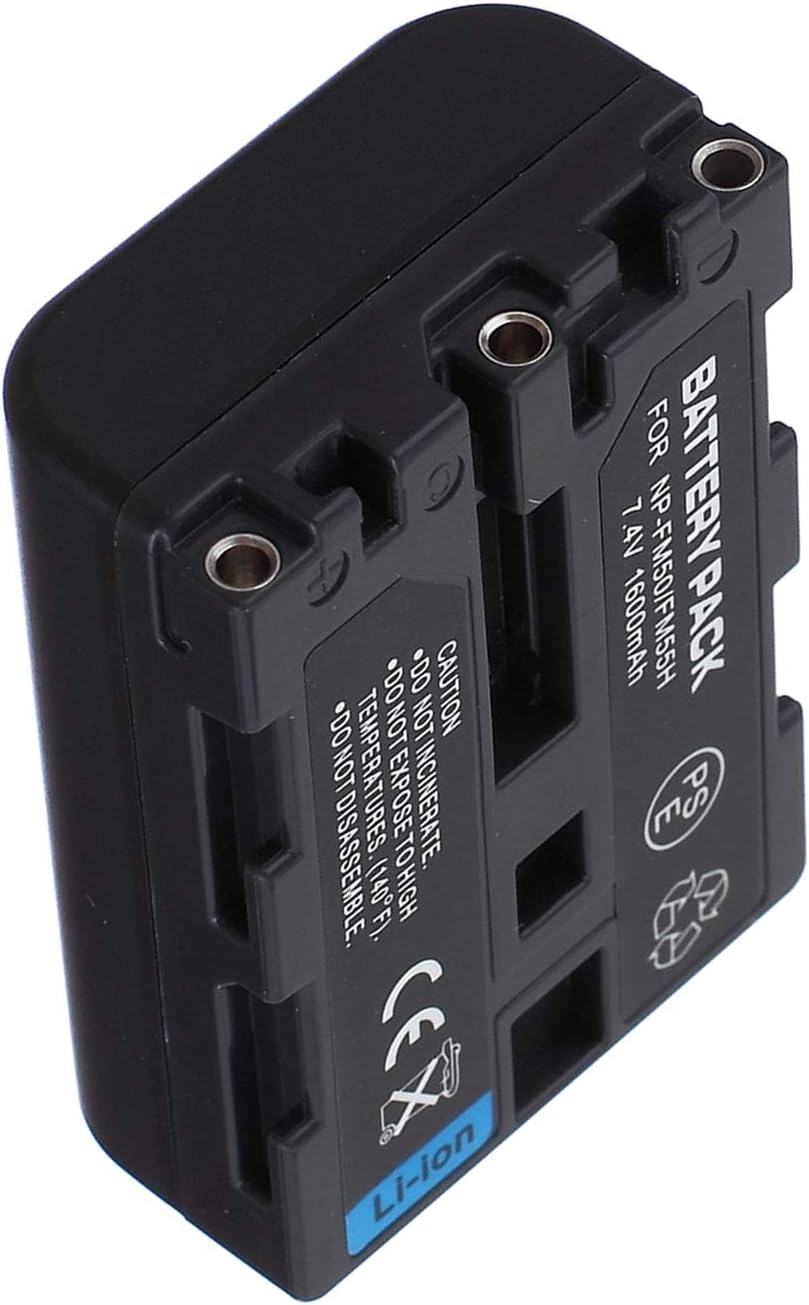
Image 3.1: Side view of the battery pack, highlighting the electrical contacts that connect to the camcorder.
4. Operating
Once the battery is installed and charged, your camcorder is ready for use. The battery provides power to the device, allowing for recording, playback, and other functions.
- Monitor your camcorder's battery indicator to track remaining power.
- For optimal performance, avoid completely draining the battery before recharging, although this battery type has no memory effect.
5. Maintenance
Proper care extends the life of your battery pack.
- Clean the battery contacts periodically with a dry, soft cloth to ensure good connection.
- Store the battery in a cool, dry place, away from direct sunlight and extreme temperatures.
- If storing for an extended period, charge the battery to approximately 50% capacity.
- Avoid dropping the battery or subjecting it to strong impacts.
6. Troubleshooting
If you encounter issues with your battery pack, refer to the table below for common problems and solutions.
| Problem | Possible Cause | Solution |
|---|---|---|
| Battery not charging | Charger not connected, faulty charger, dirty contacts, battery fully charged. | Ensure charger is properly connected. Try a different charger. Clean battery contacts. Check camcorder's battery indicator. |
| Camcorder not powering on | Battery not installed correctly, battery drained, faulty battery. | Reinstall battery securely. Charge battery fully. Test with another known-good battery if available. |
| Short operating time | Battery not fully charged, battery nearing end of life, high power consumption settings. | Ensure battery is fully charged. Consider replacing the battery if it's old. Adjust camcorder settings (e.g., screen brightness). |
7. Specifications
Detailed technical specifications for the Surpassed NP-FM50/FM55H Li-ion Battery Pack.
| Specification | Value |
|---|---|
| Battery Type | Lithium-ion (Li-ion) |
| Voltage | 7.4V |
| Capacity | 1600mAh |
| Compatible Battery Codes | Sony NP-FM30, NP-FM50, NP-FM70, NP-FM71, NP-FM90, NP-FM91, NP-QM50, NP-QM51, NP-QM70, NP-QM71, NP-QM71D, NP-QM90, NP-QM91, NP-QM91D |
| Recommended Uses | Camcorder, Camera, Digital, Handycam |
8. Warranty and Support
For any questions, concerns, or support regarding your Surpassed NP-FM50/FM55H Li-ion Battery Pack, please contact the seller or manufacturer directly. Refer to your purchase documentation for specific warranty terms and contact information.
We are committed to providing quality power products and excellent customer service.