
Introduction
This manual provides comprehensive instructions for the safe and effective use of your Fazley FSP-200-W Digital Piano. Please read this manual thoroughly before operating the instrument and retain it for future reference. The FSP-200-W is a lightweight digital piano featuring 88 semi-weighted, velocity-sensitive keys, 12 distinct voices including grand piano sounds, and an integrated speaker system.

Figure 1: Front view of the Fazley FSP-200-W Digital Piano with music rest.
Setup
1. Unpacking and Assembly
Carefully remove all components from the packaging. Ensure all parts are present: the digital piano unit, power adapter, and music rest. Place the piano on a stable, flat surface. Insert the music rest into the designated slots on the top panel of the piano.

Figure 2: Angled front view of the digital piano, showing the full keyboard and integrated speakers.
2. Power Connection
- Locate the DC IN port on the rear panel of the piano.
- Connect the provided power adapter to the DC IN port.
- Plug the power adapter into a standard electrical outlet.

Figure 3: Rear panel connections including power input, MIDI USB, and audio outputs.
3. Connecting Peripherals
- Headphones: Connect standard stereo headphones to the headphone jack on the rear panel for private practice.
- MIDI USB: Use a USB cable to connect the MIDI USB port to a computer or other MIDI device for recording or using software instruments.
- Audio Output: The piano features audio output jacks for connecting to external amplifiers, mixers, or recording equipment.
Operating Instructions
1. Power On/Off and Volume Control
- Power: Press the POWER button located on the left side of the control panel to turn the piano on or off.
- Volume: Rotate the VOLUME knob clockwise to increase volume and counter-clockwise to decrease it.
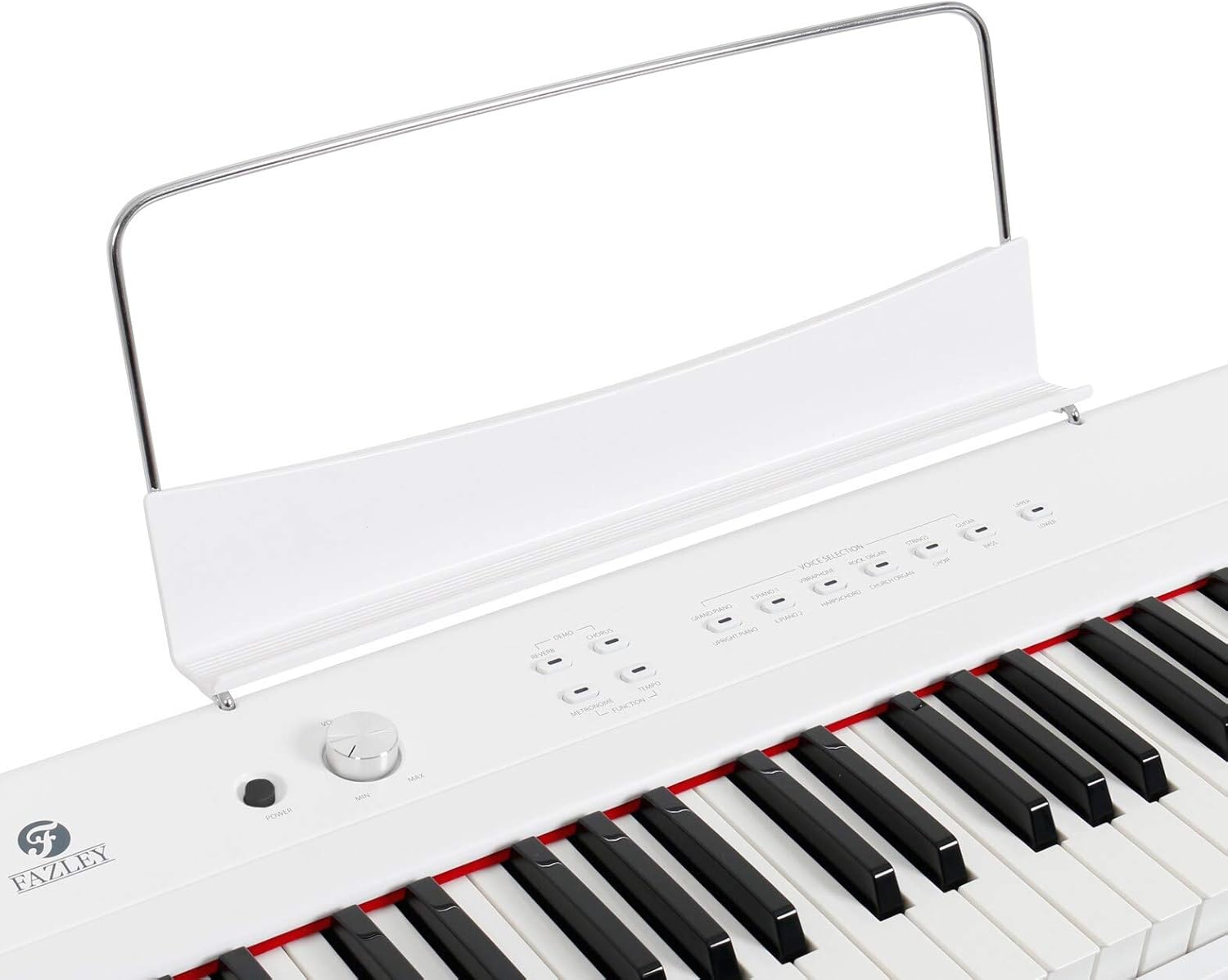
Figure 4: Overview of the control panel, showing power, volume, and various function buttons.
2. Voice Selection
The FSP-200-W offers 12 different voices. Press the corresponding button under "VOICE SELECTION" to choose a voice.
- GRAND PIANO: Standard acoustic grand piano sound.
- UPRIGHT PIANO: Acoustic upright piano sound.
- E. PIANO 1 / E. PIANO 2: Two distinct electric piano sounds.
- HARPSICHORD: Harpsichord sound.
- VIBRAPHONE: Vibraphone sound.
- ROCK ORGAN / CHURCH ORGAN: Two distinct organ sounds.
- STRINGS: String ensemble sound.
- CHOIR: Choir vocal sound.
- GUITAR: Guitar sound.
- BASS: Bass instrument sound.
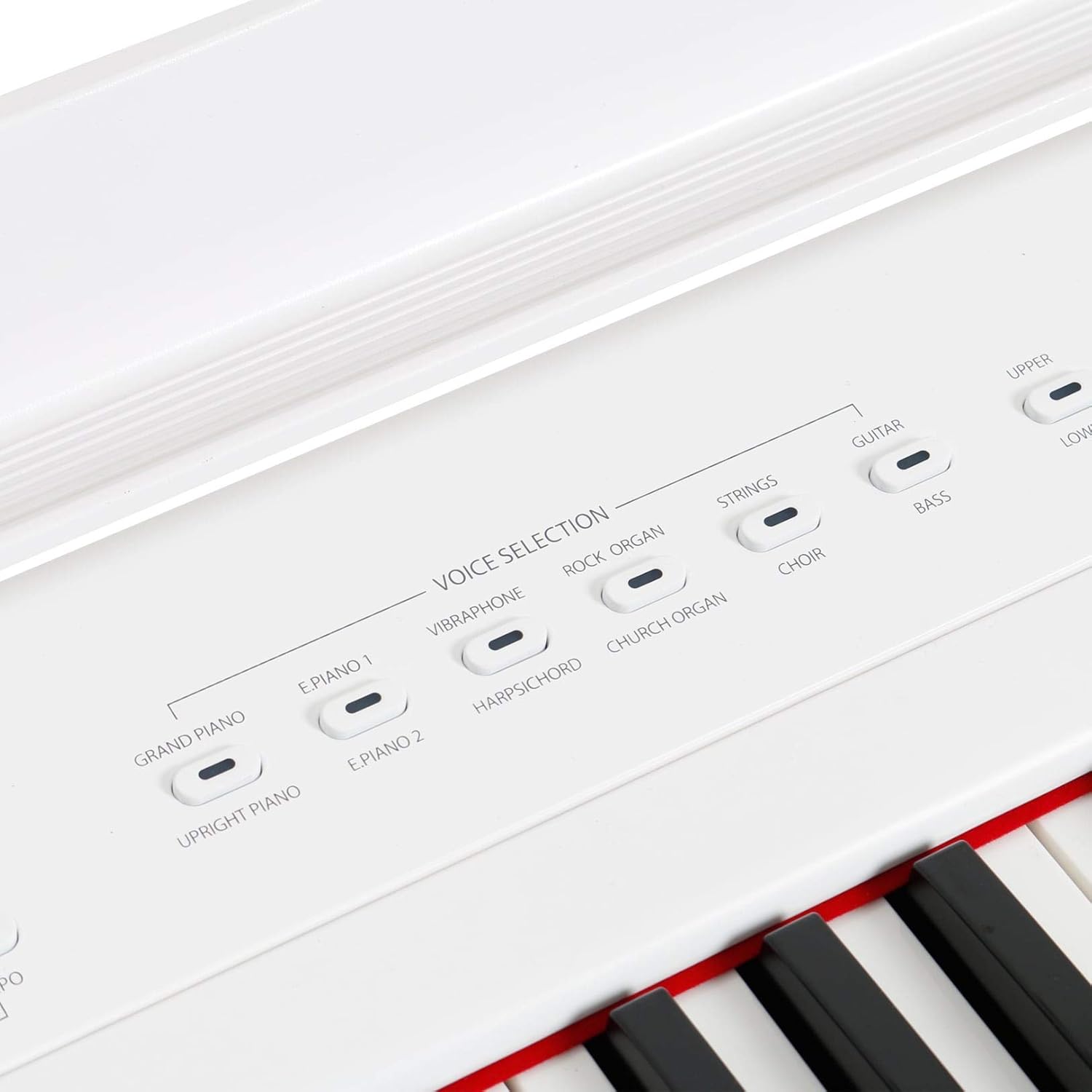
Figure 5: Detailed view of the Voice Selection buttons, allowing users to choose from 12 instrument sounds.
3. Effects and Functions
- REVERB: Press this button to add a reverberation effect, simulating different acoustic spaces.
- CHORUS: Press this button to add a chorus effect, enriching the sound.
- METRONOME: Activates the built-in metronome for rhythm practice.
- DEMO: Plays a demonstration song.
- TEMPO: Adjusts the tempo of the metronome or demo song.
- FUNCTION: This button is used in combination with certain keys to access advanced settings (e.g., touch sensitivity, transpose). Refer to the full manual for specific key combinations.
- UPPER / LOWER: These buttons are typically used for split or layer functions, allowing different voices to be played on different sections of the keyboard or simultaneously. Refer to the full manual for detailed usage.

Figure 6: Close-up of the effects and utility buttons, including Reverb, Chorus, Metronome, Demo, Tempo, and Function.

Figure 7: Close-up of the Upper and Lower function buttons, typically used for keyboard split or layer modes.
Maintenance
1. Cleaning
- Wipe the surface of the piano with a soft, dry cloth.
- For stubborn dirt, slightly dampen the cloth with water and a mild, non-abrasive cleaner, then wipe dry immediately.
- Avoid using chemical solvents, waxes, or polishes as they may damage the finish.
2. Storage
- Store the piano in a cool, dry place away from direct sunlight, extreme temperatures, and high humidity.
- Avoid placing heavy objects on the piano.
Troubleshooting
If you encounter any issues with your Fazley FSP-200-W, please refer to the following common problems and solutions:
- No Sound:
- Ensure the power adapter is securely connected and the piano is turned on.
- Check the volume knob and increase it if necessary.
- If headphones are connected, disconnect them to check the internal speakers.
- Verify that external speakers/amplifiers are properly connected and powered on if used.
- Keys Not Responding:
- Ensure the piano is powered on and a voice is selected.
- If only certain keys are not responding, contact customer support.
- Distorted Sound:
- Reduce the volume to prevent clipping.
- Check connections to external audio equipment for proper seating.
For issues not covered here, please consult the manufacturer's website or contact customer support.
Specifications
| Feature | Detail |
|---|---|
| Brand | Fazley |
| Model Number | FSP-200-W |
| Instrument Type | Digital Piano |
| Number of Keys | 88 |
| Key Type | Semi-weighted, Velocity-sensitive |
| Voices | 12 (including Grand Piano, Upright Piano, Electric Pianos, Organs, Strings, Choir, Guitar, Bass) |
| Polyphony | 32 notes |
| Connectivity Technology | MIDI USB |
| Connector Type | MIDI USB |
| Power Source | Electric Cable |
| Product Dimensions (L x W x H) | 143 x 38 x 17 cm |
| Item Weight | 10 Kilograms |
| Color | White |
| Special Feature | Lightweight |
| Skill Level | Intermediate |
| Age Range (Description) | Adult |

Figure 8: Close-up showing the FSP-200 model designation and speaker grille.

Figure 9: Detailed view of the 88 semi-weighted, velocity-sensitive keys.
Warranty and Support
Information regarding product warranty and customer support details is not provided within this document. For warranty claims, technical assistance, or further support, please refer to the official Fazley website or contact your retailer directly.

