
Rillpac KS-602H
Rillpac Smart WiFi Light Switch KS-602H User Manual
Model: KS-602H
Introduction
This manual provides detailed instructions for the installation, operation, and maintenance of your Rillpac Smart WiFi Light Switch, model KS-602H. Please read this manual thoroughly before installation and use to ensure proper function and safety.
The Rillpac Smart WiFi Light Switch offers advanced control over your lighting, including remote control via smartphone, voice control with smart assistants, and programmable scheduling. It is designed for easy integration into your smart home system.
Product Features
- Physical Button Control: Allows manual operation (ON/OFF) directly on the switch, independent of internet connectivity.
- Smartphone App Control: Remote control via the "Smart Life" free application, compatible with Android 4.1+ and iOS 8+.
- Voice Control Integration: Seamlessly works with Amazon Alexa and IFTTT for convenient voice commands.
- Built-in Scheduling Timer: Program lights to turn on or off at specific times, enhancing energy efficiency and home security.
- Countdown Function: Set a timer for the switch to turn off after a specified duration.
- Device Sharing: Share control of the smart switch with family members through the app.
- Overload Protection: Integrated safety feature to protect your electrical system.
- LED Noctilucent Navigation: An indicator light for easy location in the dark.
Safety Information
- Always turn off power at the circuit breaker before installation or maintenance.
- Installation should be performed by a qualified electrician if you are unsure about electrical wiring.
- Ensure the switch is compatible with your electrical system (AC110V-125V, 50/60Hz).
- Do not exceed the maximum rated power of 1650W or current of 15A.
- This switch requires a neutral wire for operation.
- Only supports a 2.4 GHz Wi-Fi network (802.11 b/g/n).
- Supports only one-way circuit wiring.
Installation Guide
What's in the Box

Image: Contents of the Rillpac Smart WiFi Light Switch package, including the switch unit, faceplate, wiring nuts, and user manual.
Pre-installation Checklist
- Confirm you have a neutral wire in your wall box. This is essential for the smart switch to function.
- Ensure your Wi-Fi network is 2.4 GHz (802.11 b/g/n). 5 GHz networks are not supported.
- Verify that your existing wiring is a single-way circuit.
- Check your wall box dimensions to ensure the switch fits. The product dimensions are 4.72 x 2.76 x 1.38 inches (125 x 80 x 35.5 mm).
- It is suggested that the wiring box is plastic, as metal boxes might interfere with Wi-Fi signals, though this is not confirmed.
Wiring Instructions

Image: Detailed wiring diagram showing connections for the Rillpac Smart WiFi Light Switch, including neutral, live, and load wires.
- Turn off Power: Locate the circuit breaker controlling the light switch you intend to replace and turn off the power. Verify the power is off using a voltage tester.
- Remove Old Switch: Carefully remove the existing light switch from the wall box. Disconnect the wires, noting their connections.
- Identify Wires: Identify the Live wire, Load wire, and Neutral wire. The Rillpac switch requires a Neutral wire.
- Connect Wires: Connect the wires from your wall box to the corresponding terminals on the Rillpac Smart WiFi Light Switch using the provided wiring nuts.
- Connect the Live wire to the 'L' terminal.
- Connect the Load wire to the 'Load' terminal.
- Connect the Neutral wire to the 'N' terminal.
- Connect the Ground wire to the 'GND' terminal (if applicable).
- Mount Switch: Gently push the wired switch into the wall box and secure it with screws. Attach the faceplate.
- Restore Power: Turn the power back on at the circuit breaker. The indicator light on the switch should illuminate.
Operating Instructions
Physical Control

Image: The Rillpac Smart WiFi Light Switch with its physical button, allowing for direct manual control of connected lights or ceiling fans.
The Rillpac Smart WiFi Light Switch features a physical button for direct manual control. Simply press the button to toggle the connected light or appliance ON or OFF. This function works independently of your Wi-Fi connection.
Smartphone App Control (Smart Life App)

Image: The Rillpac Smart WiFi Light Switch displaying compatibility with Wi-Fi, Amazon Alexa, Google Assistant, and available on Apple App Store and Google Play.
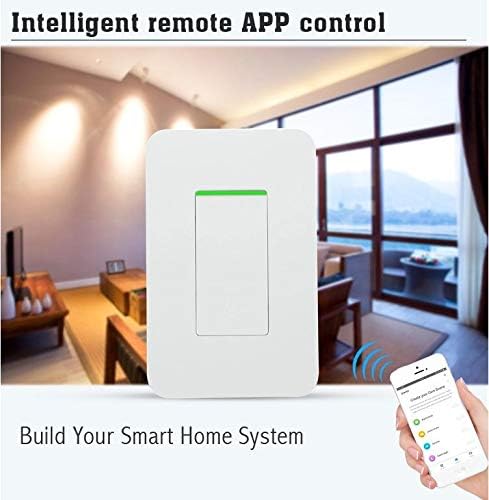
Image: A smartphone screen showing the "Smart Life" app interface, demonstrating remote control capabilities for the Rillpac Smart WiFi Light Switch.
- Download App: Download the "Smart Life" app from the Apple App Store (for iOS) or Google Play Store (for Android).
- Register/Login: Open the app and register for a new account or log in if you already have one.
- Add Device: In the app, tap the "+" icon to add a new device. Select "Electrical Switch" or "Light Switch".
- Pairing Mode: Follow the in-app instructions to put the switch into pairing mode (usually involves pressing and holding the physical button until the indicator light blinks rapidly).
- Connect to Wi-Fi: Enter your 2.4 GHz Wi-Fi network password in the app. The app will then connect to and configure your smart switch.
- Control: Once connected, you can remotely turn the light ON/OFF, set schedules, and use other features from anywhere with an internet connection.
Voice Control (Alexa, IFTTT)
The Rillpac Smart WiFi Light Switch is compatible with Amazon Alexa and IFTTT, allowing for convenient voice control of your lights.
- Enable Skill: In your Alexa app or IFTTT account, search for and enable the "Smart Life" skill/service.
- Link Account: Link your Smart Life account to your Alexa or IFTTT account.
- Discover Devices: Ask Alexa to "Discover devices" or manually discover them in the Alexa app. Your Rillpac switch should appear.
- Voice Commands: You can now use voice commands such as:
- "Alexa, turn on [Light Name]"
- "Alexa, turn off [Light Name]"
Scheduling and Timer Functions
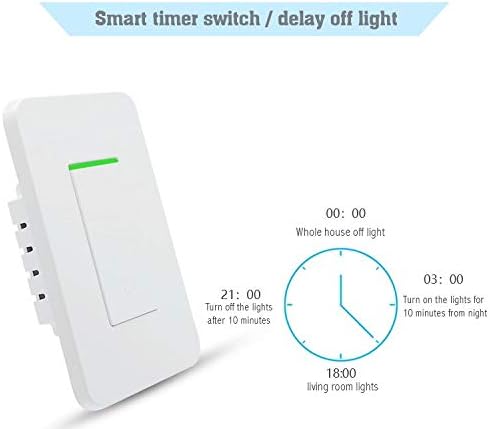
Image: Diagram illustrating the smart timer and delay-off light functions, showing examples of scheduled times for turning lights on or off.
The Smart Life app allows you to set up various schedules and timers for your Rillpac Smart WiFi Light Switch.
- Scheduling: Create daily or weekly schedules to automatically turn lights ON/OFF at specific times (e.g., turn on living room lights at 6:00 PM, turn off whole house lights at 11:00 PM).
- Countdown: Set a countdown timer for the switch to turn off after a set duration (e.g., turn off lights after 10 minutes).
- Random Timer: Some smart home apps offer a "random" or "away" mode that can randomly turn lights on and off to simulate occupancy.
Maintenance
The Rillpac Smart WiFi Light Switch is designed for minimal maintenance. Keep the switch and faceplate clean by wiping with a soft, dry cloth. Do not use abrasive cleaners or solvents. Ensure the switch is not exposed to excessive moisture or extreme temperatures outside its operating range (-20℃ to 75℃).
Troubleshooting
- Switch Not Responding:
- Check if the circuit breaker is ON.
- Ensure the switch is properly wired, especially the neutral wire connection.
- Verify the switch is receiving power.
- Wi-Fi Connectivity Issues:
- Ensure your Wi-Fi network is 2.4 GHz. The switch does not support 5 GHz networks.
- Check your Wi-Fi signal strength at the switch's location.
- Restart your Wi-Fi router.
- If your wall box is metal, it might interfere with the Wi-Fi signal. Consider relocating your router or using a Wi-Fi extender if signal is weak.
- Try re-pairing the switch with the Smart Life app.
- Voice Control Not Working:
- Ensure your Smart Life account is correctly linked to your Alexa or IFTTT account.
- Try re-discovering devices in your Alexa app.
- Verify the device name in Alexa matches the name in the Smart Life app.
- Switch Overheating:
- Ensure the connected load does not exceed the maximum rated power of 1650W or current of 15A.
- If overheating persists, discontinue use and contact customer support.
Specifications
| Parameter | Value |
|---|---|
| Model Number | KS-602H |
| Brand | Rillpac |
| Operation Mode | ON-OFF |
| Current Rating | 15 Amps |
| Operating Voltage | AC110V-125V (50/60Hz) |
| Rated Power | 1650W |
| Connectivity Protocol | Wi-Fi (IEEE802.11 b/g/n) |
| Working Frequency | 2.412-2.484 MHz |
| Control Method | App, Touch, Voice (Alexa, IFTTT) |
| Circuit Type | 1-way |
| Actuator Type | Push Button |
| Item Dimensions (L x W x H) | 4.72 x 2.76 x 1.38 inches (125 x 80 x 35.5 mm) |
| Item Weight | 5.8 ounces |
| Working Environment Temperature | -20℃ to 75℃ |
| Working Humidity | <95% |
| Touch Life | Over 100 thousand times |
| UPC | 778809055742 |
Warranty and Support
Rillpac products are tested before shipping to ensure quality. While specific warranty details are not provided in this manual, for any issues, questions, or support needs, please contact Rillpac customer service. We are committed to providing assistance and resolving any concerns you may have.
Please refer to your purchase documentation or the Rillpac official website for the most up-to-date warranty information and contact details.
Related Documents - KS-602H
 |
Smart Wall Light Switch User Manual - Installation, Features, and Setup Guide Comprehensive user manual for the BN-LINK Smart Wall Light Switch (Model KS-602H/KS-602K). Learn about product features, installation steps, app integration with Smart Life, and compatibility with Amazon Alexa, Google Assistant, and IFTTT. |
 |
Milfra Smart Switch Installation Guide - Setup and Troubleshooting Comprehensive installation guide for the Milfra Smart Switch. Learn how to wire, connect to WiFi, and troubleshoot common issues with your smart light switch. Compatible with Alexa and Google Assistant. |
 |
BN-LINK KS-602H/KS-602K Smart Wall Light Switch User Manual User manual for the BN-LINK KS-602H/KS-602K Smart Wall Light Switch. Learn about product features, installation, specifications, and setup with the Smart Life app, Amazon Alexa, and Google Assistant. |
 |
Sách Hướng Dẫn Sử Dụng Nồi Nấu và Hấp Cơm Tự Động SHARP: Hướng Dẫn Vận Hành, Vệ Sinh và Thông Số Kỹ Thuật Sách hướng dẫn chi tiết cho nồi nấu và hấp cơm tự động SHARP, bao gồm cách nấu và hấp thực phẩm, hướng dẫn vệ sinh, thông số kỹ thuật và các biện pháp an toàn. Bao gồm thông tin mẫu mã cho các dòng KS-11EV, KS-N19EV, KS-231EV và KS-R23STV. |
 |
Minston KS Series LED Operating Light Operation and Installation Manual Detailed manual for Minston KS Series LED Operating Lights, covering product specifications, installation procedures, operation modes, maintenance, safety, and troubleshooting for surgical illumination. |
 |
SEVERIN Kühlgeräte: Gebrauchsanweisung für Modelle KS 9050 bis KS 9957 Diese Gebrauchsanweisung von SEVERIN bietet detaillierte Informationen zur Installation, Bedienung, Wartung und Fehlerbehebung der Kühlgeräte-Modelle KS 9050, KS 9908, KS 9909, KS 9939, KS 9952, KS 9953, KS 9954, KS 9955, KS 9956 und KS 9957. Erfahren Sie mehr über Funktionen, Sicherheit und Energiespartipps. |
Ask a question about this manual
Ask about setup, troubleshooting, compatibility, parts, safety, or missing instructions. Manuals+ will review the question and use this page’s manual context to help answer it.