
Yaconob BT-S3NS
Yaconob BT-S3NS Motorcycle Bluetooth Headset Instruction Manual
Model: BT-S3NS | Brand: Yaconob
Introduction
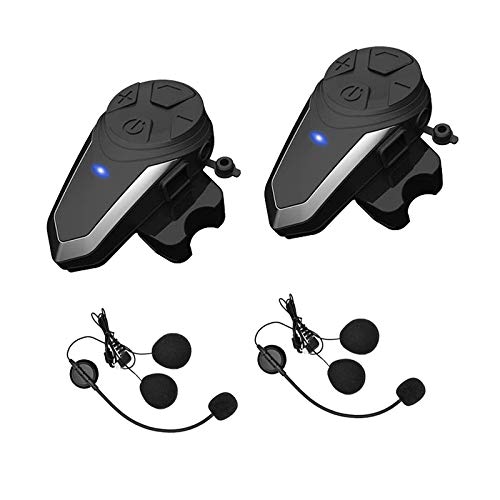
Image: The Yaconob BT-S3NS Motorcycle Bluetooth Headset.
The Yaconob BT-S3NS Motorcycle Bluetooth Headset is designed to provide clear communication and entertainment for motorcyclists. This device supports full-duplex intercom functionality for up to 2-3 riders, mobile phone connectivity for calls and music, FM radio, and GPS audio. It features DSP noise reduction for clear sound quality and a waterproof design for use in various weather conditions. This manual provides detailed instructions for installation, operation, and maintenance of your BT-S3NS headset.
What's in the Box

Image: Detailed view of all components included in the Yaconob BT-S3NS package.
Please check the package contents to ensure all items are present:
- 2x Main Unit: Yaconob BT-S3NS Bluetooth Headset.
- 2x Headphone Cord: Includes integrated speakers and microphone.
- 2x Clamp: For secure mounting to the helmet shell.
- 2x Magic Tape Clamp: Adhesive mounts for alternative installation.
- 2x Audio Cord: For wired connections to external audio sources.
- 2x Charging Cord: Type-C USB cable for charging.
- 2x Screwdriver: For clamp installation.
- 1x Operation Instructions Manual: This document.
Installation
The BT-S3NS headset can be installed on most full-face and half-face helmets. There are two primary installation methods: using clamps or using adhesive magic tape clamps.

Image: Step-by-step diagram illustrating the installation process of the headset on a helmet.
Method 1: Clamp Installation
- Prepare Clamp: Loosen the screws at the back of the clamp using the provided screwdriver.
- Mount Clamp: Open the inner lining on the left side of the helmet. Position the clamp securely and tighten the screws.
- Attach Main Unit: Align the main unit base with the clamp fastener and slide the main unit into place until it clicks securely.
- Position Speakers: Open the inner lining at the ear position of the helmet. Attach the speakers to the helmet's inner surface using the Velcro.
- Position Microphone: Attach the microphone rod to a suitable position on the left side of the helmet, ensuring the microphone is aimed towards your mouth. Adjust the inner linings as needed.
- Connect Headphone Cord: Insert the headphone cord plug into the main unit's headphone jack.
Method 2: Adhesive Mount Installation
- Prepare Mount: Align the main unit base with the adhesive mount.
- Attach Mount: Peel off the protective film from the back of the adhesive mount and firmly press it onto a clean, flat surface on the left side of the helmet.
- Secure Main Unit: Slide the main unit onto the adhesive mount until it clicks into place.
- Position Speakers & Microphone: Follow steps 4 and 5 from Method 1 for speaker and microphone placement.
- Connect Headphone Cord: Insert the headphone cord plug into the main unit's headphone jack.
Setup & Pairing
Pairing with Mobile Phone/GPS/MP3
Video: This video demonstrates the process of pairing the Yaconob BT-S3NS headset with a mobile phone for Bluetooth connectivity.
- Power On: Ensure the BT-S3NS headset is powered on.
- Enable Bluetooth: On your mobile phone, navigate to Bluetooth settings and turn Bluetooth on.
- Search & Connect: Your phone will search for available devices. Select "BT-S3NS" from the list.
- Confirmation: You will hear "Bluetooth connected" from the headset once the pairing is successful.
- The headset can now be used for hands-free calls, streaming music, or receiving GPS navigation audio from your phone.
Intercom Pairing (BT-S3NS with another BT-S3NS or BT-S3)
Video: This video provides an operation guide for the Yaconob BT-S3, including instructions for intercom pairing between two units.
To establish an intercom connection between two Yaconob BT-S3NS units, or a BT-S3NS and a BT-S3 unit:
- Clear Pairing Records: Turn on both devices. Briefly press the power button on each unit to disconnect any existing phone connections.
- Enter Pairing Mode: Long press the power button on both BT-S3NS units (or one BT-S3NS and one BT-S3) until the red and blue lights flash alternately. This indicates they are in intercom pairing mode.
- Initiate Pairing: On one of the BT-S3NS units, short press the power button and the phone button simultaneously. This unit will automatically search for the other Bluetooth unit for pairing.
- Confirmation: Once pairing is successful, you will hear "Intercom connected". Both units will show a steady blue light. You can then begin intercom communication.
Note: The BT-S3NS version can initiate pairing, but the BT-S3 version cannot actively connect to a BT-S3NS version for intercom. To restart intercom mode while connected to a phone, simply briefly press the power button on one of the units.
Pairing BT-S3NS with Other Bluetooth Headsets (Non-Yaconob)
To pair your BT-S3NS with a different brand of Bluetooth headset:
- Clear Pairing Records: Turn on both devices and clear any previous pairing records. Place them within 1 meter.
- BT-S3NS Pairing Mode: Long press the power button of the BT-S3NS until red and blue lights flash alternately (pairing mode).
- Other Headset Pairing Mode: Turn on the other Bluetooth headset and put it into its pairing mode (refer to its manual for specific instructions, usually indicated by alternating red and blue lights).
- Initiate Pairing: On the BT-S3NS, short press the power button and the phone button simultaneously. It will automatically search for the other Bluetooth headset for pairing.
- Confirmation: When you hear "Intercom connected", the connection is successful.
Operating Instructions
The Yaconob BT-S3NS features large, glove-friendly buttons for easy operation. Refer to the diagram below for button identification:

Image: Front view of the Yaconob BT-S3NS headset showing its control buttons and ports.
- Power On/Off: Long press the Power button.
- Volume Control: Use the '+' and '-' buttons to adjust volume.
- Call Handling:
- Answer Call: Short press the Phone button.
- Reject Call: Long press the Phone button.
- Hang Up Call: Short press the Phone button during a call.
- Redial Last Number: Double-press the Phone button.
- Music Playback:
- Play/Pause: Short press the Power button.
- Next Track: Short press the '+' button.
- Previous Track: Short press the '-' button.
- FM Radio:
- Turn On/Off FM: Double-press the Power button.
- Scan Channels: Short press the '+' or '-' button while FM is active.
- Intercom:
- Start Intercom: After successful pairing, short press the Power button on one unit.
- End Intercom: Short press the Power button during an intercom conversation.
Maintenance
To ensure the longevity and optimal performance of your Yaconob BT-S3NS headset, follow these maintenance guidelines:
- Cleaning: Use a soft, damp cloth to clean the exterior of the unit. Avoid using harsh chemicals or abrasive cleaners.
- Charging: Charge the device using the provided Type-C charging cable. Do not use damaged chargers or cables.
- Storage: Store the headset in a cool, dry place when not in use. Avoid extreme temperatures.
- Water Resistance: The device is designed to be waterproof, but avoid prolonged submersion in water. Ensure the charging port cover is securely closed.
Troubleshooting
If you encounter issues with your BT-S3NS headset, refer to the following common solutions:
| Problem | Solution |
|---|---|
| No Power: Device does not turn on. | Ensure the battery is charged. Connect to a power source and try again. |
| Cannot Pair with Phone: Device not found or fails to connect. |
|
| Intercom Not Connecting: Two units fail to establish intercom. |
|
| Poor Audio Quality/Noise: Sound is unclear or distorted. |
|
| Buttons Unresponsive: Controls do not work. | Try resetting the device by holding the power button for an extended period (e.g., 10-15 seconds) or until it powers off and then restart. Ensure the device is charged. |
Specifications
| Feature | Detail |
|---|---|
| Brand | Yaconob |
| Model Name | BT-S3NS |
| Model Number | Y000-S3-US |
| Bluetooth Version | 5.0 |
| Intercom Range | Up to 800-1000 meters (line of sight) |
| Max Intercom Riders | 2-3 Riders |
| Noise Control | Active Noise Cancellation (DSP noise reduction) |
| Water Resistance Level | Waterproof |
| Battery Average Life | 6 Hours |
| Battery Charge Time | 1.6 Hours |
| Headphone Jack | Type-C |
| Compatible Devices | Mobile Phones, Walkie-Talkies |
| FM Radio Frequency | 87.5 MHz - 108.0 MHz |
| Impedance | 32 Ohms |
| Material | Plastic |
Warranty and Support
For warranty information, technical support, or further assistance, please refer to the official Yaconob website or contact their customer service directly. Details regarding specific warranty periods and service procedures can typically be found on the product packaging or the manufacturer's online resources.
Ask a question about this manual
Ask about setup, troubleshooting, compatibility, parts, safety, or missing instructions. Manuals+ will review the question and use this page’s manual context to help answer it.