
1. Product Overview
The XYC MP-D056 is a 12V motorcycle audio system designed for outdoor use, featuring FM radio, USB and memory card playback, Bluetooth connectivity, and a hands-free function. This system includes an amplifier, two speakers, and a remote control, providing a comprehensive audio solution for motorcycles and electric bikes.

Image 1.1: Overview of the XYC MP-D056 Motorcycle Audio System, showing the amplifier unit, two speakers, and remote controls.
Included Components:
- 1x Motorcycle MP3 Host (Amplifier)
- 2x Speakers
- 1x Remote Controller
- 2x Mounting Bracket Kits
- 2x Wire Harness
- 1x User Manual (this document)
2. Safety Information
- Ensure the vehicle's electrical system is 12V DC. Connecting to other voltages may damage the unit.
- Always disconnect the vehicle's battery before performing any wiring or installation to prevent electrical shorts and injury.
- Securely mount all components to prevent them from becoming loose during vehicle operation, which could cause distraction or damage.
- Route all wiring away from moving parts, hot surfaces, and sharp edges to prevent damage to the wires and potential electrical hazards.
- Do not operate the audio system at excessively high volumes that could impair your ability to hear traffic or emergency vehicles.
- The unit is waterproof, but avoid submerging it in water or exposing it to high-pressure water jets.
- If you are unsure about any installation steps, consult a qualified professional.
3. Setup and Installation
3.1 Wiring Diagram
Proper wiring is crucial for the correct functionality of the audio system. Refer to the diagram below for connections.
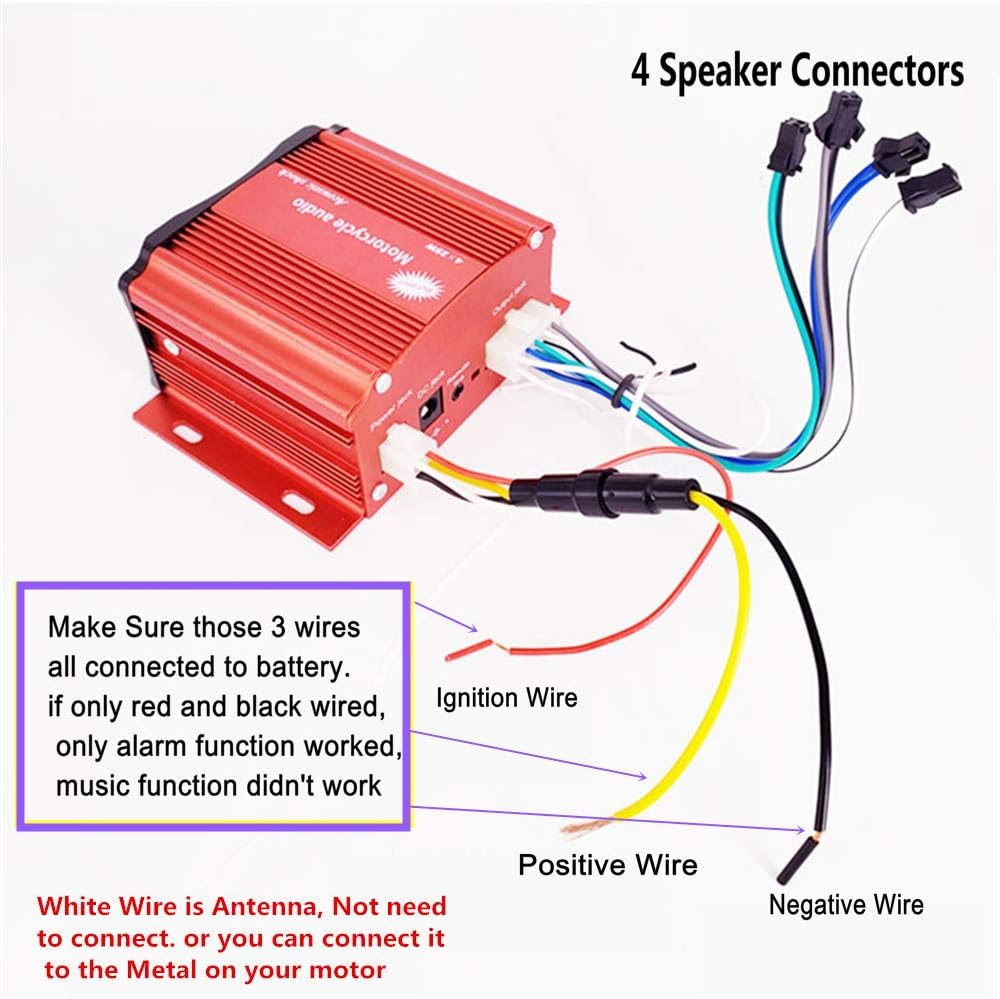
Image 3.1: Detailed wiring connections for the amplifier unit. The red wire is for positive battery connection, the black wire is for negative/ground, and the yellow wire is for ignition. The white wire acts as an antenna and can be connected to metal on the motor or left unconnected if FM reception is adequate.
- Red Wire: Connect to the positive (+) terminal of the 12V battery.
- Black Wire: Connect to the negative (-) terminal or chassis ground of the 12V battery.
- Yellow Wire (Ignition Wire): Connect to the vehicle's ignition switch (ACC) or a switched 12V source. This allows the system to turn on/off with the vehicle's ignition.
- White Wire (Antenna): This wire functions as an FM antenna. It can be connected to a metal part of your motorcycle for improved reception, or left unconnected if reception is satisfactory.
- Speaker Wires: Connect the speaker output wires from the amplifier to the corresponding speakers. Ensure correct polarity. The system supports 4 channels.
- Important: All three main power wires (Red, Black, Yellow) must be connected for full functionality. If only the red and black wires are connected, only the alarm function may work, and music playback will not be available.
3.2 Mounting the Amplifier and Speakers
The system includes various mounting brackets to suit different motorcycle configurations.
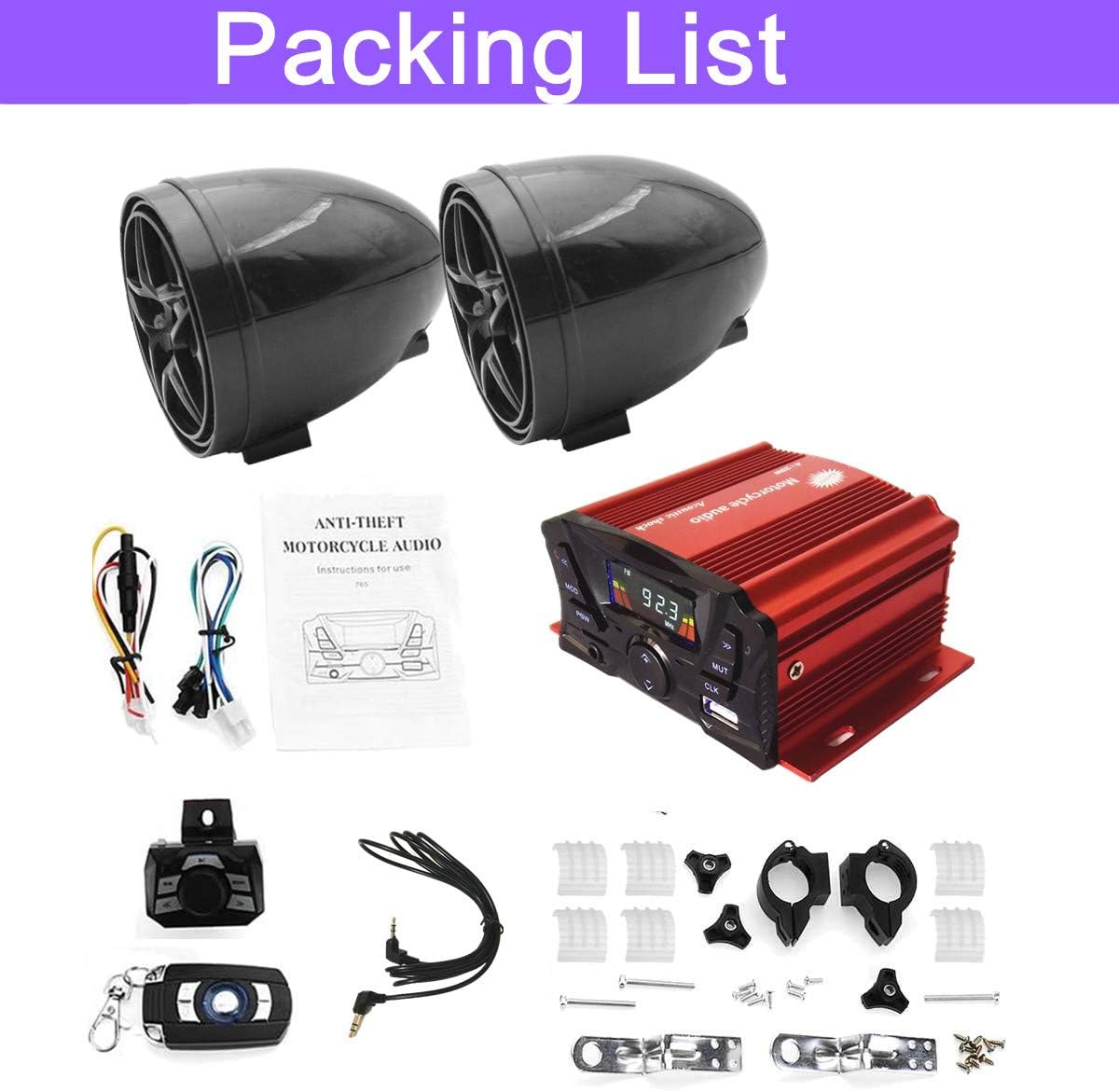
Image 3.2: Two styles of speaker holders are provided: clamp-style for handlebars (22mm/0.87" to 30mm/1.18") and bracket-style for 10mm threaded mounts. Various mounting hardware is also shown.
- Amplifier Mounting: The amplifier unit has integrated mounting flanges. Secure it in a dry, protected location using appropriate screws or bolts. Ensure adequate ventilation.
- Speaker Mounting:
- Handlebar Clamp Style: Use the provided clamps for handlebars with diameters between 22mm (0.87 inches) and 30mm (1.18 inches).
- Threaded Mount Style: Use the bracket-style holders for locations with 10mm threaded mounting points.
- Ensure speakers are mounted securely and facing the desired direction for optimal sound projection.
- The speaker wires are approximately 250cm (2.5 meters) long, providing flexibility for placement.

Image 3.3: The speaker wires are approximately 2.5 meters (250cm) in length, allowing for flexible speaker placement on most motorcycles.
4. Operating Instructions
The MP-D056 audio system offers multiple playback modes and features, controllable via the main unit and the wireless remote.

Image 4.1: Front panel controls of the amplifier unit, including LED display, mode button, power, volume, mute, clock, USB slot, and AUX input. The rear panel shows power and output jacks.
4.1 Main Unit Controls:
- POW (Power): Press to turn the unit on or off.
- MOD (Mode): Cycle through available modes: FM Radio, USB, Memory Card (TF), AUX, Bluetooth.
- VOL+/- (Volume): Adjust the audio output level.
- MUTE: Mute or unmute the audio.
- CLK (Clock): Display and set the time.
- PREV/NEXT: Navigate tracks in USB/Memory Card/Bluetooth mode, or change FM stations.
- USB Slot: Insert a USB drive for MP3 playback.
- TF Slot: Insert a memory card for MP3 playback.
- AUX IN: Connect external audio devices via a 3.5mm audio cable.
4.2 Wireless Remote Control:
The included wireless remote control provides convenient access to most functions.

Image 4.2: The wireless remote control (key fob style) and an optional wired remote control with illuminated buttons for handlebar mounting.
- Power Button: Turn the unit on/off.
- Mode Button: Switch between audio sources.
- Volume Up/Down: Adjust volume.
- Play/Pause: Control playback for USB/Memory Card/Bluetooth.
- Next/Previous Track: Skip tracks or change FM stations.
- Mute: Mute/unmute audio.
- Alarm/Clock: Access alarm and clock settings.
4.3 Bluetooth Operation:
- Turn on the audio system.
- Press the MOD button until "Bluetooth" mode is selected (indicated on the LED display).
- On your mobile device, enable Bluetooth and search for available devices.
- Select "XYC Audio" or a similar name from the list to pair.
- Once paired, you can stream audio from your device to the system.
- The built-in microphone allows for hands-free calling when connected via Bluetooth. Incoming calls will be displayed, and the system will provide a phone ring tip.
4.4 FM Radio Operation:
- Press the MOD button until "FM" mode is selected.
- Use the PREV/NEXT buttons to scan for radio stations.
- The system supports automatic station searching and memory functions.
4.5 USB/Memory Card Playback:
- Insert a USB drive into the USB slot or a memory card into the TF slot.
- The system should automatically switch to USB or TF mode and begin playing MP3 files.
- Use the PREV/NEXT buttons to navigate tracks.
- The system supports plug-and-play functionality for these media types.
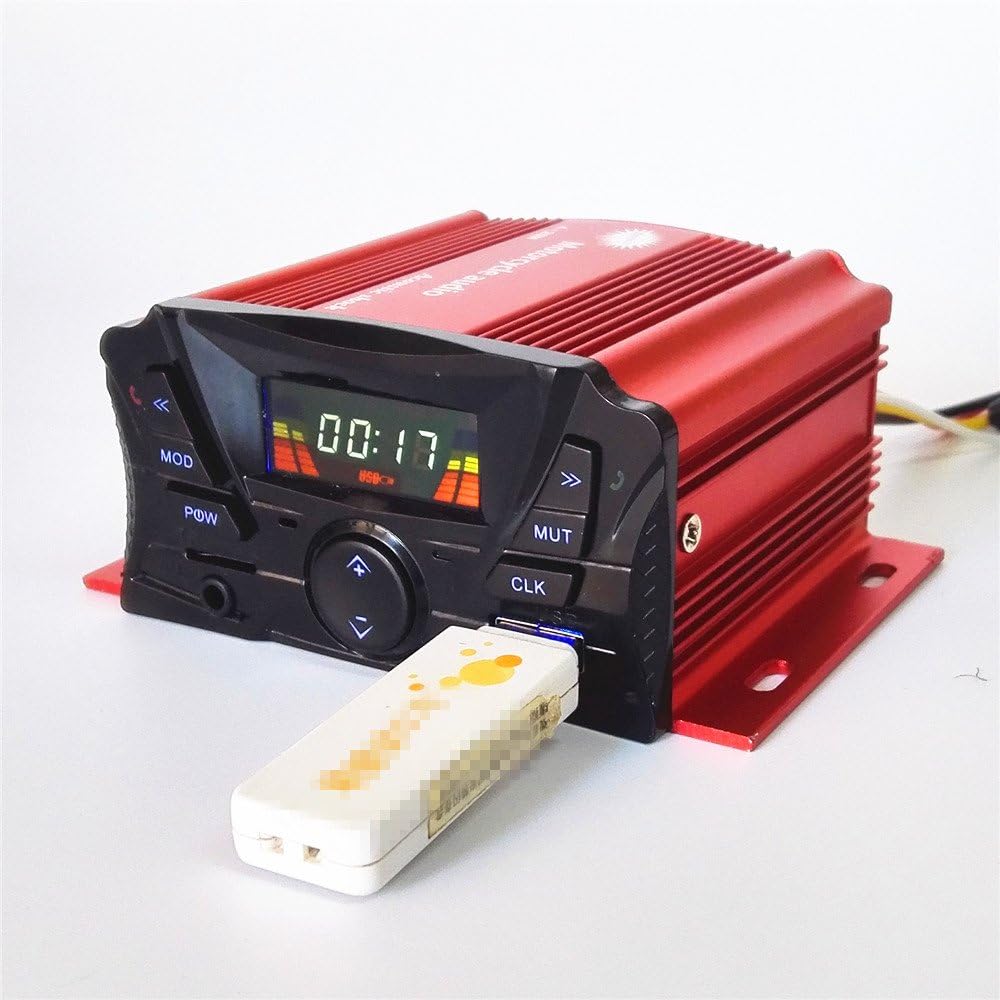
Image 4.3: A USB drive inserted into the amplifier's USB port, demonstrating media playback capability.
5. Maintenance
- Cleaning: Use a soft, damp cloth to clean the unit and speakers. Avoid harsh chemicals or abrasive cleaners.
- Water Resistance: The unit is designed to be waterproof. However, avoid direct high-pressure water spray or prolonged submersion. Ensure all covers and ports are properly sealed.
- Temperature: Operate the system within the specified working temperature range of -30℃ to +60℃.
- Connections: Periodically check all wiring connections to ensure they are secure and free from corrosion.
6. Troubleshooting
| Problem | Possible Cause | Solution |
|---|---|---|
| No power to the unit. | Loose power connection; Blown fuse; Incorrect wiring. | Check red, black, and yellow wire connections to the battery and ignition. Inspect the fuse in the power line. Ensure 12V DC power is supplied. |
| Music functions not working, only alarm. | Ignition (yellow) wire not connected. | Ensure the yellow ignition wire is properly connected to a switched 12V source. All three main power wires (red, black, yellow) are required for full functionality. |
| No sound from speakers. | Speaker wires disconnected; Volume too low; Mute activated; Incorrect source selected. | Check speaker wire connections. Increase volume. Deactivate mute. Ensure the correct input mode (FM, USB, Bluetooth, AUX) is selected. |
| Bluetooth not connecting or poor connection. | Device not in pairing mode; Interference; Out of range. | Ensure the unit is in Bluetooth mode. Make sure your mobile device's Bluetooth is on and discoverable. Move closer to the unit. Try unpairing and re-pairing the device. |
| Poor FM radio reception. | Weak signal; Antenna not connected or poorly positioned. | Try repositioning the white antenna wire, or connect it to a metal part of the motorcycle for better reception. Scan for stations again. |
| USB/Memory card not playing. | Unsupported file format; Corrupted files; Drive/card not properly inserted. | Ensure files are in MP3 format. Reinsert the USB drive or memory card. Try a different USB drive or memory card. |
7. Specifications

Image 7.1: Dimensional measurements for both the amplifier unit and the speakers, showing key sizes in millimeters and inches.
| Feature | Detail |
|---|---|
| Model Name | MP-D056 |
| Voltage | DC 12V |
| Output Power | 4 x 25W (Rated), 4 x 30W (Max) |
| Output Frequency Range | 20Hz - 20KHz |
| Distortion | ≤5% |
| Signal-to-Noise Ratio | 88dB |
| Working Temperature | -30℃ ~ +60℃ |
| Wireless Communication | Bluetooth |
| Bluetooth Range | Up to 100 meters (open land) |
| Connectivity Technology | Bluetooth, USB |
| Speaker Size | 3 inches (Woofer Diameter: 3.34 inches) |
| Water Resistance Level | Waterproof |
| Control Method | Remote (Wireless) |
| Amplifier Dimensions (Host) | 11 x 7.5 x 4.7 cm (approx. 4.3 x 3 x 1.85 inches) |
| Speaker Dimensions | 8.5 x 8.5 x 10.5 cm (approx. 3.34 x 3.34 x 4.13 inches) |
| Item Weight | 1.28 Kilograms (2.81 pounds) |
| Compatible Devices | Laptop, MP3 Player, Smartphone, Tablet |
| Features | MP3, Alarm, Clock, Audio, FM Radio, LED display, Memory Card, USB, Bluetooth, Tone control, Mute, Wireless Remote Control, Built-in Microphone, Incoming Display, Phone Ring Tip. |
8. Warranty Information
The XYC MP-D056 audio system comes with a Limited Warranty. Specific terms and conditions of the warranty may vary. Please retain your proof of purchase for any warranty claims.
For detailed warranty information or to initiate a claim, please contact the seller or manufacturer directly.
9. Customer Support
If you encounter any issues or have questions regarding the installation, operation, or maintenance of your XYC MP-D056 audio system that are not covered in this manual, please contact your retailer or the manufacturer's customer support for assistance.
Please have your product model number (MP-D056) and purchase details ready when contacting support.


