
Introduction
This document provides essential information for the proper installation, understanding, and care of your Mustpoint Main Board Motherboard Connect Flex Ribbon Replacement Part for the ZTE Blade Z Max Z982. This high-quality replacement part is designed to restore connectivity between the main board and other critical components within your device. It is a brand new, tested component ensuring 100% working condition upon arrival.
Product Overview
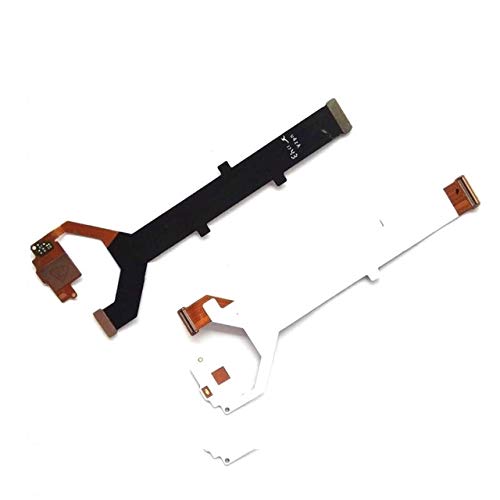
Image: The Mustpoint Main Board Motherboard Connect Flex Ribbon. This image displays the flexible circuit board, which is typically black or white, with copper contacts at its ends, designed to connect the main logic board to other internal components of the ZTE Blade Z Max Z982.
The flex ribbon is a crucial internal component that facilitates communication and power transfer between the main motherboard and various peripherals or sub-boards within the ZTE Blade Z Max Z982 smartphone. Its flexible design allows it to fit into tight spaces and bend without breaking, making it ideal for connecting components in compact electronic devices.
Installation Guide
Note: Installation of internal phone components requires technical expertise and specialized tools. If you are not comfortable performing this repair, it is highly recommended to seek professional assistance to avoid damage to your device.
Required Tools (Not Included):
- Small Phillips head screwdriver
- Pry tool (plastic spudger)
- Tweezers (optional)
- Heat gun or hairdryer (for adhesive, if applicable)
Installation Steps:
- Power Off Device: Ensure your ZTE Blade Z Max Z982 is completely powered off before beginning any disassembly.
- Remove SIM Tray: Eject the SIM card tray.
- Open Device: Carefully open the phone's casing. This may involve removing screws and gently prying open the back cover or screen assembly. Refer to device-specific disassembly guides for your ZTE Blade Z Max Z982.
- Disconnect Battery: Locate and disconnect the battery connector to prevent accidental short circuits during the repair.
- Locate and Disconnect Old Flex Ribbon: Identify the existing main board flex ribbon. Carefully disconnect its connectors from both the main board and the connected component (e.g., charging port board, display connector). Use a plastic pry tool to gently lift the connectors.
- Remove Old Flex Ribbon: Once disconnected, carefully remove the old or damaged flex ribbon. Note its orientation and routing within the device.
- Install New Flex Ribbon: Position the new Mustpoint flex ribbon in the same orientation as the old one. Carefully align and connect both ends of the new flex ribbon to their respective ports on the main board and the other component. Ensure the connectors are seated firmly and correctly.
- Reconnect Battery: Reconnect the battery connector.
- Test Functionality: Before fully reassembling, briefly power on the device to perform a quick test of basic functions that rely on this flex ribbon (e.g., charging, display, audio). Power off the device again after testing.
- Reassemble Device: Carefully reassemble the phone's casing, ensuring all screws are replaced and the cover is securely fastened.
Functionality
The Main Board Motherboard Connect Flex Ribbon serves as a vital conduit for data and power signals within the ZTE Blade Z Max Z982. It typically connects the main logic board (motherboard) to other essential sub-boards or components, such as the charging port assembly, display connector, or other peripheral modules. Its proper functioning is critical for the overall operation of the device, ensuring that all connected components can communicate effectively with the main processing unit.
Maintenance and Care
As an internal component, the flex ribbon requires minimal ongoing maintenance once installed. However, proper care during installation and general handling of the device can prolong its lifespan:
- Avoid Physical Stress: Do not bend, twist, or apply excessive force to the flex ribbon during installation or if the device is opened for other repairs.
- Protect from Moisture: Keep the device away from liquids and high humidity, as moisture can corrode the delicate contacts and circuitry of the flex ribbon.
- Prevent Contamination: Ensure no dust, debris, or foreign particles come into contact with the connectors or the ribbon itself during installation.
- Temperature Control: Avoid exposing the device to extreme temperatures, which can degrade electronic components over time.
Troubleshooting
If you experience issues after replacing the flex ribbon, consider the following troubleshooting steps:
- Check Connections: Power off the device and carefully re-open it. Verify that both ends of the flex ribbon are securely and correctly seated in their respective connectors. Even a slight misalignment can prevent proper function.
- Inspect for Damage: Visually inspect the flex ribbon for any signs of damage, such as tears, creases, or bent pins on the connectors. If damage is found, the part may need to be replaced.
- Battery Disconnect/Reconnect: Disconnect and reconnect the battery to perform a hard reset, which can sometimes resolve minor software glitches affecting hardware recognition.
- Test Related Components: If a specific function (e.g., charging, display) is not working, ensure that the component itself (e.g., charging port, screen) is not faulty.
- Professional Assistance: If issues persist after these checks, it is advisable to consult a qualified phone repair technician. Complex internal issues may require specialized diagnostic tools.
Specifications
| Brand | Mustpoint |
| Manufacturer | Mustpoint |
| Compatible Model | ZTE Blade Z Max Z982 |
| Package Dimensions | 18.29 x 10.16 x 1.78 cm |
| Item Weight | 50 g |
| ASIN | B07RNQV1B2 |
Warranty Information
Specific warranty details for this replacement part are not provided within the product listing. For information regarding warranty coverage, terms, and conditions, please contact the seller or manufacturer, Mustpoint, directly. It is recommended to retain your proof of purchase for any warranty claims.
Customer Support
For further assistance, technical support, or inquiries regarding the Mustpoint Main Board Motherboard Connect Flex Ribbon Replacement Part, please contact Mustpoint customer service through the platform where the purchase was made or via their official contact channels if available. Provide your product details and purchase information for efficient support.