
1. Introduction
The Shelly 1 PM Relay Switch is a compact, WiFi-enabled smart home automation device designed to control electrical circuits and monitor power consumption. It allows for remote control of lights, appliances, and other equipment, integrating seamlessly with various smart home platforms. This manual provides essential information for the safe and effective use of your Shelly 1 PM device.

Figure 1: Top-down view of the Shelly 1 PM Relay Switch, showing its compact design and terminal connections.
2. Key Features
- Embedded Webserver: Allows direct control and configuration via a web browser.
- Compact Design: Engineered for installation in limited spaces, such as wall mounts and electrical control panels.
- Home Automation Integration: Functions as an accessory or component within various home automation systems.
- Energy Consumption Monitoring: Capable of monitoring electrical circuits up to 16A (3.5 kW), with built-in overload and temperature protection.
- Wide Voltage Support: Compatible with 110-240V AC or 24-60V DC power supplies.
- Compatibility: Works with Amazon Alexa, Google Home, SmartThings, and Home Assistant.
3. Setup and Installation
Installation of the Shelly 1 PM should be performed by a qualified electrician or a person with sufficient knowledge of electrical wiring. Always ensure the main power supply is turned off before beginning any installation work.
3.1. Wiring Diagrams
The Shelly 1 PM supports both AC and DC power supplies. Refer to the following diagrams for typical wiring configurations:
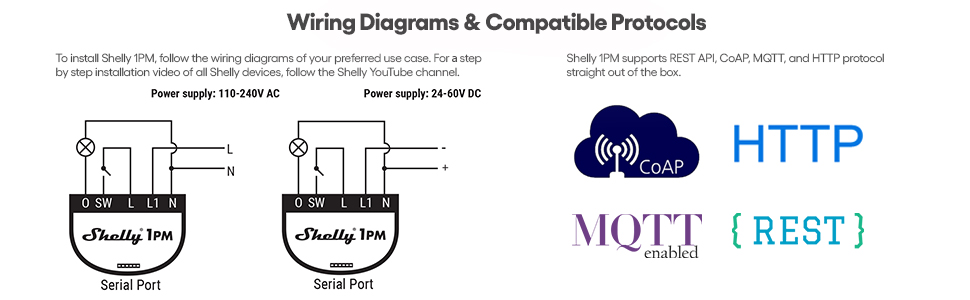
Figure 2: Wiring diagrams for Shelly 1PM, illustrating connections for 110-240V AC and 24-60V DC power supplies.
- AC Wiring: Connect L (Line), N (Neutral), and O (Output) terminals as shown. SW is for the external switch input.
- DC Wiring: Connect + (Positive), - (Negative), and O (Output) terminals as shown. SW is for the external switch input.
For detailed step-by-step installation videos, please refer to the official Shelly YouTube channel.
3.2. Physical Installation
The compact size of the Shelly 1 PM allows it to fit into standard electrical boxes behind switches or outlets.

Figure 3: The Shelly 1 PM is designed for easy installation within existing electrical wall boxes.

Figure 4: The Shelly 1 PM fits discreetly within electrical installations, enabling smart control without visible changes.
4. Operating the Shelly 1 PM
Once installed and powered, the Shelly 1 PM can be controlled and configured via its embedded web server or through the Shelly Smart Control Application.
4.1. Shelly Smart Control Application
The Shelly Smart Control Application provides intuitive control and monitoring of your Shelly devices from your smartphone or tablet. It allows for remote control, custom schedules, smart timers, real-time notifications, personalized scenes, and energy monitoring.

Figure 5: The Shelly Smart Control Application provides easy control and monitoring of your devices.
Download the app from:
4.2. Voice Assistant Integration
The Shelly 1 PM is highly compatible with popular voice assistants, allowing for convenient voice control of your connected devices.
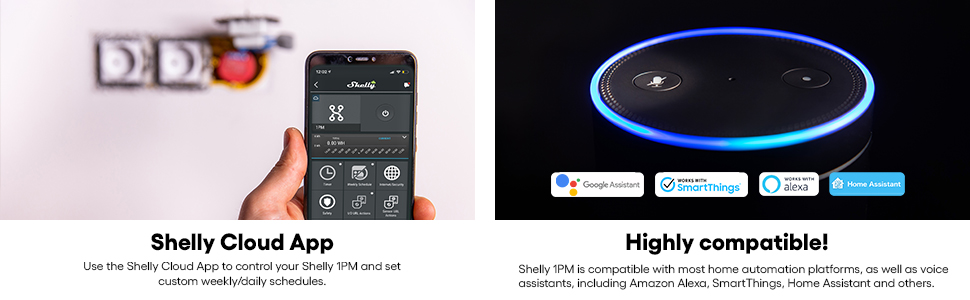
Figure 6: Shelly 1 PM offers high compatibility with leading smart home platforms and voice assistants.
- Amazon Alexa
- Google Home
- SmartThings
- Home Assistant
5. Maintenance
The Shelly 1 PM is designed for long-term, maintenance-free operation. To ensure optimal performance and longevity:
- Keep the device free from dust and moisture.
- Do not expose the device to extreme temperatures or direct sunlight.
- Ensure proper ventilation if installed in an enclosed space.
- Regularly check for firmware updates via the Shelly app to benefit from new features and improvements.
6. Troubleshooting
If you encounter issues with your Shelly 1 PM, consider the following common solutions:
- Device Not Responding: Check the power supply to the device. Ensure all wiring connections are secure according to the diagrams.
- Cannot Connect to Wi-Fi: Verify your Wi-Fi network is active and within range. Ensure the Wi-Fi password is entered correctly during setup. Try restarting your Wi-Fi router.
- App Connection Issues: Ensure your smartphone is connected to the internet. Update the Shelly app to the latest version. If issues persist, try adding the device using its IP address in the app.
- Overheating Protection Triggered: The device has built-in temperature protection. If it overheats, it will shut down. Ensure it is installed in a location with adequate ventilation and not exceeding its maximum load capacity (16A / 3.5 kW).
- Physical Fit Issues: While compact, some older or smaller switch boxes may be challenging. Ensure sufficient space for wiring and the device.
For more advanced troubleshooting or persistent issues, consult the official Shelly support resources.
7. Specifications
| Attribute | Value |
|---|---|
| Brand | Shelly |
| Model Number | Shelly 1PM UL (1 Pack) |
| Power Supply | 110-240V AC, 24-60V DC |
| Max Load | 16A / 3.5 kW |
| Connectivity | Wi-Fi |
| Dimensions (L x W x H) | 1.61 x 1.46 x 0.67 inches |
| Item Weight | 1.58 ounces |
| Certification | UL Listed (E504925) |
| Operation Mode | Automatic |
| Material | Copper |
8. Warranty and Support
For warranty information, please refer to the terms and conditions provided at the time of purchase or visit the official Shelly website. Shelly is committed to providing high-quality products and professional support.
Official User Guide (PDF): Download User Guide
Shelly Brand Store: Explore more products and information on the official Shelly Amazon Store.
Community Support: Join the Shelly community for discussions, tips, and assistance from other users: Shelly Facebook Group.