Product Overview
This instruction manual provides comprehensive details for the Generic Tax Folder with Top-Staple Tabs and Offset Windows. Designed for organizing important documents, this folder features a durable construction and intelligent design elements to streamline document management.
It is suitable for use with various software or custom slip sheets, offering a professional and organized solution for tax documents, project files, and other important paperwork.
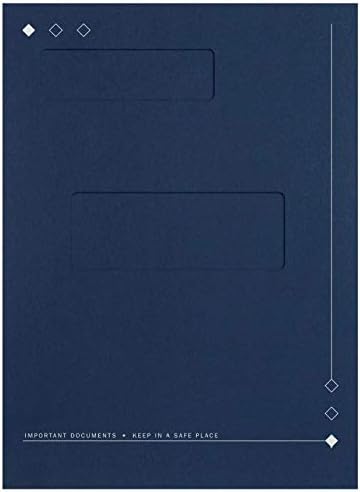
Image 1: Front view of the Generic Tax Folder, highlighting the offset windows and overall design.
Setup
The Generic Tax Folder is designed for immediate use with minimal setup required. Follow these steps to prepare your folder:
- Unpack: Remove the folders from their packaging.
- Prepare Documents: Gather the documents you intend to organize within the folder. Ensure they are standard letter size (8 1/2" x 11").
- Utilize Windows: If using with software or custom slip sheets, align your documents so that relevant information (e.g., client name, tax year) is visible through the top and bottom offset windows.
No assembly is required for the folder itself.
Operating Instructions
This folder offers several features for efficient document organization:
- Document Insertion: Insert your letter-sized documents into the folder. The folder is designed to accommodate a significant number of sheets, with a fastener capacity of up to 94 sheets.
- Top-Staple Tabs: The right panel of the folder features a fold-over flap. To secure documents, align them under this flap and staple directly to the folder. The flap will then fold over to conceal the staples, providing a neat and professional appearance.
- Offset Windows: The folder includes two offset windows on the front cover. These windows are strategically placed to display information from internal documents or custom slip sheets, allowing for quick identification of contents without opening the folder.
- Top Window: Size 1 1/2" x 4 1/2", positioned 3/4" from the left side and 9" from the bottom.
- Bottom Window: Size 2" x 5 1/2", positioned 1 1/2" from the left side and 4 3/4" from the bottom.
- Double Scored Spine: The spine is double-scored, allowing for a 3/8'' capacity expansion as documents are added, ensuring the folder maintains a clean fold even when full.
- Business Card Die-Cut: The pocket on the right side of the folder includes a die-cut slot designed to hold a standard horizontal business card, providing a convenient way to include contact information.
Maintenance
To ensure the longevity and appearance of your Tax Folder, follow these simple maintenance guidelines:
- Storage: Store folders in a dry environment, away from direct sunlight and excessive humidity, to prevent material degradation and warping.
- Cleaning: If the folder becomes dusty, gently wipe it with a clean, dry cloth. Avoid using liquid cleaners or abrasive materials, as these may damage the Feltweave material.
- Handling: Handle folders carefully to prevent creases, tears, or damage to the windows and tabs.
Troubleshooting
While the Tax Folder is designed for straightforward use, here are solutions to common concerns:
- Documents Not Fitting: Ensure all documents are standard letter size (8 1/2" x 11"). Overfilling the folder beyond its 94-sheet capacity may cause difficulty in closing or damage to the spine. Utilize the double-scored spine for maximum capacity.
- Staples Visible After Flap Closure: Ensure documents are properly aligned under the fold-over flap before stapling. The flap is designed to completely cover standard staples when correctly positioned.
- Business Card Not Fitting in Die-Cut: The die-cut is designed for standard horizontal business cards. Verify your card's dimensions.
Specifications
Product Specifications for Model 50D| Feature | Detail |
|---|
| Model Number | 50D |
| Size | 8 3/4” x 11 1/2” (for Letter Sheet Size) |
| Material | Feltweave |
| Color | Blue |
| Fastener Capacity | Up to 94 sheets |
| Spine Capacity | 3/8'' (double scored) |
| Top Window Size | 1 1/2" x 4 1/2" |
| Top Window Position | 3/4" from left, 9" from bottom |
| Bottom Window Size | 2" x 5 1/2" |
| Bottom Window Position | 1 1/2" from left, 4 3/4" from bottom |
| Manufacturer | NAGForms |
| Date First Available | May 9, 2019 |
Warranty and Support
Return Policy
This product is subject to a 30-day return policy, allowing for a refund or replacement. Please refer to the retailer's specific return guidelines for detailed instructions and eligibility.
Customer Support
For any questions, concerns, or assistance regarding your Tax Folder, please contact the seller, NAG Forms & Supplies, or the manufacturer, NAGForms. Refer to your purchase documentation for specific contact details.