
Introduction
The Ferrofish A32-Dante is a versatile 32x32 AD/DA converter designed for professional audio environments. It integrates seamlessly into Dante networks and offers extensive connectivity options including MADI and ADAT. This device functions as a central hub, routing all analog, MADI, and ADAT interfaces into the Dante network via its integrated routing matrix. Its design emphasizes operational reliability, featuring redundant Dante and MADI processes, and support for a second power supply for uninterrupted operation. Four TFT screens provide clear monitoring of all channels and system status.
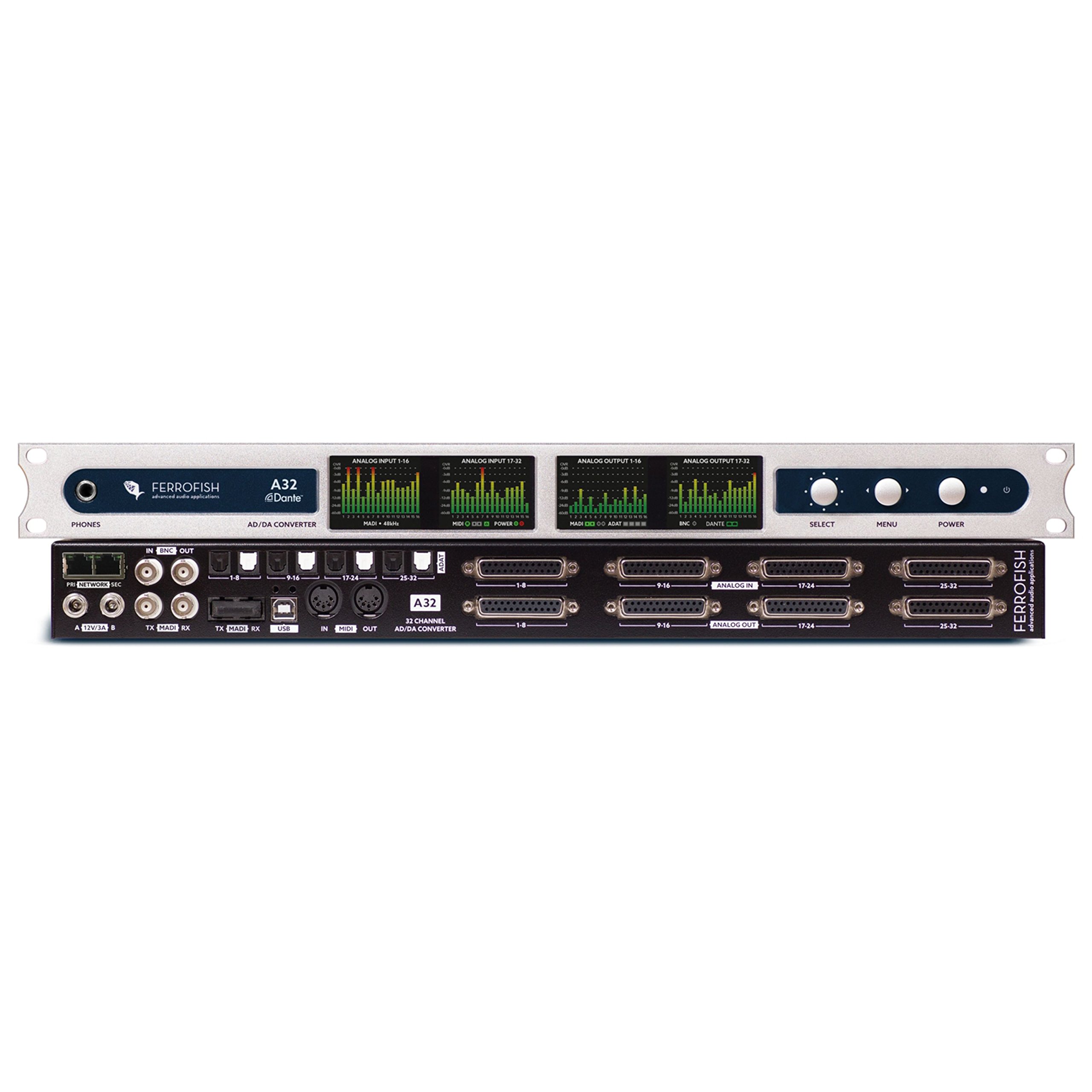
Figure 1: Front view of the Ferrofish A32-Dante converter.
Setup
Follow these steps to set up your Ferrofish A32-Dante converter:
- Unboxing and Inspection: Carefully remove the A32-Dante from its packaging. Inspect the unit for any signs of damage during transit. Ensure all included accessories, such as the power cable, are present.
- Power Connection: Connect the provided power cable to the A32-Dante's power input. For critical applications, connect a second redundant power supply to the dedicated input.
- Rack Mounting (Optional): The A32-Dante is designed for standard 19-inch rack mounting. Secure the unit using appropriate rack screws.
- Audio Connections:
- Analog: Connect your analog audio sources and destinations to the 32 analog inputs and 32 analog outputs using appropriate cables.
- MADI: Connect MADI devices using optical or coaxial MADI cables to the designated MADI ports.
- ADAT: Connect ADAT compatible devices using optical ADAT cables.
- Dante Network Connection: Connect the A32-Dante to your Dante network using standard Ethernet (Cat5e or Cat6) cables. For redundancy, connect both primary and secondary Dante ports to your network switches.
- Initial Power On: Once all connections are secure, power on the A32-Dante. The four TFT screens will illuminate, displaying the boot sequence and current status.

Figure 2: Rear panel showing various audio and network connections.
Operating the A32-Dante
The A32-Dante offers extensive control and routing capabilities. Familiarize yourself with the front panel controls and the integrated routing matrix.
Front Panel Controls and TFT Screens
The four TFT screens provide real-time status information for all 64 digital channels. Use the navigation buttons adjacent to the screens to access menus and adjust settings. Key information displayed includes input/output levels, clock status, and network activity.

Figure 3: Front panel with TFT screens displaying operational status.
Routing Matrix
The A32-Dante features an internal routing matrix that allows you to freely route any of the 192x192 analog and digital channels. This matrix is accessible via the front panel controls or through dedicated control software (if available from Ferrofish). This flexibility enables complex signal flow configurations for various studio and live sound applications.
Dante Network Integration
Once connected to a Dante network, the A32-Dante will appear as a device in the Dante Controller software. Use Dante Controller to establish audio routes between the A32-Dante and other Dante-enabled devices on your network. Ensure proper clock synchronization for stable audio transmission.
Redundancy Features
The A32-Dante incorporates redundancy for both Dante and MADI connections, as well as power. In the event of a primary connection or power supply failure, the system automatically switches to the secondary, ensuring continuous operation. Monitor the TFT screens for status indicators related to redundancy.
Maintenance
Proper maintenance ensures the longevity and optimal performance of your Ferrofish A32-Dante.
- Cleaning: Regularly clean the exterior of the unit with a soft, dry cloth. Avoid using abrasive cleaners or solvents. Ensure ventilation openings are free from dust and debris.
- Firmware Updates: Periodically check the official Ferrofish website for firmware updates. Firmware updates can provide new features, performance enhancements, and bug fixes. Follow the instructions provided by Ferrofish carefully when performing updates.
- Environmental Conditions: Operate the A32-Dante in a stable environment, avoiding extreme temperatures, humidity, and direct sunlight. Ensure adequate airflow around the unit.
- Cable Management: Maintain tidy cable connections to prevent accidental disconnections or damage to ports.
Troubleshooting
This section addresses common issues you might encounter with your A32-Dante.
| Problem | Possible Cause | Solution |
|---|---|---|
| No audio output/input | Incorrect routing in A32-Dante or Dante Controller; incorrect clock synchronization; faulty cables. | Verify routing settings on the A32-Dante and in Dante Controller. Ensure all devices are synchronized to a common clock source. Check all audio cables for proper connection and integrity. |
| Dante device not visible in network | Network configuration issue; incorrect IP settings; faulty Ethernet cable; firewall blocking. | Ensure the A32-Dante is connected to the correct network switch. Check network settings (IP address, subnet mask) on the A32-Dante and your computer. Try a different Ethernet cable. Temporarily disable firewalls for testing. |
| Intermittent audio dropouts | Network congestion; clocking issues; cable problems. | Optimize your network for Dante traffic (e.g., QoS settings). Verify stable clock synchronization. Replace suspect cables. |
| TFT screens are blank or unresponsive | Power issue; internal fault. | Check power connections. Power cycle the unit. If the problem persists, contact Ferrofish support. |
Specifications
| Feature | Detail |
|---|---|
| Analog Channels | 32 Inputs, 32 Outputs |
| Digital Channels | Up to 64 Dante channels, MADI, ADAT |
| Connectivity | Dante, MADI (Optical/Coaxial), ADAT, Analog I/O |
| Routing Matrix | 192x192 channels |
| Display | 4 TFT Screens |
| Redundancy | Dante, MADI, Power Supply |
| Item Weight | 16.12 pounds (7.31 kg) |
| Product Dimensions | 24.8 x 14.96 x 3.9 inches (62.99 x 38.00 x 9.91 cm) |
| Model Number | A32-Dante |
Warranty Information
Ferrofish products are covered by a manufacturer's warranty. The specific terms and duration of the warranty may vary by region and product. Please retain your proof of purchase. For detailed warranty information, including coverage and how to make a claim, please refer to the official Ferrofish website or contact your authorized dealer.
Note: This manual does not constitute a warranty statement. Always refer to the official warranty documentation provided with your product or available on the manufacturer's website.
Support
Should you require technical assistance, have questions about your A32-Dante, or need to report an issue, please utilize the following resources:
- Ferrofish Website: Visit the official Ferrofish website for product documentation, FAQs, firmware downloads, and support contact information. www.ferrofish.com
- Authorized Dealer: Contact the authorized Ferrofish dealer from whom you purchased the product. They can often provide initial support and guidance.
- Online Resources: Community forums and online knowledge bases related to Dante and professional audio equipment may also offer helpful information.
When contacting support, please have your product model (A32-Dante) and serial number readily available.


