
Introduction
This manual provides detailed instructions for the installation, operation, and maintenance of your Blackburn Local Basket Bike Rack. This versatile rack is designed for secure cargo transport on bicycles, offering compatibility for both front and rear mounting configurations. Please read all instructions carefully before installation and use to ensure proper function and safety.
Safety Information
- Weight Capacity: The maximum load capacity for this rack is 45.2 pounds (20.5 kg) when mounted on the rear. When mounted on the front, the capacity is typically lower (e.g., 10 kg or 22 lbs), depending on your bicycle's fork and steering stability. Do not exceed these limits.
- Secure Mounting: Ensure all bolts and fasteners are tightened securely before each ride. Loose components can lead to instability and potential accidents.
- Load Distribution: Distribute weight evenly within the basket. Avoid placing heavy or unbalanced items that could affect steering or balance.
- Clearance: Verify that the installed rack and any cargo do not interfere with the bicycle's wheels, brakes, or steering mechanism.
- Regular Inspection: Periodically inspect the rack for any signs of wear, damage, or loose connections. Replace damaged parts immediately.
Package Contents
Verify that all the following components are present in your package:
- Blackburn Local Basket Rack Frame
- Swivel Mounting Hardware (various brackets, bolts, washers, nuts)
- Cargo Net
- P-Clamps (for frames without mounting points)
Setup and Installation
The Blackburn Local Basket is designed for versatile installation on either the front or rear of most bicycles. The unique swivel mounting hardware and adjustable width accommodate various bike types, including those with disc brakes.
General Guidelines
- Tools Required: You will need a set of Allen wrenches and possibly a wrench for nuts.
- Mounting Points: The rack can attach to braze-ons, brake bosses, or using the included P-clamps if your frame lacks dedicated mounting points.
- Disc Brake Compatibility: The design ensures clearance for disc brake calipers.
- Adjustability: The rack's width and height are adjustable to fit wheel sizes from 26" to 29" and tire widths from 23c up to 3".
Step-by-Step Installation
While specific steps may vary slightly depending on your bicycle's frame and chosen mounting position (front or rear), the general procedure is as follows:
- Attach Lower Mounts: Secure the lower support arms to your bike's frame. This can be done using existing eyelets near the axle, brake bosses, or by utilizing the provided P-clamps around the seat stays (for rear mounting) or fork blades (for front mounting). The swivel hardware allows for flexible attachment angles.
- Position the Basket: Place the basket frame onto the lower support arms. Ensure it is level and centered.
- Attach Upper Mounts: Connect the upper support arms from the basket to your bike's frame. For rear mounting, this typically involves attaching to seat stay eyelets or a seatpost clamp. For front mounting, this usually involves attaching to fork crown eyelets or a handlebar clamp (if applicable).
- Adjust Width and Height: Utilize the adjustable features to ensure the rack clears your tire and is positioned correctly. The patent-pending adjustable width design allows for a snug fit without bending components.
- Tighten All Fasteners: Once the rack is correctly positioned and aligned, systematically tighten all bolts and nuts. It is recommended to use a thread-locking compound (e.g., Loctite) on critical bolts to prevent loosening from vibrations during riding. Do not overtighten.
- Final Check: Gently shake the installed rack to confirm stability. Ensure there is no interference with moving parts of the bicycle.

Image: The Blackburn Local Basket Bike Rack, shown detached, highlighting its structure.

Image: The Local Basket installed on the front of a bicycle, carrying a small bag.

Image: The Local Basket installed on the rear of a bicycle, featuring a U-lock holder and a mounted tail light.
Operation
Once installed, the Blackburn Local Basket provides a stable platform for carrying various items.
- Loading Cargo: Place items securely within the basket. Ensure that the load does not obstruct your view, interfere with steering, or create an imbalance.
- Using the Cargo Net: The included cargo net is designed to keep your items in place, especially over uneven terrain. Attach the hooks of the net to the basket frame to secure your load.
- U-Lock Holder: The basket features a dedicated slot for carrying a U-lock. To minimize noise from the U-lock rattling, consider wrapping the lock or the holder with a soft material like an old inner tube.

Image: A cardboard box secured within the rear-mounted basket using the provided cargo net.

Image: A close-up view of the cargo net hook attached to the basket frame.
Maintenance
- Cleaning: Wipe the rack with a damp cloth to remove dirt and grime. Avoid harsh chemicals that may damage the finish.
- Bolt Check: Periodically check all mounting bolts and fasteners for tightness. Vibrations from riding can cause them to loosen over time. Re-tighten as necessary.
- Inspect for Damage: Regularly inspect the rack frame and mounting hardware for any cracks, bends, or signs of fatigue. Discontinue use if significant damage is found.
Troubleshooting
- Rack is Noisy/Rattles:
- Ensure all mounting bolts are securely tightened. Consider using thread-locking compound.
- Check if the U-lock is rattling in its holder; wrap it with a soft material if needed.
- Verify that no cargo is loose within the basket. - Rack Feels Unstable:
- Re-check all mounting points and ensure they are firmly attached to the bicycle frame.
- Confirm that the adjustable width and height settings are appropriate for your bike and that the rack is level.
- Ensure the load capacity is not exceeded and weight is evenly distributed. - Difficulty with Installation:
- Review the installation steps carefully. The swivel mounting hardware is designed for flexibility; experiment with different angles to find the best fit.
- If your bike lacks eyelets, ensure the P-clamps are correctly positioned and tightened.
Specifications
| Brand | Blackburn |
| Model Number | 3570620 (Manufacturer Part Number: 7079140) |
| Item Weight | 2.1 Kilograms (approximately 4.63 lbs) |
| Load Capacity | 45.2 Pounds (20.5 kg) - Rear Mount; typically 22 lbs (10 kg) - Front Mount |
| Compatible Wheel Sizes | 26", 650b, 700c, 27.5", 29" |
| Compatible Tire Widths | 23c up to 3" |
| Color | Black |
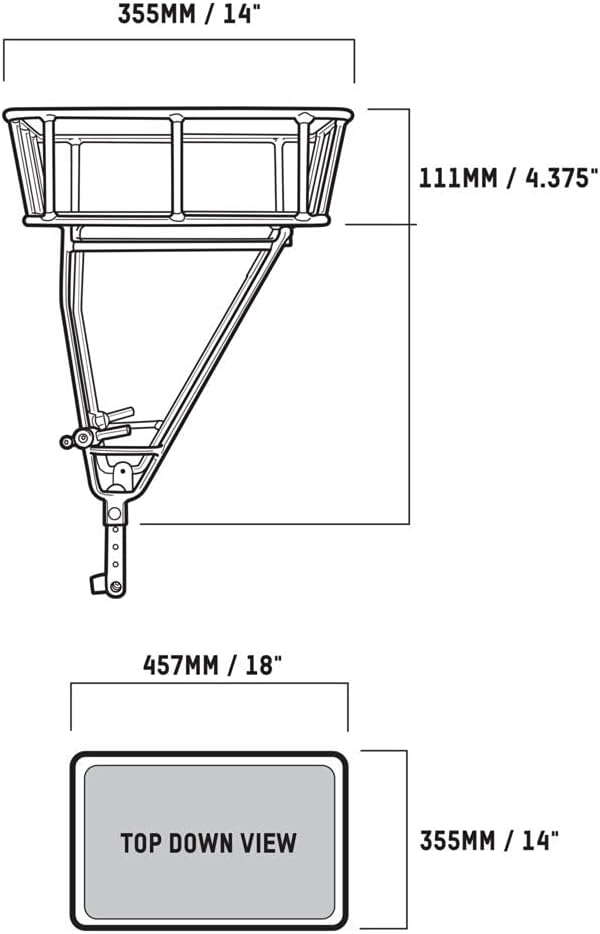
Image: Technical drawing illustrating the dimensions of the Blackburn Local Basket.
Warranty and Support
For warranty information or technical support, please refer to the official Blackburn website or contact their customer service department. Keep your purchase receipt as proof of purchase.
