
1. Introduction
The Nokta PulseDive is a versatile 2-in-1 device designed for both underwater and land-based metal detection. It functions as a powerful scuba detector and a precise pinpointer, offering exceptional performance and durability. With its waterproof design, pulse induction technology, and user-friendly features, the PulseDive is an essential tool for treasure hunters, divers, and anyone seeking to locate metallic objects in various environments.
2. Package Contents
Upon unboxing your Nokta PulseDive, ensure all the following components are present:
- PulseDive Detector Main Unit
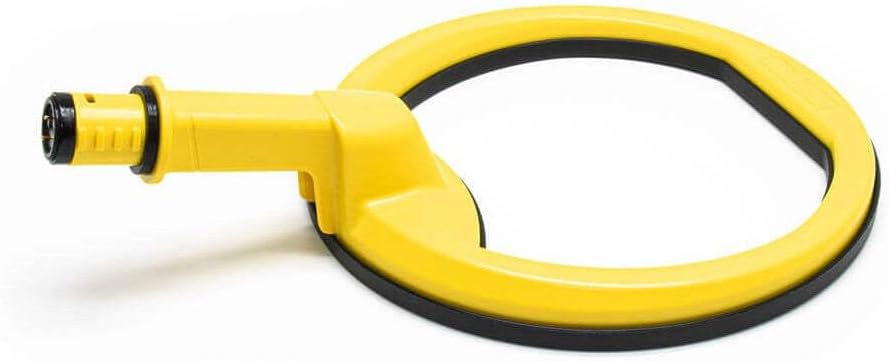
- Replaceable Scuba Coil (5.5 Inch)
- Replaceable Scuba Coil Cover
- Replaceable Pointer Coil
- Replaceable Pointer Coil Hard-Shell Case
- Belt Holster
- Security Lanyard
- Rubber Wristband
- Battery Compartment Cover For Land Use
- Coil Connector Dust Protection Cap
- USB Charging Cable
- User Manual
- Hard-Shell Carrying Case

The complete PulseDive kit, including the main unit, both coils, and accessories, neatly organized in its durable hard-shell carrying case.
3. Key Features
- Waterproof Design: Fully waterproof up to 60 meters (200 feet) with an IP68 rating, allowing for reliable underwater operation.
- Pulse Induction Technology: Provides stable operation in saltwater or any type of soil, ensuring consistent detection performance.
- 2-in-1 Versatility: Innovative design allows quick transformation between a scuba detector with a 5.5-inch search coil and a precise pinpointer.
- Built-in Wireless Module: Enables connection with compatible wireless headphones (not included).
- Audio/Vibration/LED Alerts: Multiple alert options to suit different environments and user preferences.
- LED Flashlight: Integrated LED flashlight for improved visibility during night searches or in low-light underwater conditions.
- Lost Alarm: After 5 minutes of inactivity, the device emits an audible alarm and the LED starts flashing to help locate a misplaced unit.
- Rapid Retune: Quickly retune the device to eliminate ground interference or pinpoint targets more accurately.
- Rechargeable Battery: Powered by a Lithium Polymer battery, rechargeable via USB.
4. Setup & Assembly
4.1 Charging the Device
Before first use, fully charge your PulseDive detector. Connect the provided USB charging cable to the charging port located at the end of the main unit. Plug the other end into a compatible USB power adapter (not included) or a computer USB port. The charging indicator will show the charging status. Ensure the charging port cover is securely closed after charging to maintain waterproofing.

The waterproof USB charging port, located at the end of the main unit, for convenient recharging.
4.2 Attaching/Detaching Coils
The PulseDive features an innovative modular design allowing easy switching between the scuba coil and pinpointer. To attach or detach a coil:
- Ensure the device is powered off.
- Locate the red "ALIGN and TWIST" indicator on the main unit and the coil attachment.
- Align the red marks and gently push the coil onto the main unit.
- Twist the coil until the red marks are no longer aligned and the coil is securely locked in place. You should feel a click.
- To detach, align the red marks again by twisting, then pull the coil off.
Important: Always ensure the device is dry and clean before changing coils, especially when transitioning from wet to dry environments, to prevent water ingress into the electronics. Do NOT change coils underwater.
The core PulseDive unit separated from its scuba coil attachment, demonstrating its modular design.

The PulseDive transformed into a pinpointer, ideal for precise target location.
5. Operating Instructions
5.1 Powering On/Off
To power on the PulseDive, press and hold the power button (usually the central button) until the device vibrates and/or the LED lights illuminate. To power off, press and hold the power button again until the device shuts down.
5.2 Detection Modes & Sensitivity
The PulseDive operates on a 3 kHz Pulse Induction frequency, providing excellent depth and sensitivity. You can adjust sensitivity levels and switch between different alert modes (audio, vibration, or both) using the control buttons on the main unit. Refer to the detailed user manual (PDF link available on product page) for specific button functions and mode configurations.
Official video demonstrating the Nokta PulseDive metal detector in action, including its underwater capabilities and detection features.
5.3 Lost Alarm Feature
For added security, the PulseDive is equipped with a lost alarm feature. If the device remains inactive for 5 minutes, it will emit an audible alarm and the LED will start flashing, making it easier to locate if misplaced in water or on land.
5.4 LED Flashlight
Activate the built-in LED flashlight to illuminate your search area. This feature is particularly useful for low-light conditions, night detecting, or when searching in murky underwater environments.
6. Maintenance
Proper maintenance ensures the longevity and optimal performance of your PulseDive detector.
- Cleaning: After each use, especially in saltwater, rinse the entire device thoroughly with fresh water. Wipe it dry with a soft cloth.
- O-Ring Care: Regularly inspect the O-rings on the battery compartment and coil connections for any signs of wear or damage. Apply a thin layer of silicone grease (not included, but recommended for O-rings) to the O-rings periodically to maintain a watertight seal. Replace O-rings if they appear cracked or stretched.
- Storage: Store the PulseDive in its hard-shell carrying case in a cool, dry place away from direct sunlight and extreme temperatures. Ensure the device is clean and dry before storage.
- Battery Care: Avoid fully discharging the battery frequently. For long-term storage, charge the battery to approximately 50-70% capacity.
7. Troubleshooting
| Problem | Possible Cause | Solution |
|---|---|---|
| Device not turning on. | Low battery; improper power button press. | Charge the device fully. Press and hold the power button firmly for a few seconds. |
| Water ingress/Device malfunction after water use. | Improperly sealed battery cap or coil connection; damaged O-rings. | Ensure all caps and coils are securely twisted and sealed before water use. Inspect O-rings for damage and replace if necessary. If water has entered, immediately power off, open all compartments, and allow to dry completely before attempting to use again. Contact support if issues persist. |
| Poor detection range/sensitivity. | Incorrect sensitivity setting; mineralized ground interference; small target size. | Adjust sensitivity settings. Use the Rapid Retune feature to eliminate ground interference. For very small or deep targets, ensure you are using the appropriate coil (pinpointer for precise location). |
| Device beeps continuously or erratically. | Interference from nearby electronics/metal; high mineralization; device in dive mode on surface. | Move away from other metal objects or electronics. Perform a Rapid Retune. Ensure the device is properly oriented or in the correct mode for the environment (e.g., not in dive mode on land). |
8. Specifications
- Brand: Nokta DETECTION TECHNOLOGIES
- Color: Yellow
- Material: Plastic
- Power Source: Battery Powered (1 Lithium Polymer battery required)
- Item Weight: 1 Kilogram (2.2 pounds)
- Product Dimensions: 15.3"L x 5.5"W x 5.5"H
- Extended Length: 15.3 Inches
- Adjustable Length: Yes
- International Protection Rating: IP68 (Waterproof up to 60m / 200ft)
- Operating Frequency: 3 KHz (Pulse Induction)
- Recommended Uses: Metal Detection
- Display Type: LED
- Number of Programs: 4
- Model Number: PulseDive
9. Warranty & Support
Nokta DETECTION TECHNOLOGIES provides a manufacturer's warranty for the PulseDive detector. Please refer to the official user manual included in your package or visit the Nokta Detection Technologies Store on Amazon for detailed warranty information and customer support contacts. For technical assistance or inquiries, it is recommended to consult the comprehensive user manual (PDF) provided by the manufacturer.
User Manual (PDF): Download Here